
Introducción
Welcome to the Ipega PG-9033 Bluetooth Gamepad user manual. This guide provides detailed instructions for setting up, operating, maintaining, and troubleshooting your new wireless controller. Please read this manual carefully before use to ensure optimal performance and longevity of your device.
Producto terminadoview
The Ipega PG-9033 is a versatile Bluetooth gamepad designed for an enhanced gaming experience across multiple platforms, including Android, iOS, and PC. It features an adjustable phone holder, dual analog sticks, a D-pad, and action buttons.

Figure 1: The Ipega PG-9033 Bluetooth Gamepad with a smartphone securely mounted in its adjustable holder, actively displaying a racing game. This illustrates the controller's primary use for mobile gaming.
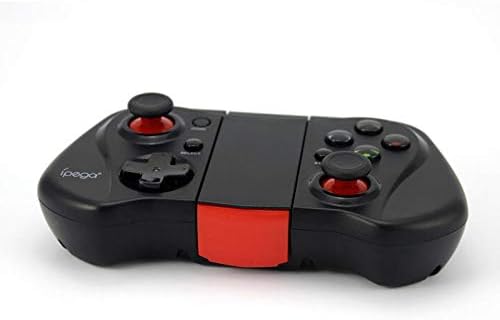
Figura 2: Un lado view of the Ipega PG-9033 Bluetooth Gamepad, showcasing its ergonomic design and compact form factor when not in use. The red accent on the central hinge is visible.
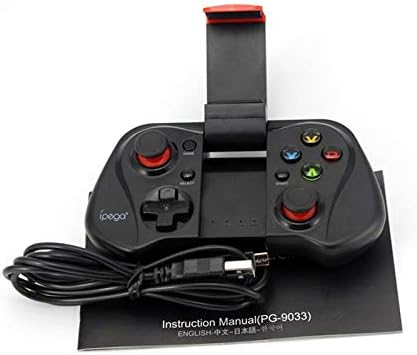
Figure 3: The Ipega PG-9033 Bluetooth Gamepad displayed alongside its USB charging cable and the included instruction manual, which clearly indicates the model number PG-9033.

Figura 4: La parte trasera view of the Ipega PG-9033 Bluetooth Gamepad, featuring a label with technical details such as "BLUETOOTH CONTROLLER," working voltage, working current, and input specifications.
Configuración
Cargando el Gamepad
Before first use, fully charge the gamepad using the provided USB cable.
- Connect the micro-USB end of the charging cable to the gamepad's charging port.
- Connect the USB-A end to a USB power source (e.g., computer, USB wall adapter).
- The charging indicator light will illuminate. It will typically turn off or change color when fully charged.
Emparejamiento con un dispositivo
The PG-9033 supports different pairing modes for various operating systems.
Emparejamiento de Android
- Asegúrese de que el gamepad esté apagado.
- Mantenga pulsado el HOGAR botón y el X button simultaneously until the indicator light flashes rapidly. This puts the gamepad into Android pairing mode.
- En su dispositivo Android, vaya a la configuración de Bluetooth y busque los dispositivos disponibles.
- Select "PG-9033" from the list to pair. The indicator light will become solid when connected.
iOS Pairing (iCade Mode)
- Asegúrese de que el gamepad esté apagado.
- Mantenga pulsado el HOGAR botón y el B button simultaneously until the indicator light flashes rapidly. This puts the gamepad into iOS iCade pairing mode.
- On your iOS device, go to Bluetooth settings and search for available devices.
- Select "PG-9033" from the list to pair. The indicator light will become solid when connected.
Note: iCade mode has limited game compatibility. For broader iOS compatibility, check specific game requirements.
Emparejamiento de PC
- Asegúrese de que el gamepad esté apagado.
- Mantenga pulsado el HOGAR botón y el A button simultaneously until the indicator light flashes rapidly. This puts the gamepad into PC pairing mode.
- On your PC, go to Bluetooth settings and search for available devices.
- Select "PG-9033" from the list to pair. The indicator light will become solid when connected.
Note: A Bluetooth adapter may be required for PCs without built-in Bluetooth.
Instrucciones de funcionamiento
Cómo conectar su teléfono inteligente
- Gently extend the adjustable phone holder located on the top of the gamepad.
- Carefully place your smartphone into the holder, ensuring it is securely gripped and centered.
- Ajuste el ángulo para obtener una óptima viewEn.
Game Mode Selection
The gamepad automatically enters the last used mode upon reconnection. To switch modes, disconnect the gamepad and re-pair using the desired mode's button combination (HOME + X for Android, HOME + B for iOS, HOME + A for PC).
Encendido/apagado
Para encender, presione el botón HOGAR Botón. Para apagar, mantenga presionado el botón HOGAR button for approximately 5 seconds until the indicator light turns off. The gamepad will automatically power off after a period of inactivity.
Mantenimiento
To ensure the longevity and proper functioning of your Ipega PG-9033 gamepad, follow these maintenance guidelines:
- Mantenga el dispositivo seco. Evite la exposición a la humedad o a líquidos.
- Limpie el mando con un paño suave y seco. No utilice productos químicos agresivos ni limpiadores abrasivos.
- Guarde el gamepad en un lugar fresco y seco, alejado de la luz solar directa y de temperaturas extremas.
- Evite dejar caer o someter el gamepad a impactos fuertes.
- Cargue la batería periódicamente, incluso si no está en uso, para mantener su salud.
Do not attempt to disassemble the gamepad. This will void the warranty and may cause damage.
Solución de problemas
Gamepad not connecting or pairing:
- Asegúrese de que el gamepad esté completamente cargado.
- Verifique que Bluetooth esté habilitado en su dispositivo.
- Make sure the gamepad is in the correct pairing mode for your device (Android, iOS, or PC).
- Intente olvidar el dispositivo en su configuración de Bluetooth y volver a emparejarlo.
- Reinicie tanto el gamepad como su dispositivo.
Los botones o joysticks no responden:
- Comprueba si el gamepad está conectado correctamente.
- Asegúrate de que el juego que estás jugando admita controladores externos.
- Some games may require specific controller mapping or settings adjustments within the game.
- If the issue persists, try resetting the gamepad (if a reset button is available, typically a small pinhole).
Retraso o retardo de entrada:
- Ensure your device is not too far from the gamepad. Maintain a clear line of sight.
- Reduce las interferencias de otros dispositivos inalámbricos.
- Cierre las aplicaciones en segundo plano innecesarias en su dispositivo.
El teléfono no cabe en el soporte:
- The holder is designed for most smartphones. Ensure your phone's dimensions are within the supported range.
- Retire cualquier funda voluminosa del teléfono que pueda impedir un ajuste seguro.
Presupuesto
| Característica | Detalle |
|---|---|
| Modelo | PG-9033 |
| Marca | Ipega |
| Conectividad | Bluetooth |
| Compatibilidad | Android, iOS (iCade), PC |
| Vol de trabajotage | 3.7 V CC |
| Corriente de trabajo | 30 mA |
| Vol de entradatage | 5 V CC, 500 mA |
| ASIN | B07P52YH7M |
Garantía y soporte
Para obtener información sobre la garantía y soporte técnico, consulte el sitio web oficial de Ipega. webSitio web o contacte a su vendedor. Conserve su recibo de compra como comprobante.
Este manual es solo para fines informativos. Las especificaciones están sujetas a cambios sin previo aviso.