
Introducción
The MUSKY DY28 is a versatile device combining a Bluetooth speaker, smart touch lamp, alarm clock, and MP3 player into a single unit. This manual provides instructions for its setup, operation, and maintenance to ensure optimal performance.
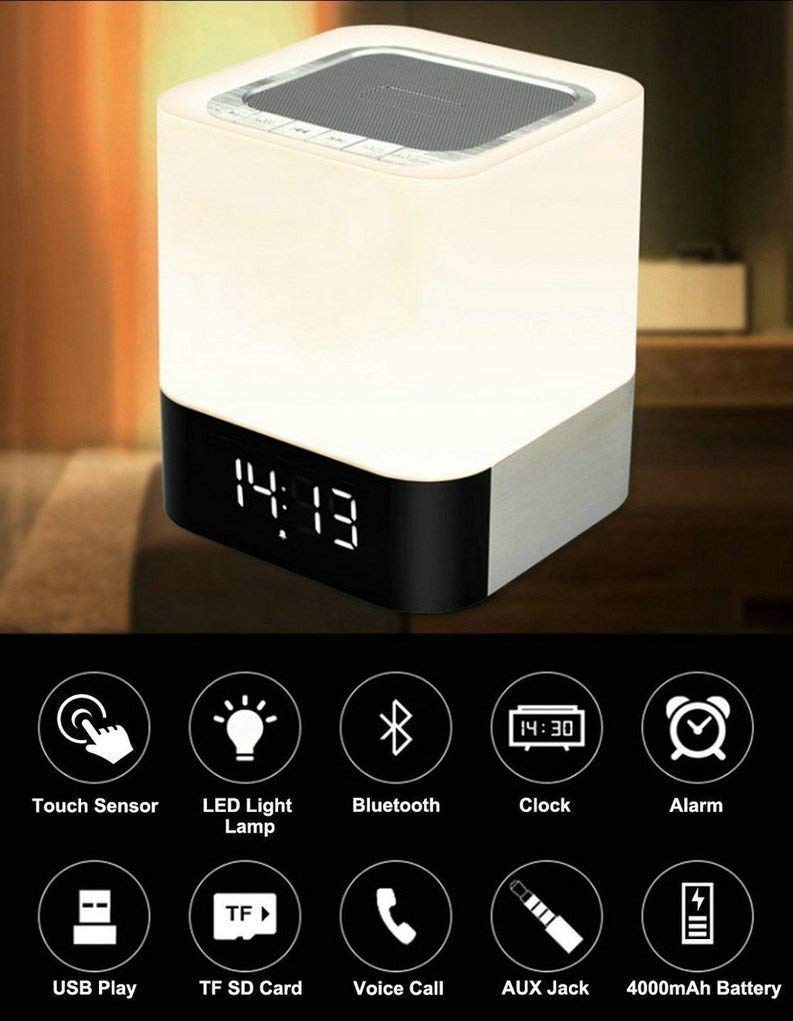
Image: The MUSKY DY28 device, showcasing its integrated clock display and touch-sensitive light panel.
Contenido de la caja
- MUSKY DY28 Bluetooth Speaker
- Manual de usuario
- Cable de carga
Características del producto
- Multifuncional: Bluetooth speaker, smart touch lamp, alarm clock, and MP3 player.
- Bluetooth 4.0: Easy and stable connection with Bluetooth-enabled devices.
- Luz LED ajustable: Warm LED light with adjustable brightness (Max 20 Lumen) via touch sensor.
- Reloj digital y alarma: Big digit 12/24H alarm clock with calendar, alarm, and sleep mode functions.
- Múltiples modos de reproducción: Supports MP3 playback via USB, micro TF/SD Card, and 3.5mm AUX input.
- Calidad de audio: 5W single acoustic driver with enhanced passive low-frequency radiator for clear sound and solid bass.
- Batería de larga duración: Built-in 4000mAh battery provides up to 15 hours of lighting or 9 hours of music playback (depending on usage).
- Llamadas manos libres: Micrófono integrado para responder llamadas.
Configuración
1. Carga del dispositivo
Before first use, fully charge the speaker. Connect the provided USB charging cable to the charging port on the device and to a standard USB power adapter (not included) or a computer's USB port. The charging indicator will show the charging status.
2. Encendido y apagado
Locate the Power On/Off switch on the device. Slide the switch to the 'ON' position to power on the speaker. Slide it to 'OFF' to power off.
3. Emparejamiento Bluetooth
- Ensure the speaker is powered on and in Bluetooth mode (indicated by a flashing blue light or voice prompt).
- En su dispositivo móvil, habilite Bluetooth y busque dispositivos disponibles.
- Select 'MUSKY DY28' from the list of devices.
- Once paired, the speaker will indicate a successful connection (e.g., solid blue light or voice prompt).
4. Configuración de la hora y la alarma
Refer to the detailed control diagram for button locations. Use the 'Mode' button to cycle through functions until the clock setting is displayed. Use the 'Previous' and 'Next' buttons to adjust hours and minutes, and the 'Play/Pause' button to confirm. For alarm settings, follow a similar procedure, activating the alarm function and setting the desired time.

Imagen: Detallada view of the MUSKY DY28's control panel, highlighting buttons for power, charging, audio inputs, playback, volume, and the touch sensor.
Instrucciones de funcionamiento
1. Reproducción de música
The DY28 supports multiple music sources:
- Modo Bluetooth: After successful pairing, play music from your connected device. Use the speaker's 'Play/Pause', 'Previous', and 'Next' buttons to control playback.
- Entrada USB: Inserte una unidad flash USB que contenga MP3 fileConecte el cable al puerto USB. El altavoz cambiará automáticamente al modo USB y comenzará la reproducción.
- Micro TF/SD Card: Insert a micro TF/SD card with MP3 files into the Micro SD Slot. The speaker will automatically switch to TF/SD card mode and play music.
- Entrada auxiliar: Connect an external audio device using a 3.5mm AUX cable to the AUX port. The speaker will switch to AUX mode. Control playback from your external device.

Image: Visual guide demonstrating the three primary ways to play music on the DY28: via Bluetooth, Micro SD card, and USB drive.
2. Operación de luz
The top panel of the speaker features a touch sensor for controlling the LED light. Tap the touch sensor to turn the light on/off and cycle through different brightness levels. The light offers a warm glow suitable for various environments.

Image: The MUSKY DY28 speaker illuminated, serving as a night light with its digital clock display visible in a low-light environment.
3. Funciones del despertador
Once the alarm is set, it will sound at the designated time. To snooze, tap the touch sensor. To turn off the alarm, press the 'Mode' button or power off the device. The sleep mode feature allows the lamp and speaker to automatically turn off after a set period.
4. Llamadas manos libres
When a call comes in while connected via Bluetooth, the speaker will ring. Press the 'Play/Pause' button to answer the call. Press it again to end the call. The integrated microphone allows for hands-free conversation.
Presupuesto
| Característica | Detalle |
|---|---|
| Marca | ALMIZCLADO |
| Número de modelo | DY28 |
| Tecnología de conectividad | Auxiliar, Bluetooth, USB |
| Tipo de tecnología inalámbrica | Bluetooth |
| Tipo de montaje | Montaje de mesa |
| Tipo de altavoz | Estante para libros |
| Características del producto | Light for emergency use |
| Tipo de controlador | Panel táctil |
| Método de control | Tocar |
| Color | Blanco |
| Capacidad de la batería | 4000 mAh (incorporada) |
| Battery Life (Lighting) | Hasta 15 horas |
| Duración de la batería (reproducción de música) | Hasta 9 horas |
| Tiempo de carga | 2-4 horas |
| Alcance de Bluetooth | 33 pies / 10 metros |
| Fuente de poder | Funciona con pilas |
| Cantidad de canales de audio | 5 vatio |
| es resistente al agua | VERDADERO |
| Peso del artículo | 700 gramos |
| Dispositivos compatibles | Reproductor de MP3, teléfono inteligente, tableta |
Solución de problemas
- Sin energía: Asegúrese de que el dispositivo esté completamente cargado. Compruebe que el interruptor de encendido esté en la posición de encendido.
- No se puede emparejar Bluetooth: Make sure the speaker is in Bluetooth pairing mode. Ensure your device's Bluetooth is enabled and within range (10 meters). Try restarting both devices.
- Sin sonido: Check the volume level on both the speaker and your connected device. Ensure the correct input mode (Bluetooth, USB, TF/SD, AUX) is selected.
- La luz no funciona: Tap the touch sensor on the top of the speaker. Ensure the device has sufficient battery charge.
- La alarma no suena: Verify the alarm time is set correctly and the alarm function is activated.
Mantenimiento
- Limpie el dispositivo con un paño suave y seco. No utilice limpiadores abrasivos ni disolventes.
- Evite exponer el altavoz a temperaturas extremas, luz solar directa o humedad alta.
- Guarde el dispositivo en un lugar fresco y seco cuando no lo utilice durante períodos prolongados.
- No intente desmontar o reparar el dispositivo usted mismo, ya que esto anulará la garantía.
Vídeo oficial del producto
Video: Official product video demonstrating the key features and functions of the MUSKY DY28 Bluetooth Speaker, Smart Touch Lamp, and Alarm Clock.
Garantía y soporte
Para obtener información sobre la garantía y atención al cliente, consulte la documentación incluida con su compra o póngase en contacto directamente con el fabricante. Conserve el comprobante de compra para cualquier reclamación de garantía.