
Introducción
This instruction manual provides essential information for the setup, operation, and maintenance of your Superior Electronics Universal Remote Control, model SUPTRB016. This remote is designed as a direct replacement for Telefunken televisions, including Smart TV models, and requires no programming for immediate use. Its ergonomic design and durable construction ensure comfortable and reliable control of your TV.
Configuración
1. Insertar baterías
The remote control requires two (2) AAA batteries (not included). Follow these steps to insert them:
- Ubique la tapa del compartimiento de la batería en la parte posterior del control remoto.
- Deslice la cubierta hacia abajo o presione el pestillo para abrirla.
- Inserte dos pilas AAA, asegurándose de que los terminales positivo (+) y negativo (-) estén alineados correctamente con las marcas dentro del compartimiento.
- Vuelva a colocar la tapa del compartimiento de la batería, deslizándola en su lugar hasta que encaje firmemente.

Figure 1: Inserting AAA batteries into the remote control.
2. Uso inicial
Once batteries are inserted, the remote control is ready for immediate use. No additional programming or code entry is required. Simply point the remote at your Telefunken TV and begin operating it.
Instrucciones de funcionamiento
The Superior Electronics SUPTRB016 remote control replicates the functions of your original Telefunken TV remote. Ensure a clear line of sight between the remote control and your TV's infrared receiver for optimal performance.

Figure 2: Remote control layout with streaming service buttons.
Funciones clave:
- Botón de encendido: Enciende o apaga el televisor.
- Botones numéricos (0-9): Para selección directa de canales.
- Subir/Bajar volumen: Ajusta el volumen del televisor.
- Canal arriba/abajo: Cambia los canales de televisión.
- Botón de silencio: Silencia o reactiva el audio del televisor.
- Panel de navegación (OK, Arriba, Abajo, Izquierda, Derecha): Se utiliza para la navegación y selección del menú.
- Atrás/Salir: Regresa a la pantalla anterior o sale de un menú.
- Botones de Smart TV: Dedicated buttons provide quick access to popular streaming applications such as Netflix, YouTube, and Prime Video (functionality depends on your TV model and internet connection).
- Fuente/Entrada: Selecciona la fuente de entrada (HDMI, AV, etc.).
- Menú/Información: Accesses TV menus and displays information.
The remote operates effectively within a maximum range of 10 meters, provided there are no obstructions between the remote and the TV's infrared sensor.
Mantenimiento
Para garantizar la longevidad y el rendimiento óptimo de su control remoto, siga estas sencillas pautas de mantenimiento:
- Limpieza: Limpie el control remoto con un paño suave y seco. Evite usar limpiadores líquidos o materiales abrasivos, ya que pueden dañar la superficie o los componentes internos.
- Reemplazo de batería: Reemplace las pilas cuando el control remoto responda con lentitud o deje de funcionar. Siempre reemplace ambas pilas a la vez por pilas AAA nuevas. No mezcle pilas viejas y nuevas, ni pilas de diferentes tipos.
- Almacenamiento: Guarde el control remoto en un lugar fresco y seco, alejado de la luz solar directa y de temperaturas extremas.
- Evite las gotas: While constructed with durable materials, excessive drops or impacts can cause damage.
Solución de problemas
Si experimenta problemas con su control remoto, consulte las siguientes soluciones comunes:
| Problema | Posible causa | Solución |
|---|---|---|
| El control remoto no funciona en absoluto. | Pilas muertas o insertadas incorrectamente. | Verifique la orientación de las pilas. Reemplácelas con pilas AAA nuevas. |
| El control remoto funciona de forma intermitente. | Pilas débiles, obstrucción o control remoto demasiado lejos del televisor. | Replace batteries. Ensure clear line of sight to TV. Move closer to the TV (within 10 meters). |
| Botones específicos no responden. | Button malfunction or TV not supporting the function. | Ensure your TV model supports the specific function (e.g., Smart TV apps). If other buttons work, the specific button might be faulty. |
| El televisor no responde al control remoto. | TV's IR sensor blocked or TV is not a Telefunken model. | Clear any obstructions in front of the TV's IR sensor. Verify that your TV is a Telefunken brand. |
Presupuesto
- Modelo: SUPTRB016
- Marca: Electrónica superior
- Dimensiones: 5 x 1.5 x 19 cm
- Peso: 90 gramos
- Pilas necesarias: 2 pilas AAA (1.5 V)
- Pilas incluidas: No
- Tecnología de conectividad: Infrarrojo
- Alcance máximo: 10 metros
- Dispositivos compatibles: Telefunken Televisions (LED, LCD, OLED, Smart TV models)
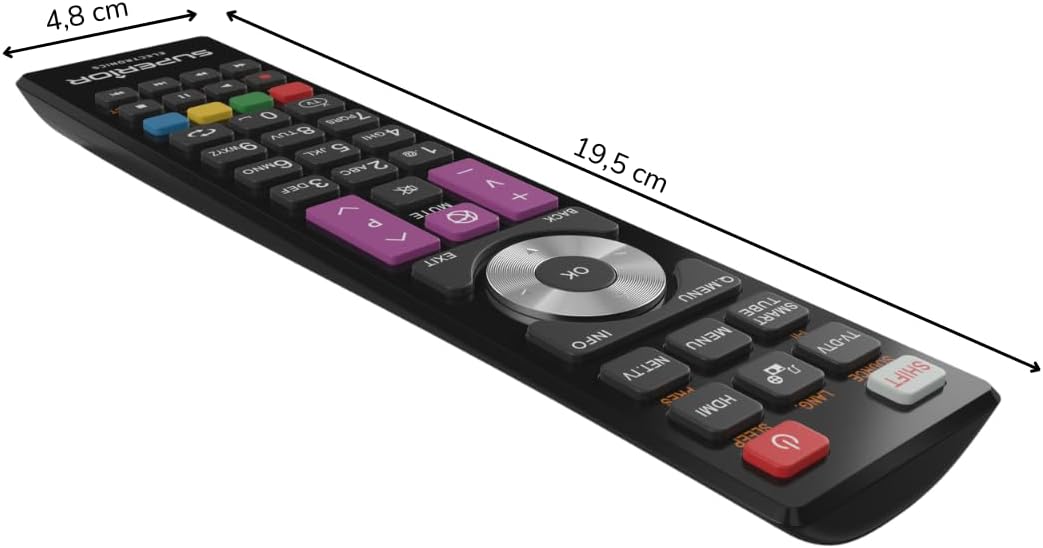
Figura 3: Dimensiones del control remoto.
Garantía y soporte
For warranty information, please refer to the terms and conditions provided by your retailer at the time of purchase or contact Superior Electronics directly. For additional support or inquiries, you may visit the official Superior Electronics store on Amazon: