
Introducción
This manual provides instructions for the safe and efficient operation of your RIDGID R84086B 18-Volt Cordless Mini Bluetooth Radio. This compact and versatile device offers portable audio entertainment and device charging, featuring AM/FM radio, Bluetooth connectivity, and an auxiliary input. It is powered by RIDGID 18-Volt batteries and can also function as a power bank for charging other devices.
Información de seguridad
Lea y comprenda siempre todas las advertencias e instrucciones de seguridad antes de utilizar este producto. El incumplimiento de estas instrucciones podría provocar descargas eléctricas, incendios o lesiones graves.
- Do not expose the radio to rain or wet conditions. Water entering the radio will increase the risk of electric shock.
- Use only with specified battery packs. Using any other battery packs may create a risk of injury and fire.
- Do not operate the radio in explosive atmospheres, such as in the presence of flammable liquids, gases, or dust.
- Keep the radio away from heat sources, direct sunlight, and extreme temperatures.
- Always ensure the battery is properly seated before use.
Producto terminadoview
Familiarize yourself with the components of your RIDGID R84086B radio.
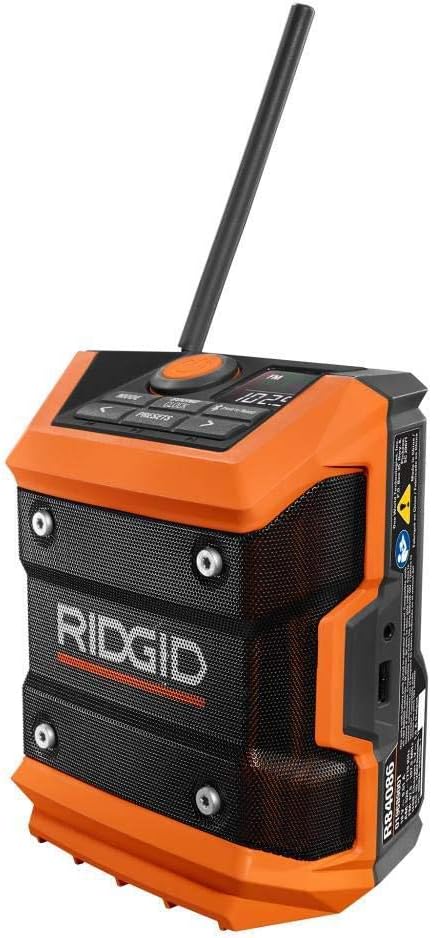
Figura 1: Frente view of the RIDGID R84086B radio, showing the control panel, speaker, and extended antenna.

Figure 2: The RIDGID R84086B radio in a workshop setting, demonstrating its portability and use with a smartphone.
Configuración
Instalación de la batería
- Asegúrese de que la radio esté apagada.
- Align a charged RIDGID 18-Volt battery pack with the battery port on the radio.
- Deslice el paquete de baterías en el puerto hasta que encaje firmemente en su lugar.
Ajuste de antena
For optimal radio reception, extend and adjust the antenna as needed. The antenna can be rotated and tilted to improve signal strength.
Instrucciones de funcionamiento
Encendido/apagado
Press the orange power button located on the control panel to turn the radio on or off.
Selección de modo
Presione el MODO button to cycle through available audio sources: FM Radio, AM Radio, Bluetooth, and Auxiliary (AUX) input.
Radio Tuning (AM/FM)
- Seleccione el modo FM o AM usando el MODO botón.
- Use the left (<) y derecha (>) botones de flecha para sintonizar manualmente la frecuencia deseada.
- Para guardar una estación como preestablecida, mantenga presionada la tecla PRESETS button, then use the arrow buttons to select a preset number and press PRESETS De nuevo para confirmar.
Emparejamiento Bluetooth
- Seleccione el modo Bluetooth usando el MODO button. The Bluetooth icon on the display will flash, indicating it is in pairing mode.
- En su dispositivo móvil, habilite Bluetooth y busque dispositivos disponibles.
- Select "RIDGID Radio" from the list of devices to pair. Once paired, the Bluetooth icon will stop flashing and remain solid.
Entrada auxiliar
To use the auxiliary input, connect an audio device (e.g., smartphone, MP3 player) to the 3.5mm AUX port on the side of the radio using a standard audio cable. Select AUX mode using the MODO botón.
Ajuste de sonido
Presione el SOUND/CLOCK button to access sound settings. Use the arrow buttons to adjust bass and treble levels for your preferred audio experience.
Funcionalidad del banco de energía
The radio features a USB port that allows you to charge compatible devices. Connect your device to the USB port using an appropriate charging cable. The radio's battery will provide power to charge your device.
Video: Demonstration of the RIDGID R84086B radio's features, including battery installation, mode selection, radio tuning, auxiliary input, and power bank functionality.
Mantenimiento
Limpieza
Limpie periódicamente la radio con un paño suave y seco.amp Paño. No utilice productos químicos agresivos ni limpiadores abrasivos. Asegúrese de que todos los puertos estén libres de polvo y residuos.
Cuidado de la batería
Store battery packs in a cool, dry place away from direct sunlight. Do not store battery packs in a discharged condition. Always charge batteries fully before extended storage.
Solución de problemas
Sin poder
- Asegúrese de que la batería esté completamente cargada y correctamente insertada.
- Check for any obstructions in the battery port.
Mala recepción de radio
- Extend and adjust the antenna for better signal.
- Move the radio to a different location to avoid interference.
Problemas de conectividad Bluetooth
- Asegúrese de que la radio esté en modo de emparejamiento Bluetooth.
- Asegúrese de que el Bluetooth de su dispositivo móvil esté habilitado y dentro del alcance.
- Intente desvincular y volver a vincular el dispositivo.
Presupuesto
| Marca | RÍGIDO |
| Número de modelo | R84086B |
| Tecnología de conectividad | Bluetooth |
| Fuente de poder | Battery Powered (RIDGID 18-Volt) |
| Peso del artículo | 1.75 libras |
| Dispositivos compatibles | Teléfono inteligente |
| Interfaz de hardware | USB |
| Código Postal | 723548648427 |
Garantía y soporte
Información de garantía
This product comes with a 90-day limited warranty. Please refer to the warranty card included with your purchase for full terms and conditions.
Atención al cliente
For technical assistance, troubleshooting, or warranty claims, please contact RIDGID customer support. Contact information can typically be found on the official RIDGID websitio o en el embalaje de su producto.