
1. Introducción
This manual provides detailed instructions for the proper setup, operation, and maintenance of your Zerone USB Digital Microscope. This device is designed for various applications including industrial testing, laboratory research, educational purposes, and detailed examination of small objects. Please read this manual thoroughly before using the product to ensure optimal performance and longevity.
2. Información de seguridad
- No exponga el dispositivo a temperaturas extremas, humedad o sustancias corrosivas.
- Avoid direct exposure of the LED lights to eyes.
- Mantenga el dispositivo fuera del alcance de los niños.
- Use only the provided accessories or compatible replacements.
- Disconnect the device from the power source when not in use or during cleaning.
3. Contenido del paquete
Verifique que todos los artículos estén presentes en el paquete:
- Zerone USB Digital Microscope
- Soporte ajustable
- USB Cable with LED Dimming Knob
- CD de instalación del software (o enlace de descarga)

Image 3.1: Contents of the Zerone USB Digital Microscope package, including the microscope, stand, USB cable, and software CD.
4. Producto terminadoview
The Zerone USB Digital Microscope features a compact design with adjustable magnification and integrated LED illumination. Key components include:
- Cuerpo del microscopio: Contains the lens, sensor, and control buttons.
- Zoom/Focus Wheel: Located on the microscope body for adjusting magnification and focus.
- Luces LED: Eight adjustable LEDs surrounding the lens for illuminating the specimen.
- Botón a presión: Para capturar imágenes fijas.
- Cable USB: Connects the microscope to a computer.
- LED Dimming Knob: Integrated into the USB cable for brightness control.
- Soporte ajustable: Provides stable support and allows for precise positioning of the microscope.

Image 4.1: The Zerone USB Digital Microscope mounted on its adjustable stand, connected via USB cable.

Imagen 4.2: Un acercamiento view of the Zerone USB Digital Microscope on its stand, highlighting its portable design and 1000X zoom capability.
5. Configuración
5.1 Instalación del software
- Insert the provided software installation CD into your computer's CD-ROM drive. If your computer does not have a CD-ROM drive, please refer to the manufacturer's websitio para obtener instrucciones de descarga de software.
- Follow the on-screen prompts to install the digital microscope software.
- Una vez completada la instalación, reinicie su computadora si se le solicita.
5.2 Conexión del microscopio
- Attach the microscope to the adjustable stand. Ensure it is securely fastened.
- Connect the USB cable from the microscope to an available USB port on your computer.
- The computer should automatically detect the device. If not, check your device manager for driver installation status.

Image 5.1: The Zerone USB Digital Microscope set up on a surface, demonstrating its use in a typical research or inspection environment.
6. Instrucciones de funcionamiento
6.1 Inicio del software
Launch the digital microscope software installed on your computer. The live feed from the microscope should appear on your screen.
6.2 Ajuste del enfoque y el zoom
- Place the object you wish to examine under the microscope lens.
- Girar el Zoom/Focus Wheel on the microscope body to adjust the magnification and bring the image into clear focus on your computer screen.
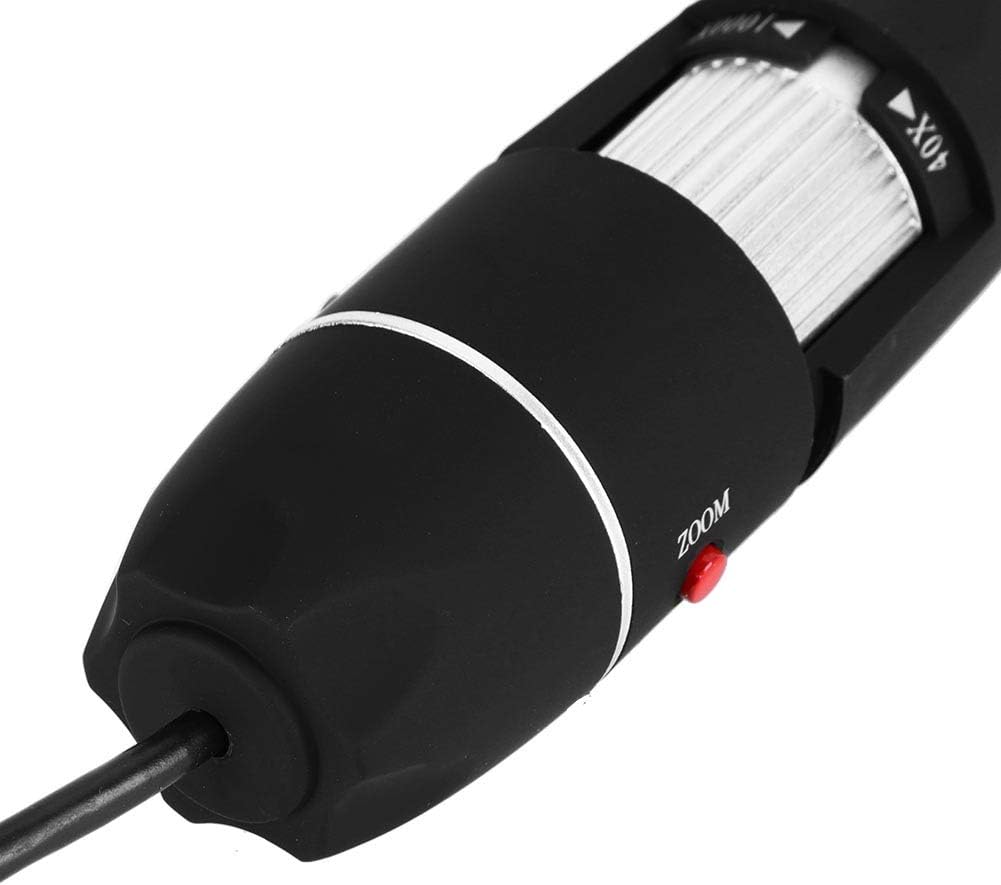
Imagen 6.1: Un detalle view of the zoom and focus adjustment wheel on the microscope body, used for precise image clarity and magnification.
6.3 Ajuste del brillo del LED
The microscope is equipped with 8 adjustable LED lights. Use the LED Dimming Knob located on the USB cable to increase or decrease the brightness. Adjust the lighting to achieve optimal visibility of your specimen.

Image 6.2: A close-up showing the arrangement of the 8 LEDs around the microscope lens, designed to provide even illumination.

Image 6.3: The front of the microscope with its 8 LEDs illuminated, demonstrating the lighting capability for viewespecímenes de ing.
6.4 Captura de imágenes y vídeos
Para capturar una imagen fija, presione el botón Botón a presión on the microscope body or use the corresponding function within the software. To record video, select the video recording option in the software and follow the prompts.

Image 6.4: A hand holding the Zerone USB Digital Microscope, illustrating its ergonomic design and portability for handheld use.
6.5 Vídeo de demostración del producto
Watch this video for a visual guide on the features and operation of the Zerone USB Digital Microscope.
Vídeo 6.1: Un vídeo de demostración muestraasing the Zerone 1000X Zoom USB Digital Microscope, highlighting its features and how it functions as a digital magnifier and endoscope camera.
7. Mantenimiento
7.1 Limpieza
- Limpie suavemente el cuerpo del microscopio con un paño suave y seco.
- Para la lente, utilice un paño y una solución de limpieza de lentes especializados para evitar rayones.
- No utilice limpiadores abrasivos ni disolventes.
7.2 Almacenamiento
When not in use, store the microscope in a clean, dry place, away from direct sunlight and extreme temperatures. Use the original packaging or a protective case to prevent dust accumulation and physical damage.
8. Solución de problemas
| Problema | Posible causa | Solución |
|---|---|---|
| No hay imagen en la pantalla | Microscope not connected properly; Software not launched; Driver issue. | Ensure USB cable is securely connected. Launch the software. Reinstall drivers if necessary. |
| La imagen es borrosa | Incorrect focus; Incorrect working distance. | Adjust the Zoom/Focus Wheel. Ensure the microscope is at an appropriate distance from the object. |
| Los LED no se encienden | LED dimming knob set to minimum; Power issue. | Rotate the LED Dimming Knob to increase brightness. Check USB connection. |
| Software not detecting device | Driver not installed or corrupted; USB port issue. | Reinstall the software and drivers. Try a different USB port. |
9. Especificaciones
| Característica | Detalle |
|---|---|
| Marca | Zerone |
| Número de modelo | SKIESOARtbx1zsgua2 |
| Aumento | Hasta 1000X |
| Fuente de luz | 8 LED ajustables |
| Conectividad | USB |
| Dispositivos compatibles | Ordenador personal |
| Material | Metal |
| Color | Negro, Plata |
| Dimensiones del producto | 5.31 x 5.12 x 1.77 pulgadas |
| Peso del artículo | 7 onzas |
10. Garantía y soporte
For warranty information and technical support, please refer to the documentation included with your product or visit the official Zerone webSitio. Conserve su recibo de compra como comprobante de compra para cualquier reclamación de garantía.