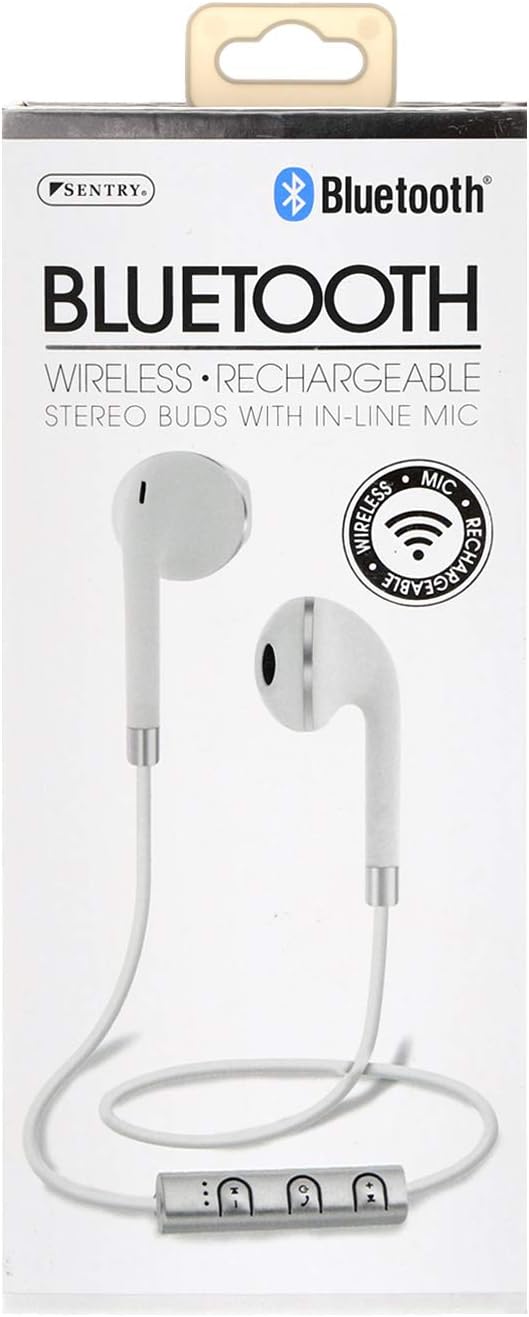
SENTRY Bluetooth® Wireless Stereo Earbuds with Mic - Model BT879
Manual de usuario oficial
Introducción
Gracias por la compraasing the SENTRY Bluetooth® Wireless Stereo Earbuds with Mic, Model BT879. These earbuds are designed to provide a high-quality audio experience with the convenience of wireless connectivity. This manual will guide you through the setup, operation, and maintenance of your new earbuds.
For optimal performance and longevity, please read this manual thoroughly before use and retain it for future reference.
Información importante de seguridad
ADVERTENCIA:
This product contains chemicals known to the State of California to cause cancer and birth defects or other reproductive harm. Please handle with care and dispose of responsibly.
Do not expose the earbuds to extreme temperatures, moisture, or corrosive materials.
Do not disassemble or attempt to repair the earbuds yourself. This may void the warranty and cause damage.
Mantener fuera del alcance de los niños y las mascotas.
Evite escuchar a volúmenes altos durante períodos prolongados para evitar daños auditivos.
¿Qué hay en la caja?
Your SENTRY Bluetooth® Wireless Stereo Earbuds package should contain the following items:
Image: The SENTRY BT879 earbuds displayed in their retail packaging, showcasing the earbuds, in-line controls, and the included deluxe carry pouch.
Guía de configuración
1. Carga de los auriculares
Before first use, ensure your earbuds are fully charged. The earbuds are equipped with a Lithium-ion battery.
Locate the charging port on the in-line control unit.
Connect the provided USB charging cable to the earbuds and plug the other end into a USB power source (e.g., computer USB port, wall adapter).
An indicator light will typically show the charging status. Refer to the light behavior for full charge indication (e.g., light turns off or changes color).
Image: Close-up of the SENTRY BT879 earbuds, highlighting the in-line control unit which houses the charging port and control buttons.
2. Emparejamiento con un dispositivo Bluetooth
The SENTRY BT879 earbuds are compatible with devices that have Bluetooth capabilities and microphone support.
Asegúrese de que los auriculares estén cargados y apagados.
Press and hold the power button on the in-line control unit until the indicator light begins to flash, indicating pairing mode. (Typically blue/red flashing).
En su dispositivo (teléfono inteligente, tableta, computadora), vaya a la configuración de Bluetooth.
Buscar available devices. The earbuds should appear as "SENTRY BT879" or similar.
Seleccione los auriculares de la lista para iniciar el emparejamiento.
Once successfully paired, the indicator light on the earbuds will typically stop flashing and remain solid blue, or turn off. A voice prompt may also confirm the connection.
El alcance del Bluetooth es de aproximadamente 10 metros (33 pies).
Instrucciones de funcionamiento
The in-line control unit allows for easy management of your audio and calls.
Botones de control sobreview
Imagen: Un detalle view of the SENTRY BT879 in-line control unit, showing the various buttons for power, volume, and track control.
Funciones de control en línea
Botón/Acción
Función
Botón de encendido (centro)
Press and Hold: Power On/Off, Enter Pairing Mode
Single Press (Music): Play/Pause
Single Press (Call): Answer/End Call
Double Press (Call): Redial Last Number
Press and Hold (Call): Reject Incoming Call
Subir volumen (+)
Single Press: Increase Volume
Mantener presionado: Pista siguiente
Bajar volumen (-)
Single Press: Decrease Volume
Mantener presionado: Pista anterior
Reproducción de música
A reproducir o pausar Música, presione el Botón de encendido una vez.
Para saltar al Pista siguiente, mantenga presionada la tecla Subir volumen (+) botón.
Ir al pista anterior, mantenga presionada la tecla Bajar volumen (-) botón.
A ajustar el volumen, presione el Subir volumen (+) or Bajar volumen (-) botones brevemente.
Realizar y recibir llamadas
A contestar una llamada entrante, presione el Botón de encendido una vez.
A end an active call, presione el Botón de encendido una vez.
A rechazar una llamada entrante, mantenga presionada la tecla Botón de encendido durante aproximadamente 2 segundos.
A volver a marcar el último número, presione dos veces el Botón de encendido.
El incorporado micrófono en línea allows for clear hands-free communication.
Cuidado y mantenimiento
Proper care will ensure the longevity and optimal performance of your SENTRY earbuds.
Limpieza: Use a soft, dry, lint-free cloth to clean the earbuds. Do not use abrasive cleaners, alcohol, or chemical solvents. Gently wipe the ear tips and the body of the earbuds.
Almacenamiento: When not in use, store the earbuds in the provided deluxe travel friendly carry pouch to protect them from dust, dirt, and physical damage.
Temperatura: Avoid exposing the earbuds to extreme temperatures (hot or cold) as this can affect battery life and internal components.
Humedad: Keep the earbuds dry. Do not immerse them in water or expose them to excessive moisture.
Solución de problemas
If you encounter issues with your earbuds, please refer to the following common problems and solutions:
Problema
Posible causa / solución
Los auriculares no se encienden.
Battery is depleted. Charge the earbuds fully.
Power button not held long enough. Press and hold the power button until the indicator light appears.
No se puede emparejar con el dispositivo.
Earbuds are not in pairing mode. Ensure the indicator light is flashing (e.g., blue/red).
Bluetooth is off on your device. Enable Bluetooth in your device's settings.
Earbuds are already connected to another device. Disconnect from the previous device or turn off Bluetooth on that device.
Distance too far. Ensure earbuds are within 10 meters of your device.
Interference. Move away from other wireless devices or strong electromagnetic fields.
Intente olvidar el dispositivo en su teléfono y volver a emparejarlo.
No hay sonido o volumen bajo.
Volume on earbuds or device is too low. Increase volume using the '+' button on the earbuds and on your device.
Earbuds are not properly connected. Re-pair the earbuds with your device.
Audio output setting on your device is incorrect. Ensure audio is routed to the Bluetooth earbuds.
La calidad del sonido es deficiente o intermitente.
Distance from device is too far or there are obstacles. Reduce distance and remove obstructions.
Low battery. Charge the earbuds.
Interference from other wireless devices. Move to an area with less interference.
El micrófono no funciona.
Ensure the earbuds are properly connected and selected as the audio input device on your phone/computer.
Check for any mute functions on your device or in the application you are using.
Especificaciones técnicas
Característica
Especificación
Modelo
BT879
Conectividad
Bluetooth inalámbrico
Alcance de Bluetooth
10 metros
Unidad de controlador
15 mm
Respuesta de frecuencia
20 Hz - 20 kHz
Impedancia
32 ohmios
Sensibilidad
100dB +/- 3dB
Tipo de batería
Iones de litio
Tipo de control
In-line Control Buttons
Micrófono
Sí (en línea)
Material
Metal, plástico, silicona
Color
Blanco
Colocación de orejas
En el oído
Factor de forma
En el oído
Toma de auriculares
Sin Jack
Dimensiones del producto
3.5 x 6.75 x 3.8 pulgadas
Peso del artículo
5.4 onzas
Fabricante
Centinela
Código Postal
080068548799, 800685487994
Garantía y soporte
SENTRY Industries is committed to customer satisfaction. While specific warranty details are not provided in this manual, most SENTRY products come with a limited warranty against defects in materials and workmanship.
For warranty claims, technical support, or further assistance, please visit the official SENTRY webSitio web o contacte con el departamento de atención al cliente. Conserve su comprobante de compra para cualquier consulta relacionada con la garantía.
Ask about setup, troubleshooting, compatibility, parts, safety, or missing instructions. Manuals+ will review the question and use this page’s manual context to help answer it.