
Introducción
This manual provides instructions for the installation, operation, and maintenance of your Swann SRDVR-44580V 4 Channel Digital Video Recorder. This DVR is designed to work with select Swann cameras, offering 1080p Full HD recording capabilities, HDMI and VGA outputs, and remote access via the HomeSafe View App. Please read this manual thoroughly before operating the device.
Contenido del paquete
Verifique que todos los artículos enumerados a continuación estén incluidos en su paquete:
- Swann SRDVR-44580V 4 Channel Digital Video Recorder
- Adaptador de corriente
- Cable HDMI
- Cable Ethernet
- Ratón USB
- Etiquetas engomadas del disuasivo del robo

Imagen 1: Contents of the Swann SRDVR-44580V package, including the DVR unit, power adapter, HDMI cable, Ethernet cable, USB mouse, and theft deterrent stickers.
Dispositivo terminadoview
Panel frontal
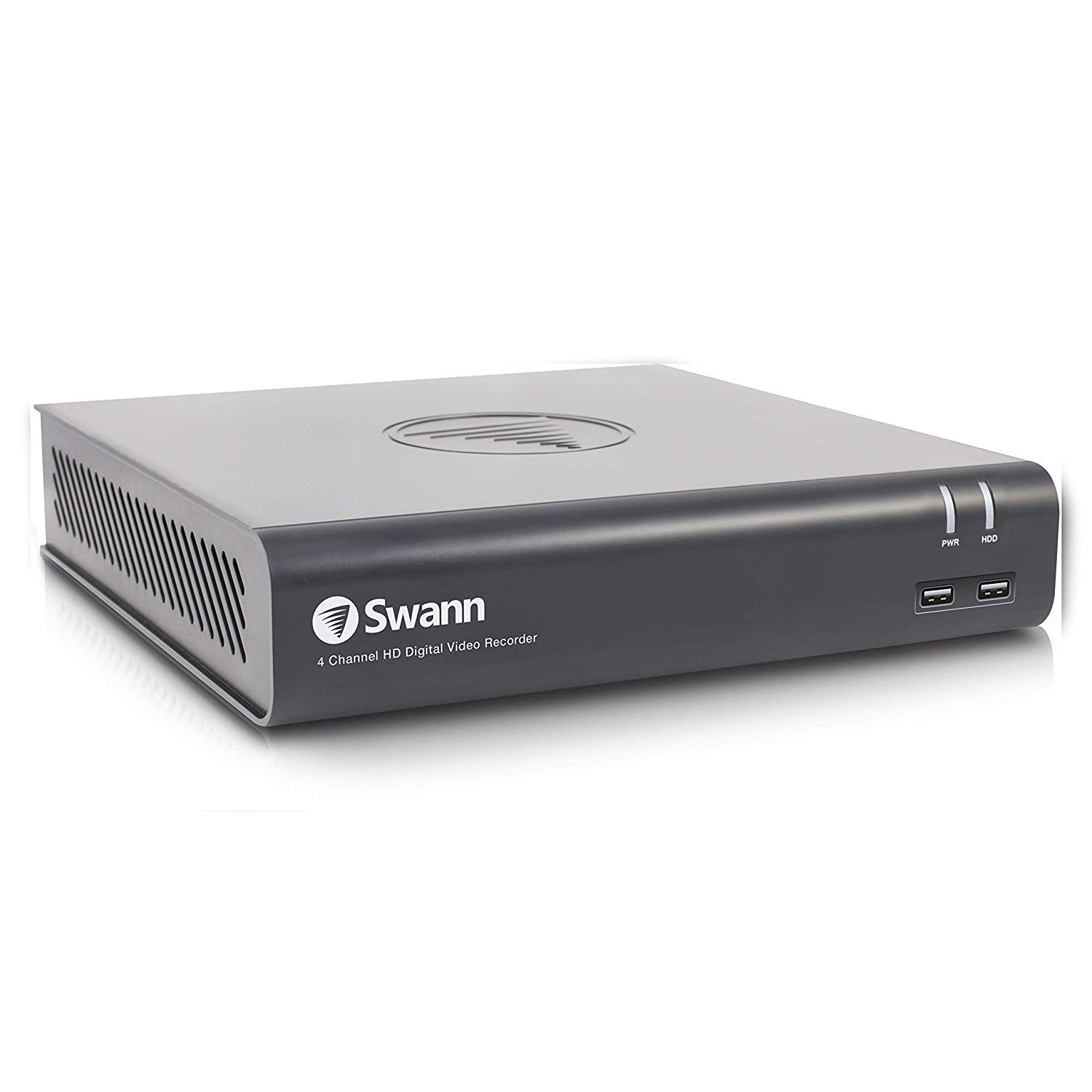
Imagen 2: Frente view of the Swann SRDVR-44580V Digital Video Recorder, showing the Swann logo, '4 Channel HD Digital Video Recorder' text, PWR and HDD indicator lights, and two front USB ports.
The front panel features indicator lights for power (PWR) and hard disk drive activity (HDD). Two USB 2.0 ports are conveniently located on the front for connecting a mouse or USB storage devices.
Panel trasero
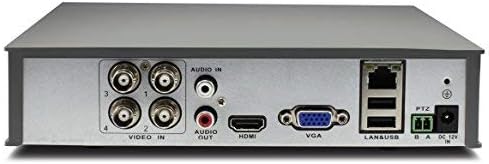
Imagen 3: Trasero view of the Swann SRDVR-44580V Digital Video Recorder, displaying various input and output ports including Video In (BNC), Audio In/Out (RCA), HDMI, VGA, LAN, USB, PTZ, and Power Input.
The rear panel provides all necessary connections for your security system:
- Entrada de vídeo (BNC): Four ports for connecting compatible security cameras.
- Entrada/Salida de audio (RCA): For connecting audio input devices (e.g., microphone) and audio output to a speaker or monitor.
- Salida HDMI: Para conectar a un monitor o televisor de alta definición.
- Salida VGA: For connecting to a standard computer monitor.
- Puerto LAN (RJ45): For network connection to enable remote viewing and internet access.
- Puertos USB: Puertos USB adicionales para periféricos.
- PTZ Port: For connecting Pan-Tilt-Zoom cameras.
- Entrada de energía: Para conectar el adaptador de corriente DC 12V.
Configuración
Follow these steps to set up your Swann SRDVR-44580V:
- Conectar cámaras: Connect your compatible Swann security cameras to the BNC 'Video In' ports on the rear panel. Ensure connections are secure.
- Conectar un monitor: Use an HDMI cable to connect the DVR's HDMI output to your TV or monitor. Alternatively, use a VGA cable for VGA-compatible displays.
- Conectar el ratón USB: Plug the included USB mouse into one of the USB ports on the front or rear of the DVR.
- Connect to Network (Optional for Remote Access): para control remoto viewPara funciones de red e internet, conecte un cable Ethernet desde el puerto LAN del DVR a su enrutador o conmutador de red.
- Conecte la electricidad: Connect the power adapter to the DVR's 'Power Input' port and then plug it into a power outlet. The DVR will power on automatically.
- Configuracion inicial: Follow the on-screen prompts to complete the initial setup, including setting the date/time, creating a password, and configuring network settings.
Operante
Once set up, you can begin operating your DVR system:
- Vivir View: The DVR will display live video from connected cameras on your monitor. Use the mouse to navigate the on-screen menu.
- Grabación: The DVR is pre-configured to record continuously or based on motion detection. You can customize recording schedules and settings via the main menu.
- Reproducción: Para volverview comida grabadatage, access the 'Playback' function from the main menu. You can search by date, time, and event type.
- Remote Access (HomeSafe View Aplicación):
- Download the 'HomeSafe View' app from your mobile device's app store (iOS or Android).
- Open the app and follow the instructions to add your DVR using its unique ID or QR code.
- Una vez conectado, puede view live camera feeds, play back recordings, and receive alerts from anywhere with an internet connection.
- Backup: Puede realizar copias de seguridad de archivos de vídeo importantestage to a USB flash drive connected to the DVR's USB port.
Mantenimiento
Regular maintenance ensures optimal performance and longevity of your DVR system:
- Administración del disco duro: The DVR's hard drive will automatically overwrite the oldest recordings when it becomes full. Regularly back up any critical footage al almacenamiento externo.
- Limpieza: Keep the DVR unit clean and free from dust. Use a soft, dry cloth to wipe the exterior. Do not use liquid cleaners directly on the device. Ensure ventilation openings are not blocked.
- Actualizaciones de firmware: Periodically check the official Swann support website for available firmware updates. Updating the firmware can improve performance, add new features, and enhance security.
- Ciclo de energía: If the DVR experiences minor issues, try power cycling the unit by disconnecting the power adapter for a few seconds and then reconnecting it.
Solución de problemas
If you encounter issues with your DVR, refer to the following common troubleshooting steps:
- No hay salida de video en el monitor:
- Asegúrese de que el cable HDMI o VGA esté conectado de forma segura tanto al DVR como al monitor.
- Verifique que el monitor esté encendido y configurado en la fuente de entrada correcta (HDMI/VGA).
- Check if the DVR's power indicator light is on.
- No realices grabaciones:
- Check the hard drive status in the DVR's menu to ensure it is detected and functioning correctly.
- Verify that recording schedules are properly configured and motion detection is enabled if desired.
- Ensure cameras are connected and displaying live video.
- El acceso remoto no funciona:
- Confirm the DVR is connected to your network via an Ethernet cable and has an active internet connection.
- Check your router settings to ensure the DVR is assigned an IP address and there are no firewall restrictions.
- Verify that the HomeSafe View app is correctly configured with the DVR's details.
- Camera Not Displaying Video:
- Check the BNC cable connection between the camera and the DVR.
- Asegúrese de que la cámara esté recibiendo energía.
- Confirm the camera is compatible with the Swann SRDVR-44580V.
Presupuesto
| Número de modelo | SRDVR-44580V |
| Entrada de vídeo | 4 canales (BNC) |
| Salidas de video | 1x HDMI, 1x VGA |
| Resolución de grabación | Up to 1080p (supports resolutions up to 1920 x 1536 pixels) |
| Entrada de audio | 1 x RCA |
| Salida de audio | 1 x RCA |
| Disco duro | 1TB SATA HDD (supports up to 4TB) |
| Interfaz de red | 1 puerto Ethernet RJ45 |
| Interfaz USB | 2 x USB 2.0, 1 x USB 3.0 (Total 3 USB ports) |
| Dimensiones (An x Pr x Al) | 230mm x x 210mm 47mm (9.05 "x 8.3" x 1.9 ") |
| Tecnología de conectividad | Cableado |
| Dispositivos compatibles | Select Swann Cameras |
Información de garantía
Swann products typically come with a limited warranty that covers defects in materials and workmanship. The specific terms and duration of the warranty may vary by region and product. For detailed warranty information, including coverage, exclusions, and how to make a claim, please refer to the official Swann websitio o la tarjeta de garantía incluida con la documentación de compra.
Apoyo
For further assistance, technical support, or to download the latest software, firmware, and comprehensive manuals, please visit the official Swann support website. You can also find FAQs and contact customer service for personalized help.
Official Swann Websitio: www.swann.com


