
1. Introducción
The OnLyee CR1009 Emergency Weather Radio is a versatile and essential device designed to keep you informed and safe during emergencies and outdoor activities. This portable radio features multiple power sources, including solar, hand crank, and rechargeable battery, ensuring continuous operation. It provides access to AM, FM, SW, and NOAA weather bands, along with integrated lighting and an SOS alarm function.

Figure 1: OnLyee CR1009 Emergency Weather Radio Overview
2. ¿Qué hay en la caja?
- Radio de emergencia
- Cable micro USB
- Brújula
- Handy Braid belt
- Mosquetón

Figura 2: Contenido del paquete
3. Configuración
3.1 Encendido de la radio
The OnLyee CR1009 offers five methods to ensure it's always powered:
- Internal Rechargeable Battery (5000mAh): The radio comes with a built-in 5000mAh lithium-ion battery. This is the primary power source for extended use.
- Carga USB: Connect the provided Micro USB cable to the radio's DC IN 5V port and a 5V/2A (not included) power adapter or a computer USB port. The charging indicator will illuminate.
- Panel solar: Place the radio with its solar panel facing direct sunlight. This method is ideal for maintaining charge or for slow charging in outdoor environments.
- Manivela: Extend the hand crank from the back of the radio and rotate it clockwise or counter-clockwise for approximately 3-5 minutes to generate enough power for short-term use.
- AAA Batteries (3x, not included): For a last-minute power backup, open the battery compartment and insert 3 AAA batteries. Ensure the power switch is set to 'AAA' mode.

Figure 3: Five Power Supply Methods
3.2 Configuración de la antena
For optimal radio reception, extend the telescopic antenna fully when listening to FM, SW, or NOAA bands. For AM reception, the radio uses a built-in AM antenna, so no external antenna adjustment is needed.
4. Instrucciones de funcionamiento
4.1 Funciones de radio
- Encendido/apagado: Rotate the 'VOLUME' knob clockwise to turn the radio on and adjust the volume. Rotate counter-clockwise until it clicks to turn off.
- Selección de banda: Use the 'BAND' switch to select between SW (Shortwave), AM (Amplitude Modulation), FM (Frequency Modulation), and WB (Weather Band).
- Sintonización: Rotate the 'TUNING' knob to scan for stations within the selected band. The frequency display will show the current station.
- Banda meteorológica de la NOAA: For weather alerts, switch to the 'WB' band. Then, use the 'WEATHER BAND' selector to choose one of the 7 preset NOAA weather channels (162.400MHz, 162.425MHz, 162.450MHz, 162.475MHz, 162.500MHz, 162.525MHz, 162.550MHz). The radio will sound a loud SOS alarm and flash a red light for 9 seconds when a severe weather alert is issued by the National Weather Service.
- Toma de auriculares: Plug 3.5mm headphones (not included) into the headphone jack for private listening. The speaker will be muted automatically.
4.2 Funciones de iluminación
- Linterna led: Press the flashlight button on the side of the radio to activate the 3W LED flashlight. Press again to cycle through brightness levels or turn off.
- Luz para leer: Flip up the solar panel to reveal the 2.5W reading lamp. Press the reading light button to turn it on and cycle through its 2 adjustable brightness levels.

Figure 4: Lighting and Audio Features
4.3 alarma SOS
In an emergency, press the red 'SOS' button to activate a loud siren and flashing red light. This feature is designed to attract attention and signal for help.

Figura 5: Activación de la alarma SOS
4.4 Carga de dispositivos externos
The radio's built-in 5000mAh battery can be used to charge external USB-powered devices like smartphones. Connect your device's USB charging cable to the radio's USB output port (USB CHARGING 5V 1A).

Figure 6: Charging External Devices
5. Mantenimiento
- Mantenga la radio limpia con un paño suave y seco. Evite usar productos químicos agresivos o limpiadores abrasivos.
- Guarde la radio en un lugar fresco y seco cuando no esté en uso.
- Si utiliza pilas AAA, retírelas si no utilizará la radio durante un período prolongado para evitar fugas.
- Regularly check the internal rechargeable battery level and recharge as needed to maintain its lifespan.
6. Solución de problemas
- Sin energía: Ensure the internal battery is charged, or try using the hand crank, solar panel, or fresh AAA batteries. Check the power source switch (Li-ion/AAA).
- Mala recepción de radio: Fully extend the telescopic antenna for FM/SW/NOAA. Try repositioning the radio to improve signal. Ensure you are within range of broadcast towers.
- Dispositivo externo no se carga: Verify the radio's internal battery has sufficient charge. Ensure the USB cable is securely connected to both the radio and the external device.
- La alarma SOS no funciona: Ensure the radio has power. Press and hold the SOS button firmly.
7. Especificaciones
| Característica | Especificación |
|---|---|
| Marca | En Lyee |
| Número de modelo | CR1009 |
| Color | Verde |
| Dimensiones del producto | 6.69" de largo x 2.36" de ancho x 3.74" de alto (17.2 x 9.4 x 7.4 cm) |
| Peso del artículo | 14.88 onzas (420 gramos) |
| Fuente de poder | Micro USB input, 5000mAh Rechargeable Battery, Solar Panel, Hand Crank, 3x AAA Battery |
| Bandas de radio compatibles | AM/FM/SO/WB (NOAA) |
| Frecuencia AM | 520 1710-kHz |
| Frecuencia FM | 88-108 MHz |
| Frecuencia SW | 7-19.00 MHz |
| NOAA Weather Bands | 7 preset bands (162.400-162.550 MHz) |
| Linterna LED | 3W, illuminates up to 80 meters |
| Luz de lectura | 2.5W, 2 adjustable brightness levels |
| Potencia de salida del altavoz | 2.5 vatios |
| Nivel de resistencia al agua | IPX6 (impermeable) |
| Material | Acrilonitrilo butadieno estireno (ABS) |
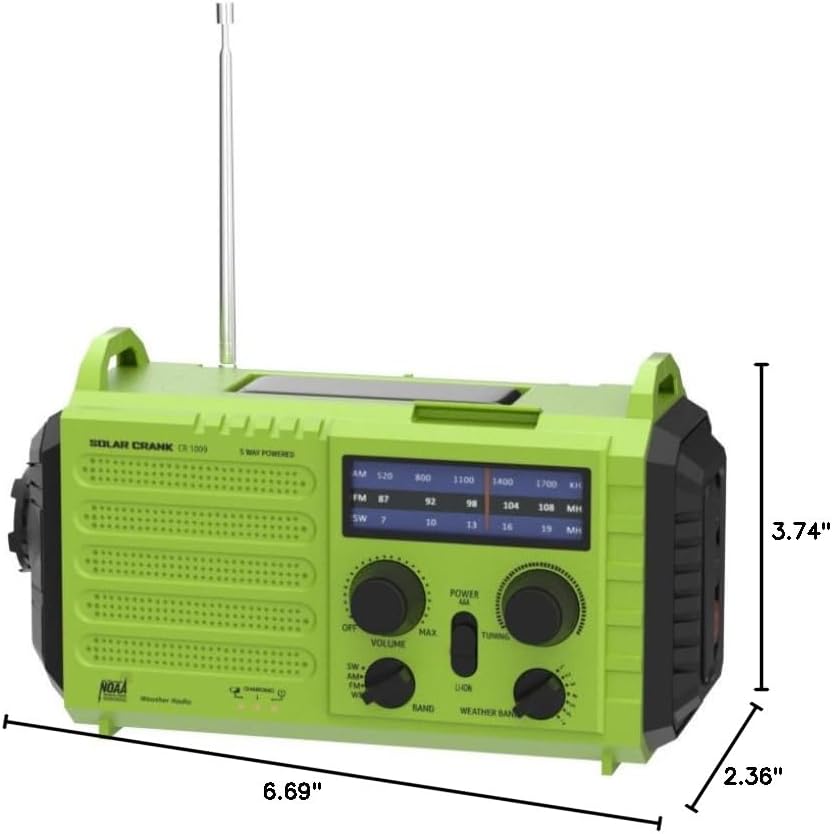
Figura 7: Dimensiones del producto
8. Garantía y soporte
OnLyee provides a one-year manufacturer's warranty for this product, along with a 30-day money-back guarantee. Our customer service team is available 24/7 to assist you with any inquiries or issues. Please refer to the contact information provided in your product packaging for support.