
1. Introducción
Gracias por la compraasing the MUSE M-10 Red Radio Alarm Clock. This manual provides essential information for the safe and efficient operation of your device. Please read these instructions carefully before use and retain them for future reference.

Figure 1: MUSE M-10 Red Radio Alarm Clock. This image shows the front view of the red alarm clock with its digital LED display showing '12:00' and various control buttons on the top panel.
2. Instrucciones de seguridad
- Lea todas las instrucciones antes de operar el aparato.
- No exponga este aparato a la lluvia ni a la humedad para evitar riesgos de incendio o descarga eléctrica.
- Asegúrese de que el adaptador de corriente sea de fácil acceso.
- Utilice únicamente accesorios especificados por el fabricante.
- No coloque el producto bajo la luz solar directa ni cerca de fuentes de calor.
- Avoid placing the product on surfaces that are unstable or subject to vibration.
- No abra la casing; delegue cualquier servicio a personal calificado.
- Deseche las baterías usadas de manera responsable, siguiendo las regulaciones locales.
3. Producto terminadoview
3.1 Panel frontal y pantalla
The front panel features a clear 0.6-inch white LED display for time and alarm indicators.
3.2 Controles del panel superior
The top panel houses all control buttons for easy access:
- MEMORIA: Memory button for saving and recalling radio presets.
- CONJUNTO: Button for setting time and alarm parameters.
- AL1: Alarm 1 setting button.
- AL2: Alarm 2 setting button.
- << HR: Hour adjustment button (backward).
- MIN >>: Minute adjustment button (forward).
- DORMITAR: Activa la función de repetición durante una alarma.
- DORMIR: Activa la función de temporizador de apagado.
- REGULADOR DE INTENSIDAD: Ajusta el brillo de la pantalla.

Figura 2: Sobreview of the MUSE M-10 Red Radio Alarm Clock's functions, including its 0.6-inch white LED display, PLL radio, 20 FM presets, dimmer, dual alarm, snooze, and sleep features.
4. Configuración
4.1 Conexión de alimentación
Connect the provided AC adapter to the DC IN jack on the rear of the unit and then plug it into a standard wall outlet. The unit will power on and the display will light up.
4.2 Instalación de la batería de respaldo
Para realizar copias de seguridad de la configuración de hora y alarma durante un corte de energíatage, install 2 x AAA batteries (not included) into the battery compartment located on the bottom of the unit. Ensure correct polarity (+/-) when inserting batteries.
5. Instrucciones de funcionamiento
5.1 Configuración de la hora
- Mantenga pulsado el COLOCAR Botón hasta que los dígitos de la hora parpadeen.
- Utilice el << HR or MIN >> Botones para ajustar la hora.
- Prensa COLOCAR de nuevo, y los dígitos de los minutos parpadearán.
- Utilice el << HR or MIN >> Botones para ajustar los minutos.
- Prensa COLOCAR una vez más para confirmar y salir del modo de configuración de la hora.
5.2 Configuración de alarmas (Alarma 1 y Alarma 2)
La unidad cuenta con dos alarmas independientes.
- Mantenga pulsado el AL1 (o AL2) hasta que los dígitos de la hora de la alarma parpadeen.
- Utilice el << HR or MIN >> Botones para configurar la hora de alarma deseada.
- Prensa AL1 (o AL2) again, and the alarm minute digits will flash.
- Utilice el << HR or MIN >> Botones para configurar los minutos de alarma deseados.
- Prensa AL1 (o AL2) nuevamente para seleccionar la fuente de alarma: Zumbador or Radio.
- Prensa AL1 (o AL2) once more to confirm and activate the alarm. An alarm icon will appear on the display.
5.3 Funcionamiento de la radio FM
The unit has a PLL FM radio with 20 preset stations.
- Sintonización: Presione el << HR or MIN >> buttons to manually tune the radio frequency. Press and hold these buttons for automatic scanning to the next available station.
- Guardar ajustes preestablecidos: Sintoniza la emisora que desees. Mantén pulsado el botón MIEMBRO button until 'P01' (or the next available preset number) flashes. Use << HR or MIN >> para seleccionar un número preestablecido, luego presione MIEMBRO de nuevo para salvar.
- Recuperación de preajustes: Presione brevemente el MIEMBRO Botón para recorrer las estaciones preestablecidas guardadas.
5.4 Función de repetición
Cuando suene una alarma, presione el DORMITAR Botón para silenciar la alarma temporalmente durante aproximadamente 9 minutos. La alarma volverá a sonar después de este tiempo.
5.5 Función de temporizador de apagado
Presione el DORMIR button repeatedly to set a sleep timer (e.g., 90, 60, 30, 15 minutes, or OFF). The radio will play for the selected duration and then automatically turn off.
5.6 Atenuador de pantalla
Presione el REGULADOR DE INTENSIDAD button repeatedly to cycle through display brightness levels: High, Low, or Off.

Figure 3: Key features of the MUSE M-10 Red Radio Alarm Clock, including snooze, radio or buzzer alarm, dimmable display, and FM PLL radio with 20 presets.
6. Mantenimiento
- Limpieza: Limpie la unidad con un paño suave y seco. No utilice limpiadores abrasivos ni disolventes.
- Reemplazo de batería: Reemplace las baterías de respaldo anualmente o cuando la pantalla muestre signos de oscurecimiento durante un corte de energía.tages.
- Almacenamiento: Si va a almacenar la unidad durante un período prolongado, retire las baterías de respaldo para evitar fugas.
7. Solución de problemas
| Problema | Posible causa | Solución |
|---|---|---|
| Sin energía/Pantalla apagada | Adaptador de corriente no conectado o defectuoso. | Check power adapter connection. Try a different outlet. |
| La alarma no suena | Alarma no activada o configurada incorrectamente. | Ensure alarm icon is visible on display. Re-check alarm time and source settings. |
| Mala recepción de radio | Antena FM no extendida o área de señal deficiente. | Fully extend the FM wire antenna. Adjust its position for better reception. |
| Se perdió la hora y la configuración después de un corte de energíatage | Baterías de respaldo no instaladas o agotadas. | Install new AAA batteries for backup. |
8. Especificaciones
- Modelo: M-10 ROJO
- Marca: MUSA
- Mostrar: 0.6-inch White LED, Digital
- Radio: FM PLL Radio with 20 Presets
- Alarma: Alarma dual (zumbador o radio)
- Características especiales: Snooze, Sleep Timer, Display Dimmer (High/Low/Off)
- Fuente de energía: AC Adapter (included), 2 x AAA batteries for backup (not included)
- Dimensiones (L x An x Al): 12 x 7 x 10.9 cm (aproximadamente 4.7 x 2.8 x 4.3 pulgadas)
- Peso: 200 gramos (aproximadamente 0.44 libras)
- Material: Plástico
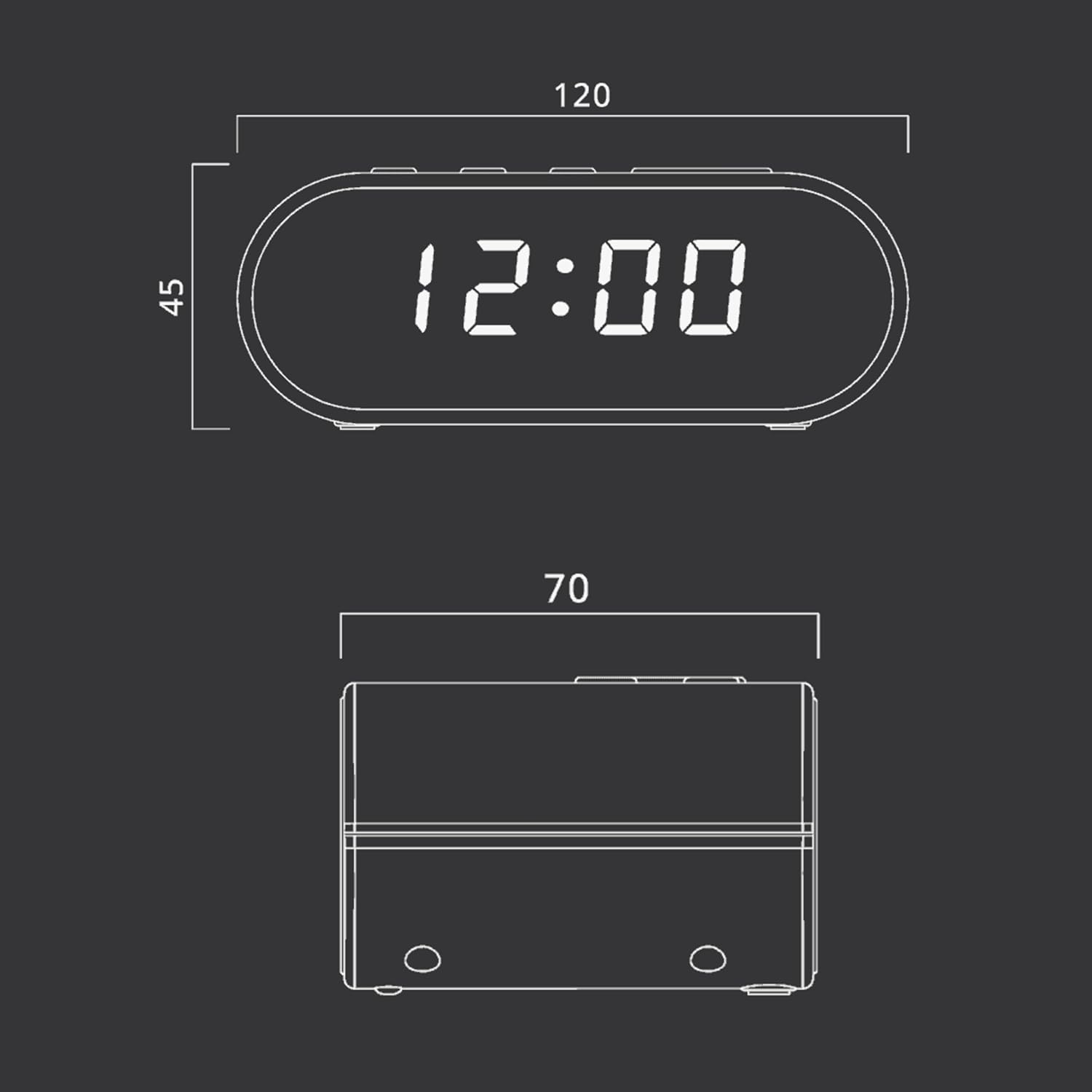
Figure 4: Dimensional drawing of the MUSE M-10 Red Radio Alarm Clock, showing its length (120mm), width (70mm), and height (45mm).
9. Garantía y soporte
For warranty information or technical support, please refer to the warranty card included with your product or contact your local MUSE distributor. Keep your purchase receipt as proof of purchase.