
Introducción
The Philips Sonicare DiamondClean Smart 9350 is an advanced rechargeable electric toothbrush designed for comprehensive oral care. It features high-performance brush heads and Smart Sensor technology to provide personalized feedback and coaching, aiming for improved oral health and a confident smile.
¿Qué hay en la caja?
Su paquete Philips Sonicare DiamondClean Smart 9350 incluye los siguientes componentes:
- 1 DiamondClean Smart Handle
- 2 High-Performance Brush Heads
- 1 Charging Glass
- 1 USB Charging Travel Case
- Base del cargador 1
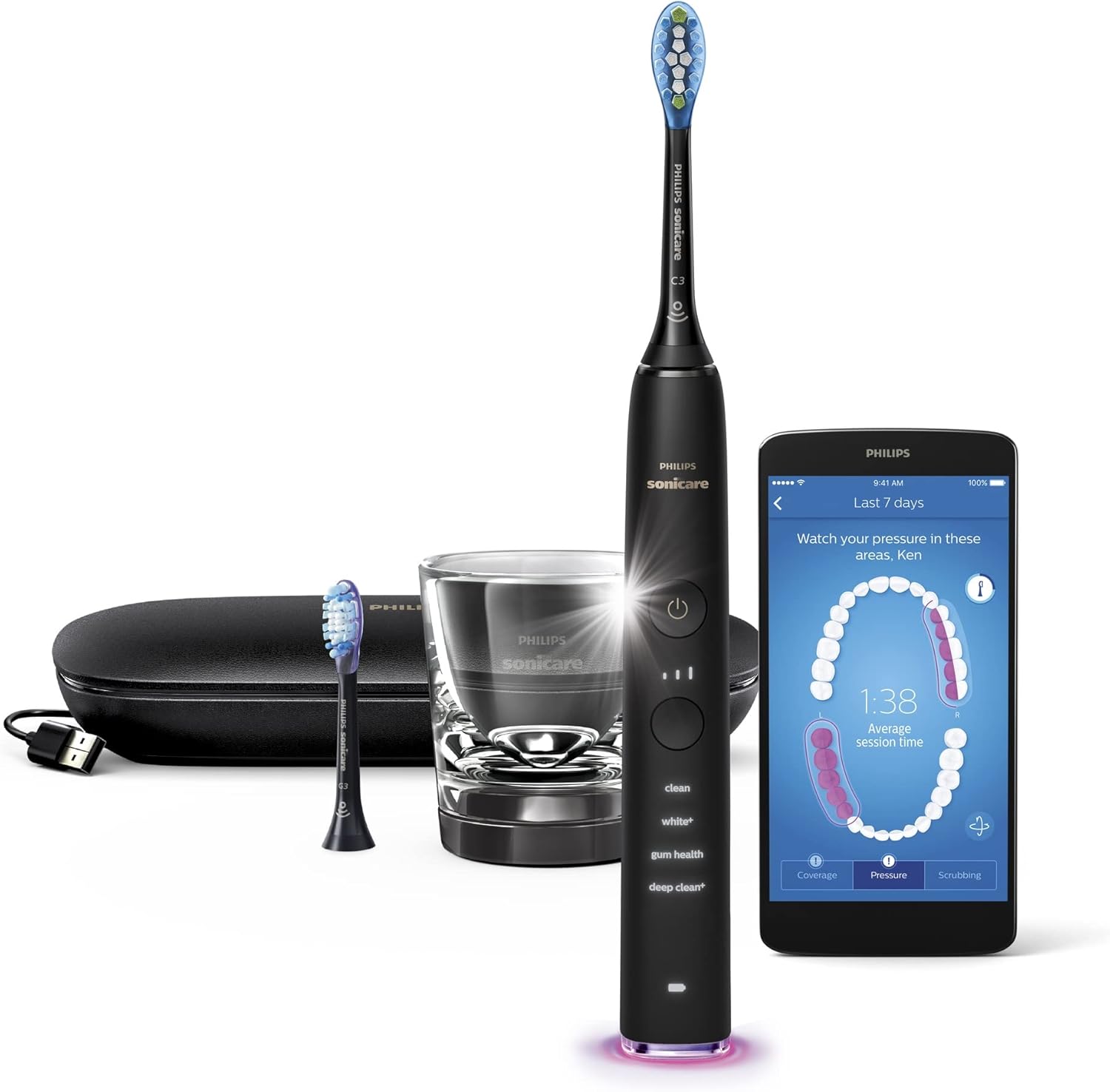
Image: Contents of the Philips Sonicare DiamondClean Smart 9350 package, including the toothbrush handle, two brush heads, charging glass, USB charging travel case, and charger base.
Configuración y primer uso
- Cargar el cepillo de dientes: Place the DiamondClean Smart handle into the charging glass or connect it to the USB charging travel case. Ensure the charger is plugged into a power source. A full charge can take up to 24 hours.
- Coloque un cabezal de cepillo: Alinee el cabezal del cepillo con el mango y empújelo firmemente hacia abajo hasta que encaje en su lugar.
- Aplicar pasta de dientes: Wet the brush head and apply a pea-sized amount of toothpaste.
- Position the Toothbrush: Place the brush head against your teeth at a 45-degree angle towards the gum line.
- Encendido: Presione el botón de encendido para comenzar a cepillar.

Image: The Philips Sonicare DiamondClean Smart toothbrush charging in its elegant glass charger.
Instrucciones de funcionamiento
Técnica de cepillado
Move the toothbrush slowly and gently in a circular motion, covering the outer, inner, and chewing surfaces of all teeth. Brush your tongue and the roof of your mouth to remove bacteria. The toothbrush features a 2-minute timer and QuadPacer to guide you through brushing each quadrant of your mouth for optimal cleaning.
Brushing Modes and Intensity Settings
The DiamondClean Smart 9350 offers four distinct brushing modes and three intensity settings to customize your brushing experience:
- Limpio: For an exceptional everyday clean.
- Blanco+: To remove surface stains and whiten teeth.
- Salud de las encías: Provides a gentle yet effective clean for gums.
- Limpieza profunda+: Para una limpieza profunda vigorizante.
You can adjust the intensity (low, medium, high) to suit your comfort level. The brush heads automatically select optimal settings when attached.

Image: Close-up of the Philips Sonicare DiamondClean Smart handle, highlighting the four brushing modes and three intensity settings.
Using the Philips Sonicare App
Connect your toothbrush to the Philips Sonicare app via Bluetooth for personalized coaching and real-time feedback. The app guides you to brush effectively, highlights missed areas, and tracks your brushing habits to help you perfect your routine.

Image: A smartphone displaying the Philips Sonicare app, illustrating real-time feedback during brushing.

Image: A user interacting with the Philips Sonicare app on a smartphone while holding the DiamondClean Smart toothbrush.
Mantenimiento
Limpiar tu cepillo de dientes
After each use, rinse the brush head and handle thoroughly under running water. Wipe the handle with a damp cloth. Do not immerse the handle in water. Clean the charging glass and travel case as needed with a damp paño.
Reemplazo del cabezal del cepillo
For optimal performance and hygiene, replace your Philips Sonicare brush head every 3 months, or sooner if the bristles become frayed or worn. The toothbrush may also indicate when a replacement is due.
Solución de problemas
| Problema | Posible causa / solución |
|---|---|
| Toothbrush not charging or powering on. | Ensure the charger is properly connected to a power source and the toothbrush is correctly seated in the charging glass or travel case. Allow sufficient time for initial charge. |
| Problemas de conexión de la aplicación. | Ensure Bluetooth is enabled on your device and the toothbrush. Try placing the toothbrush in the charging dock to reset the connection. Restart the app or your device if necessary. |
| Toothbrush making unusual noise or vibrating weakly. | This could indicate an internal issue. Ensure the brush head is securely attached. If the problem persists, contact Philips customer support. |
| Brush head feels ineffective or bristles are splayed. | It's time to replace your brush head. Replace every 3 months or sooner if bristles are worn. |
Presupuesto
| Característica | Detalle |
|---|---|
| Número de modelo | HX9902/66 |
| Marca | SONICARE |
| Fuente de poder | Eléctrico con cable |
| Color | Negro |
| Dimensiones del producto | 25.2 x 17.4 x 4.37 cm; 829 g |
| Baterías | Se requieren 2 pila AA (incluida) |
| Componentes incluidos | Charger, Travel Case |
| Forma del cabezal del cepillo de dientes | Oval |
| Fabricante | Electrónica Philips |
Garantía y soporte
Philips Sonicare products are known for their quality and reliability. In the event of a defect or issue, your DiamondClean Smart 9350 toothbrush is covered by a manufacturer's warranty. For warranty claims, technical support, or replacement parts, please contact Philips customer service directly. Keep your proof of purchase for warranty validation.
You can find contact information for Philips support on their official websitio o a través de la documentación incluida con su producto.