
1. Introducción y másview
This manual provides essential instructions for the safe and efficient use of your QI-EU 4-in-1 Fast Wireless Charging Station, Model C1. This device is designed to simplify your charging setup by consolidating multiple devices onto a single platform, reducing cable clutter.
The charging station allows for simultaneous wireless charging of your Qi-enabled smartphone, Apple Watch, and AirPods. It also includes a dedicated charging dock for the Apple Pencil (1st generation).
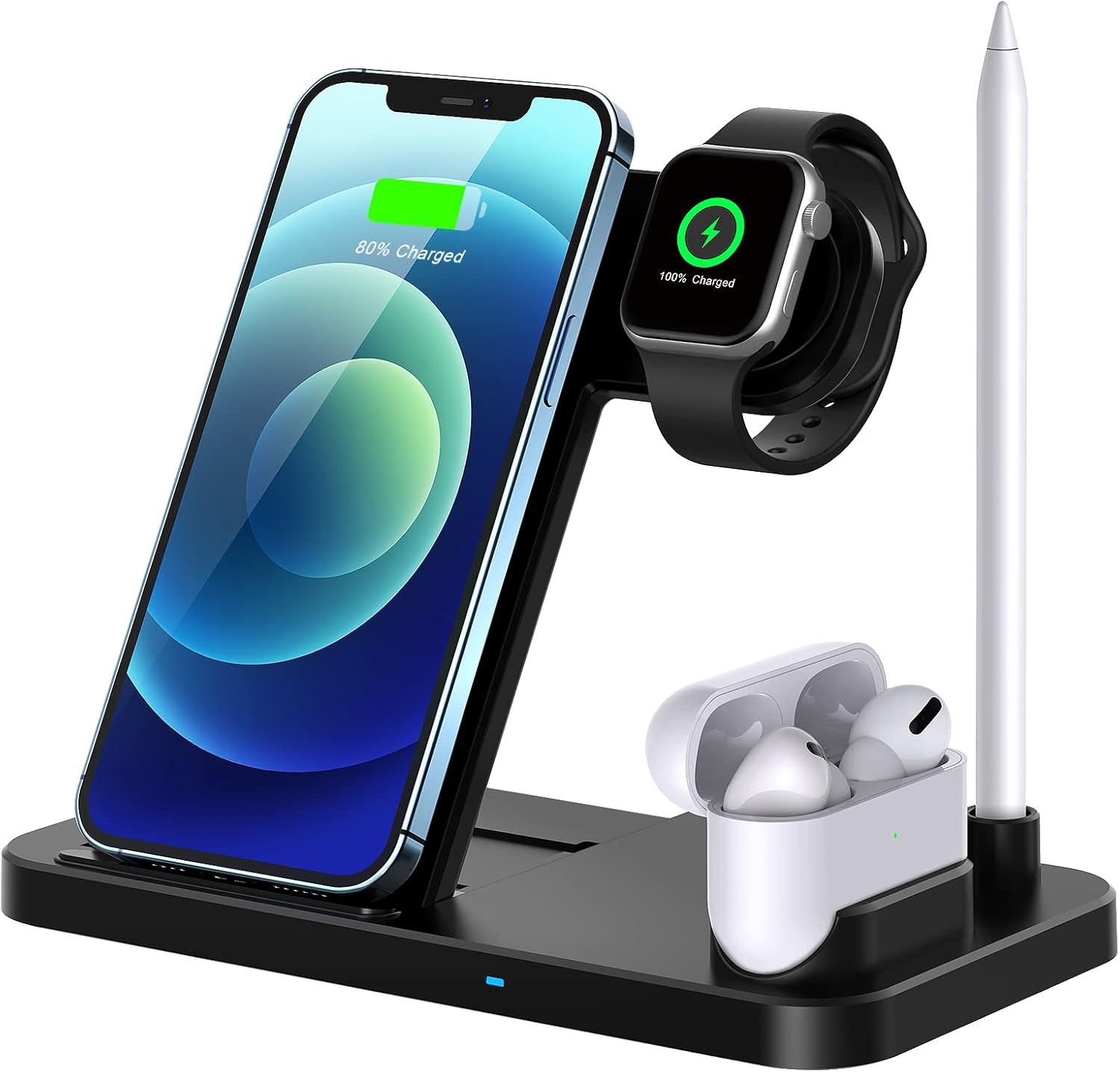
Image 1: The QI-EU 4-in-1 Fast Wireless Charging Station with devices in place.
2. Características del producto
- Carga 4 en 1: Simultaneously charges a Qi-enabled smartphone, Apple Watch, AirPods, and Apple Pencil.
- Carga inalámbrica rápida: Supports 10W, 7.5W, and 5W wireless charging modes for compatible smartphones.
- Adjustable Support Angle: Features a magnetic metal support that allows for angle adjustment, enhancing viewing comodidad.
- Diseño plegable y portátil: The compact, foldable design makes it suitable for home, office, or travel.
- Qi Certified Safety: Equipped with advanced automatic control technology and built-in safeguards against overcharge, overcurrent, overvoltage, temperature control, and foreign object detection.
- Refrigeración eficiente: Designed with cooling holes and an upgraded chip for faster charging and reduced heat generation.
- Caso amistoso: Charges through phone cases up to 5mm thick.

Imagen 2: Detallada view of the charging station's silicone pad, cooling holes, and adjustable support angle mechanism.
3. Instrucciones de configuración
- Deshacer: Retire con cuidado la estación de carga de su embalaje.
- Conexión de energía: Connect the provided USB charging cable to the charging station.
- Adaptador de corriente: Connect the other end of the USB cable to a 9V/2A power adapter (not included). Ensure the adapter is a high-quality power adapter for optimal performance. Do not connect the power cord directly to a power supply without a suitable USB wall charger to prevent excessive power.
- Encendido: Conecte el adaptador de corriente a una toma de corriente. La estación de carga ya está lista para usar.

Image 3: Illustration of recommended power adapter (9V/2A) for optimal charging.
4. Instrucciones de funcionamiento
- Carga de teléfono inteligente: Place your Qi-enabled smartphone on the upright charging pad. Ensure the phone is centered on the pad for proper alignment. The phone can be charged vertically or horizontally.
- Carga del Apple Watch: Place your Apple Watch on the magnetic charging module. The watch will automatically align and begin charging.
- Carga de AirPods: Place your AirPods case (with wireless charging capability) on the designated flat charging area.
- Carga del Apple Pencil: Insert your Apple Pencil (1st generation) into the dedicated charging dock.
- Indicador de carga: Observe the LED indicator on the base of the charging station to confirm charging status (specific indicator behavior may vary).
Notas importantes para la operación:
- For optimal charging, ensure your device is properly aligned with the charging coils.
- The watch charging module includes temperature control. If the watch's temperature reaches 40 degrees Celsius, charging will automatically pause and resume once the temperature normalizes.
- Charging speed can be influenced by ambient temperature; lower temperatures generally result in faster charging.
- The adjustable support angle allows for comfortable viewmientras se carga.

Image 4: The charging station supports both vertical and horizontal phone placement for various activities.

Image 5: Simultaneous charging of multiple devices with integrated cooling and safety mechanisms.
5. Compatibilidad
The QI-EU 4-in-1 Fast Wireless Charging Station is compatible with a wide range of Qi-enabled devices:
- Dispositivos Apple:
- iPhones (7.5W Fast Charging): iPhone 12/12 Pro, iPhone 11/11 Pro/11 Pro Max, iPhone XS/XS Max/XR/X, iPhone 8/8 Plus.
- Reloj de Apple: Series 1, 2, 3, 4, 5, 6, SE.
- AirPods: AirPods 1, AirPods 2, AirPods Pro (wireless charging cases).
- Lápiz de Apple: 1st Generation.
- Samsung Devices (10W Fast Charging): Galaxy S20/S10/S9/S8/S7 series, Note 10/9/8/7/5 series, and other Qi-enabled Samsung models.
- Other Qi-Enabled Devices (5W Standard Charging): Includes various LG, Google Pixel, Xiaomi, Sony, Nokia, Microsoft, BlackBerry, and Motorola models that support Qi wireless charging.
NOTE: Not compatible with iPhone 12 Pro Max.

Image 6: Comprehensive compatibility list for various devices.
6. Información de seguridad
- This wireless charger is designed for use with Qi-Certified devices only.
- Do not place any magnetic or metal accessories, credit cards, or PopSockets between your phone and the charging pad, as these can interfere with charging and potentially damage the device or charger.
- The effective charging distance is 2-10mm. Avoid using phone cases thicker than 5mm, as this may prevent proper charging.
- Keep the charging station away from water, moisture, and high temperatures.
- Do not disassemble, modify, or attempt to repair the device yourself. Contact customer support if service is required.
- Asegúrese de que haya una ventilación adecuada alrededor de la estación de carga durante su uso.
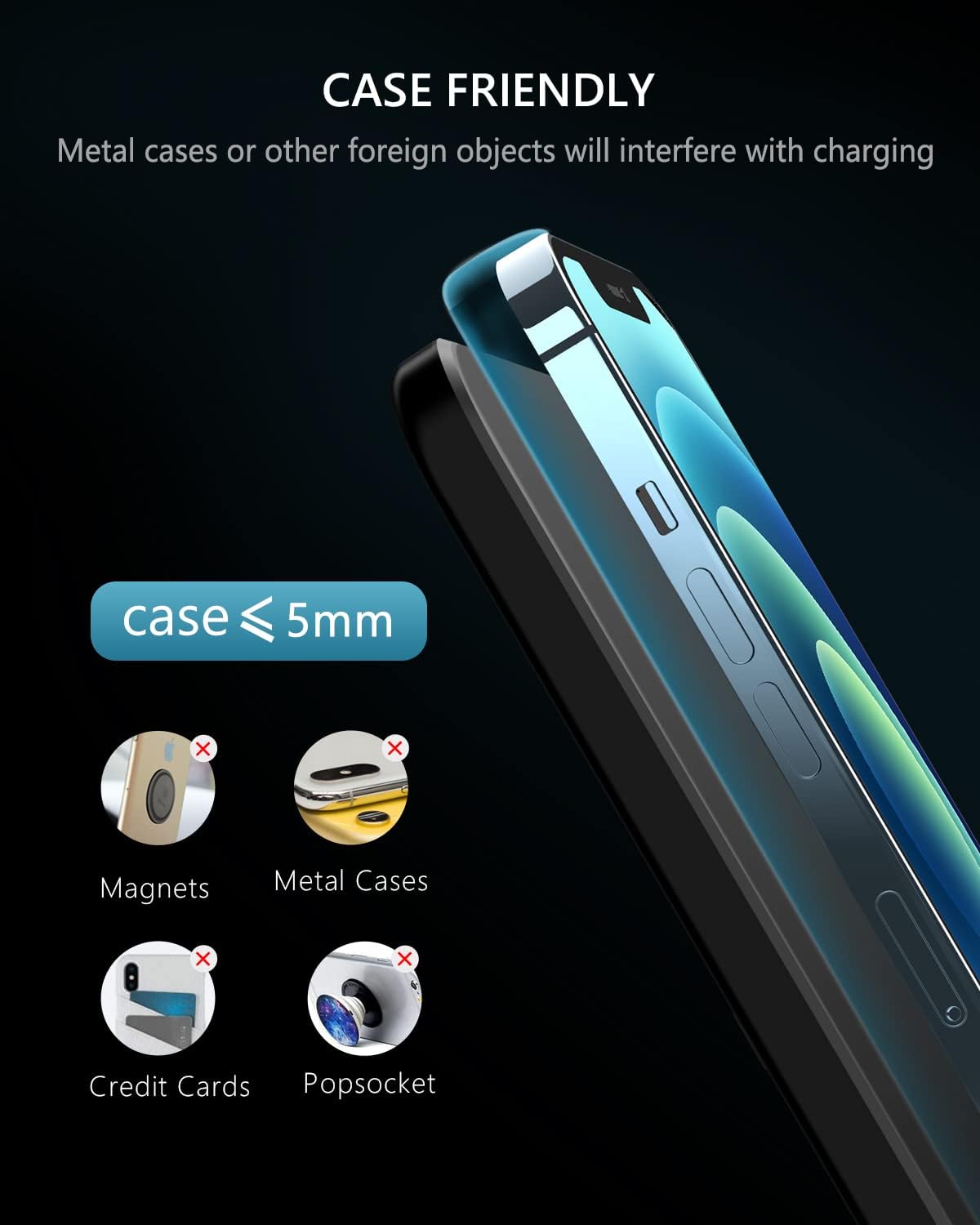
Image 7: Guidelines for case compatibility and objects to avoid during charging.
7. Mantenimiento
- Limpieza: Disconnect the power before cleaning. Use a soft, dry cloth to wipe the surface of the charging station. Do not use abrasive cleaners or solvents.
- Almacenamiento: Cuando no esté en uso durante períodos prolongados, guarde la estación de carga en un lugar fresco y seco, alejado de la luz solar directa.
8. Solución de problemas
| Problema | Posible causa | Solución |
|---|---|---|
| El dispositivo no se carga | Incorrect power adapter; Device not properly aligned; Thick phone case; Foreign object on pad. | Ensure a 9V/2A adapter is used. Realign device. Remove phone case if over 5mm. Remove any metal objects. |
| Carga lenta | Underpowered adapter; Device misalignment; High ambient temperature. | Use a 9V/2A adapter. Ensure proper alignment. Charge in a cooler environment. |
| Apple Watch stops charging | Watch temperature too high. | This is a safety feature. Charging will resume automatically once the watch cools down. |
| El indicador LED no funciona | Sin energía; Unidad defectuosa. | Verifique la conexión eléctrica. Si el problema persiste, contacte con atención al cliente. |
9. Especificaciones
- Modelo: C1
- Dimensiones del producto: 6.4 x 5.4 x 1 pulgadas
- Peso del artículo: 8.4 onzas
- Vol de entradatage: 9 voltios
- Ampedad: 2 Amps
- Puertos USB totales: 2 (for internal power distribution, not external use)
- Color: Negro
- Componentes incluidos: Charging station, USB charging cable. (Note: Power adapter not included)
- Tecnologías de conectividad: Wireless (Qi Wireless)
- Características especiales: Wireless Charging, Adjustable Support Angle
10. Garantía y soporte
Specific warranty information for the QI-EU 4-in-1 Fast Wireless Charging Station Model C1 is not provided in this document. For warranty details, technical support, or customer service inquiries, please refer to the product packaging, the seller's websitio, o comuníquese directamente con el fabricante.
Manufacturer: TJDZUS