
Introducción
This manual provides essential information for the setup, operation, and maintenance of your HCDZ Universal Replacement Remote Control. This remote is designed as a direct replacement for various television models and requires no programming.
Configuración
Instalación de la batería
The HCDZ Replacement Remote Control requires two (2) AAA alkaline batteries (not included).
- Ubique el compartimiento de la batería en la parte posterior del control remoto.
- Deslice suavemente la tapa del compartimiento de la batería hacia abajo o hacia afuera para abrirla.
- Inserte dos pilas AAA, asegurándose de que los terminales positivo (+) y negativo (-) estén alineados correctamente con las marcas dentro del compartimiento.
- Vuelva a colocar la tapa del compartimiento de la batería deslizándola hacia su posición hasta que encaje firmemente.

Descripción de la imagen: Un primer plano view of the back of the HCDZ replacement remote control, showing the rectangular battery compartment cover. The cover is black and blends seamlessly with the remote's design.
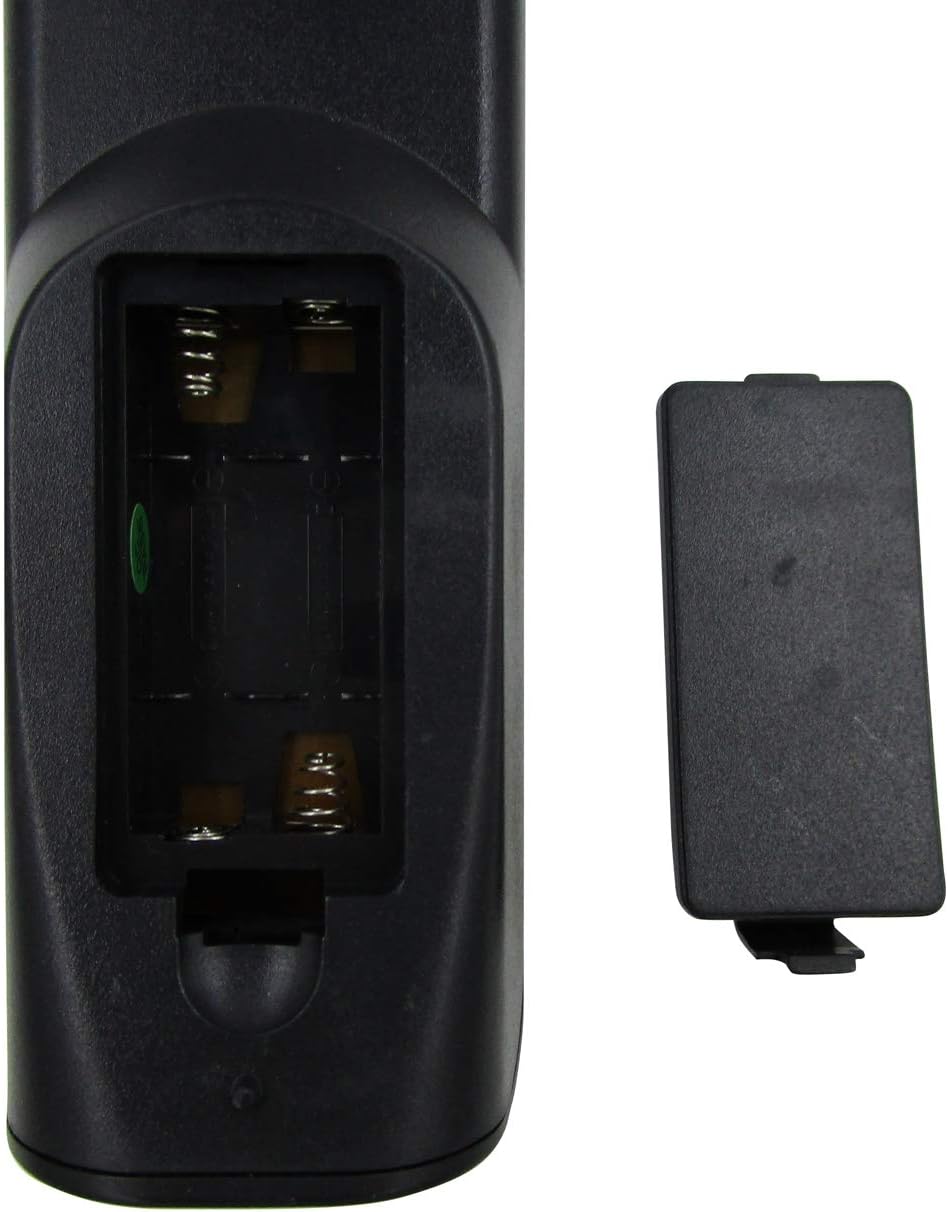
Descripción de la imagen: Un primer plano view of the HCDZ replacement remote control with the battery compartment open. Two empty slots for AAA batteries are visible, along with the metal spring contacts. The detached battery cover is shown next to the open compartment.
Instrucciones de funcionamiento
Operación básica
This remote control operates using infrared (IR) technology. Ensure there is a clear line of sight between the remote and your television's IR receiver for optimal performance.
- Fuerza: Press the Power button to turn your television on or off.
- Selección de canal: Use the number buttons to directly enter channel numbers or the Channel Up/Down buttons to navigate sequentially.
- Control de volumen: Ajuste el volumen utilizando los botones subir/bajar volumen.
- Silenciar: Press the Mute button to silence the television audio.
- Fuente de entrada: Use the Input or Source button to switch between different video inputs (e.g., HDMI, AV).
Rango de operación
The remote control has a maximum operating range of approximately 10 meters (33 feet). Performance may vary depending on environmental factors and battery condition.
Mantenimiento
Limpieza
Para limpiar el control remoto, utilice un paño suave y seco. No utilice limpiadores líquidos ni materiales abrasivos, ya que pueden dañar la superficie o los componentes internos del control remoto.
Reemplazo de batería
Reemplace las pilas cuando el control remoto responda con lentitud o deje de funcionar. Siempre reemplace ambas pilas simultáneamente por pilas alcalinas AAA nuevas. No mezcle pilas nuevas y usadas, ni pilas de diferentes tipos.
Solución de problemas
Problemas comunes y soluciones
- El control remoto no responde:
- Compruebe si las pilas están insertadas correctamente con la polaridad correcta.
- Reemplace las baterías con baterías alcalinas AAA nuevas.
- Ensure there are no obstructions between the remote and the television's IR receiver.
- Confirme que el control remoto esté apuntando directamente al televisor.
- Algunos botones no funcionan:
- Esto puede indicar que la batería está baja. Reemplace las baterías.
- Ensure the remote is compatible with your specific television model. Refer to the product listing for compatible models.
If issues persist after following these steps, please contact HCDZ customer support.
Presupuesto
Especificaciones del producto
| Característica | Detalle |
|---|---|
| Marca | HCDZ |
| Modelo | Control remoto de repuesto universal |
| Dispositivos compatibles | Television (Majestic TVDB826BKHK, SANSUI STY0632C, ACONATIC AN-LT3233, etc.) |
| Tecnología de conectividad | Infrarrojos (IR) |
| Máximo de dispositivos compatibles | 1 |
| Tipo de controlador | Control de botones |
| Rango operativo máximo | 10 metros (33 pies) |
| Pilas necesarias | 2 pilas alcalinas AAA (no incluidas) |
| Características especiales | No programming needed, ready to use |
Información de garantía
Garantía limitada
HCDZ products are typically covered by a limited warranty against defects in materials and workmanship. For specific warranty terms and conditions, please refer to the original product packaging or contact HCDZ customer support. Keep your purchase receipt as proof of purchase.
Atención al cliente
Contáctenos
For further assistance, technical support, or warranty inquiries, please visit the official HCDZ websitio o comuníquese con su departamento de servicio al cliente.
Soporte en línea: Tienda HCDZ en Amazon
Nota: Specific contact details may vary. Please refer to the product packaging or the HCDZ official websitio para obtener la información más actualizada.


