
Introducción
This manual provides detailed instructions for the safe and efficient use of your FONESTAR DOTS-N Bluetooth TWS Speaker. Please read this manual thoroughly before operating the device and retain it for future reference.
The FONESTAR DOTS-N is a portable Bluetooth TWS speaker featuring Bluetooth 4.2 and NFC connectivity. It offers powerful sound with enhanced bass, playback controls, and hands-free calling. Equipped with a rechargeable Li-Ion battery providing up to 10 hours of autonomy, it also includes a 3.5mm auxiliary input. Its compact design makes it suitable for home use.
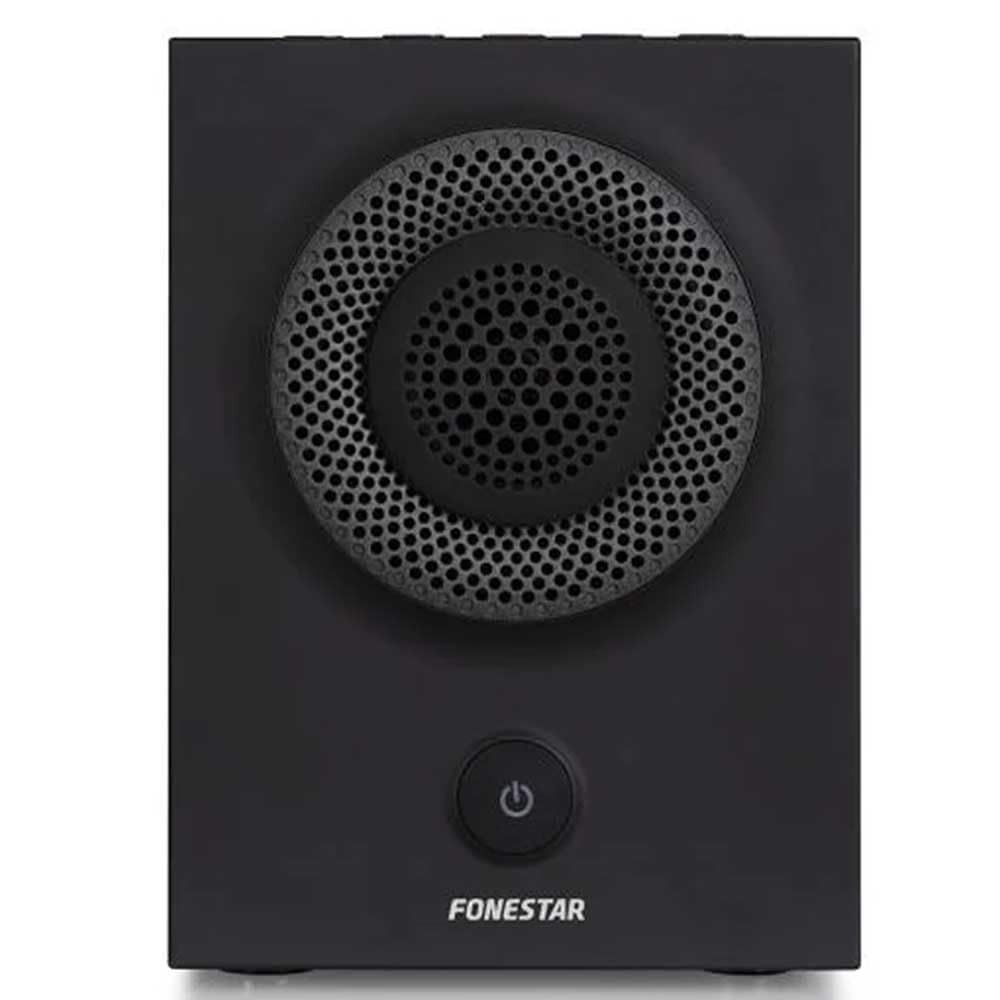
Figura 1: Frente view of the FONESTAR DOTS-N Bluetooth TWS Speaker.
Configuración
1. Desembalaje
Retire con cuidado todos los componentes del embalaje. Asegúrese de que estén presentes todos los elementos enumerados a continuación:
- FONESTAR DOTS-N Bluetooth TWS Speaker
- Cable de carga USB a micro USB
- Cable de audio estéreo de 3.5 mm
- Manual de usuario (este documento)
2. Carga del altavoz
Before first use, fully charge the speaker. Connect the Micro USB end of the charging cable to the speaker's charging port and the USB-A end to a compatible USB power adapter (not included) or a computer's USB port.
- La luz indicadora de carga se iluminará durante la carga.
- El tiempo de carga es de aproximadamente 3 horas para una carga completa.
- La luz indicadora cambiará o se apagará una vez que se complete la carga.
3. Encendido / apagado
To power on the speaker, press and hold the power button (usually indicated by a ⏻ symbol) for a few seconds until you hear an audible prompt or see an indicator light. To power off, repeat the process.
Instrucciones de funcionamiento
1. Emparejamiento Bluetooth
The speaker supports Bluetooth 4.2 for wireless audio streaming.
- Ensure the speaker is powered on and in pairing mode (usually indicated by a flashing LED). If not, press the Bluetooth pairing button or power button briefly to enter pairing mode.
- En su teléfono inteligente, tableta u otro dispositivo con Bluetooth habilitado, vaya a la configuración de Bluetooth.
- Buscar available devices and select "FONESTAR DOTS-N" from the list.
- Once paired, the speaker will emit an audible confirmation, and the LED indicator will typically become solid.
2. Emparejamiento NFC (comunicación de campo cercano)
For devices with NFC, pairing can be done quickly:
- Asegúrese de que NFC esté habilitado en su dispositivo y que el altavoz esté encendido.
- Tap your NFC-enabled device gently against the NFC area on the speaker (refer to product diagram for exact location, if available).
- Confirme la solicitud de emparejamiento en su dispositivo.
3. Función estéreo verdaderamente inalámbrico (TWS)
The TWS function allows you to pair two FONESTAR DOTS-N speakers together for a stereo sound experience.
- Ensure both DOTS-N speakers are powered on and not connected to any other Bluetooth device.
- On one speaker (this will be the primary speaker), press and hold the TWS button (if available) or a designated button for TWS pairing.
- El altavoz principal buscará al altavoz secundario. Una vez conectados, ambos altavoces emitirán un sonido de confirmación.
- Ahora, conecta tu dispositivo Bluetooth al altavoz principal como se describe en la sección "Emparejamiento Bluetooth". El audio se reproducirá en estéreo por ambos altavoces.
4. Entrada auxiliar (AUX)
For non-Bluetooth devices, use the included 3.5mm stereo audio cable.
- Conecte un extremo del cable de audio de 3.5 mm al puerto de entrada AUX del altavoz.
- Conecte el otro extremo al conector de auriculares o a la salida de audio de su dispositivo.
- The speaker will automatically switch to AUX mode or may require manual selection via a mode button.
5. Playback Control and Hands-Free Calls
The speaker features integrated controls for music playback and managing calls:
- Reproducir/Pausa: Press the Play/Pause button (often combined with the power button or a dedicated button).
- Subir/Bajar volumen: Utilice los botones de volumen (+ / -) en el altavoz.
- Pista siguiente / anterior: Long press or double-press the volume buttons, or use dedicated track skip buttons if present.
- Responder/Finalizar llamada: Press the Play/Pause button during an incoming call to answer, and again to end the call.
- Rechazar llamada: Mantenga presionado el botón Reproducir/Pausa durante una llamada entrante.
Mantenimiento
1. Limpieza
- Apague siempre el altavoz antes de limpiarlo.
- Utilice un paño suave, seco y sin pelusa para limpiar las superficies exteriores.
- No utilice limpiadores abrasivos, ceras o disolventes ya que pueden dañar el acabado.
- Evite que entre humedad en las aberturas.
2. Almacenamiento
- Guarde el altavoz en un lugar fresco y seco, alejado de la luz solar directa y de temperaturas extremas.
- Si lo almacenará durante un período prolongado, cargue la batería aproximadamente al 50 % cada pocos meses para mantener su salud.
3. Cuidado de la batería
- No exponga la batería a calor excesivo, fuego o luz solar directa.
- Evite descargar completamente la batería con frecuencia, ya que esto puede reducir su vida útil.
- Utilice únicamente el cable de carga proporcionado o un equivalente certificado.
Solución de problemas
| Problema | Posible causa | Solución |
|---|---|---|
| El altavoz no se enciende. | La batería está agotada. | Cargue el altavoz utilizando el cable USB proporcionado. |
| No se puede emparejar a través de Bluetooth. | El altavoz no está en modo de emparejamiento; el dispositivo está demasiado lejos; hay interferencia. | Ensure speaker is in pairing mode. Move device closer (within 10m). Turn off other Bluetooth devices. |
| No hay sonido o volumen bajo. | El volumen es demasiado bajo en el altavoz o en el dispositivo fuente; modo de entrada incorrecto. | Sube el volumen tanto del altavoz como del dispositivo fuente. Comprueba que esté seleccionada la entrada correcta (Bluetooth/AUX). |
| El emparejamiento de TWS falla. | Speakers are already paired to another device; incorrect TWS pairing procedure. | Asegúrate de que ambos altavoces estén desconectados de otros dispositivos. Sigue atentamente los pasos de emparejamiento de TWS. |
| Distorsión de sonido. | Volumen demasiado alto; batería baja; mala señal. | Reduce volume. Charge the speaker. Move source device closer to the speaker. |
Especificaciones técnicas

Figure 2: Dimensions of the FONESTAR DOTS-N Bluetooth TWS Speaker.
| Nombre del modelo | DOTS-N |
| Marca | FONESTAR |
| Tecnología de conectividad | Bluetooth 4.2, NFC, 3.5mm AUX |
| alcance inalámbrico | Hasta 10 metros (33 pies) |
| Modo de salida de audio | Estéreo (con TWS) |
| Tipo de altavoz | 3" Coaxial Woofer with Tweeter, 3" Subwoofer, 4" Passive Radiator |
| Potencia máxima de salida del altavoz | 12 vatios RMS |
| Respuesta de frecuencia | 80 - 20,000 Hz |
| Relación señal a ruido | ≥ 75 dB |
| Fuente de poder | Alimentado por batería (ion de litio recargable) |
| Capacidad de la batería | 2200 mAh, 7.4 V |
| Autonomía de la batería | Hasta 10 horas (al 50% del volumen) |
| Tiempo de carga | Aproximadamente 3 horas |
| Método de control | Táctil (Toque) |
| Características especiales | High-res audio, Bluetooth, Integrated microphone, USB port (for charging) |
| Dispositivos compatibles | Smartphones, tabletas |
| Uso recomendado | For home |
| Color | Negro |
| Dimensiones (An x Al x Pr) | 125 x 175 x 158 mm (aprox. 4.9 x 6.9 x 6.2 pulgadas) |
| Peso del artículo | 1.82 kg (aproximadamente 4.01 libras) |
| Impermeable | No |
Note: Specifications are subject to change without prior notice. Battery autonomy may vary depending on usage, volume level, and music type.
Información de garantía
FONESTAR products are designed and manufactured to the highest quality standards. This product is covered by a limited warranty against manufacturing defects from the date of purchase. The specific terms and duration of the warranty may vary by region and retailer.
Please retain your proof of purchase (receipt or invoice) as it will be required for any warranty claims. The warranty does not cover damage caused by misuse, accident, unauthorized modification, or normal wear and tear.
For detailed warranty terms and conditions, please refer to the warranty card included with your product or contact your local FONESTAR distributor or retailer.
Atención al cliente
If you encounter any issues that are not resolved by the troubleshooting guide, or if you require further assistance, please contact FONESTAR customer support or your authorized retailer.
Al comunicarse con el soporte técnico, esté preparado para proporcionar la siguiente información:
- Product Model: FONESTAR DOTS-N
- Fecha de compra
- Descripción del problema
- Tu información de contacto
For the most up-to-date support information, including contact details and FAQs, please visit the official FONESTAR websitio.