
1. Introducción
This manual provides essential information for the installation, operation, maintenance, and troubleshooting of your Chieftec Polaris 650W 80Plus Certified Power Supply Unit (PSU). Please read this manual thoroughly before installing and using the product to ensure proper function and safety. The Chieftec Polaris 650W PSU is designed to provide stable and efficient power to your personal computer system.
2. Información de seguridad
Observe siempre las siguientes precauciones de seguridad para evitar lesiones o daños a su equipo:
- No Abra la fuente de alimentación casing. Alto volumentages inside can cause electric shock. There are no user-serviceable parts inside.
- No insert any objects into the PSU's ventilation openings.
- No expose the PSU to water, moisture, or high humidity.
- Ensure the PSU is installed in a well-ventilated area, free from obstructions to airflow.
- Desconecte siempre el cable de alimentación de CA del tomacorriente de pared antes de instalar, quitar o limpiar la fuente de alimentación.
- Use only the modular cables provided with your Chieftec Polaris 650W PSU. Using incompatible cables may damage the PSU or connected components.
- Asegúrese de que todas las conexiones de cables estén seguras antes de encender el sistema.
3. Contenido del paquete
Verifique que todos los artículos estén presentes en su paquete:
- Chieftec Polaris 650W Power Supply Unit
- Modular Cable Set (e.g., 24-pin ATX, 8-pin EPS/CPU, PCIe, SATA, Molex)
- Cable de alimentación de CA
- Tornillos de montaje
- Manual de usuario (este documento)
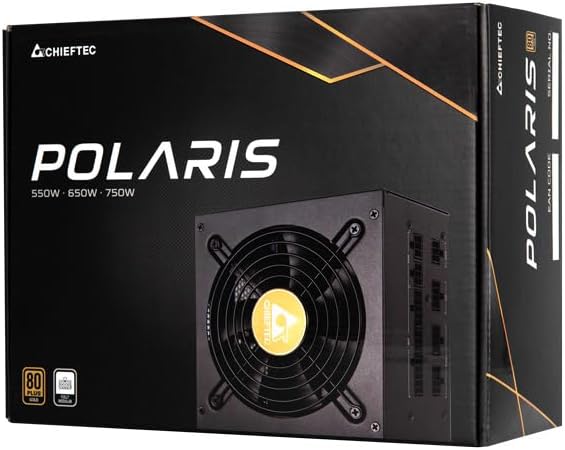
Image: The Chieftec Polaris 650W Power Supply Unit and its retail packaging.
4. Configuración e instalación
Follow these steps to install your Chieftec Polaris 650W PSU into your personal computer system:
- Prepare su sistema: Asegúrese de que su computadora esté completamente apagada y desenchufada del tomacorriente. Abra la carcasa para acceder al área de montaje de la fuente de alimentación.
- Retire la fuente de alimentación antigua (si corresponde): If replacing an existing PSU, disconnect all cables from the components and motherboard, then unscrew and remove the old PSU.
- Monte la nueva fuente de alimentación: Carefully slide the Chieftec Polaris 650W PSU into the designated PSU bay in your computer case. Ensure the fan faces the correct direction (typically downwards for bottom-mounted PSUs, or as per case design for optimal airflow). Secure the PSU with the provided mounting screws.
- Conectar cables modulares: Identify the necessary modular cables for your system components (motherboard, CPU, graphics card, storage drives). Connect these cables to the corresponding ports on the back of the PSU. Refer to the image below for connector identification.
- Conectarse a los componentes: Connect the other end of the modular cables to your motherboard (24-pin ATX and 8-pin EPS/CPU), graphics card(s) (PCIe), and storage devices (SATA/Molex). Ensure all connections are firm and fully seated.
- Sistema de organización de cables: Coloque los cables de forma ordenada para mejorar el flujo de aire y la estética dentro de su carcasa.
- Comprobaciones finales: Double-check all connections. Ensure no loose cables are obstructing fans. Close your computer case.
- Conecte la alimentación de CA: Plug the AC power cord into the PSU's power inlet and then into a wall outlet.

Imagen: Trasera view of the Chieftec Polaris 650W PSU showing modular cable connection ports for M/B, SATA, PCIe, and CPU.

Image: The Chieftec Polaris 650W Power Supply Unit with its modular cables connected, ready for installation.
5. Instrucciones de funcionamiento
Once the Chieftec Polaris 650W PSU is correctly installed and all connections are secure:
- Encendido: Locate the power switch on the back of the PSU (next to the AC power inlet). Ensure it is in the 'I' (On) position.
- Puesta en marcha del sistema: Press the power button on your computer case. The system should power on, and the PSU fan will begin to spin, indicating normal operation.
- Operación del ventilador: The PSU features an air cooling method. The fan will operate to dissipate heat generated by the power supply components. Its speed may vary depending on the load and temperature to maintain optimal cooling and noise levels.
- Apagado: To shut down your system, use the operating system's shutdown procedure. For a complete power cut, switch the PSU's power switch to the 'O' (Off) position and unplug the AC power cord.
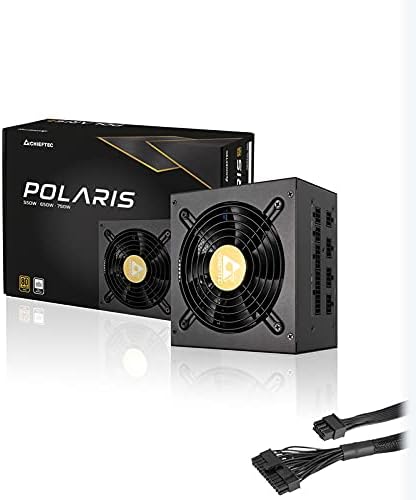
Imagen: de arriba hacia abajo view of the Chieftec Polaris 650W Power Supply, highlighting the cooling fan and protective grille.
6. Mantenimiento
Un mantenimiento adecuado garantiza la longevidad y el rendimiento óptimo de su fuente de alimentación:
- Limpieza de polvo: Periodically (e.g., every 3-6 months), power off your computer, unplug the AC cord, and open the case. Use compressed air to gently blow dust out of the PSU's fan and ventilation grilles. No use a vacuum cleaner directly on the PSU as it can generate static electricity.
- Condiciones ambientales: Ensure the computer operates in a clean, dry, and well-ventilated environment. Avoid extreme temperatures and direct sunlight.
- Integridad del cable: Occasionally check that all modular cables are securely connected and not frayed or damaged.
7. Solución de problemas
If you encounter issues with your Chieftec Polaris 650W PSU, consider the following troubleshooting steps:
- Sin energía:
- Asegúrese de que el cable de alimentación de CA esté enchufado de forma segura tanto a la fuente de alimentación como al tomacorriente de pared.
- Check that the PSU's power switch on the back is in the 'I' (On) position.
- Verifique que el tomacorriente de pared funcione enchufando otro dispositivo.
- Confirm all internal power cables (24-pin ATX, 8-pin EPS/CPU) are firmly connected to the motherboard.
- Inestabilidad del sistema/apagados aleatorios:
- Ensure the PSU is adequately ventilated and not overheating.
- Check all power connections to components (graphics card, storage) for looseness.
- If possible, test the PSU with a different set of components or in another system to rule out other hardware issues.
- Ruidos inusuales:
- A rattling or grinding noise may indicate a fan issue. Power off the system and inspect the PSU fan for obstructions (e.g., loose cables).
- If the noise persists and is not due to an obstruction, contact support.
Si estos pasos no resuelven el problema, consulte la sección Garantía y soporte.
8. Especificaciones
| Característica | Especificación |
|---|---|
| Marca | Jefe Tecnico |
| Nombre del modelo | estrella polar |
| Número de modelo del artículo | IN-ACT-ZDLCHFOBU0087 |
| Salida Wattage | 650 vatios |
| Factor de forma | ATX |
| Método de enfriamiento | Aire |
| Tipo de conector | ATX |
| Dispositivos compatibles | Ordenador personal |
| Dimensiones del producto (L x An x Al) | 8.66 x 3.15 x 1.18 pulgadas (22 x 8 x 3 cm) |
| Peso del artículo | 4.4 libras (2 kilogramos) |
| Proceso de dar un título | Certificado 80Plus |
9. Garantía y soporte
Los productos Chieftec se fabrican con altos estándares de calidad. Para conocer los términos y condiciones específicos de la garantía, consulte la tarjeta de garantía incluida con su producto o visite el sitio web oficial de Chieftec. website. Warranty periods and coverage may vary by region and product.
For technical support, product inquiries, or warranty claims, please contact Chieftec customer service through their official website or the contact information provided in your product documentation. When contacting support, please have your product model number (IN-ACT-ZDLCHFOBU0087) and proof of purchase readily available.