
1. Instrucciones de seguridad importantes
Lea atentamente todas las instrucciones de seguridad y funcionamiento antes de usar este televisor. Conserve estas instrucciones para futuras consultas.
- Fuente de energía: Conecte el televisor únicamente a la fuente de alimentación indicada en la etiqueta.
- Ventilación: Asegúrese de que haya una ventilación adecuada. No bloquee las aberturas de ventilación.
- Limpieza: Desconecte el televisor del tomacorriente antes de limpiarlo. Use un paño suave y seco. No utilice limpiadores líquidos ni en aerosol.
- Agua y humedad: Do not use this TV near water, such as a bathtub, washbowl, kitchen sink, laundry tub, swimming pool, or in a wet basement.
- Calor: Position the TV away from heat sources such as radiators, heat registers, stoves, or other products (including ampificadores) que producen calor.
- cables: Proteja el cable de alimentación para que no sea pisado ni pellizcado, especialmente en los enchufes, receptáculos y en el punto donde sale del televisor.
- Iluminación: Desenchufe este televisor durante tormentas eléctricas o cuando no lo utilice durante períodos prolongados.
- Servicio: No intente reparar este televisor usted mismo. Deje todas las reparaciones a personal técnico cualificado.
2. Producto terminadoview
The CHIQ L40H7N is a 40-inch Full HD Smart TV designed to provide an immersive viewing experience with integrated smart features. It offers a resolution of 1080p and includes connectivity options such as Wi-Fi and Bluetooth.
Características principales:
- Resolución Full HD (1080p): Ofrece imágenes claras y detalladas.
- Funcionalidad de televisión inteligente: Access popular streaming services like Netflix, YouTube, and Prime Video.
- Integrated Wi-Fi and Bluetooth: For wireless connectivity and device pairing.
- Múltiples puertos de conectividad: Includes 3 HDMI and 2 USB ports for various external devices.
- Sintonizador triple: Supports DVB-T/T2/C/S/S2 for versatile broadcast reception.
- Sonido Dolby: Experiencia de sonido mejorada.
- Soporte HDR10: Provides improved contrast and color reproduction.
- CPU de cuatro núcleos: Ensures smooth performance for smart features and applications.

Imagen: Frente view of the CHIQ L40H7N Smart TV, showcasing su bisel delgado y su pantalla.
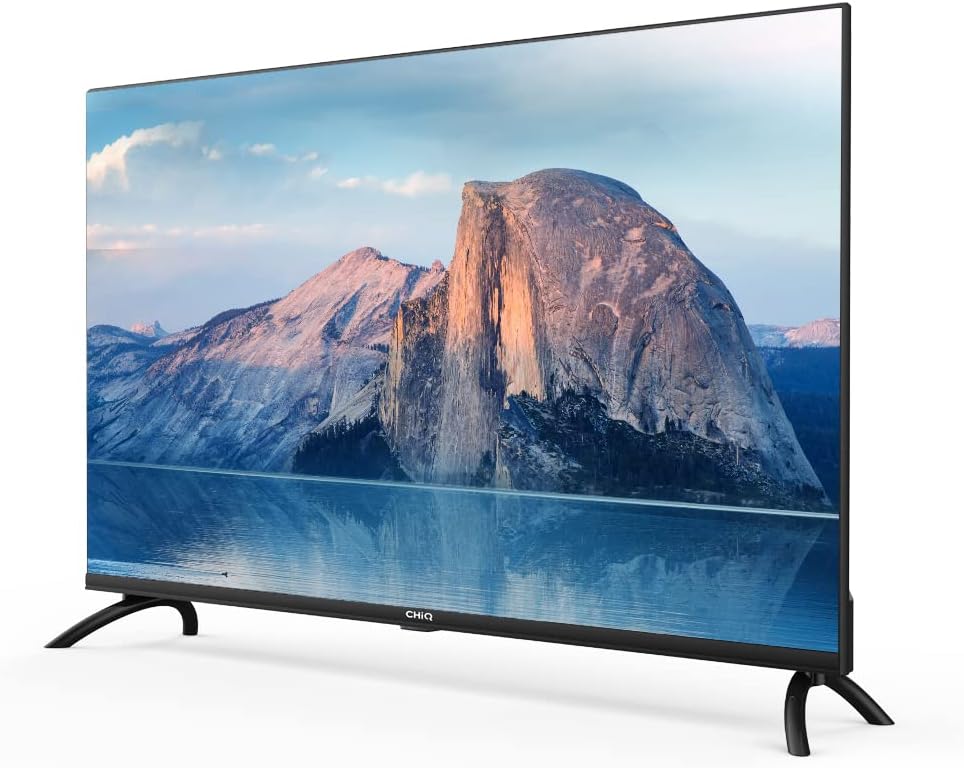
Imagen: Lateral view of the CHIQ L40H7N Smart TV, highlighting its thin profile.
3. Configuración
3.1 Desembalaje
- Abra con cuidado el embalaje y retire el televisor y todos los accesorios.
- Ensure all components are present: TV unit, remote control, batteries, power cord, stand components, and user manual.
- Retain the packaging materials for future transport or servicing.
3.2 Instalación del soporte
Para instalar el soporte del televisor:
- Coloque el televisor boca abajo sobre una superficie suave y plana (por ejemplo, una manta o espuma) para evitar dañar la pantalla.
- Alinee las patas del soporte con las ranuras correspondientes en la parte inferior del televisor.
- Fije las patas del soporte con los tornillos incluidos. Asegúrese de que estén bien apretados.

Image: Diagram showing the dimensions of the CHIQ L40H7N TV, including height with stand (568.9mm), width (900.3mm), and depth with stand (178.9mm).
3.3 Montaje en pared (opcional)
If you choose to wall mount your TV, please consult a professional installer and refer to the specific instructions provided with your wall mount bracket. Ensure the wall mount is compatible with the TV's VESA mounting pattern.
3.4 Conexión de periféricos
Conecte sus dispositivos externos a los puertos del televisor:
- HDMI: Connect Blu-ray players, game consoles, or set-top boxes to the HDMI ports (HDMI1, HDMI2, HDMI3).
- USB: Insert USB drives for media playback into the USB ports (USB1, USB2).
- Antena/Cable: Conecte su antena o señal de TV por cable a la entrada adecuada.
- Ethernet: Para una conexión a Internet por cable estable, conecte un cable Ethernet al puerto LAN.
3.5 Conexión de alimentación
After connecting all necessary cables, plug the power cord into the TV's power input, then into a wall outlet.
3.6 Encendido inicial
Press the power button on the remote control or on the TV. Follow the on-screen instructions to complete the initial setup, including language selection, network connection, and channel scanning.
4. Operación del televisor
4.1 Funciones de control remoto
The remote control allows you to navigate the TV's features:
- Botón de encendido: Enciende o apaga el televisor.
- Volumen +/-: Ajusta el nivel de volumen.
- Canal +/-: Cambia los canales de televisión.
- Fuente de entrada: Selecciona la fuente de entrada (HDMI, USB, TV).
- Botones de navegación (Arriba/Abajo/Izquierda/Derecha/OK): Navega por los menús y confirma las selecciones.
- Inicio/Smart Hub: Accede a la interfaz de Smart TV.
- Botones de la aplicación: Dedicated buttons for Netflix, YouTube, Prime Video, etc.
4.2 Funciones de Smart TV
Your CHIQ L40H7N TV provides access to a range of smart features and applications:
- Acceder a las aplicaciones: Press the Home button or dedicated app buttons to launch applications like Netflix, YouTube, and Prime Video.
- Tienda de aplicaciones: Descargue e instale aplicaciones adicionales desde la tienda de aplicaciones integrada.
- Duplicar pantalla: Transmite contenido desde teléfonos inteligentes o tabletas compatibles a tu televisor.

Image: The CHIQ Smart TV displaying the Netflix application interface, along with other streaming apps like YouTube and Prime Video.

Image: A CHIQ Smart TV screen showing a variety of content from streaming services, indicating a rich media experience.
4.3 Conexión de red
To use Smart TV features, connect your TV to the internet:
- Wifi: Vaya a Configuración > Red > Wi-Fi, seleccione su red e ingrese la contraseña.
- Ethernet: Connect an Ethernet cable from your router to the TV's LAN port. The TV will automatically detect the wired connection.
4.4 Conectividad Bluetooth
Pair Bluetooth devices like headphones or speakers:
- Enable Bluetooth on your external device and set it to pairing mode.
- On the TV, go to Settings > Remotes & Accessories > Bluetooth.
- Seleccione su dispositivo de la lista y siga las instrucciones en pantalla para emparejarlo.
4.5 Selección de entrada
Press the 'Input' or 'Source' button on your remote to switch between connected devices (HDMI1, HDMI2, HDMI3, USB, TV Tuner).
4.6 Configuración de imagen y sonido
Adjust display and audio preferences via the Settings menu:
- Modo de imagen: Elija entre configuraciones estándar, dinámicas, de película o personalizadas.
- Brillo/Contraste/Color: Ajuste la calidad de la imagen.
- Modo de sonido: Seleccione ajustes preestablecidos de audio como estándar, música, película o personalizado.
- Sonido Dolby: The TV supports Dolby Audio for enhanced sound.
- HDR10: Experience improved contrast and color with HDR10 content.

Image: The CHIQ L40H7N TV displaying a scene with the Dolby Audio logo, indicating support for enhanced sound.

Image: A split-screen comparison on the CHIQ L40H7N TV, demonstrating the visual improvement with HDR10 technology, showing richer colors and contrast.

Image: An illustration of a Quad Core CPU, representing the processing power within the CHIQ L40H7N TV for smooth operation.

Image: The CHIQ L40H7N TV positioned on a media console in a living room, showcasing su integración estética en el entorno del hogar.
5. Mantenimiento
5.1 Limpieza del televisor
Para mantener la apariencia y el rendimiento del televisor:
- Pantalla: Limpie suavemente la pantalla con un paño suave que no deje pelusa. Para manchas difíciles, limpie ligeramenteampEnjuague el paño con agua o un limpiador de pantallas especializado (no rocíe directamente sobre la pantalla).
- Gabinete: Limpie el mueble del televisor con un paño suave y seco. Evite usar limpiadores abrasivos o disolventes.
- Desenchufe siempre el televisor antes de limpiarlo.
5.2 Actualizaciones de software
Las actualizaciones de software periódicas pueden mejorar el rendimiento y agregar nuevas funciones:
- Actualizaciones automáticas: Asegúrese de que su televisor esté conectado a Internet para actualizaciones automáticas.
- Comprobación manual: You can manually check for updates in the Settings menu (e.g., Settings > About > System Update).
6. Solución de problemas
Si tiene problemas con su televisor, consulte los siguientes problemas y soluciones comunes:
- Sin energía:
- Check if the power cord is securely plugged into the TV and the wall outlet.
- Ensure the wall outlet is functioning by testing it with another device.
- Try pressing the power button on the TV itself, not just the remote. - No hay imagen, pero hay sonido:
- Check the input source. Ensure it matches the device you are trying to view (e.g., HDMI1 for a Blu-ray player).
- Verify that the external device is powered on and functioning correctly.
- Try a different HDMI cable or port. - No hay sonido, pero hay imagen:
- Check the volume level and ensure the TV is not muted.
- Verify audio output settings in the TV menu (e.g., internal speakers, external audio system).
- If using an external device, check its volume and audio settings. - El control remoto no funciona:
- Reemplace las pilas del control remoto.
- Asegúrese de que no haya obstrucciones entre el control remoto y el sensor IR del televisor.
- Point the remote directly at the TV. - Problemas de conexión de red:
- Restart your router and modem.
- Check Wi-Fi password if connecting wirelessly.
- If using a wired connection, ensure the Ethernet cable is properly connected.
If the problem persists, consult the CHiQ customer support or a qualified technician.
7. Especificaciones
Below are the technical specifications for the CHIQ L40H7N Smart TV:
| Característica | Especificación |
|---|---|
| Marca | CHiQ |
| Nombre del modelo | L40H7N |
| Tamaño de pantalla | 40 pulgadas |
| Tecnología de visualización | Pantalla LCD |
| Resolución | 1080p (Full HD) |
| Frecuencia de actualización | 60 Hz |
| Característica especial | Full HD, Smart TV, HDR10, Dolby Audio |
| Tecnología de conectividad | Bluetooth, Ethernet, HDMI (3 puertos), USB (2 puertos), Wi-Fi |
| Servicios de Internet compatibles | Amazon Instant Video, Netflix, YouTube |
| Dispositivos compatibles | Laptop, Smart Speaker, Smart Watch, Tablet, Car Audio System, Cellphone |
| Consumo de energía (SDR) | 47.0 W |
| Clase de eficiencia energética (SDR) | G |
| Screen Diagonal (cm) | 100.3 centímetros |
| Screen Resolution (pixels) | 1920 x 1080 |
| Minimum Guaranteed Software Updates Until | 20-01-2030 |
| Minimum Guaranteed Spare Parts Until | 20-01-2029 |
Para obtener información energética detallada, consulte la base de datos EPREL: https://eprel.ec.europa.eu/qr/454406

Image: The EU Energy Label for the CHIQ L40H7N TV, showing an energy efficiency class G and consumption of 47 kWh/1000h.
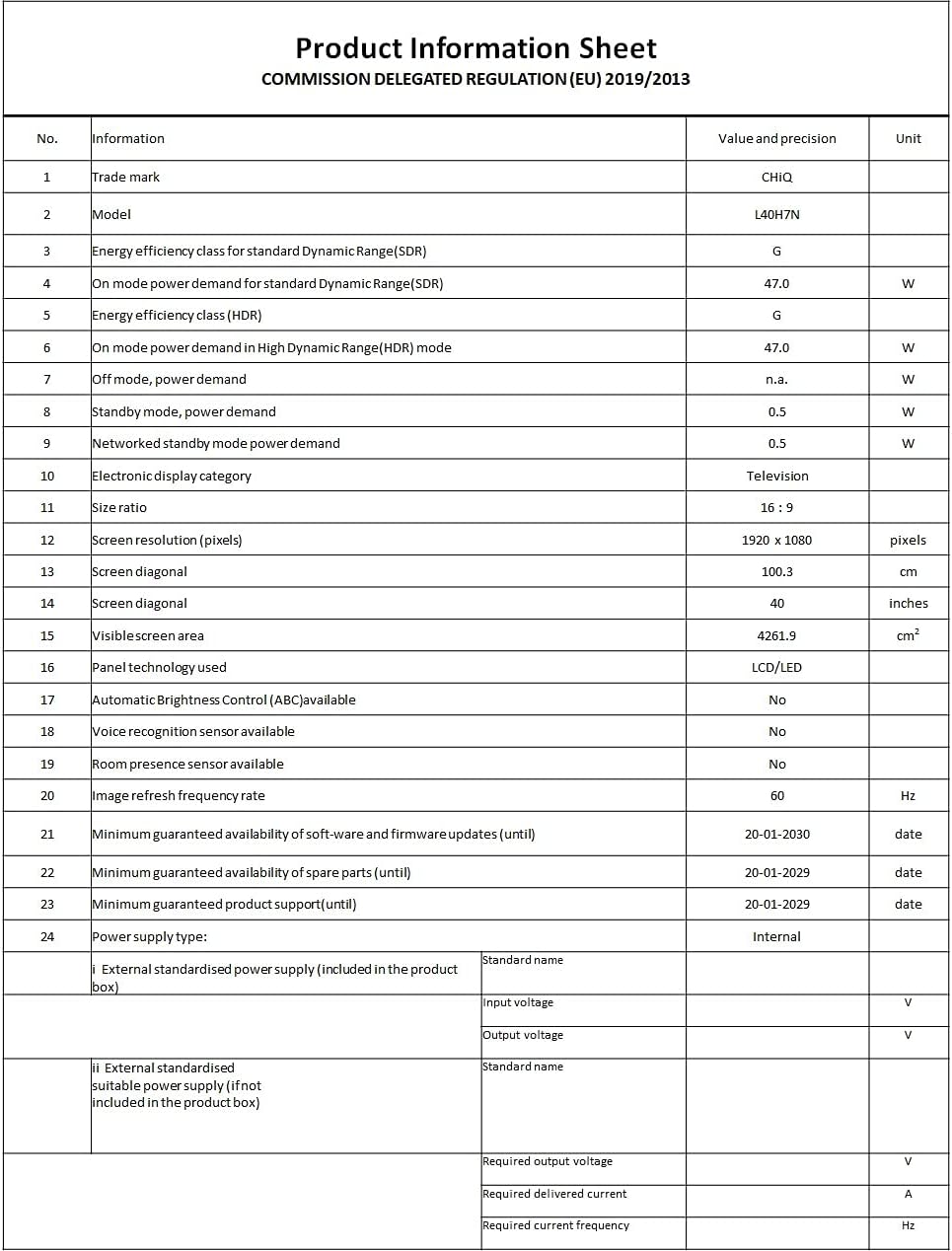
Image: A Product Information Sheet for the CHIQ L40H7N, detailing various specifications and compliance with COMMISSION DELEGATED REGULATION (EU) 2019/2013.
8. Garantía y soporte
Your CHIQ L40H7N Smart TV comes with a manufacturer's warranty. Please refer to the warranty card included in your product packaging for specific terms and conditions, including warranty period and coverage details.
Atención al cliente:
For technical assistance, troubleshooting, or warranty claims, please contact CHiQ customer support. Contact information can typically be found on the CHiQ official websitio web o en la documentación de su producto.