
Introducción
The Perel EDIN305N is a 230V 16A 3600W DIN-rail mount digital weekly timer designed for indoor use. This device allows for precise, programmable control of electrical circuits, enabling automatic switching ON and OFF of connected appliances or lighting systems over a weekly cycle. It features a clear digital display and multiple programming options to suit various scheduling needs.
Precauciones de seguridad
ADVERTENCIA: Electrical installation should only be performed by a qualified electrician. Incorrect wiring can lead to electric shock, fire, or damage to the device and connected equipment. Always disconnect power at the main circuit breaker before installation or maintenance.
- Ensure the power supply matches the device's specifications (230V~50Hz).
- No exceda la capacidad de carga máxima de 16A / 3600W.
- This device is designed for indoor use only. Avoid exposure to moisture, dust, or extreme temperatures.
- No intente abrir ni reparar el dispositivo usted mismo. Encargue cualquier reparación a personal cualificado.
- Mantener fuera del alcance de los niños.
Producto terminadoview
The Perel EDIN305N digital timer consists of a main body with a digital display, control buttons, and terminal blocks for electrical connections. A transparent cover protects the display and buttons.
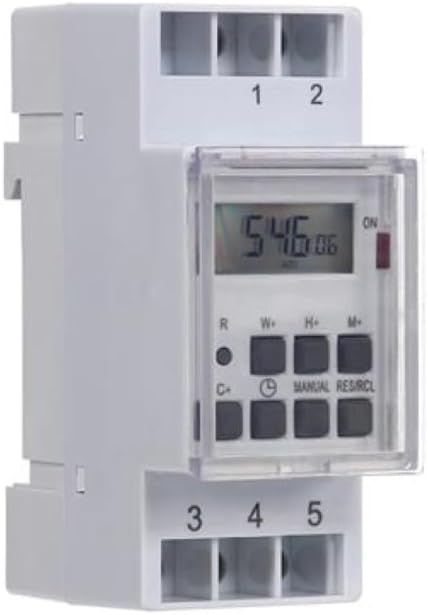
Figura 1: Frente view of the Perel EDIN305N Digital Weekly Timer. The image displays the LCD screen, control buttons (R, W+, H+, M+, C+, Clock, Manual, RES/RCL), and numbered terminal blocks (1, 2 at the top, 3, 4, 5 at the bottom).
Botones de control:
- R: Reset button (recessed).
- W+: Weekday setting.
- H+: Ajuste de hora.
- M+: Minute setting.
- C+: Clear program.
- Icono de reloj: Used to set current time and day, and to exit programming mode.
- MANUAL: Manual override for ON/AUTO/OFF modes.
- RES/RCL: Reset/Recall program.
Bloques terminales:
- 1, 2: Power supply input (N, L).
- 3, 4, 5: Output terminals for controlled circuit (Common, Normally Open, Normally Closed).
Especificaciones técnicas
| Parámetro | Valor |
|---|---|
| Número de modelo | EDIN305N |
| Volumentage | 230 V ~ 50 Hz |
| Corriente máxima | 16A |
| Máxima potencia | 3600 W |
| Número de configuraciones | 7 (programas de encendido y apagado) |
| Tipo de montaje | DIN-Rail |
| Dimensiones (L x An x Al) | 2.36 x 3.54 x 1.57 pulgadas (60 x 90 x 40 mm) |
| Peso | 0.12 kg (4.2 onzas) |
| Material | Plástico |
| Color | Blanco |
| Pilas necesarias | No (internal battery for memory backup) |
Instalación
1. Montaje
The Perel EDIN305N is designed for DIN-rail mounting. Securely attach the timer to a standard 35mm DIN-rail within an electrical enclosure. Ensure sufficient space for wiring and ventilation.
2. cableado
IMPORTANTE: Ensure power is disconnected at the main circuit breaker before proceeding with wiring. Follow local electrical codes and regulations.
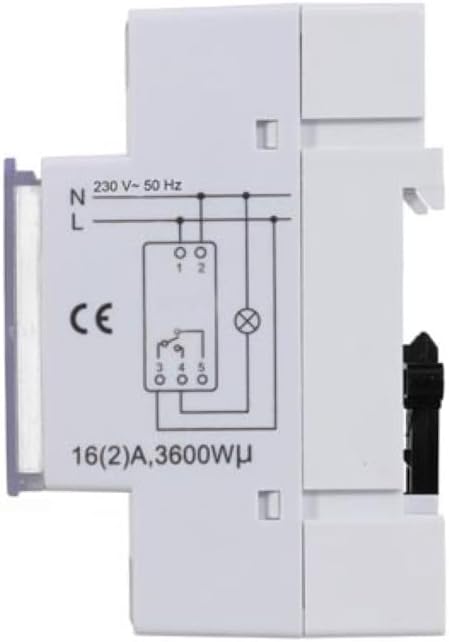
Figura 2: Lado view of the Perel EDIN305N Digital Weekly Timer showing the electrical wiring diagram. It illustrates connections for Neutral (N), Live (L), and the output contacts (1, 2, 3, 4, 5) for controlling a load.
Refer to the wiring diagram (Figure 2) and the terminal block labels on the device:
- Connect the Neutral (N) wire of your 230V AC supply to terminal 1.
- Connect the Live (L) wire of your 230V AC supply to terminal 2.
- For the controlled circuit:
- Terminal 3: Common contact for the relay output.
- Terminal 4: Normally Open (NO) contact. The circuit connected here will be ON when the timer is active.
- Terminal 5: Normally Closed (NC) contact. The circuit connected here will be OFF when the timer is active.
- Connect the load (e.g., light, appliance) between the Live (L) supply and either terminal 4 (for NO operation) or terminal 5 (for NC operation), with terminal 3 connected to the Live (L) supply. Alternatively, connect the load between terminal 4 or 5 and the Neutral (N) supply, with terminal 3 connected to the Live (L) supply. Consult a qualified electrician for specific load wiring configurations.
Configuración inicial y operación
1. Power On and Reset
After wiring and restoring power, the display will illuminate. If the display is blank or shows erratic characters, press the recessed R (Reset) button using a pointed non-metallic object (e.g., a pen tip). This will clear all settings and restore default values.
2. Configuración de la hora y el día actuales
- Mantenga pulsado el Icono de reloj botón.
- Mientras sostiene el Icono de reloj botón, presione W+ to set the current day of the week (1=Monday, 7=Sunday).
- Mientras sostiene el Icono de reloj botón, presione H+ para establecer la hora actual (0-23).
- Mientras sostiene el Icono de reloj botón, presione M+ para establecer el minuto actual (0-59).
- Liberar el Icono de reloj Botón. La hora y el día ya están configurados.
3. Programación de ciclos de encendido y apagado
El temporizador admite hasta 7 programas de encendido/apagado. Cada programa consta de una hora de encendido y una hora de apagado.
- Presione el Icono de reloj Presione una vez para entrar al modo de programación. La pantalla mostrará "1 ON".
- Prensa W+ Para seleccionar los días de este programa. Puede elegir un solo día, un bloque de días (p. ej., de lunes a viernes) o todos los días.
- Prensa H+ to set the ON hour for program 1.
- Prensa M+ to set the ON minute for program 1.
- Presione el Icono de reloj Presione el botón de nuevo. La pantalla mostrará "1 OFF".
- Repeat steps 2-4 to set the OFF day(s), hour, and minute for program 1.
- To set additional programs (2-7), press the Icono de reloj button to cycle through "2 ON", "2 OFF", etc., and repeat the setting process.
- Después de configurar todos los programas deseados, presione el botón MANUAL Botón para salir del modo de programación y volver a la visualización de la hora actual.
4. Accionamiento manual
Presione el MANUAL Botón repetidamente para recorrer los modos de funcionamiento:
- EN: La salida está continuamente activada, anulando todos los programas.
- COCHE: The timer operates according to the programmed ON/OFF cycles.
- OFF: La salida está continuamente APAGADA, anulando todos los programas.
Asegúrese de que el temporizador esté configurado en AUTO para operación programada.
5. Clearing Programs
Para borrar un programa específico:
- Enter programming mode by pressing the Icono de reloj button until the desired program number (e.g., "3 ON") is displayed.
- Presione el C+ button. This will clear both the ON and OFF times for that specific program.
- Repita este procedimiento para otros programas según sea necesario.
- Prensa MANUAL para salir del modo de programación.
To clear all programs and reset the device, use the recessed R Botón (Reiniciar).
Mantenimiento
- Limpie el dispositivo con un paño suave y seco. No utilice limpiadores abrasivos ni disolventes.
- Ensure the transparent cover is closed to protect the display and buttons from dust and splashes.
- Regularly check electrical connections for tightness, especially in high-vibration environments.
Solución de problemas
| Problema | Posible causa | Solución |
|---|---|---|
| La pantalla está en blanco. | No hay fuente de alimentación; batería interna agotada. | Check power connections (terminals 1 & 2). Ensure main power is ON. If power is present, press the R (Reset) button. The internal battery recharges when connected to power. |
| El temporizador no se enciende ni se apaga según lo programado. | Incorrect program settings; timer in manual ON/OFF mode. | Verify program settings (time, day, ON/OFF). Ensure the timer is in AUTO modo presionando el botón MANUAL botón. |
| Connected appliance not receiving power. | Incorrect wiring; appliance fault; timer fault. | Check wiring according to Figure 2. Test the appliance directly. If wiring and appliance are fine, the timer may be faulty. |
| Buttons unresponsive or display erratic. | Software glitch; low internal battery. | Presione el hueco R (Reset) button. Ensure the timer has been connected to power for at least 24 hours to fully charge the internal battery. |
Desecho
Do not dispose of this product with general household waste. This electronic device contains materials that can be recycled. Please dispose of it at a designated collection point for electrical and electronic equipment waste, in accordance with local regulations.
Garantía y soporte
Perel products are manufactured to high quality standards. For warranty information, technical support, or service inquiries, please refer to the documentation provided with your purchase or contact your local Perel distributor or retailer. Please have your model number (EDIN305N) and purchase details ready when contacting support.