
1. Introducción
This manual provides detailed instructions for the installation, operation, and maintenance of the DEWIN CONN873 Sensorless Brushless Three-Phase BLDC Motor Speed Controller. This device is designed for precise speed regulation of three-phase brushless DC motors operating within a DC 5V-36V range, supporting both clockwise (CW) and counter-clockwise (CCW) rotation.
2. Producto terminadoview
The DEWIN CONN873 controller is a compact and efficient unit featuring a main control board housed in a protective casing, along with external components for speed and direction control.

Figure 2.1: DEWIN CONN873 Brushless Motor Speed Controller with its protective casing open, revealing the circuit board with heat sinks and connection terminals.

Figure 2.2: Dimensions of the DEWIN CONN873 controller, showing approximate measurements of 10cm (3.94 inches) in length, 4cm (1.57 inches) in width, and 6.8cm (2.68 inches) in height.

Figura 2.3: Primer plano view of the B100K potentiometer, used for adjusting motor speed.

Figura 2.4: Primer plano view of the ON-ON toggle switch, rated 6A 125VAC, used for controlling motor direction (CW/CCW).
3. Especificaciones
| Característica | Especificación |
|---|---|
| Marca | DeWin |
| Modelo | CONN873 |
| Vol de entradatage | CC 5 V-36 V |
| Material | Metal |
| Solicitud | Three-phase sensorless brushless DC motors |
| Control de velocidad | Potenciómetro |
| Control de dirección | Toggle Switch (CW/CCW) |
| Número de pieza del fabricante | CONN873 |
| Código Postal | 738613669429 |
4. Información de seguridad
- Desconecte siempre la alimentación antes de realizar cualquier conexión o desconexion.
- Asegúrese de que el volumen de entradatage is within the specified range (DC 5V-36V). Exceeding this range can damage the controller.
- Verify correct polarity for power connections (DC+ to positive, DC- to negative). Incorrect polarity will damage the unit.
- Avoid short circuits between motor phases or between phases and ground.
- Operate the controller in a well-ventilated area to prevent overheating.
- Mantenga el dispositivo alejado de la humedad, el polvo y sustancias corrosivas.
- This product is intended for use by individuals familiar with electronic components and motor control systems.
5. Configuración
Follow these steps to correctly set up your DEWIN CONN873 motor speed controller:
- Identificar componentes: Familiarize yourself with the controller board, potentiometer, and toggle switch.
- Conexión de la fuente de alimentación: Connect your DC power supply (5V-36V) to the terminals labeled CC+ (positivo) y CORRIENTE CONTINUA- (negative) on the controller board. Ensure correct polarity.
- Conexión del motor: Connect the three phase wires of your BLDC motor to the terminals labeled A, B, y C on the controller board. The order of connection for A, B, C may affect the initial direction of rotation.
- Conexión del potenciómetro: The potentiometer is pre-wired and connects to the designated port on the controller board. This will control the motor speed.
- Direction Switch Connection: The toggle switch is pre-wired and connects to its designated port. This switch controls the motor's rotation direction.
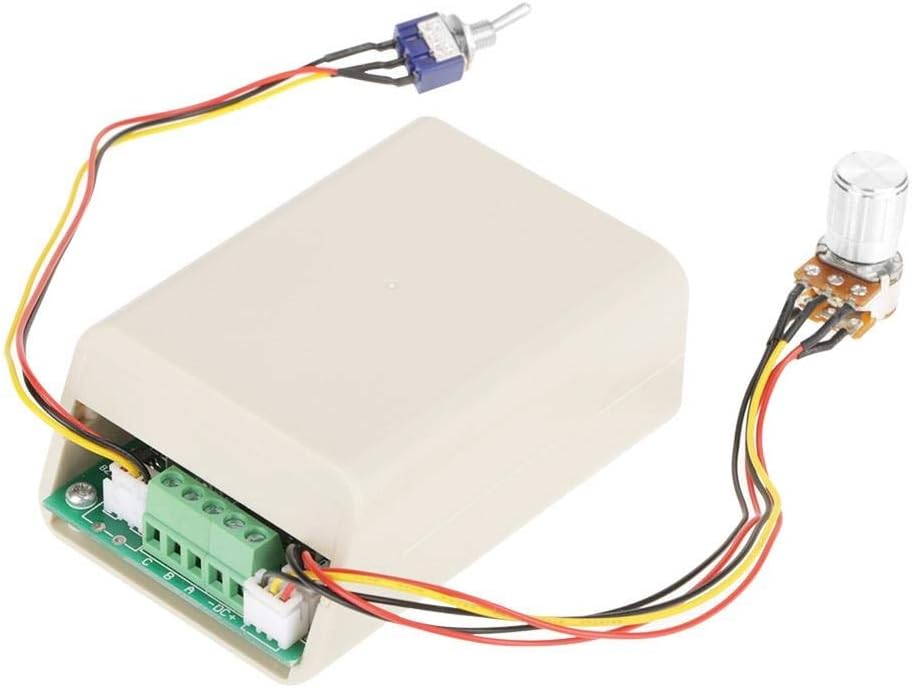
Figure 5.1: Wiring diagram showing connections for power supply (DC+, DC-) and motor phases (A, B, C) to the controller board. The potentiometer and toggle switch are also shown connected.
6. Instrucciones de funcionamiento
Once the controller is properly wired, follow these steps to operate your BLDC motor:
- Encendido: Apply power to the controller within the DC 5V-36V range.
- Establecer dirección: Use the toggle switch to select the desired rotation direction (CW or CCW). It is recommended to change direction only when the motor is stopped or at very low speed to prevent mechanical stress.
- Ajustar velocidad: Rotate the potentiometer knob to adjust the motor speed. Turning the knob clockwise typically increases speed, while counter-clockwise decreases it.
- Apagado: To stop the motor, turn the potentiometer to its minimum setting, then disconnect the power supply.
7. Mantenimiento
The DEWIN CONN873 controller is designed for reliable operation with minimal maintenance. Adhere to the following guidelines:
- Manténlo limpio: Regularly clean the controller and its casing to prevent dust and debris accumulation, which can hinder heat dissipation. Use a soft, dry cloth.
- Inspeccionar las conexiones: Revise periódicamente todas las conexiones del cableado para asegurarse de que estén seguras y libres de corrosión o daños.
- Condiciones ambientales: Ensure the operating environment remains within recommended temperature and humidity ranges to prolong the lifespan of the electronic components.
- Evite la sobrecarga: Do not operate the motor or controller beyond their specified current and voltage limits, as this can lead to overheating and permanent damage.
8. Solución de problemas
If you encounter issues with your DEWIN CONN873 controller, refer to the following troubleshooting guide:
| Problema | Posible causa | Solución |
|---|---|---|
| El motor no arranca | Sin suministro de energía Polaridad de alimentación incorrecta Conexiones sueltas Motor or controller fault | Verifique la fuente de alimentación y el volumentage Verify DC+ and DC- connections Secure all wiring connections Test motor independently; contact support if controller is faulty |
| El motor funciona de forma errática o a una velocidad incorrecta | Potentiometer issue Motor phase wiring incorrect Motor not compatible (e.g., brushed DC motor) | Check potentiometer connection and function Re-check motor phase connections (A, B, C) Ensure a three-phase sensorless BLDC motor is used |
| Motor does not change direction | Toggle switch issue Motor phase wiring | Check toggle switch connection and function Ensure motor phase wiring is correct and allows for reversal |
| El controlador se sobrecalienta | Sobrecarga Mala ventilación Cortocircuito | Reducir la carga del motor Ensure adequate airflow around the controller Check for any short circuits in wiring |
9. Garantía y soporte
DEWIN products are manufactured to high-quality standards. For warranty information or technical support, please refer to the documentation included with your purchase or contact your retailer. Please have your model number (CONN873) and purchase date available when seeking support.