
1. Introducción
Thank you for choosing the Impex THUNDER T4 Stereo System. This 2.1 channel speaker system is designed to provide high-quality audio for your entertainment needs. It features multiple connectivity options including USB, MMC, FM radio, and Bluetooth, along with karaoke functionality. This manual provides essential information for the safe and efficient operation of your device.
2. Instrucciones de seguridad
- Read all instructions carefully before operating the system.
- Conserve el manual para futuras consultas.
- No exponga la unidad a la lluvia ni a la humedad para evitar incendios o descargas eléctricas.
- Asegúrese de que haya una ventilación adecuada; no bloquee ninguna abertura de ventilación.
- Coloque la unidad sobre una superficie estable y plana.
- No abra la casing. Deje todo servicio a personal cualificado.
- Desenchufe la unidad durante tormentas eléctricas o cuando no la utilice durante períodos prolongados.
- Evite colocar la unidad cerca de fuentes de calor como radiadores, rejillas de calefacción, estufas u otros aparatos (incluidos ampificadores) que producen calor.
3. Contenido del paquete
Por favor, compruebe que los siguientes artículos estén incluidos en su paquete:
- Impex THUNDER T4 Main Speaker Unit
- Altavoces satélite (2 unidades)
- Remote Control (if applicable, not explicitly mentioned but common for stereo systems)
- Cables de conexión de audio
- Manual de usuario (este documento)
- Microphone Set (for Karaoke)
4. Producto terminadoview
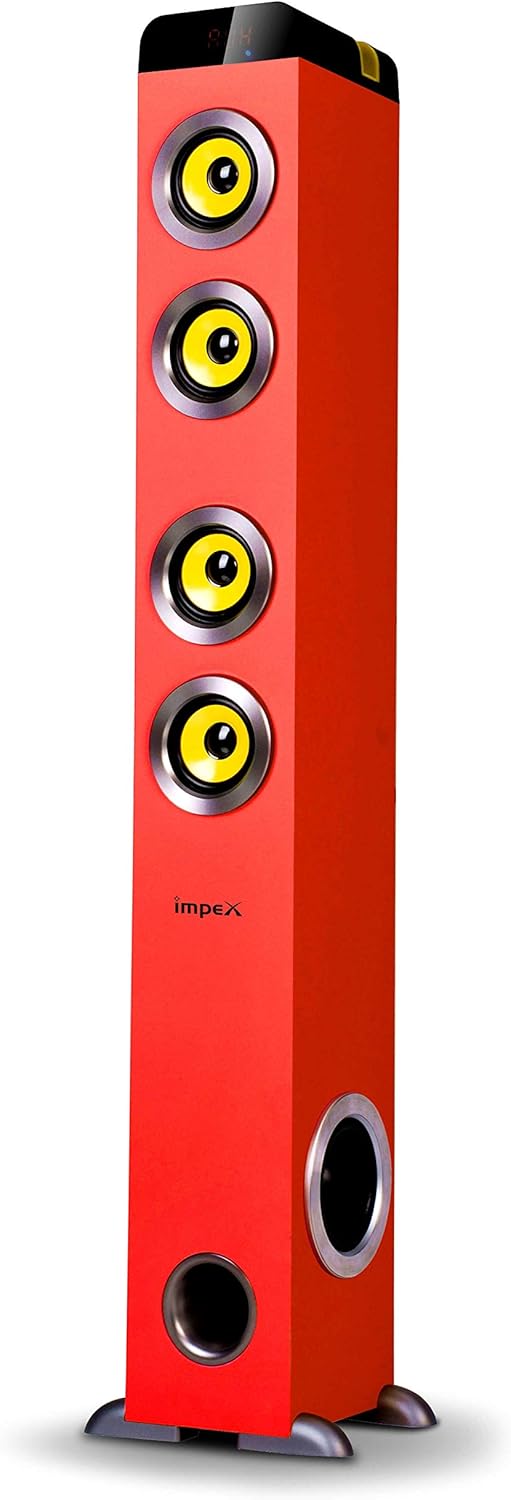
Figura 1: Impex THUNDER T4 Main Speaker Unit. This image displays the Impex THUNDER T4 stereo system, a tall, red tower speaker. It features four prominent yellow speaker cones arranged vertically on the front panel. Towards the bottom, there is a circular bass port. The 'Impex' logo is visible on the front. The speaker stands on a dark base with small feet.
The Impex THUNDER T4 is a 2.1 channel speaker system. The main unit (subwoofer and primary speakers) is a tower design, complemented by two satellite speakers (wooden satellite, speaker unit: 4"+3"*2+1"*2). The system integrates various input options and controls for a versatile audio experience.
5. Configuración
- Colocación: Position the main speaker unit and satellite speakers in your desired location. For optimal sound, ensure the main unit is on a stable surface.
- Conectar altavoces satélite: Connect the satellite speakers to the main unit using the provided audio cables. Ensure connections are secure.
- Conexión de energía: Plug the power cord into the main speaker unit and then into a suitable wall outlet.
- Encendido inicial: Press the Power button on the main unit or remote control to turn on the system.
- Conexión de fuente de audio: Connect your desired audio source (e.g., TV, smartphone, computer) using the appropriate input method (Bluetooth, USB, AUX).
6. Instrucciones de funcionamiento
6.1. Funcionamiento básico
- Encendido/apagado: Use the Power button on the unit or remote.
- Control de volumen: Adjust the master volume using the dedicated knob on the unit or volume buttons on the remote.
- Selección de modo: Press the "Mode" button to cycle through available input sources: Bluetooth, FM, USB, MMC, AUX.
6.2. Modo Bluetooth
- Switch the system to Bluetooth mode. The display will indicate "BT".
- Habilite Bluetooth en su dispositivo móvil o computadora.
- Buscar "THUNDER T4" in your device's Bluetooth settings and pair.
- Once connected, you can play audio from your device through the stereo system.
6.3. Modo de radio FM
- Cambie el sistema al modo FM.
- Press the "Scan" button (if available) to automatically search and save available radio stations.
- Utilice los botones "Anterior" y "Siguiente" para navegar por las estaciones guardadas.
6.4. USB/MMC Mode
- Insert a USB flash drive or MMC card into the respective slot.
- The system will automatically switch to USB/MMC mode and begin playing audio files.
- Use the play/pause, previous, and next buttons to control playback.
6.5. Función de karaoke
- Connect the microphone to the designated microphone input jack.
- Adjust the microphone volume and echo effects (if available) using the controls on the unit or remote.
- Play your desired karaoke track from any input source.
7. Mantenimiento
- Limpieza: Utilice un paño suave y seco para limpiar el exterior de la unidad. No utilice limpiadores líquidos ni aerosoles.
- Ventilación: Asegúrese de que las aberturas de ventilación no estén bloqueadas por polvo o residuos.
- Almacenamiento: Si va a almacenar la unidad durante un período prolongado, desconéctela del tomacorriente y guárdela en un lugar fresco y seco.
8. Solución de problemas
| Problema | Posible causa | Solución |
|---|---|---|
| Sin poder | Cable de alimentación no conectado; toma de corriente defectuosa | Verifique la conexión del cable de alimentación; Pruebe con una toma de corriente diferente |
| Sin sonido | Volume too low; Incorrect input mode; Audio cables loose | Increase volume; Select correct input mode; Check audio cable connections |
| Error de emparejamiento de Bluetooth | Device too far; Bluetooth not enabled on source; Incorrect pairing procedure | Move device closer; Enable Bluetooth; Refer to Bluetooth pairing instructions |
| USB/MMC not playing | Sin soporte file format; USB/MMC card faulty; Card not inserted correctly | Asegurar files are compatible; Try a different USB/MMC card; Reinsert card |
9. Especificaciones
| Marca | Impex |
| Número de modelo | THUNDER T4 |
| Tipo | Stereo System (2.1 Channel) |
| Potencia de salida | 60 vatios |
| Respuesta de frecuencia | 40-20,000 Hz (Assumed from 40-20Hz in description, typically 20kHz) |
| Speaker Unit Configuration | Main: 4" Woofer; Satellites: 3" x 2 + 1" x 2 |
| Tecnología de conectividad | USB, Bluetooth |
| Características especiales | FM Tuner, MMC Card Slot, Karaoke Function (with Mic set) |
| Modo de salida de audio | Estéreo |
| Fabricante | Impex |
| Número de modelo del artículo | THUNDER T4 Red |
| ASIN | B081TNH5SM |
| Dimensiones del paquete | 6.97 x 5.33 x 3.01 cm; 1.1 g (Note: This dimension may refer to a component or packaging detail, not the full system.) |
Nota: Las especificaciones están sujetas a cambios sin previo aviso.
10. Garantía y soporte
For warranty information and customer support, please refer to the warranty card included with your product or visit the official Impex webSitio. Conserve su recibo de compra como comprobante de compra.