
1. Introducción
This manual provides comprehensive instructions for the IMILAB CMSXJ16A Smart Home Security Camera, a product of XIAOMI. It covers setup, operation, maintenance, and troubleshooting to ensure optimal performance and security monitoring. Please read this manual carefully before using the product and retain it for future reference.
2. Producto terminadoview
2.1 Contenido del paquete
Verifique que todos los artículos estén presentes en el paquete:
- IMILAB Home Security Camera Basic x 1
- Manual de instrucciones x 1
- Cable de alimentación x 1
- Power Adapter (UK/EU/US) x 1
- Wall Mounting Package x 1 (includes screws and wall plugs)
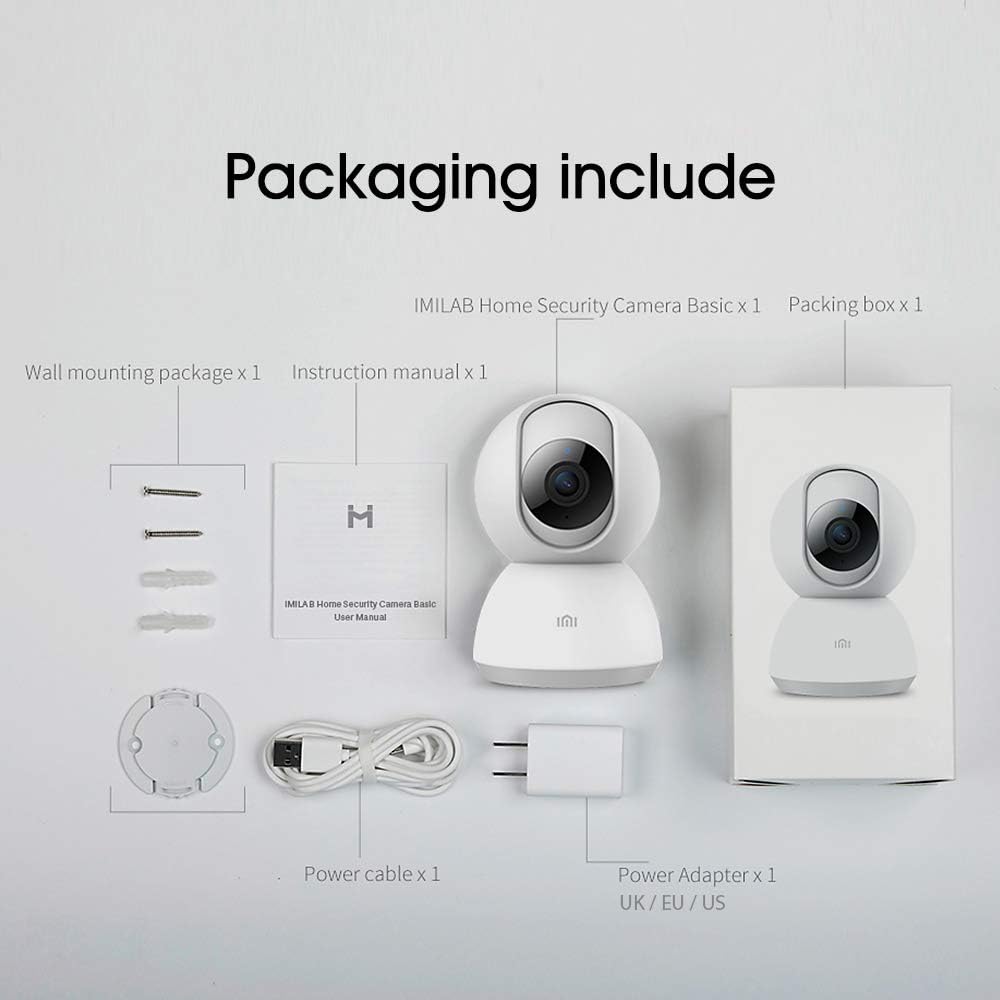
Image: Contents of the IMILAB CMSXJ16A camera package.
2.2 Componentes de la cámara
The IMILAB CMSXJ16A camera features a compact, spherical design with a rotating base for 360-degree coverage. Key components include the lens, microphone, speaker, status indicator light, and power port.

Imagen: Frente view of the IMILAB CMSXJ16A camera.
2.3 Características principales
- FHD (1080P) Resolution: Provides clear and detailed image quality.
- Rotación de 360°: Ofertas panorámicas viewing for comprehensive area coverage.
- Glare-Free Night Vision: Equipped with F2.1 aperture and 8x 940mm infrared LEDs for a visible distance of 10m.
- True Color Night Vision: Maintains full color in low light conditions, even at 100 lumens.
- Detección humana por IA: Advanced AI reduces unnecessary alerts by 70% for more accurate notifications.
- Crying Baby Notification: Alerts you to the sound of a crying baby.
- Múltiples opciones de almacenamiento: Supports cloud storage, up to 64GB Micro TF card, and NAS storage.
- Codificación de vídeo H.265: Efficiently compresses video, saving storage space while maintaining quality.
3. Configuración
3.1 Encendido
- Conecte el cable de alimentación al puerto de alimentación de la cámara.
- Conecte el adaptador de corriente a una toma de corriente estándar.
- The camera will power on, and the status indicator light will begin to flash, indicating it is ready for connection.
3.2 Instalación de la aplicación
Download the official IMILAB Home Security app from your smartphone's app store. The app is compatible with Android 4.4 and above, and iOS 8.0 and above.
- Buscar "IMILAB Home Security" in the Google Play Store (for Android) or Apple App Store (for iOS).
- Descargue e instale la aplicación.
- Abra la aplicación y siga las instrucciones en pantalla para crear una cuenta o iniciar sesión.
3.3 Conexión a wifi
Follow the in-app instructions to connect your camera to your home Wi-Fi network. This typically involves scanning a QR code generated by the app with the camera's lens.
3.4 Montaje de la cámara
The camera supports wall mounting. Use the provided wall mounting package for secure installation.
- Elija una ubicación adecuada para el montaje, asegurándose de que haya un campo libre de obstáculos. view y acceso a una toma de corriente.
- Use the mounting base as a template to mark drill holes on the wall.
- Perfore agujeros e inserte los tacos.
- Fije la base de montaje a la pared con tornillos.
- Conecte la cámara a la base de montaje.
4. Instrucciones de funcionamiento
4.1 en vivo View y control remoto
Once connected, open the IMILAB Home Security app to access the live video feed from your camera. You can remotely control the camera's 360-degree rotation to view diferentes áreas de tu espacio.

Imagen: En vivo view of the camera feed on mobile devices, demonstrating H.265 encoding efficiency.
4.2 Visión nocturna
The camera automatically switches to night vision mode in low light conditions. It features glare-free infrared night vision and true color night vision for clear visibility even in very dim environments.

Image: Demonstration of glare-free and true color night vision capabilities.
4.3 Detección humana y notificaciones de IA
The camera utilizes AI to detect human movement, significantly reducing false alarms from pets or other non-human movements. You will receive precise notifications on your smartphone when human activity is detected.

Image: AI movement notification interface in the mobile application.
4.4 Crying Baby Detection
Enable the crying baby detection feature in the app to receive alerts if the camera detects the sound of a baby crying, providing an additional layer of monitoring for nurseries.
4.5 Grabación y almacenamiento de vídeo
The camera supports real-time video recording with multiple storage options:
- Almacenamiento en la nube: Subscribe to cloud services for secure off-site storage of your recordings.
- Tarjeta Micro TF: Insert a Micro TF card (up to 64GB, not included) into the camera for local storage.
- Almacenamiento NAS: Connect the camera to a Network Attached Storage (NAS) device for expanded local storage capabilities.
4.6 Codificación de vídeo H.265
The camera uses H.265 video encoding, which allows for more efficient compression of video files. This means you can save the same quality video with approximately 50% less file size compared to H.264, optimizing storage and bandwidth usage.
5. Mantenimiento
Para garantizar la longevidad y el rendimiento óptimo de su cámara, siga estas pautas de mantenimiento:
- Limpieza: Limpie suavemente la lente y el cuerpo de la cámara con un paño suave y seco. No utilice productos químicos agresivos ni limpiadores abrasivos.
- Colocación: Asegúrese de que la cámara esté colocada en un entorno estable, lejos de la luz solar directa, temperaturas extremas y alta humedad.
- Actualizaciones de firmware: Revise periódicamente la aplicación para verificar si hay actualizaciones de firmware disponibles para asegurarse de que su cámara tenga las últimas funciones y mejoras de seguridad.
6. Solución de problemas
If you encounter issues with your IMILAB CMSXJ16A camera, refer to the following common solutions:
- La cámara no se conecta: Ensure your Wi-Fi network is 2.4GHz (5GHz is not supported). Check Wi-Fi signal strength. Restart the camera and your router.
- Mala calidad de imagen: Clean the camera lens. Ensure adequate lighting in the environment. Check your internet connection speed.
- Sin notificaciones: Verify that notifications are enabled in both the camera app settings and your smartphone's system settings. Check network connectivity.
- Cámara sin conexión: Check the power connection. Ensure your Wi-Fi network is active and the camera is within range. Restart the camera.
- Micro TF Card Not Detected: Ensure the card is inserted correctly. Format the card through the app if it's new or has issues. Use a compatible Micro TF card (up to 64GB).
7. Especificaciones
| Característica | Especificación |
|---|---|
| Número de modelo | CMSXJ16A |
| Dimensiones (L x An x Al) | 10.8 x 7.6 x 7.6 cm |
| Peso | 211 gramos |
| Resolución de vídeo | 1080p (Full HD) |
| Campo de View / Angle of View | 360 grados |
| Distancia de visión nocturna | 10 metros |
| LED infrarrojos | 8 x 940 mm |
| Abertura | F2.1 |
| Tecnología de conectividad | Wired, Wireless (Wi-Fi 2.4GHz) |
| Fuente de poder | Mains Powered (via 5V, 5W adapter) |
| Dispositivos compatibles | Teléfono inteligente (Android 4.4+, iOS 8.0+) |
| Opciones de almacenamiento | Cloud, Micro TF Card (max 64GB), NAS |
| Formato de captura de video | MP4 (codificación H.265) |
| Uso interior/exterior | Interior |
| Tipo de montaje | Montaje en pared |
8. Garantía y soporte
For warranty information and technical support, please refer to the official IMILAB webSitio web o contacte con el servicio de atención al cliente. Conserve el recibo de compra como comprobante para reclamaciones de garantía.