
1. Introducción
This manual provides instructions for the FocalTop N2QAYB000953 replacement remote control. This remote is designed to function as a direct replacement for the original Panasonic Blu-ray Player remote control models N2QAYB000953, compatible with DMP-BDT360, DMP-BDT361, DMP-BDT460, and DMP-BDT460PS Blu-ray players.
No programming is required for this remote control. Simply insert batteries, and it is ready for use.
2. Configuración
2.1 Instalación de la batería
- Ubique el compartimiento de la batería en la parte posterior del control remoto.
- Deslice la tapa del compartimiento de la batería hacia abajo para abrirla.
- Inserte dos (2) baterías alcalinas AAA (no incluidas), asegurándose de que los terminales positivo (+) y negativo (-) estén alineados correctamente con las marcas dentro del compartimiento.
- Deslice la tapa del compartimiento de la batería nuevamente a su lugar hasta que encaje firmemente.

Figure 2.1: Battery compartment with cover removed, showing battery placement.
Nota: Asegúrese de que las pilas estén insertadas con la polaridad correcta. Una instalación incorrecta podría impedir el funcionamiento del control remoto.
3. Operar el control remoto
The FocalTop N2QAYB000953 remote control is designed for intuitive operation of your compatible Panasonic Blu-ray Player. Point the remote directly at the Blu-ray player's infrared sensor for optimal performance.
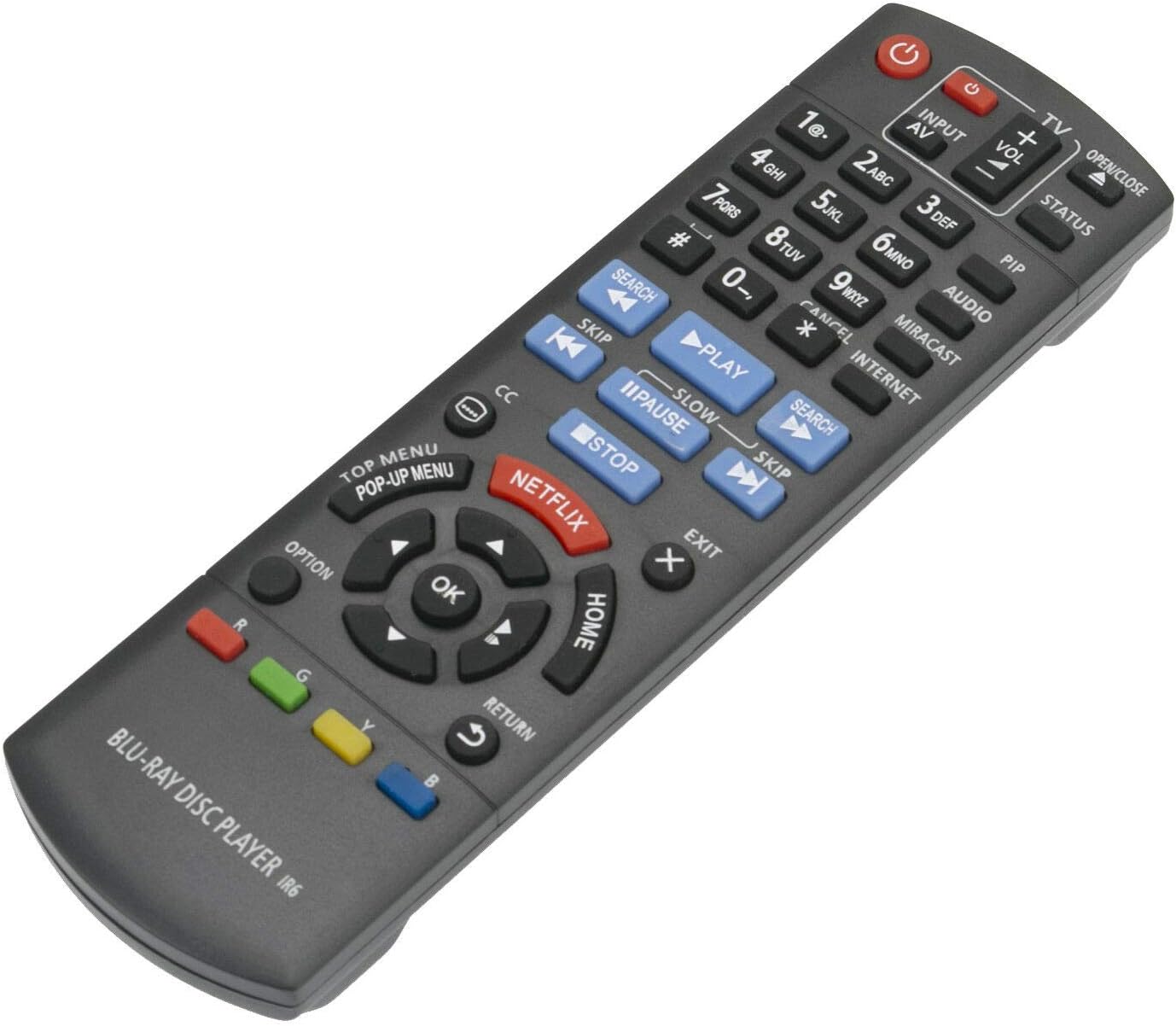
Figura 3.1: Frente view del control remoto con disposición de botones.
3.1 Funciones clave
- Fuerza (⏻): Turns the Blu-ray player on or off.
- Input/AV: Selects the input source on your television.
- Volumen (+/-): Adjusts the volume of the connected audio system (if supported by the Blu-ray player's HDMI-CEC or similar function).
- Botones numéricos (0-9): Used for direct track selection or entering numerical data.
- jugar(▶), Pausa (⏸), Detener (■): Controles de reproducción de medios estándar.
- Saltar (⏭), Search (⏮): Navigate between tracks or fast-forward/rewind.
- Pad direccional (arriba, abajo, izquierda, derecha) y OK: Navega por los menús y confirma las selecciones.
- HOGAR: Returns to the main menu of the Blu-ray player.
- MENÚ SUPERIOR/MENÚ EMERGENTE: Accesses the disc's top menu or pop-up menu.
- NETFLIX: Botón de acceso directo a la aplicación Netflix.
- DEVOLVER: Vuelve a la pantalla o menú anterior.
- OPCIÓN: Displays options relevant to the current screen or playback.
- Botones de colores (rojo, verde, amarillo, azul): Se utiliza para funciones específicas dentro de menús o aplicaciones, como se indica en pantalla.
4. Mantenimiento
- Limpieza: Limpie el control remoto con un paño suave y seco. No utilice limpiadores líquidos ni productos abrasivos.
- Reemplazo de batería: Replace batteries when the remote's response becomes sluggish or stops working. Always replace both batteries at the same time with new ones of the same type (AAA alkaline).
- Almacenamiento: Si no se utilizará el control remoto durante un período prolongado, retire las pilas para evitar fugas y posibles daños.
- Ambiente: Evite exponer el control remoto a temperaturas extremas, luz solar directa o alta humedad.
5. Solución de problemas
| Problema | Posible causa | Solución |
|---|---|---|
| El control remoto no funciona. |
|
|
| Algunos botones no responden. |
|
|
| El control remoto funciona de forma intermitente. |
|
|
6. Especificaciones
- Modelo: N2QAYB000953
- Marca: FocalTop
- Compatibilidad: Panasonic Blu-ray Player models DMP-BDT360, DMP-BDT361, DMP-BDT460, DMP-BDT460PS
- Tecnología de conectividad: Infrarrojos (IR)
- Tipo de controlador: Control de botones
- Fuente de energía: 2 pilas alcalinas AAA (no incluidas)
- Característica especial: Diseño ergonómico
7. Garantía y soporte
This product is a replacement remote control. For specific warranty information or technical support, please refer to the documentation provided by the original seller or contact FocalTop directly. No explicit warranty information is provided within this manual.