
1. Introducción
Thank you for choosing the Homcloud Wi-Fi LED Strip Controller, Model AS-SL1. This device allows you to control 12-24V RGB + White LED strips via Wi-Fi, offering smart lighting solutions for your home. This manual provides essential information for safe installation, operation, and maintenance of your controller. Please read it thoroughly before use and retain it for future reference.
2. Información de seguridad
- Asegúrese de que la fuente de alimentación esté desconectada antes de la instalación o el mantenimiento para evitar descargas eléctricas.
- This device is designed for indoor use only. Do not expose it to moisture or extreme temperatures.
- Use only with 12-24V DC power supplies and compatible RGB + White LED strips. Exceeding the specified voltage o wattage (192 Watts max) can damage the device and LED strips.
- Do not attempt to open or modify the controller. This will void the warranty and may cause damage or injury.
- Mantener fuera del alcance de los niños.
- Ensure all wiring connections are secure and correctly polarized (positive to positive, negative to negative).
3. Contenido del paquete
Por favor revise el paquete para ver los siguientes artículos:
- Homcloud Wi-Fi LED Controller (AS-SL1)
- Manual de usuario (este documento)
4. Producto terminadoview
The Homcloud AS-SL1 is a compact Wi-Fi controller designed to manage RGB + White LED strips. It features terminal blocks for secure wiring connections and an integrated Wi-Fi module for smart control via a mobile application or voice commands.
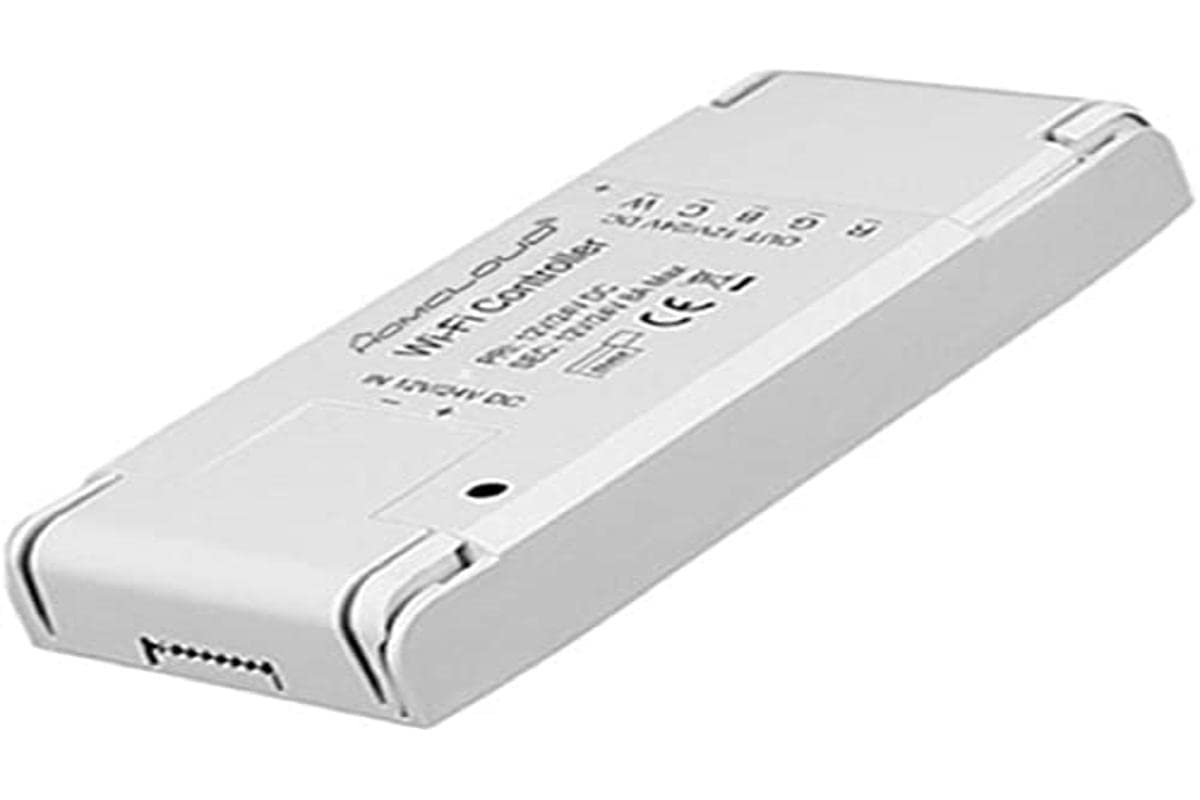
Figura 1: Homcloud Wi-Fi LED Strip Controller (AS-SL1). This image shows the compact design of the controller with its input and output terminals.
Características principales:
- Wi-Fi Connectivity (2.4GHz)
- Compatible with 12-24V RGB + White LED Strips
- App Control (via Homcloud app or compatible smart home platforms)
- Voice Control (compatible with smart assistants)
- Programmable Schedules and Timers
- Acceso remoto
5. Configuración
5.1 Instalación del cableado
- Preparar componentes: Ensure you have your Homcloud Wi-Fi LED Controller, a compatible 12-24V DC power supply, and an RGB + White LED strip.
- Desconectar la energía: Before making any connections, ensure the power supply is unplugged from the mains.
- Connect Power Supply to Controller: Locate the input terminals on the controller (usually marked DC IN, V+, V- or similar). Connect the positive (+) output of your 12-24V DC power supply to the V+ terminal and the negative (-) output to the V- terminal. Ensure connections are secure.
- Connect LED Strip to Controller: Locate the output terminals on the controller (usually marked V+, R, G, B, W or similar). Connect the corresponding wires from your RGB + White LED strip to these terminals.
- LED Strip V+ to Controller V+
- LED Strip R to Controller R
- LED Strip G to Controller G
- LED Strip B to Controller B
- LED Strip W to Controller W
- Verificar conexiones: Double-check all wiring for correct polarity and secure connections. Loose connections can cause malfunctions or damage.
Note: A detailed wiring diagram is typically provided in the physical product packaging. Ensure you follow the specific wiring instructions for your LED strip and power supply.
5.2 Emparejamiento de aplicaciones
- Descargar aplicación: Download the "Homcloud" app from your smartphone's app store (iOS or Android).
- Registrarse/Iniciar sesión: Abra la aplicación y regístrese para obtener una nueva cuenta o inicie sesión con una existente.
- Controlador de encendido: Plug in the power supply to the mains. The LED strip should light up briefly or flash, indicating it's in pairing mode. If not, refer to the app's instructions for resetting the device to pairing mode (often involves cycling power multiple times).
- Agregar dispositivo: In the Homcloud app, tap the "+" icon (usually in the top right corner) to add a new device. Select "Lighting" or "LED Controller" from the device list.
- Conectarse a Wi-Fi: Follow the on-screen instructions to connect the controller to your 2.4GHz Wi-Fi network. Ensure your phone is also connected to the same 2.4GHz network during pairing.
- Emparejamiento completo: Once the device is successfully added, you can rename it and begin controlling your LED strip through the app.
6. Instrucciones de funcionamiento
6.1 Control de aplicaciones
Once paired, the Homcloud app provides full control over your LED strip:
- Encendido/apagado: Toggle the power button to turn the LED strip on or off.
- Selección de colores: Use the color wheel or predefined color palettes to choose any desired color for RGB LEDs.
- Ajuste de luz blanca: Adjust the brightness and color temperature (if supported by your LED strip) of the dedicated white LEDs.
- Control de brillo: Deslice la barra de brillo para ajustar la intensidad de la luz.
- Modos de escena: Select from various pre-programmed scene modes (e.g., Party, Relax, Reading) or create custom scenes.
- Sincronización musical: Some apps offer music synchronization features, allowing the lights to react to sound.
- Temporizadores y horarios: Set schedules for the LED strip to turn on/off at specific times or activate certain scenes.
6.2 Control de voz
The Homcloud AS-SL1 controller supports voice control through compatible smart assistants (e.g., Amazon Alexa, Google Assistant). To enable voice control:
- Cuenta de enlace: In your smart assistant's app (e.g., Alexa app, Google Home app), search for the "Homcloud" skill or service.
- Autorizar: Link your Homcloud account with your smart assistant account.
- Descubrir dispositivos: Ask your smart assistant to discover new devices. Your LED strip controller should appear.
- Comandos de voz: Ahora puedes usar comandos de voz como:
- "Alexa, turn on [LED strip name]"
- "Hey Google, set [LED strip name] to blue"
- "Alexa, dim [LED strip name] to 50%"
7. Mantenimiento
- Limpieza: Disconnect power before cleaning. Use a soft, dry cloth to wipe the controller. Do not use liquid cleaners or solvents.
- Ambiente: Ensure the controller is kept in a dry, indoor environment, away from direct sunlight, high temperatures, and corrosive substances.
- Conexiones: Revise periódicamente las conexiones del cableado para asegurarse de que permanezcan seguras.
8. Solución de problemas
| Problema | Posible causa | Solución |
|---|---|---|
| La tira de LED no se enciende. | No power; incorrect wiring; faulty LED strip or power supply. | Check power connection. Verify all wiring connections (V+, V-, R, G, B, W). Test LED strip and power supply separately if possible. |
| Controller cannot connect to Wi-Fi. | Incorrect Wi-Fi password; 5GHz Wi-Fi network; controller not in pairing mode; weak Wi-Fi signal. | Ensure correct 2.4GHz Wi-Fi password. Confirm your router supports 2.4GHz. Reset controller to pairing mode (refer to app instructions). Move controller closer to router. |
| El control de la aplicación no responde. | Poor Wi-Fi connection; app glitch; controller offline. | Check your home Wi-Fi network. Restart the Homcloud app. Power cycle the controller. |
| El control de voz no funciona. | Smart assistant not linked to Homcloud account; device not discovered; incorrect voice command. | Ensure Homcloud skill/service is enabled and linked in your smart assistant app. Ask the assistant to discover devices. Use correct voice commands as listed in section 6.2. |
9. Especificaciones
| Característica | Detalle |
|---|---|
| Número de modelo | AS-SL1 |
| Marca | Nube de hom |
| Vol de entradatage | 12-24 voltios CC |
| Potencia máxima de salida | 192 vatios |
| Tecnología inalámbrica | Wi-Fi (2.4 GHz) |
| Método de control | Control de aplicaciones, control por voz |
| Características especiales | Voice control, remote access, programmable, timer functions |
| Entorno de uso | Uso en interiores únicamente |
| Dimensiones (L x An x Al) | 0.01 x 0.01 x 0.01 cm (approx. 0.004 x 0.004 x 0.004 inches) - Note: These dimensions seem unusually small and might be placeholder data. |
| Peso | 10 gramos (aprox. 0.35 oz) |
| Código Postal | 700443260688 |
10. Garantía y soporte
Specific warranty information for the Homcloud AS-SL1 controller is not provided in the product details. For warranty claims or technical support, please contact your retailer or visit the official Homcloud website. Please have your model number (AS-SL1) and proof of purchase ready when contacting support.