
1. Introducción
Gracias por la compraasing el Moukey MAMP1 220W Bluetooth Dual Channel Power Ampmás duradero. Esta amplifier is designed to provide powerful and versatile audio amplification for various applications, including karaoke, home theater systems, and general audio playback. It features multiple input options, Bluetooth 5.0 connectivity, and intuitive controls for an enhanced audio experience. Please read this manual thoroughly before use to ensure proper operation and to maximize the product's performance.
2. Instrucciones de seguridad
Para evitar descargas eléctricas, incendios o daños a la unidad, tenga en cuenta las siguientes precauciones de seguridad:
- No exponga esta unidad a la lluvia ni a la humedad.
- No abra la casing. No hay piezas que el usuario pueda reparar en el interior. Encargue cualquier reparación a personal cualificado.
- Asegúrese de que la fuente de alimentación voltage coincide con los requisitos especificados en la unidad.
- Coloque la unidad sobre una superficie estable y plana con ventilación adecuada. No obstruya las aberturas de ventilación.
- Mantenga la unidad alejada de fuentes de calor, luz solar directa y polvo excesivo.
- Disconnect the power plug from the outlet if the unit will not be used for an extended period.
- No opere la unidad con las manos mojadas.
3. Contenido del paquete
Verifique que todos los artículos estén presentes en el paquete:
- Moukey MAMP1 Poder AmpUnidad elevadora
- Mando a distancia
- Antena FM
- Manual de usuario (este documento)
4. Producto terminadoview
4.1 Controles y funciones del panel frontal
The front panel provides access to all primary controls and input ports for easy operation.

Image: Detailed diagram of the Moukey MAMP1 front panel, highlighting each control and port with corresponding numbers.
- Interruptor de alimentación: Enciende o apaga la unidad.
- USB / SD Slot: Para reproducir audio files from USB drives (max 32GB) or SD cards (max 16GB).
- Botón de modo: Cycles through input modes (Bluetooth, USB, SD, AUX, FM).
- Botón BT: Cambia directamente al modo Bluetooth.
- Prev Button: Salta a la pista/estación anterior.
- Botón de reproducción / pausa: Reproduce o pausa la reproducción de audio.
- Siguiente botón: Salta a la siguiente pista/estación.
- Pantalla LED: Shows current mode, track information, or frequency.
- Folder / Track: Navigates through folders or tracks on USB/SD.
- Perilla de volumen maestro: Ajusta el volumen de salida general.
- Toma de auriculares: 3.5mm output for monitor headphones.
- Microphone 1 Input: Jack de 6.35 mm para conexión de micrófono.
- Microphone 2 Input: 6.35mm jack for a second microphone connection.
- Perilla de volumen del micrófono: Ajusta el volumen de los micrófonos conectados.
- Perilla de eco: Controla el efecto de eco de los micrófonos.
- Perilla de graves: Ajusta la salida de audio de baja frecuencia.
- Perilla de agudos: Ajusta la salida de audio de alta frecuencia.
- Perilla de equilibrio: Ajusta el balance del canal izquierdo/derecho.
- Conector de entrada AUX: Entrada de 3.5 mm para dispositivos de audio externos.
- Selector de entrada: Rotary switch to select between CD, AUX, DVD, and MP3/W inputs.
4.2 Conexiones del panel posterior
The rear panel houses the main audio input and output connections.

Imagen: Trasera view of the Moukey MAMP1 amplificador, mostrando todos los puertos de entrada y salida.

Image: Detailed diagram of the Moukey MAMP1 rear panel, highlighting each connection point.
- Audio Input for DVD (RCA): Connect DVD players or other audio sources.
- Audio Input for CD (RCA): Connect CD players or other audio sources.
- Line Out Jack (RCA): Para conectarse a otro ampLifier o dispositivo de grabación.
- Conector de antena FM: Conecte la antena FM incluida para la recepción de radio.
- Conectores de salida de altavoz: Connect passive speakers (4-16 Ohm impedance).
- Entrada del cable de alimentación: Conecte el cable de alimentación de CA.
5. Configuración
5.1 Colocación
Coloque el amplifier on a flat, stable surface. Ensure there is sufficient space around the unit for proper ventilation to prevent overheating.
5.2 Conexión de alimentación
Connect the power cable to the Power Cable Input on the rear panel of the amplifier, then plug the other end into a suitable AC power outlet (115V AC).
5.3 Conexión de altavoces
A ellosAMP1 amplifier supports two sets of passive speakers with an impedance of 4-16 Ohms. Use appropriate speaker wire to connect your speakers to the Speaker Output Jacks on the rear panel.

Image: Diagram illustrating how to connect speakers to the amplifier's binding posts.
- Rotate and loosen the speaker knob on the binding post.
- Insert the bare wire (remove approximately 10mm of insulation) into the hole. Ensure correct polarity (+ to + and - to -).
- Tighten the knobs to secure the wires firmly.
5.4 Conexión del dispositivo de entrada
Connect your audio sources (CD player, DVD player, tuner, etc.) to the corresponding RCA Audio Input jacks on the rear panel. For microphones, use the 6.35mm jacks on the front panel. For 3.5mm AUX devices, use the front panel AUX Input Jack.
6. Instrucciones de funcionamiento
6.1 Encendido y apagado
Presione el Interruptor de encendido en el panel frontal para girar el ampActivar o desactivar el dispositivo. La pantalla LED se iluminará al encender la unidad.
6.2 Selección de entrada
Utilice el Botón de modo on the front panel or the remote control to cycle through available input sources (Bluetooth, USB, SD, AUX, FM). Alternatively, use the Selector de entrada knob on the front panel for RCA inputs (CD, AUX, DVD, MP3/W).
6.3 Control de volumen
- Volumen principal: Girar el Perilla de volumen maestro to adjust the overall output level of the ampmás duradero.
- Volumen del micrófono: Utilice el Perilla de volumen del micrófono to control the volume of connected microphones independently.
Control de 6.4 tonos
Adjust the audio characteristics using the Perilla de graves y Perilla de agudos to suit your preference. The Perilla de equilibrio allows adjustment of the left and right channel output levels.

Image: Close-up of the Moukey MAMP1 showing the Bass and Treble adjustment knobs.
6.5 Echo Control
Girar el perilla de eco to add or reduce the echo effect on the microphone inputs, suitable for karaoke applications.
6.6 Emparejamiento Bluetooth
Para conectar un dispositivo Bluetooth:
- Presione el Botón BT or cycle through modes until "BLUE" appears on the LED display.
- Habilite Bluetooth en su teléfono inteligente, tableta o computadora.
- Buscar "Moukey MAMP1" in your device's Bluetooth settings and select it to pair.
- Once paired, you can stream audio wirelessly. Playback will temporarily pause during phone calls to protect privacy.
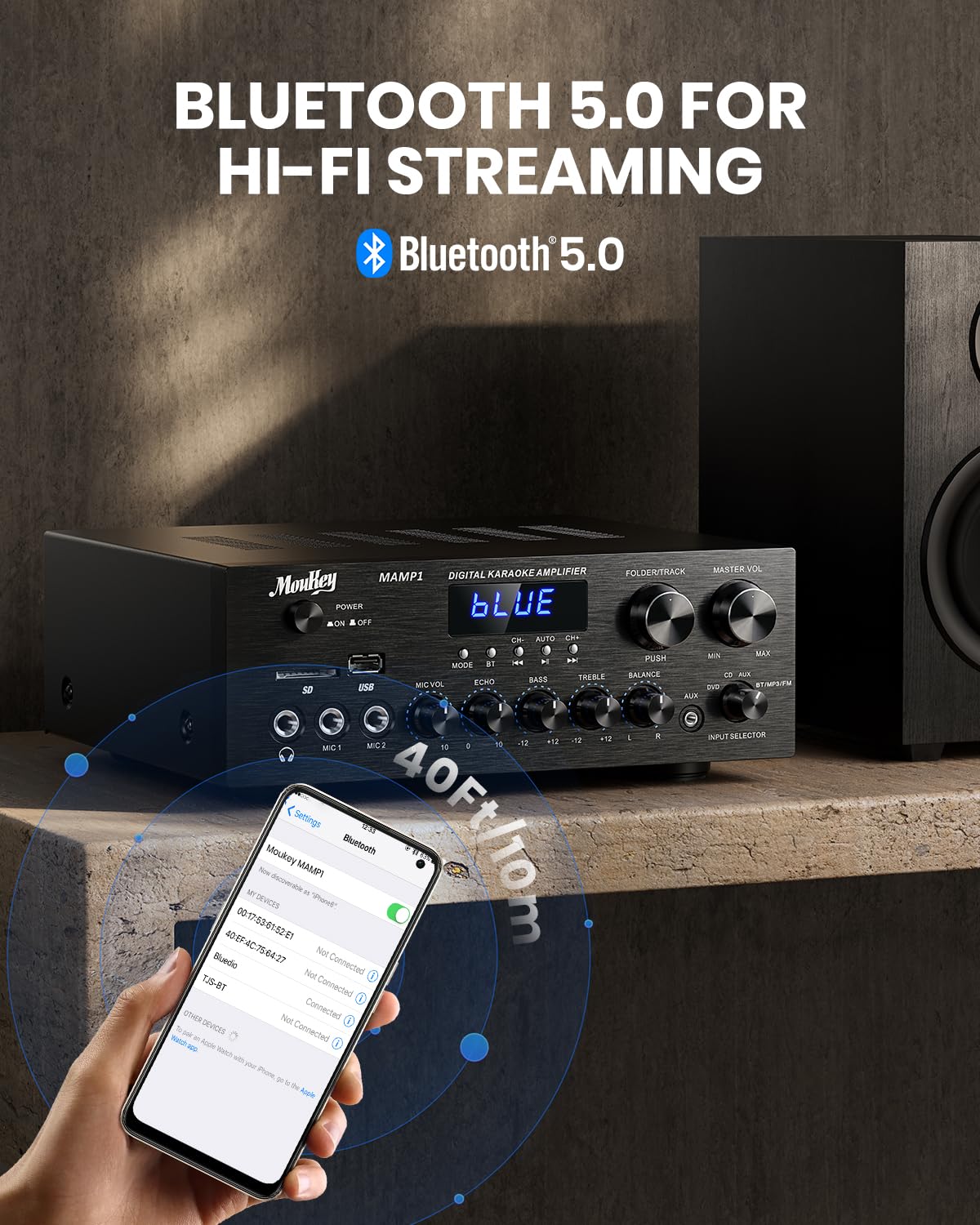
Imagen: The Moukey MAMP1 amplifier displaying "BLUE" on its screen, indicating Bluetooth mode, with a smartphone showing pairing options.
6.7 Reproducción USB/SD
Insert a USB drive (max 32GB) or SD card (max 16GB) into the respective slot on the front panel. The ampEl dispositivo cambiará automáticamente al modo USB/SD y comenzará la reproducción. Utilice el Anterior, Reproducir/Pausa, Próximo, y Folder/Track Botones para controlar la reproducción.
6.8 Radio FM
Ensure the FM antenna is connected to the rear panel. Select FM mode using the Botón de modoUtilice el Anterior y Próximo buttons to tune to radio stations. The LED display will show the current frequency.
7. Mantenimiento
Para mantener el rendimiento y la apariencia de su ampmás duradero:
- Limpieza: Utilice un paño suave y seco para limpiar el exterior de la unidad. No utilice limpiadores líquidos ni productos químicos abrasivos.
- Ventilación: Asegúrese de que las aberturas de ventilación estén libres de polvo y residuos.
- Almacenamiento: Si va a almacenar la unidad durante un período prolongado, desconéctela de la alimentación y guárdela en un lugar fresco y seco.
8. Solución de problemas
If you encounter issues with your Moukey MAMP1 amplificador, consulte la siguiente tabla para ver problemas y soluciones comunes:
| Problema | Posible causa | Solución |
|---|---|---|
| Sin poder | Cable de alimentación no conectado; Toma de corriente defectuosa; Interruptor de encendido apagado. | Ensure power cable is securely connected. Try a different power outlet. Press the power switch to ON. |
| No hay salida de sonido | Incorrect input selected; Volume too low; Speakers not connected; Speaker wires loose; Mute function active. | Select the correct input source. Increase Master Volume. Check speaker connections and polarity. Ensure mute is off. |
| El Bluetooth no se conecta | AmpEl dispositivo no está en modo Bluetooth; el dispositivo está demasiado lejos; el dispositivo ya está emparejado con otra unidad. | Asegurar amplifier is in Bluetooth mode ("BLUE" on display). Move device closer to amplifier. Disconnect from other devices. |
| El micrófono no funciona | Microphone not connected; Mic volume too low; Echo knob set to minimum. | Connect microphone securely. Increase Microphone Volume. Adjust Echo knob. |
| Problemas de reproducción de USB/SD | Sin soporte file format; USB drive/SD card corrupted; Capacity exceeded. | Asegurar audio files are in supported formats (e.g., MP3). Try a different USB drive/SD card. Check capacity limits (USB max 32G, SD max 16G). |
Si el problema persiste después de probar estas soluciones, comuníquese con el servicio de atención al cliente.
9. Especificaciones
| Característica | Especificación |
|---|---|
| Marca | Ratón |
| Modelo | MAMP1 |
| Potencia de salida | 220 vatios |
| Canales | 2 |
| Volumentage | 115 voltios (CA) |
| Impedancia del altavoz | 4-16 ohmios |
| Versión de Bluetooth | 5.0 |
| Alcance de Bluetooth | Más de 12 metros (40 pies) |
| Compatibilidad con tarjetas USB/SD | USB: Max 32GB, SD: Max 16GB |
| Dimensiones (L x An x Al) | 25 cm x 21.3 cm x 9.5 cm (aprox. 10 pulgadas x 8 pulgadas x 4 pulgadas) |
| Código Postal | 715802779039 |
| País natal | Porcelana |

Imagen: The Moukey MAMP1 amplifier with its dimensions labeled.
10. Garantía y soporte
This Moukey MAMP1 Poder AmpEl amplificador viene con un 1 año de garantía A partir de la fecha de compra. Esta garantía cubre defectos de fabricación y mano de obra en condiciones normales de uso.
La garantía no cubre:
- Damage caused by accident, abuse, misuse, flood, fire, or other natural causes.
- Daños causados por modificaciones o reparaciones no autorizadas.
- Damage caused by improper installation or connection.
- Cosmetic damage, such as scratches, dents, and broken plastic on ports.
For warranty claims or technical support, please contact the retailer where you purchased the product or visit the official Moukey website for contact information. Please have your purchase receipt and product model number (MAMP1) ready when contacting support.