
Introducción
This manual provides essential instructions for the proper use, setup, and maintenance of your BYTECH Lightning Cable (Model: CLMFCBLASST). This cable is designed for charging and data transfer with compatible Apple iOS devices, including iPhones, iPads, and iPods, as well as connecting to laptops and personal computers.
Producto terminadoview
The BYTECH Lightning Cable is a durable accessory for your Apple devices. It features a Lightning connector on one end and a USB-A connector on the other, facilitating both power delivery for charging and data exchange. The cable supports fast charging capabilities for compatible devices.
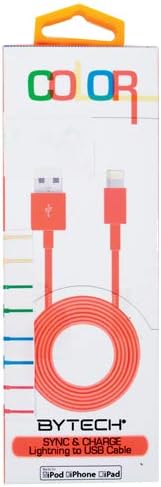
This image displays the retail packaging for the BYTECH Lightning to USB Cable. The packaging is white with 'COLOR' printed at the top in multi-colored letters. An orange Lightning to USB cable is visible through a clear window, coiled neatly. The bottom of the package indicates 'BYTECH SYNC & CHARGE Lightning to USB Cable' and compatibility with iPod, iPhone, and iPad.
Componentes:
- Conector Lightning: Connects to your Apple iOS device (iPhone, iPad, iPod).
- Conector USB-A: Connects to a USB power adapter, computer USB port, or other USB charging source.
- Cable: The flexible cord connecting the two connectors, designed for durability and efficient power/data transfer.
Configuración
To begin using your BYTECH Lightning Cable, follow these steps:
- Identificar conectores: Locate the Lightning connector (smaller, 8-pin) and the USB-A connector (larger, rectangular).
- Conectar a la fuente de alimentación o computadora:
- For charging, insert the USB-A connector into a compatible USB wall adapter or car charger.
- For charging and data transfer, insert the USB-A connector into an available USB port on your laptop or personal computer.
- Conéctese al dispositivo iOS: Insert the Lightning connector into the charging port of your iPhone, iPad, or iPod. Ensure it is fully seated.
- Verificar conexión: Your device should indicate that it is charging or connected to a computer.
Instrucciones de funcionamiento
Carga de su dispositivo:
Once connected as described in the "Setup" section, your iOS device will begin charging automatically. The cable supports fast charging when paired with a compatible power adapter and device.
Transferencia de datos:
When connected to a computer, the cable enables data transfer between your iOS device and the computer. This allows for syncing media, documents, and other files using iTunes or Finder (macOS Catalina and later).
- Connect your iOS device to your computer using the BYTECH Lightning Cable.
- Unlock your iOS device and respond to any "Trust This Computer?" prompts by tapping "Trust" and entering your passcode if required.
- Open iTunes (Windows/older macOS) or Finder (macOS Catalina and later) on your computer.
- Select your device within the application to manage and transfer data.
Mantenimiento
Proper care extends the life of your cable:
- Almacenamiento: When not in use, coil the cable loosely. Avoid tight coiling or sharp bends, especially near the connectors, as this can damage the internal wires.
- Limpieza: Utilice un paño suave y seco para limpiar con cuidado el cable y los conectores. No utilice limpiadores líquidos ni productos abrasivos.
- Manejo: Sujete siempre el conector al conectar o desconectar el cable. Evite tirar directamente del cable.
- Ambiente: Mantenga el cable alejado de temperaturas extremas, luz solar directa y humedad.
Solución de problemas
If you encounter issues with your BYTECH Lightning Cable, consider the following:
- El dispositivo no se carga:
- Asegúrese de que ambos extremos del cable estén bien conectados.
- Try a different USB power adapter or computer USB port.
- Check the charging port on your iOS device for debris or lint.
- Test the cable with a different compatible iOS device, if available.
- Problemas de transferencia de datos:
- Ensure your iOS device is unlocked and you have tapped "Trust This Computer" when prompted.
- Restart both your iOS device and your computer.
- Update iTunes or Finder to the latest version.
- Pruebe con un puerto USB diferente en su computadora.
- Daños en los cables: Inspect the cable for any visible signs of damage, such as fraying, cuts, or bent connectors. Discontinue use if damage is found.
Presupuesto
| Atributo | Detalle |
|---|---|
| Marca | Tecnología de bytes |
| Número de modelo | CLMFCBLASST |
| Código Postal | 805112016938 |
| Tipo de conector | Lightning (Male) to USB-A (Male) |
| Tipo de cable | Iluminación |
| Dispositivos compatibles | iPhone, iPad, iPod, Laptop, Personal Computer |
| Característica especial | Carga rápida |
| Usos recomendados | Charging, data transfer for iOS devices |
| Número de pines | 8 (Rayo) |
| Peso del artículo | 1.76 onzas |
| Dimensiones del producto | 1 x 1 x 1 pulgadas (embalaje) |
Garantía y soporte
For warranty information or technical support regarding your BYTECH Lightning Cable, please refer to the official Bytech webSitio web o contacte directamente con el servicio de atención al cliente. Conserve el recibo de compra para reclamaciones de garantía.
Para consultas generales, puede visitar el Bytech brand page on Amazon.