
1. Introducción y másview
Thank you for choosing the Comix S3508D Desktop Micro-Cut Paper Shredder. This manual provides essential information for the safe and efficient operation, maintenance, and troubleshooting of your new shredder. Please read it thoroughly before use and retain it for future reference.
The Comix S3508D is designed for personal and home office use, offering secure destruction of sensitive documents, CDs/DVDs, and credit cards with its micro-cut technology. Key features include:
- Continuous shredding for up to 30 minutes.
- Separate waste bin design for CD/DVD fragments, allowing for easy waste separation.
- Energy-saving technology that automatically shuts off the device after 30 minutes of inactivity.
2. Instrucciones de seguridad importantes
Para reducir el riesgo de lesiones o daños, tenga en cuenta las siguientes precauciones de seguridad:
- Mantener fuera del alcance de los niños y las mascotas. The shredder has sharp blades and moving parts.
- Avoid loose clothing, jewelry, and long hair near the paper entry slot.
- Do not insert fingers or hands en la ranura de entrada de papel.
- Do not spray any flammable products onto the shredder or use it near flammable materials.
- Unplug the shredder before moving, cleaning, or emptying the waste bin.
- Do not shred metal objects, wet paper, or adhesive labels as this can damage the blades.
- Utilice la trituradora sobre una superficie plana y estable.
- Do not overload the shredder. Refer to the maximum sheet capacity in the specifications.
- Do not open the shredder housing. No hay piezas en el interior que puedan ser reparadas por el usuario.
3. Componentes del producto
Familiarize yourself with the main parts of your Comix S3508D shredder:
- Cabezal triturador: Contains the cutting mechanism and control panel.
- Ranura de entrada de papel: For inserting documents.
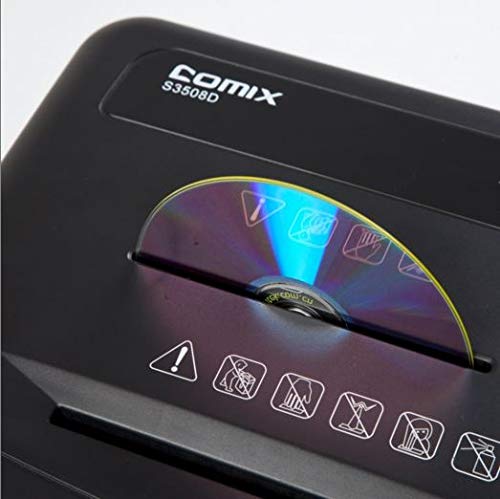
- CD/DVD Entry Slot: A separate slot for optical media.
- Interruptor de control: For selecting ON/OFF, Auto, Forward, and Reverse modes.
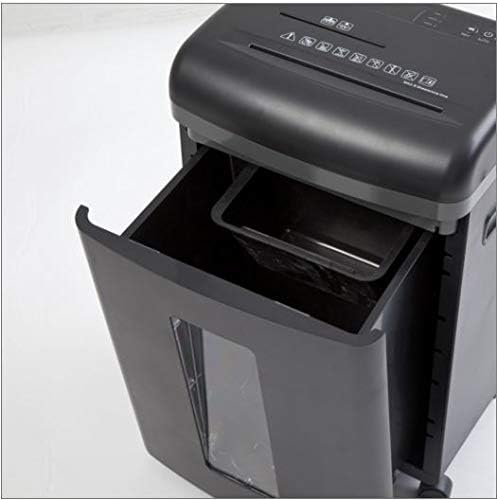
- Cubo de basura: Collects shredded paper and media.
- CD/DVD Waste Compartment: A smaller, separate compartment within the main bin for shredded optical media.
- Ruedas: Ruedas para fácil movilidad.
4. Configuración
- Deshacer: Retire con cuidado la trituradora de su embalaje. Conserve el embalaje para su posterior transporte o almacenamiento.
- Posición: Place the shredder on a level and stable surface. Ensure there is enough space around the unit for proper ventilation and access to the power outlet.
- Conecte la electricidad: Conecte el cable de alimentación a una toma eléctrica estándar.
- Comprobar contenedor: Asegúrese de que el contenedor de residuos esté correctamente insertado en la trituradora. La trituradora no funcionará si el contenedor no está bien colocado.
5. Instrucciones de funcionamiento
Control Switch Functions:
- OFF: La trituradora está apagada.
- COCHE: The shredder is in standby mode. It will automatically start when paper is inserted and stop when shredding is complete. This is the recommended setting for normal operation.
- ADELANTE: Manually runs the shredder forward. Use this for continuous shredding if needed, but be mindful of the duty cycle.
- CONTRARRESTAR: Manually runs the shredder in reverse. Use this to clear paper jams.
Destrucción de documentos:
- Coloque el interruptor de control en AUTO.
- Insert up to 8 sheets of A4 (70gsm) paper straight into the paper entry slot. The shredder will automatically start and stop.
- No exceda la capacidad máxima de hojas para evitar atascos y daños.
Destrucción de CD/DVD y tarjetas de crédito:
- Coloque el interruptor de control en AUTO.
- Insert one CD/DVD or credit card at a time into the dedicated CD/DVD entry slot.
- The shredded media will fall into the separate CD/DVD waste compartment within the main bin.
Ciclo de trabajo:
The Comix S3508D is designed for a continuous run time of 30 minutes ON, seguido de un 40 minutos APAGADO cool-down period. Exceeding the duty cycle may cause the shredder to overheat and activate its thermal protection, temporarily shutting down the unit. Allow it to cool down before resuming operation.
6. Mantenimiento
Cómo vaciar el contenedor de basura:
- Always set the control switch to APAGADO and unplug the shredder before emptying the bin.
- Extraiga el contenedor de residuos de la parte delantera de la trituradora.
- Dispose of the shredded waste. Remember to empty the separate CD/DVD compartment as well.
- Deslice el contenedor de basura nuevamente a su lugar hasta que encaje firmemente.
Lubricación de trituradora:
Regular oiling is recommended to maintain optimal performance and extend the life of your shredder, especially after emptying the waste bin 2-3 times or after heavy use. Use shredder oil (vegetable oil is not recommended).
- Coloque el interruptor de control en APAGADO.
- Aplique una línea fina de aceite para trituradora a lo largo de la ranura de entrada del papel.
- Coloque el interruptor de control en ADELANTE for 2-3 seconds to distribute the oil, then switch back to APAGADO.
Limpieza:
Limpie el exterior de la trituradora con un paño suave y seco. No utilice limpiadores abrasivos ni disolventes.
7. Solución de problemas
| Problema | Posible causa | Solución |
|---|---|---|
| La trituradora no funciona. | 1. El cable de alimentación no está enchufado.
2. Waste bin not properly inserted. 3. Sobrecalentamiento. |
1. Ensure power cord is securely plugged into an outlet.
2. Push the waste bin firmly into place. 3. Allow the shredder to cool down for 40 minutes. |
| Atasco de papel. | 1. Too much paper inserted.
2. Paper inserted incorrectly. |
1. Set switch to CONTRARRESTAR to clear paper. Remove excess paper.
2. If jam persists, unplug, carefully remove paper, then plug in and try CONTRARRESTAR de nuevo. |
| Shredder runs continuously in AUTO mode. | El sensor está bloqueado o sucio. | Unplug the shredder and clean the paper entry sensor (usually a small clear window) with a soft cloth. |
8. Especificaciones
| Característica | Detalle |
|---|---|
| Marca | Cómic |
| Modelo | S3508D |
| Tipo de triturado | Microcorte |
| Tamaño triturado | 2 x 12 mm |
| Standard Sheet Capacity (70gsm) | 8 hojas |
| CD/DVD/Card Capacity | 1 a la vez |
| Ancho de entrada | 220 milímetros |
| Velocidad de trituración | 2.3 metros/minuto |
| Ciclo de trabajo | 30 minutos ENCENDIDO / 40 minutos APAGADO |
| Característica especial | Modo de ahorro de energía |
| Peso del artículo | 2.2 libras |
| ASIN | B083XFNHQH |
9. Garantía y soporte
Comix products are manufactured to high-quality standards. For warranty information, please refer to the warranty card included with your purchase or contact your retailer. For technical support or service inquiries, please contact Comix customer service through the contact information provided on the official Comix websitio web o su documentación de compra.