
1. Bienvenido
Gracias por la compraasing the Korg i3 61-Key Synthesizer Music Workstation. This instrument is designed to help you easily realize your musical ideas, offering a versatile range of sounds, styles, and recording capabilities. Please read this manual thoroughly to ensure proper use and to maximize your enjoyment of the i3.
2. Información de seguridad
Para evitar descargas eléctricas, no abra el caasing. Refer servicing to qualified personnel only. Do not expose this appliance to rain or moisture. Avoid placing the unit near heat sources or in direct sunlight. Ensure proper ventilation. Use only the specified power adapter or batteries. Keep out of reach of children.
3. Contenido del paquete
- Korg i3 61-Key Synthesizer Music Workstation
- Adaptador de CA
- Guía de inicio rápido
- Precauciones de seguridad
4. Configuración
4.1 Encendido / Apagado
Connect the supplied AC adapter to the DC 12V input jack on the rear panel and plug it into a power outlet. Alternatively, the i3 supports battery operation for portability. To power on, press the power button. To power off, press and hold the power button until the unit shuts down.
4.2 Conexión de periféricos
The Korg i3 offers various connectivity options on its rear panel:
- Auriculares: Connect standard 3.5mm headphones to the PHONES jack for private practice.
- USB: Use the USB Type A port for connecting to a computer (TO HOST) or external storage devices (TO DEVICE).
- MIDI: Connect external MIDI devices using the MIDI IN/OUT ports.
- Entrada/salida de audio: Connect external audio sources to the AUDIO IN jack or output audio to external speakers/amplifiers via the OUTPUT L/MONO and R jacks.
- Controlador de pie: Connect a foot controller (e.g., sustain pedal) to the FOOT CONTROLLER jack for expressive control.

Image: Rear panel connections, showing various input and output ports including USB, MIDI, Audio, and Foot Controller.

Imagen: Detallada view of the rear panel, highlighting the DC 12V power input, USB TO HOST/DEVICE, MIDI OUT, FOOT CONTROLLER, OUTPUT L/MONO and R, and AUDIO IN ports.
5. Instrucciones de funcionamiento
5.1 Funcionamiento básico y visualización
The i3 features a backlit LCD panel that displays current settings, sound names, and sequencer information. Use the navigation buttons and data entry dial to browse menus and adjust parameters.

Image: A close-up of the Korg i3's central control panel, featuring a backlit LCD screen displaying 'Grand Piano' and 'Play the i3', surrounded by various buttons and a data entry dial for navigation and selection.
5.2 Selección de sonido
The i3 offers a wide variety of sound sets and styles. Use the dedicated buttons and the data entry dial to select different instrument sounds such as Grand Piano, Organ, Brass, Drums, Guitar, and more. The keyboard features touch-sensitive keys for expressive performance.

Image: A close-up of the Korg i3's control surface, showing buttons for sound sets (Upper 1, Upper 2, Upper 3, Lower/Split), instrument categories (Bass, Drum, Percussion, Chord 1-8), and Style Performance controls, indicating the wide range of sound options available.
5.3 Uso del secuenciador
The built-in sequencer allows you to record, save, and play back both MIDI and audio files. Refer to the detailed sequencer section in the full manual for advanced recording and editing techniques.
6. Funciones terminadasview
The Korg i3 is a versatile music workstation designed for various musical situations, from live performances to home studio use. Key features include:
- 61-Key touch-sensitive keyboard.
- Extensive sound sets and backing styles.
- Built-in MIDI and audio sequencer.
- Lightweight and portable design, supporting battery operation.
- Diverse connectivity options including USB, MIDI, and audio I/O.

Imagen: Frente view of the Korg i3 61-Key Synthesizer Music Workstation, showcasing its full keyboard, control panel, and display.

Image: An angled perspective of the Korg i3, highlighting its sleek design and compact form factor.
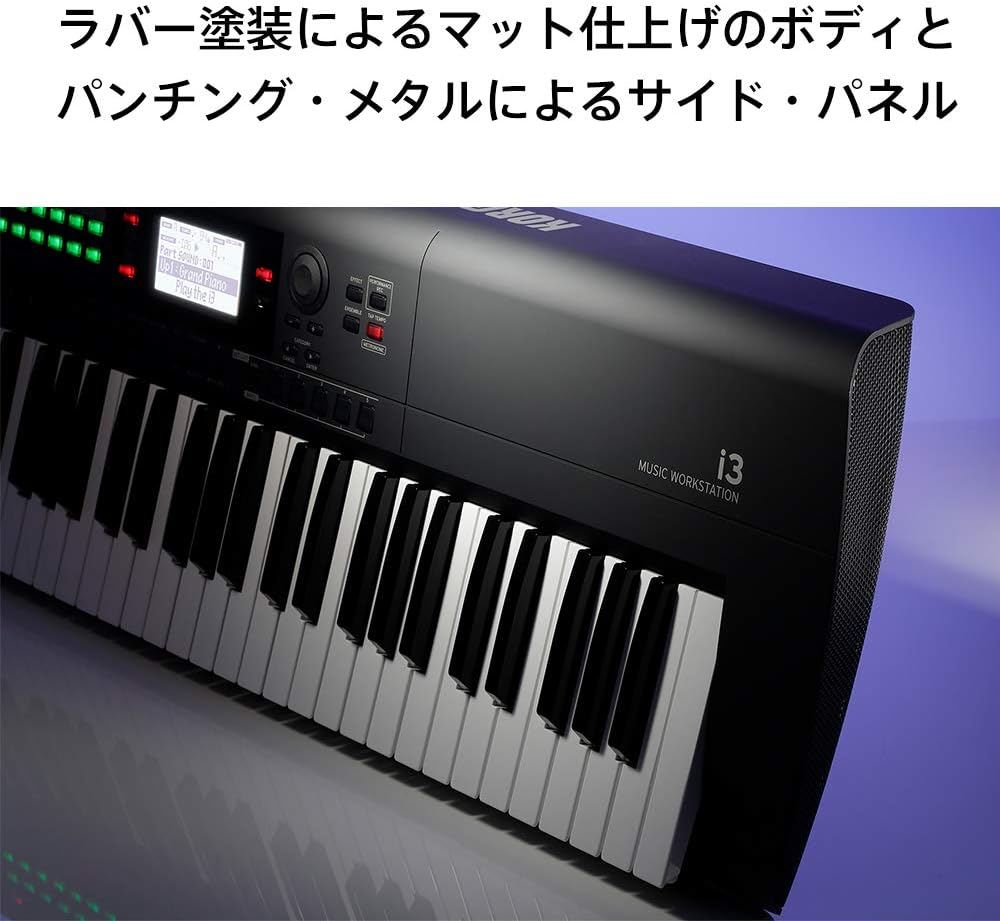
Imagen: Side profile of the Korg i3, illustrating its slim and lightweight construction, ideal for portability.
7. Mantenimiento
7.1 Limpieza
Limpie la unidad con un paño suave y seco. Para la suciedad difícil, utilice un paño ligeramente seco.amp Paño y séquelo bien. Evite usar limpiadores abrasivos, ceras o disolventes.
7.2 Almacenamiento
When not in use for extended periods, store the i3 in a cool, dry place away from direct sunlight and extreme temperatures. If using batteries, remove them before long-term storage to prevent leakage.
8. Solución de problemas
- Sin sonido: Check volume levels on the i3 and any connected audio equipment. Ensure cables are securely connected.
- Problemas de energía: Verify AC adapter connection or check battery levels.
- Las teclas no responden: Asegúrese de que la unidad esté encendida y no bloqueada. Intente reiniciarla.
For further assistance, please refer to the full user manual or contact KORG customer support.
9. Especificaciones
- Número de llaves: 61
- Tipo de clave: Pantalla táctil
- Dimensiones: 11.65 x 40.83 x 3.15 pulgadas (29.6 cm x 103.7 cm x 8 cm)
- Peso del artículo: 0.203 ounces (approximately 5.75 grams, note: this weight seems unusually low and may be a data entry error, typical keyboard weight is several pounds/kg)
- Fuente de energía: Battery Powered (also AC adapter)
- Conectividad: USB Type A (TO HOST, TO DEVICE), MIDI IN/OUT, Audio IN, OUTPUT L/MONO, R, 3.5mm Headphones Jack, Foot Controller
- Tipo de material: Plástico
- Color: Negro, gris, blanco
- Nombre del modelo: i3 Music Workstation
10. Garantía y soporte
KORG products are covered by a limited warranty. Please refer to the warranty card included with your product for specific terms and conditions. For technical support, product registration, or service inquiries, please visit the official KORG website or contact your local KORG distributor.


