
1. Introducción
Thank you for choosing the SUNSHINE P-1503T Analog Power Supply. This manual provides essential information for the safe and efficient operation, setup, maintenance, and troubleshooting of your device. Please read this manual thoroughly before using the product and keep it for future reference.
The SUNSHINE P-1503T is a versatile 15-volt, 3-amp analog power supply designed primarily for mobile phone maintenance. It features touch-sensitive controls and includes two USB ports for convenient mobile testing and charging.
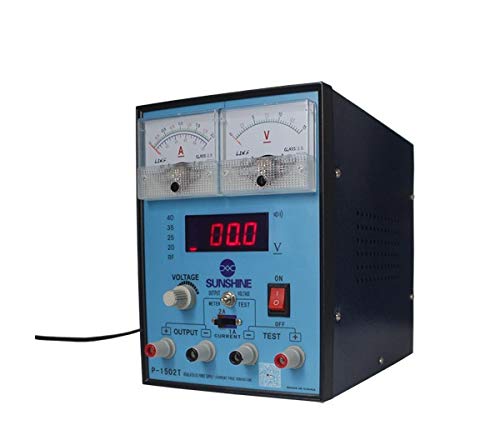
Figura 1: Frente view of the SUNSHINE P-1503T Analog Power Supply. This image shows the device's display, control knobs, and output terminals, including the two USB ports.
2. Información de seguridad
ADVERTENCIA: No seguir estas instrucciones de seguridad puede provocar descargas eléctricas, incendios o lesiones graves.
- Conecte siempre la fuente de alimentación a una toma eléctrica con conexión a tierra.
- No opere el dispositivo en mojado o damp condiciones.
- Asegúrese de que haya una ventilación adecuada para evitar el sobrecalentamiento. No bloquee las aberturas de ventilación.
- No abra la casing de la fuente de alimentación. No contiene piezas que el usuario pueda reparar. Encargue cualquier reparación a personal cualificado.
- Evite tocar los terminales de salida cuando el dispositivo esté encendido.
- Disconnect the power cord from the outlet before cleaning or if the device will not be used for an extended period.
- Utilice únicamente el volumen de entrada especificadotage (15 Volts) as indicated on the device.
3. Configuración
3.1 Desembalaje
- Retire con cuidado la fuente de alimentación de su embalaje.
- Inspect the device for any signs of damage during transit. If damaged, do not use and contact your supplier.
- Ensure all accessories are present (e.g., power cord, test leads if included).
3.2 Conexión a la alimentación
- Place the power supply on a stable, level surface with adequate ventilation.
- Connect the provided power cord to the power input socket on the rear of the device.
- Conecte el otro extremo del cable de alimentación a una toma eléctrica adecuada con conexión a tierra.
4. Instrucciones de funcionamiento
4.1 Encendido / Apagado
- To power on the device, press the power switch located on the front panel. The display will illuminate.
- Para apagar, presione nuevamente el interruptor de encendido.
4.2 Adjusting Output
The P-1503T is an analog power supply, typically meaning voltage and current are set via rotary knobs.
- Utilice el Volumentage Perilla de ajuste para establecer el volumen de salida deseadotage. Monitor the voltage pantalla.
- Utilice el Perilla de ajuste de corriente to set the desired current limit. Monitor the current display.
- The device emits a sound upon touch, indicating interaction with its controls.
4.3 Uso de puertos USB
The power supply features two USB ports on the front panel:
- USB Port 1 (Mobile Testing): Connect a mobile device here for diagnostic purposes. This port is designed to provide stable power for testing mobile phone circuits.
- USB Port 2 (Mobile Charging): Connect a mobile device here for charging. This port delivers power suitable for recharging mobile phone batteries.
Note: Always ensure the output voltage and current settings are appropriate for the device being connected to prevent damage.
5. Mantenimiento
5.1 Limpieza
- Ensure the power supply is turned off and disconnected from the main power outlet before cleaning.
- Utilice un paño suave y seco para limpiar el exterior del dispositivo.
- Do not use liquid cleaners, aerosols, or solvents, as these may damage the casing o componentes internos.
- Mantenga las aberturas de ventilación libres de polvo y residuos.
5.2 Almacenamiento
Cuando no esté en uso, guarde la fuente de alimentación en un lugar fresco y seco, lejos de la luz solar directa y de temperaturas extremas.
6. Solución de problemas
| Problema | Posible causa | Solución |
|---|---|---|
| El dispositivo no se enciende. |
|
|
| Sin volumen de salidatage / actual. |
|
|
| Los puertos USB no funcionan. |
|
|
7. Especificaciones
| Característica | Detalle |
|---|---|
| Marca | LUZ SOLAR |
| Modelo | P-1503T |
| Dispositivos compatibles | Teléfono móvil |
| Tipo de conector | ATX |
| Factor de forma | ATX |
| Método de enfriamiento | Aire |
| Volumen de entrada máximotage | 15 voltios |
| Vol. Mínimo de entradatage | 15 voltios |
| Fabricante | LUZ SOLAR |
| System Bus Connector Type | Conector 2 |
| Fuente de poder | Externo |
| ASIN | B0847QS2FX |
8. Garantía y soporte
This product is covered by a standard manufacturer's warranty. Please refer to the warranty card included with your purchase for specific terms and conditions. For technical support, service, or warranty claims, please contact your retailer or the manufacturer directly.
For the latest information and support, please visit the official SUNSHINE websitio (si está disponible).