
Introducción
This manual provides essential information for setting up, operating, and maintaining your Palm Phone PVG100. The Palm Phone PVG100 is a compact, unlocked 4G LTE smartphone with 32GB memory, featuring a 3.3-inch HD display, 12MP rear camera, and IP68 water and dust resistance. Its design focuses on a minimalist and outdoor-friendly experience.
Qué incluye
- 1 x Palm Phone
- 1 x Pin de bandeja de tarjeta SIM
- 1 x cable tipo C
- 1 x cargador
- 1 x Manual de usuario
Note: SIM card is not included.
Configuración
Inserción de la tarjeta SIM
To insert your SIM card, locate the SIM tray on the side of the device. Use the provided SIM tool to gently press into the small pinhole next to the tray. Angle the tool and pull the tray outward to remove it. Place your Nano-SIM card into the tray, ensuring proper orientation, then reinsert the tray into the phone.
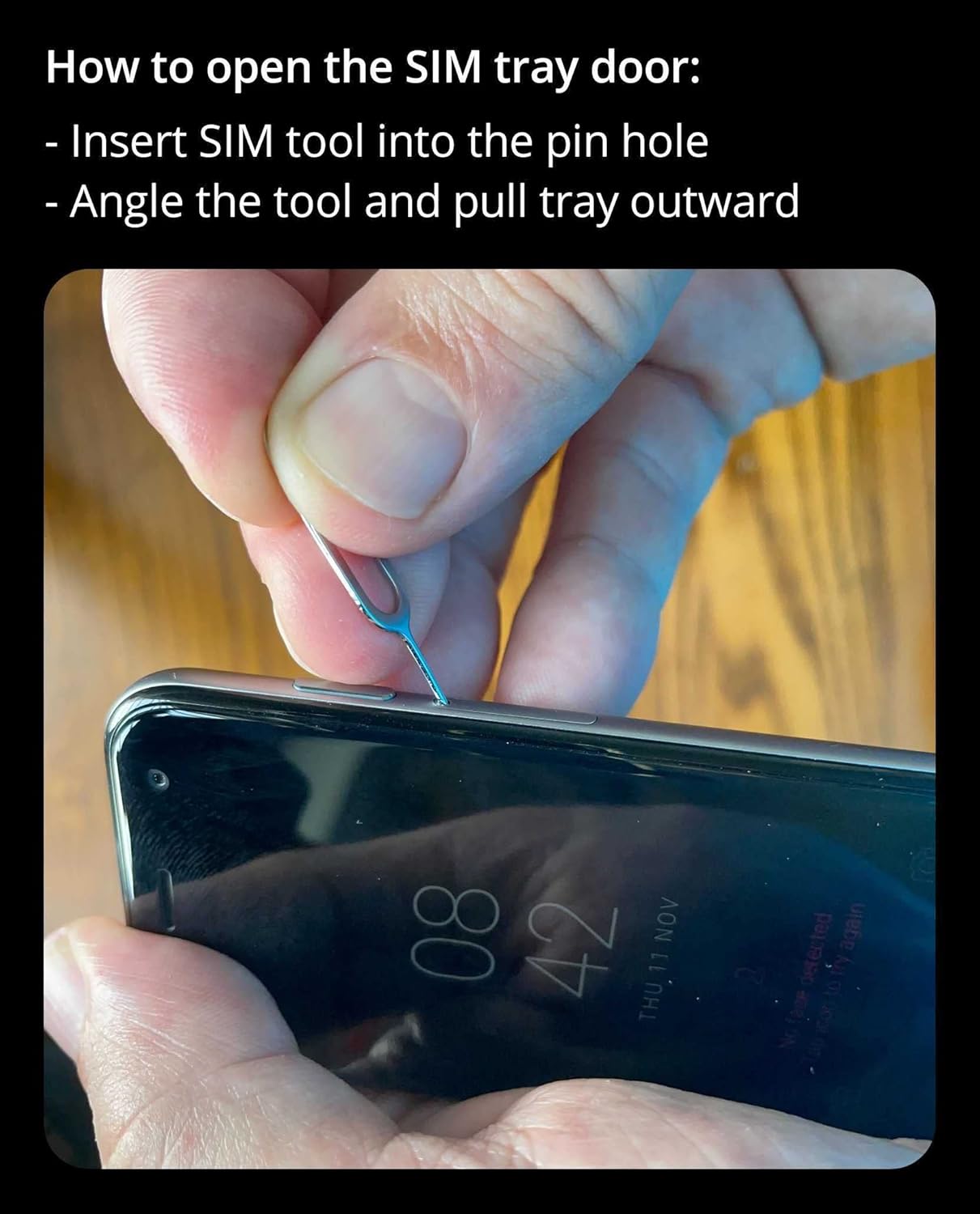
Image: A hand demonstrating how to insert the SIM tool into the Palm Phone's SIM tray pinhole.
Video: Instructions on how to open the SIM tray on the Palm Phone.
Encendido inicial y configuración
Press and hold the power button to turn on your Palm Phone. Follow the on-screen prompts to select your language, connect to a Wi-Fi network, and set up your Google account. This process will guide you through essential settings to personalize your device.
Compatibilidad del operador
The U.S. carrier unlocked Palm Phone PVG100 is compatible with Verizon and its subsidiary networks. It is not compatible with AT&T, Sprint, or T-Mobile networks, or any subsidiary networks using the same cellular bands and frequencies. For detailed compatibility, check your carrier's bands and frequencies.
Operating Your Palm Phone
Compact Design and Handling
The Palm Phone is designed to be compact and lightweight, fitting easily in the palm of your hand. It weighs just 2.2 oz and features a 3.3-inch HD display for clear visuals despite its small size.

Image: The Palm Phone PVG100 shown resting in the palm of a hand, highlighting its compact form factor.
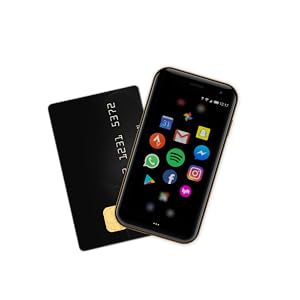
Image: The Palm Phone PVG100 displayed alongside a credit card, illustrating its small dimensions.
Life Mode
Life Mode is a feature designed to minimize distractions. When enabled, it silences incoming calls and notifications when the screen is turned off. Your phone becomes fully connected again once you wake the screen, ensuring you receive important communications when you are ready.
Características de la cámara
The Palm Phone is equipped with a high-resolution 12MP rear camera and an 8MP selfie camera. Access the camera app from your home screen to capture photos and videos. The phone supports custom shooting modes.
Face Unlock Recognition
For convenient and secure access, the Palm Phone features Face Unlock Recognition. Set up this feature in the security settings to unlock your device using facial recognition.
Hands-free Google Assistant
Utilize the hands-free Google Assistant for voice commands, information retrieval, and controlling smart devices. Simply say "Hey Google" or "Ok Google" to activate the assistant.
Mantenimiento
Cargando su dispositivo
The Palm Phone uses a USB-C charger. Connect the provided Type-C cable to the phone's charging port and to the charger. The device supports fast charging, reaching 50% in approximately 31 minutes and 100% in 68 minutes. Battery life varies by usage, configuration, cellular coverage, signal strength, and Wi-Fi connection. Typical use with Life Mode provides all-day battery life.
- Talk-Time: Up to 3 hours and 20 minutes
- GPS Workout: Up to 4 hours and 45 minutes
- Music LTE Streaming: Up to 5 hours and 30 minutes
- Music Wi-Fi Streaming: Up to 6 hours
- Local Music Playback: Up to 9 hours and 30 minutes
- Music Over LTE + GPS Workout: Up to 3 hours (outdoor workout with streaming audio, GPS, and LTE)
- Tiempo de espera: más de 3 días
Resistencia al agua y al polvo (IP68)
The Palm Phone PVG100 is rated IP68 for water and dust resistance. This means it can withstand immersion in up to 1.5 meters of fresh water for up to 30 minutes. While resistant, it is not waterproof. Avoid intentional submersion, exposure to pressurized water, or extreme conditions to maintain its resistance.

Image: The Palm Phone PVG100 shown with water splashing around it, illustrating its water-resistant design.
Solución de problemas
If you encounter issues with your Palm Phone, consider the following general troubleshooting steps:
- Reinicie el dispositivo: A menudo, un simple reinicio puede resolver pequeños fallos de software.
- Buscar actualizaciones de software: Asegúrese de que el sistema operativo de su dispositivo esté actualizado.
- Borrar caché/datos de la aplicación: If a specific app is causing issues, try clearing its cache or data in the app settings.
- Restablecimiento de fábrica: As a last resort, a factory reset can resolve persistent software problems. Back up your data before performing a factory reset.
- Contactar con soporte: If problems persist, refer to the warranty and support section for contact information.
Presupuesto
| Característica | Detalle |
|---|---|
| Marca | Palmera |
| Nombre del modelo | PVG100 |
| Sistema operativo | Androide |
| Capacidad de almacenamiento de memoria | 32 GB |
| Tamaño de la memoria RAM instalada | 3 GB |
| Tamaño de pantalla | 3.3 pulgadas |
| Resolución | 1280 x 720 |
| Tecnología celular | 4G |
| Tecnología de red inalámbrica | GSM, LTE, UMTS, Wi-Fi |
| Operador inalámbrico | Verizon (Unlocked) |
| Resolución de la cámara trasera | 12 MP |
| Resolución de la cámara frontal | 8 MP |
| Resolución de captura de video | 1080p (30 fps) |
| Capacidad de la batería | 6000 miliamp Hours (Lithium-Ion) |
| Nivel de resistencia al agua | Impermeable (IP68) |
| Seguridad biométrica | Reconocimiento facial |
| Tipo de conector | USB tipo C |
| Peso del artículo | 0.07 kilogramos |
| Año del modelo | 2018 |
Garantía y soporte
For warranty information and technical support, please refer to the documentation included in your product packaging or visit the official Palm webSitio. Conserve su comprobante de compra para reclamaciones de garantía.