
Launch CRP239
Manual del usuario del escáner lector de códigos LAUNCH CRP239 PREMIUM
Model: CRP239
1. Introducción
The LAUNCH CRP239 is an intelligent and networkable automotive diagnostic tool designed for passenger cars. It offers comprehensive OBD II full functionality and rapid testing capabilities for four major vehicle systems: Engine, Automatic Transmission (A/T), Anti-lock Braking System (ABS), and Supplemental Restraint System (SRS). Additionally, the CRP239 includes advanced reset functions such as Oil Reset, Steering Angle Reset, Brake-Pad Reset, Battery Matching, Throttle Adaptation, and Diesel Particulate Filter (DPF) Regeneration, catering to the needs of professional technicians and DIY enthusiasts.
2. Información de seguridad
Always observe the following safety precautions when operating the LAUNCH CRP239:
- Asegúrese de que el encendido del vehículo esté apagado antes de conectar o desconectar la herramienta de diagnóstico.
- No opere la herramienta en condiciones húmedas o cerca de líquidos o gases inflamables.
- Utilice equipo de protección personal adecuado, como gafas de seguridad, cuando trabaje en vehículos.
- Consulte el manual de servicio del vehículo para conocer los procedimientos de diagnóstico y las advertencias de seguridad específicos.
- Keep the tool away from strong magnetic fields.
- Utilice únicamente los cables y accesorios proporcionados.
3. Contenido del paquete
Verifique que todos los artículos estén presentes en el paquete:
- LAUNCH CRP239 Main Unit
- Cable de diagnóstico OBD II
- Cable USB
- Manual de usuario
- Estuche de transporte

Figure 3.1: Contents of the LAUNCH CRP239 package, showing the diagnostic tool, cables, and storage case.
4. Producto terminadoview
The LAUNCH CRP239 features a robust design with a 5.0-inch 720p touch screen for intuitive navigation. It includes physical buttons for common operations and a durable rubber exterior for protection.

Figura 4.1: Frente view of the LAUNCH CRP239, highlighting the touch screen display and navigation buttons.
4.1. Componentes
- Pantalla táctil de 5.0 pulgadas: High-resolution display for clear data presentation and touch input.
- Botones de navegacion: Directional pad, OK button, and Return button for menu navigation.
- Conector OBD II: Conector estándar de 16 pines para comunicación del vehículo.
- Puerto USB: Para conectarse a una computadora para actualizaciones o transferencia de datos.
- Indicador de encendido: Luz LED que indica el estado de energía.
5. Configuración
Follow these steps for initial setup of your LAUNCH CRP239:
- Cargue el dispositivo: Connect the CRP239 to a power source using the provided USB cable to ensure the internal 4000mAh lithium-polymer battery is fully charged before first use.
- Encendido: Mantenga presionado el botón de encendido para encender el dispositivo.
- Selección de idioma: On the initial setup screen, select your preferred language. The device supports multilingual operation.
- Conexión Wi-Fi: Navigate to the 'Settings' menu and select 'Wi-Fi'. Connect to an available wireless network to enable online updates and diagnostic report sharing.
- Actualización de software: It is recommended to perform a software update immediately after connecting to Wi-Fi to ensure you have the latest features and vehicle coverage. Navigate to the 'Update' section and follow the on-screen prompts.

Figure 5.1: The LAUNCH CRP239 with its diagnostic cable connected, ready for vehicle communication.
6. Instrucciones de funcionamiento
The LAUNCH CRP239 provides a comprehensive suite of diagnostic functions. Below are instructions for common operations.
6.1. Conexión al vehículo
- Locate the vehicle's 16-pin OBD II diagnostic port (usually under the dashboard).
- Asegúrese de que el encendido del vehículo esté APAGADO.
- Connect the OBD II diagnostic cable to the vehicle's OBD II port and to the CRP239.
- Turn the vehicle's ignition to the ON position (engine off). The CRP239 will power on automatically.
6.2. Navegación por el menú principal
Desde el menú principal, puedes acceder a diversas funciones:
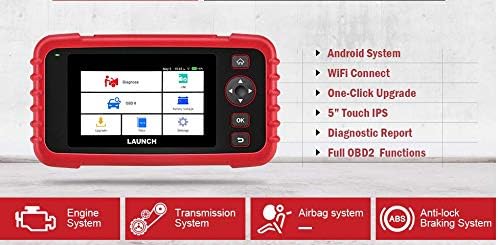
Figure 6.1: The main menu interface of the LAUNCH CRP239, providing access to all primary functions.
- Diagnosticar: For full system diagnostics (Engine, A/T, ABS, SRS).
- SOY: Readiness status for emissions.
- OBD II: Standard OBD II functions (read/clear DTCs, live data, freeze frame, O2 sensor test, etc.).
- Reset: Access various maintenance reset functions.
- Volumen de la bateríatage: Muestra el volumen de la batería del vehículo en tiempo real.tage.
- Actualizar: For software and firmware updates via Wi-Fi.
- Datos: Review saved diagnostic data and reports.
- Ajustes: Configure device settings such as language, Wi-Fi, and display.
6.3. Realización de un análisis de diagnóstico
- Desde el menú principal, seleccione "Diagnose".
- The tool will attempt to automatically identify the vehicle via VIN scan. If unsuccessful, you may need to manually select the vehicle make, model, and year.
- Elija el sistema que desea diagnosticar (por ejemplo, motor, transmisión, ABS, SRS).
- Seleccionar "Read Fault Codes" a view Diagnostic Trouble Codes (DTCs).
- Seleccionar "Clear Fault Codes" to erase DTCs after repairs have been made. Caution: Clearing codes without addressing the underlying issue will result in the codes reappearing.
- Seleccionar "Read Data Stream" a view datos de sensores en vivo
6.4. Using Reset Functions
The CRP239 supports several common maintenance reset functions:
- Reinicio de aceite: Restablece el recordatorio de vida útil del aceite después de un cambio de aceite.
- Restablecimiento del ángulo de dirección: Resets the steering angle sensor after alignment or component replacement.
- Brake-Pad Reset (EPB): Restablece el sistema de freno de estacionamiento electrónico después de reemplazar las pastillas de freno.
- Coincidencia de baterías (BMS): Registra una batería nueva en el sistema de gestión de batería del vehículo.
- Adaptación del acelerador: Vuelve a aprender la posición del cuerpo del acelerador después de limpiarlo o reemplazarlo.
- Regeneración del DPF: Inicia el proceso de regeneración del filtro de partículas diésel.
To use a reset function, select "Reset" from the main menu, then choose the desired function and follow the on-screen instructions.
6.5. Actualizaciones de software
The CRP239 supports one-click Wi-Fi updates for software and vehicle coverage, ensuring you always have the latest diagnostic capabilities.
- Asegúrese de que el dispositivo esté conectado a una red Wi-Fi estable.
- Desde el menú principal, seleccione "Actualizar".
- The device will check for available updates. Select the updates you wish to install and confirm.
- Allow the update process to complete without interruption. The device may restart during this process.

Figure 6.2: The update screen on the LAUNCH CRP239, showing available software updates for various vehicle brands.
6.6. Generación de informes de diagnóstico
The CRP239 can automatically generate diagnostic reports, which can be shared via email.
- After completing a diagnostic session, the tool will prompt you to generate a report.
- Confirm to generate the report.
- Navegar hasta el "Data" Menú para view saved reports.
- Select a report and choose the option to share via email. Ensure your Wi-Fi is connected and email settings are configured in the 'Settings' menu.
7. Mantenimiento
Proper maintenance ensures the longevity and optimal performance of your LAUNCH CRP239:
- Limpieza: Utilice un paño suave y seco para limpiar el dispositivo. No utilice limpiadores abrasivos ni disolventes.
- Almacenamiento: Store the device in its carrying case in a cool, dry place when not in use. Avoid extreme temperatures.
- Cuidado de la batería: Cargue la batería regularmente, incluso si no usa el dispositivo con frecuencia, para mantenerla en buen estado. Evite descargarla completamente durante periodos prolongados.
- Inspección de cables: Periodically inspect the diagnostic and USB cables for any signs of damage. Replace damaged cables immediately.
8. Solución de problemas
This section addresses common issues you might encounter with the LAUNCH CRP239.
| Problema | Posible causa | Solución |
|---|---|---|
| El dispositivo no se enciende. | Low battery; faulty connection to vehicle. | Charge the device fully. Ensure the OBD II cable is securely connected to both the CRP239 and the vehicle. Check vehicle's ignition is ON. |
| No se puede comunicar con el vehículo. | Incorrect vehicle protocol; faulty OBD II port; damaged cable. | Verify vehicle compatibility. Check the vehicle's OBD II port for power. Try a different vehicle or cable if available. Ensure vehicle ignition is ON. |
| La actualización del software falla. | Conexión Wi-Fi inestable; almacenamiento insuficiente. | Asegúrese de tener una conexión wifi estable y estable. Compruebe el espacio de almacenamiento disponible en el dispositivo. Reinicie el proceso de actualización. |
| La pantalla no responde. | Fallo de software; daño físico. | Perform a soft reset by holding the power button until the device restarts. If the issue persists, contact customer support. |
9. Especificaciones
| Característica | Detalle |
|---|---|
| Modelo | CRP239 (CREADER PROFESSIONAL 239) |
| Mostrar | Pantalla táctil de 5.0 pulgadas y 720p |
| Batería | Batería recargable de polímero de litio de 4000 mAh (incluida) |
| Conectividad | OBD II, Wi-Fi, USB |
| Cobertura del vehículo | Domestic, Asian, European vehicles (1996 and newer OBD2) |
| Sistemas compatibles | Engine, Automatic Transmission (A/T), ABS, SRS |
| Funciones especiales | Oil Reset, Steering Angle Reset, Brake-Pad Reset (EPB), Battery Matching (BMS), Throttle Adaptation, DPF Regeneration |
| Dimensiones | 32.4 x 25.4 x 8 cm (Paquete) |
| Peso del artículo | 560 gramos |
| Material exterior | Goma |
10. Información de garantía
The LAUNCH CRP239 comes with a standard manufacturer's warranty. For specific warranty terms and conditions, please refer to the warranty card included in your product package or visit the official Launch webSitio. Conserve su recibo de compra como comprobante para reclamaciones de garantía.
Es posible que haya opciones de garantía extendida disponibles a través de proveedores externos. Por ejemplo:ampSe ofrecen garantías extendidas de 1 año y 2 años de Salama Care para este producto.
11. Soporte
For technical assistance, product inquiries, or support, please contact Launch customer service through their official website or the contact information provided in your product documentation. Ensure you have your product model number (CRP239) and serial number ready when contacting support.
Para obtener recursos adicionales, visite el Launch Official Websitio.
Ask a question about this manual
Ask about setup, troubleshooting, compatibility, parts, safety, or missing instructions. Manuals+ will review the question and use this page’s manual context to help answer it.