
1. Producto terminadoview
The realme 6 Pro is a high-performance smartphone designed for advanced mobile computing and photography. It features a powerful Qualcomm Snapdragon 720G processor, a 90Hz Ultra Smooth Display, and a versatile 64MP AI Quad Camera system. This manual provides essential information for setting up, operating, maintaining, and troubleshooting your device.
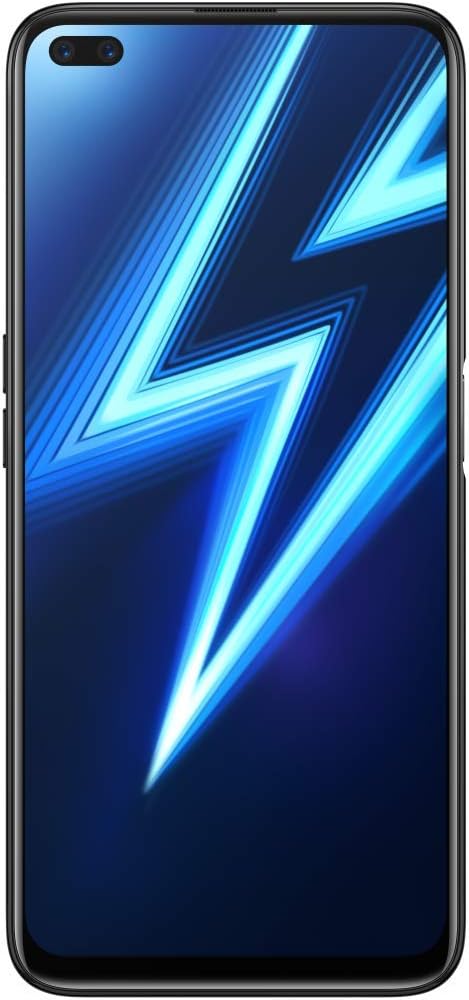
Figura 1.1: Frente view of the realme 6 Pro smartphone, showing the dual in-display selfie cameras and the large display.
2. Configuración
2.1 Desembalaje e inspección inicial
Carefully unbox your realme 6 Pro and verify that all components are present. The standard package includes:
- teléfono inteligente realme 6 Pro
- Batería integrada (preinstalada)
- FlashCharge Charger
- Cable USB tipo C
- Herramienta de expulsión de SIM
- Funda protectora de TPU
- Película protectora de pantalla preaplicada
- Guía de inicio rápido
2.2 Instalación de la tarjeta SIM y la tarjeta MicroSD
The realme 6 Pro supports dual SIM cards and one MicroSD card simultaneously. Follow these steps to install them:
- Localice la bandeja de la tarjeta SIM en el costado del dispositivo.
- Inserte la herramienta de extracción de SIM en el pequeño orificio al lado de la bandeja y presione suavemente hasta que la bandeja salga.
- Place your Nano-SIM cards into the designated slots (SIM1, SIM2) and your MicroSD card into its slot, ensuring the gold contacts face downwards.
- Vuelva a insertar con cuidado la bandeja en el teléfono hasta que encaje en su lugar.

Figura 2.1: Lado view of the realme 6 Pro, showing the location of the SIM card tray and volume buttons.
2.3 Carga inicial
Before first use, fully charge your realme 6 Pro. Use the provided FlashCharge charger and USB Type-C cable for optimal charging speed.
- Conecte el cable USB tipo C al puerto de carga del teléfono.
- Connect the other end of the cable to the FlashCharge adapter.
- Conecte el adaptador a una toma de corriente.
- The device should fully charge in approximately 1 hour.
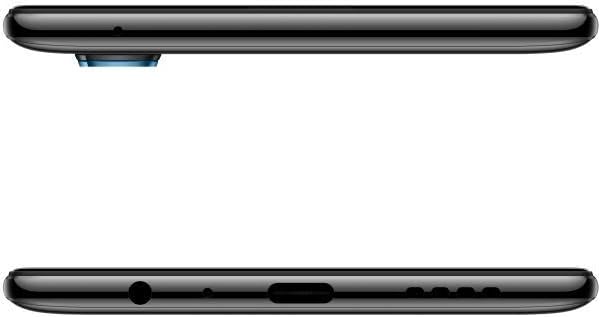
Figura 2.2: Abajo view of the realme 6 Pro, illustrating the USB Type-C charging port and 3.5mm headphone jack.
2.4 Encendido / Apagado
- Para encender: Mantenga presionado el botón de encendido (ubicado en el lado derecho) hasta que aparezca el logotipo de realme.
- Para apagar: Mantenga presionado el botón de Encendido, luego seleccione “Apagar” de las opciones en la pantalla.
- Para reiniciar: Mantenga presionado el botón de Encendido, luego seleccione “Reiniciar” de las opciones.
3. Instrucciones de funcionamiento
3.1 Pantalla y navegación
Your realme 6 Pro features a 6.6-inch LCD display with a resolution of 1080 x 2400 pixels and a 90Hz refresh rate for smooth visuals. Navigation is primarily via touchscreen gestures and on-screen buttons.
- Tocar: Tap to select items or open applications.
- Golpe fuerte: Mueva el dedo por la pantalla para desplazarse o navegar entre pantallas.
- Pellizco: Utilice dos dedos para acercar o alejar las imágenes y web páginas.
3.2 Uso de la cámara
The realme 6 Pro is equipped with a 64MP AI Quad Camera system on the rear and dual 16MP selfie cameras on the front. To access the camera, tap the Camera icon on your home screen.

Figura 3.1: Trasero view of the realme 6 Pro, highlighting the 64MP AI Quad Camera setup.
Características principales de la cámara:
- Cámaras traseras: 64MP main sensor, with additional lenses for wide-angle, macro, and depth sensing.
- Cámaras frontales: Dual 16MP sensors for high-resolution selfies.
- Modos de disparo: Includes Macro and Portrait modes for creative photography.
3.3 Biometric Features
The device supports facial recognition for secure unlocking. To set up facial recognition, navigate to Configuración > Seguridad > Desbloqueo facial y siga las instrucciones en pantalla.
3.4 Conectividad
The realme 6 Pro offers various connectivity options:
- 4G LTE: Para datos móviles de alta velocidad.
- Bluetooth: Para conectar a accesorios inalámbricos.
- GPS: GPS incorporado para servicios de navegación y ubicación.
- Wifi: Conectarse a redes inalámbricas para acceder a Internet.
3.5 Gestión de la batería
The realme 6 Pro is equipped with a 4300 mAh Lithium-ion battery. To optimize battery life:
- Ajuste el brillo de la pantalla.
- Cierre las aplicaciones no utilizadas que se ejecutan en segundo plano.
- Habilite los modos de ahorro de energía cuando sea necesario.
- Evite temperaturas extremas.
4. Mantenimiento
4.1 Limpieza del dispositivo
To keep your realme 6 Pro in optimal condition:
- Utilice un paño suave que no suelte pelusa para limpiar la pantalla y el cuerpo.
- Evite utilizar productos químicos agresivos o materiales abrasivos.
- The device is not water-resistant; avoid exposure to liquids.
4.2 Actualizaciones de software
Revisa e instala periódicamente las actualizaciones de software para asegurarte de que tu dispositivo cuente con las últimas funciones, parches de seguridad y mejoras de rendimiento. Normalmente, puedes encontrar esta opción en Configuración > Actualización de software.
4.3 Gestión del almacenamiento
The realme 6 Pro comes with 128GB of internal storage. To manage your storage effectively:
- Eliminar periódicamente lo innecesario files, fotos y videos.
- Desinstalar aplicaciones no utilizadas.
- Utilice servicios de almacenamiento en la nube.
- Expand storage using a MicroSD card (up to supported capacity).
5. Solución de problemas
This section addresses common issues you might encounter with your realme 6 Pro.
| Problema | Posible solución |
|---|---|
| El dispositivo no enciende | Asegúrese de que la batería esté cargada. Conecte el cargador y espere unos minutos antes de volver a encenderlo. Si no responde, fuerce el reinicio manteniendo pulsado el botón de encendido durante 10-15 segundos. |
| La pantalla no responde o está congelada | Perform a forced restart. If the issue persists, try clearing the cache partition (refer to advanced troubleshooting guides online) or consider a factory reset (Nota: This will erase all data. Back up your device first.). |
| Cannot connect to Wi-Fi or Bluetooth | Toggle Wi-Fi/Bluetooth off and on. Restart the device. Ensure you are within range of the network/device. Check router settings for Wi-Fi. |
| Mala calidad de la cámara | Ensure camera lenses are clean. Check lighting conditions. Update camera software if available. Some specific camera modes or lenses may have different performance characteristics. |
| Fingerprint sensor issues | Ensure your finger is clean and dry. Re-register your fingerprints. If the issue persists, restart the device. |
6. Especificaciones
| Característica | Detalle |
|---|---|
| Marca | Realme |
| Nombre del modelo | REALME 6 PRO |
| Sistema operativo | realme UI Based on Android 10 |
| Procesador | Qualcomm Snapdragon 720G (Octa-Core, 2300 MHz) |
| RAM | 8 GB |
| Almacenamiento interno | 128 GB (variant specific, this manual refers to 8GB/128GB) |
| Tamaño de la pantalla | 6.6 pulgadas |
| Resolución de pantalla | 1080 x 2400 píxeles |
| Frecuencia de actualización | 90 Hz |
| Cámara trasera | 64 MP (Quad Camera setup) |
| Cámara frontal | 16 MP (Dual Camera setup) |
| Capacidad de la batería | 4300 mAh (iones de litio) |
| Cargando | 30W FlashCharge (approx. 1 hour for full charge) |
| Ranuras para tarjetas SIM | Doble SIM |
| SIM Card Format | Micro (Nano-SIM compatible) |
| Conectividad | 4G LTE, Bluetooth, GPS, Wi-Fi |
| Biometric Features | Reconocimiento facial |
| Dimensiones | 16.4 x 7.6 x 0.9 cm |
| Peso | 199 gramos |
7. Garantía y soporte
7.1 Garantía del producto
The realme 6 Pro comes with a Garantía del fabricante de 2 años. Please retain your proof of purchase for warranty claims. The warranty covers manufacturing defects but does not cover damage caused by misuse, accidents, or unauthorized modifications.
7.2 Atención al cliente
For technical assistance, service, or further inquiries, please visit the official realme support website or contact their customer service. You may also find additional resources, including a detailed user manual in PDF format and a data transparency statement, on the product's support page.
Documentos importantes: