
1. Introducción
This manual provides detailed instructions for the setup, operation, and maintenance of your HENEX HC-3208 2D Barcode Scanner. This device is a versatile USB wired scanner capable of reading both 1D and 2D barcodes, including those displayed on screens. It features both manual and automatic induction scanning modes, offering flexibility for various business environments.
2. Producto terminadoview
The HENEX HC-3208 is designed for efficient and accurate barcode scanning. Key features include:
- Induction Scanning Mode: Supports both manual trigger and automatic induction scanning.
- Conectar y usar: No software or driver installation required; simply connect via USB.
- Alta compatibilidad: Works with Windows, Linux, and MAC operating systems, and common software like Word and Excel.
- Escaneo de pantalla: Capable of reading barcodes from labels, paper, mobile phones, or computer displays, including dirty or incomplete codes.
- Strong Decode Capability: Utilizes advanced decoding algorithms for various 1D and 2D codes (DataMatrix (ECC 200), QR Code, PDF417, UPC-A, UPC-E, EAN-8, EAN-13, Code 39, Code 93, Code 32, Code39 (ASCII), etc.).

Figure 2.1: HENEX HC-3208 2D Barcode Scanner demonstrating its ability to scan various 1D and 2D QR codes, including blurry and long barcodes, and codes from screens. Sample barcode data shown: QR Code, 0076950450479, 110120102011.

Figure 2.2: The HENEX HC-3208 2D Barcode Scanner with its main unit, USB cable, and flexible stand. A caution is displayed regarding the scanner laser beam.
3. Configuración
The HENEX HC-3208 barcode scanner is designed for easy setup with its plug-and-play functionality. Follow these steps to get started:
- Desempaquetar componentes: Carefully remove all items from the packaging: the barcode scanner unit, the USB cable, and the adjustable stand.
- Montar el soporte: Insert the flexible arm of the stand into the base, ensuring it is securely fastened. Then, attach the scanner holder to the top of the flexible arm.
- Conecte el cable USB: Plug the USB cable into the port at the base of the scanner unit.
- Conectar a la computadora: Insert the other end of the USB cable into an available USB port on your computer (Laptop or Desktop).
- Reconocimiento del sistema: Su computadora debería detectar e instalar automáticamente los controladores necesarios. Normalmente no se requiere instalar software adicional.

Figure 3.1: The USB wired connection of the HENEX HC-3208 scanner, emphasizing its simple plug-and-play setup without the need for drivers.

Figure 3.2: The main scanner unit and the components of the adjustable stand, showing how they fit together for desktop use.
4. Instrucciones de funcionamiento
The HENEX HC-3208 offers flexible scanning modes to suit various operational needs.
4.1. Manual Scanning Mode
In manual mode, you activate the scanner by pressing the trigger button. This mode is ideal for precise scanning of individual items.
- Sostenga el escáner cómodamente en su mano.
- Apunte el haz de luz del escáner hacia el código de barras que desea escanear.
- Press and hold the trigger button. The scanner will emit a light and a beep upon successful scan.
- Release the trigger button after the scan is complete.
4.2. Automatic Induction Scanning Mode
In automatic induction mode, the scanner will automatically detect a barcode placed within its scanning field and initiate a scan without needing to press the trigger. This mode is convenient for hands-free operation, especially when using the stand.
- Place the scanner on its stand.
- To activate automatic mode, scan the 'Automatic Mode' barcode from the provided setup sheet (refer to the video for demonstration).
- Present the barcode to the scanner's window. The scanner will automatically activate its light and scan the barcode.
- A successful scan will be indicated by a beep.
4.3. Scanning Various Barcode Types
The HC-3208 is capable of scanning a wide range of 1D and 2D barcodes, including those on physical labels, mobile phone screens, and computer monitors. It can also read dirty or incomplete codes due to its advanced decoding technology.

Figure 4.1: The scanner positioned on its stand, actively scanning a QR code from a mobile phone, showcasing its screen scanning capability. Sample barcode data shown: 134818719994658501.
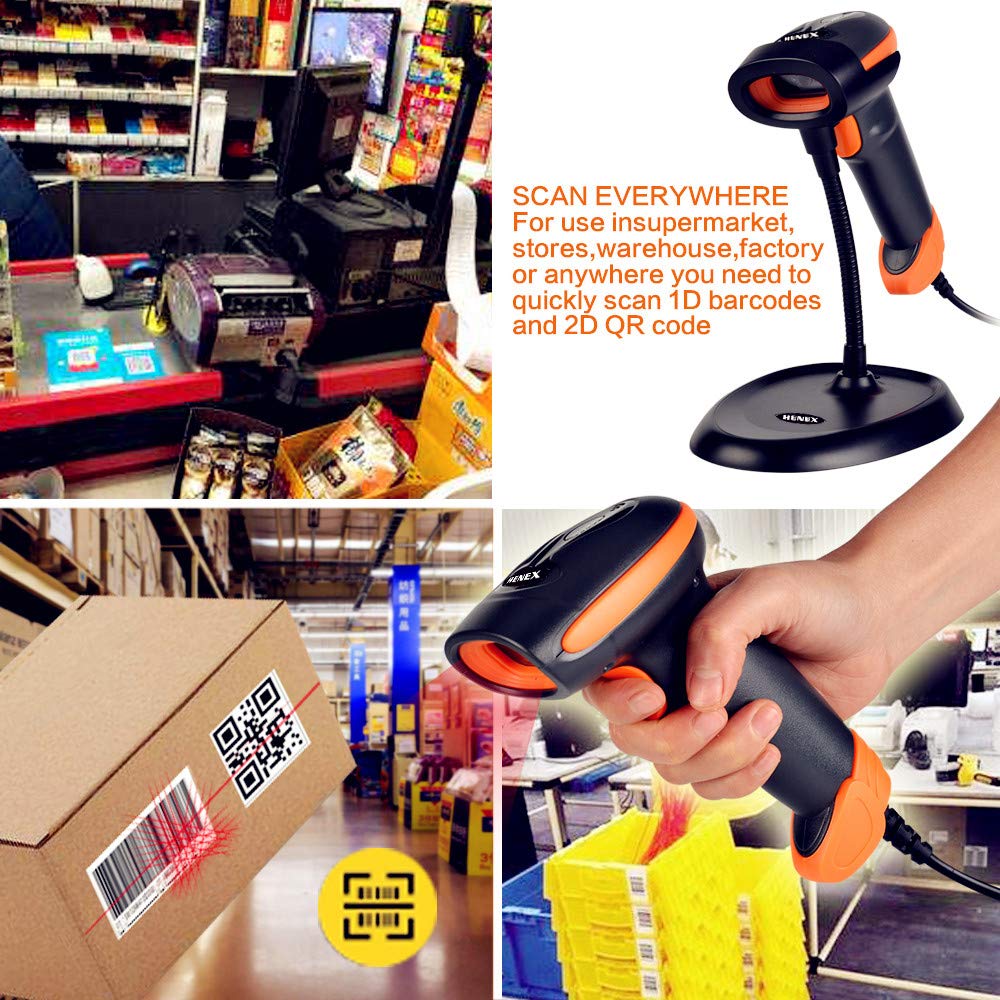
Figura 4.2: Examples of the scanner's application in various settings, including supermarket checkout, warehouse inventory, and handheld scanning of a QR code on a package. Sample barcode data shown: 01234567891011121314151617181920.
5. Mantenimiento
Un mantenimiento adecuado garantiza la longevidad y el rendimiento óptimo de su escáner de código de barras HENEX HC-3208.
- Limpieza: Regularly clean the scanner's window and exterior with a soft, lint-free cloth. For stubborn dirt, dampen the cloth with a mild, non-abrasive cleaning solution. Avoid harsh chemicals or abrasive materials that could scratch the scanning window.
- Cuidado de cables: Ensure the USB cable is not bent sharply, twisted, or subjected to excessive pulling, which can damage internal wires.
- Almacenamiento: Cuando no esté en uso, guarde el escáner en un entorno limpio y seco, alejado de la luz solar directa, temperaturas extremas y polvo excesivo.
- Manejo: Evite dejar caer el escáner o someterlo a impactos fuertes, ya que esto puede dañar los componentes internos.
6. Solución de problemas
Si tiene problemas con su escáner HENEX HC-3208, consulte los siguientes pasos comunes de solución de problemas:
- El escáner no responde:
- Compruebe si el cable USB está conectado de forma segura tanto al escáner como a la computadora.
- Intente conectar el cable USB a un puerto USB diferente en su computadora.
- Reinicie su computadora.
- No se pueden escanear códigos de barras:
- Ensure the scanner's light beam is correctly aimed at the barcode.
- Verify that the barcode is not excessively damaged, smudged, or poorly printed.
- Check if the correct scanning mode (manual or automatic) is selected. Refer to the operating instructions for switching modes.
- Ensure the barcode type is supported by the scanner (e.g., 1D or 2D).
- Salida de datos incorrecta:
- Confirm that your computer's keyboard layout matches the scanner's default settings.
- If scanning specific types of barcodes results in incorrect data, you may need to adjust advanced settings using the programming barcodes in the full user manual (available for download).
- No Beep or Light:
- This usually indicates a power or connection issue. Recheck the USB connection.
- Si el problema persiste, póngase en contacto con el servicio de atención al cliente.
For more detailed troubleshooting or advanced configuration, please refer to the complete user manual available for download from the manufacturer's websitio o póngase en contacto con su distribuidor.
7. Especificaciones
Below are the technical specifications for the HENEX HC-3208 2D Barcode Scanner:
| Característica | Especificación |
|---|---|
| Marca | henex |
| Modelo | HC-3208 |
| Tecnología de conectividad | Cable USB (con cable) |
| Modos de escaneo | Manual, Automatic Induction |
| Códigos de barras compatibles | 1D and 2D codes (DataMatrix (ECC 200), QR Code, PDF417, UPC-A, UPC-E, EAN-8, EAN-13, Code 39, Code 93, Code 32, Code39 (ASCII), etc.) |
| Compatibilidad | Windows, Linux, MAC, Android |
| Características especiales | Automatic induction reading and handheld scanning (2-in-1), Screen scanning, Plug and Play (no driver needed) |
| Dimensiones del producto | 17.3 x 6.7 x 9.4 cm |
| Peso del artículo | 300 gramos |
| Fuente de poder | Cortado |
| Pilas necesarias | No |
| Temperatura máxima de almacenamiento | 70 grados centígrados |

Figura 7.1: Dimensional view of the scanner stand, indicating its height (7.87 inches / 20 cm) and base dimensions (6.69 inches / 17 cm by 4.92 inches / 12.5 cm).
8. Garantía y soporte
Your HENEX HC-3208 2D Barcode Scanner comes with a standard warranty. For specific details regarding the warranty period and coverage, please refer to the warranty policy provided at the time of purchase or contact your retailer.
For technical support, service, or further inquiries, please reach out to your product vendor or the official HENEX customer service channels. Keep your purchase receipt or proof of purchase handy when contacting support.