
1. Introducción
Thank you for choosing the DELUX M625BU(3050) RGB Wired Gaming Mouse. This manual provides detailed instructions for setting up, operating, and maintaining your gaming mouse to ensure optimal performance and an enhanced gaming experience. Please read this manual thoroughly before use.
2. Contenido del paquete
- DELUX M625BU(3050) RGB Wired Gaming Mouse
- Manual de usuario
3. Producto terminadoview
The DELUX M625BU(3050) is an ergonomic wired gaming mouse designed for precision and customization. It features a high-performance A3050 PixArt optical sensor, 7 programmable buttons, and customizable RGB lighting.
3.1 Disposición y botones del mouse
Familiarize yourself with the buttons and their default functions:

Image: DELUX M625BU(3050) Gaming Mouse Button Layout
- Botón izquierdo: Función de clic principal.
- Botón derecho: Función de clic secundario.
- Rueda de desplazamiento: Desplácese hacia arriba/abajo, haga clic con el botón central.
- Botón PPP: Recorre las configuraciones de DPI.
- Botón de avance: Navega hacia adelante en web navegadores/aplicaciones.
- Botón de retroceso: Navega hacia atrás en web navegadores/aplicaciones.
- Botón de disparo: Rapid-fire function (default).
3.2 Diseño ergonómico
The mouse features an ergonomic streamline structure and non-slip rubber sides, designed to fit comfortably in your palm for extended gaming sessions.
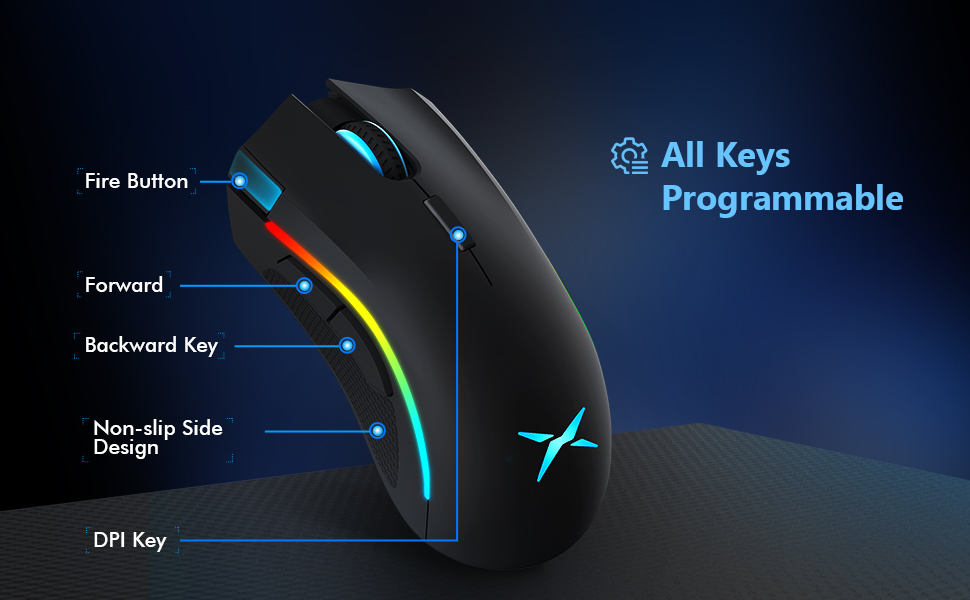
Image: Ergonomic Design Features
4. Configuración
The DELUX M625BU(3050) mouse is a plug-and-play device, requiring no additional drivers for basic functionality.
- Conectar el ratón: Plug the USB connector of the mouse's 1.8m braided cable into an available USB port on your computer.
- Reconocimiento del sistema: Your operating system (Windows XP, Vista, 7, 8, or 10) will automatically detect and install the necessary drivers.
- Instalación de software opcional: For advanced customization of buttons, DPI, and RGB lighting, download and install the DELUX Pro Game Software from the official DELUX websitio.

Image: Plug and Play Connectivity
5. Instrucciones de funcionamiento
5.1 Ajuste de DPI (puntos por pulgada)
The mouse features an A3050 PixArt optical sensor with adjustable DPI settings. You can cycle through preset DPI levels by pressing the DPI button located behind the scroll wheel.

Image: DPI Adjustment Levels
- Available DPI levels: 800, 1600, 3200, 4000.
- Each press of the DPI button will switch to the next level.
- The current DPI level may be indicated by a specific LED color or pattern (refer to software for detailed customization).
5.2 efectos de iluminación RGB
The mouse features customizable RGB lighting with various effects.
- Cambio de modos de iluminación: Press the Left Button, Scroll Wheel, and Right Button simultaneously for 3 seconds to cycle through different lighting modes (e.g., full lighting, breathing, floating).
- Personalización mediante software: Use the DELUX Pro Game Software to customize RGB backlight effects from 16.8 million colors, adjust lighting direction, and speed.
5.3 Programmable Buttons and Software
All 7 buttons on the M625BU(3050) mouse are programmable using the DELUX Pro Game Software.
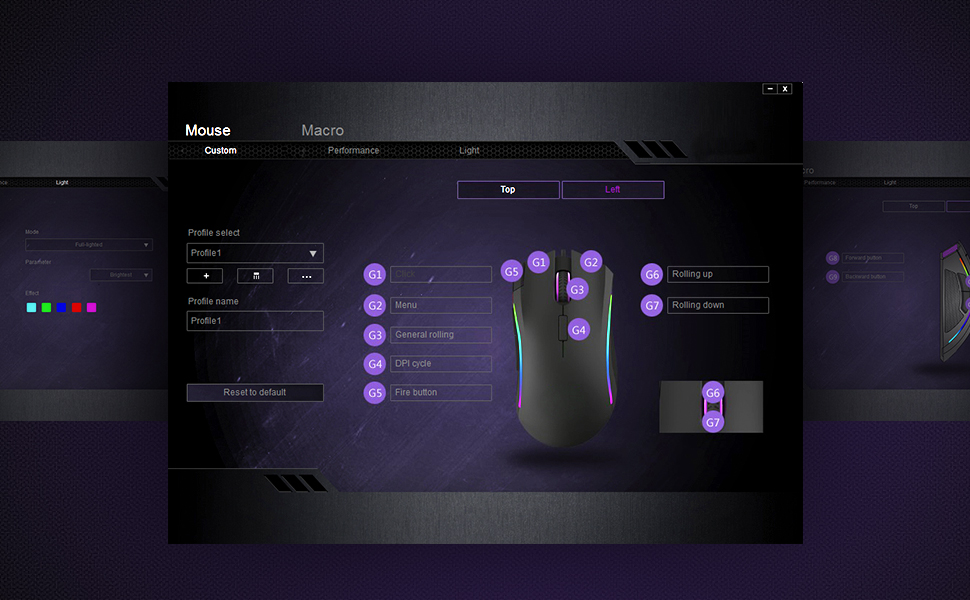
Image: Pro Game Software Interface for Customization
- Funciones de los botones: Reassign any button to perform different functions, including keyboard keys, multimedia controls, or specific file ejecución.
- Macros: Create and assign complex macro sequences to buttons for automated actions.
- Sensitivity and Polling Rate: Fine-tune pointer speed, DPI sensitivity, and polling rate (125/250/500/1000Hz) for precise control.
6. Mantenimiento
To ensure the longevity and optimal performance of your DELUX M625BU(3050) gaming mouse, follow these maintenance guidelines:
- Limpieza: Utilice un paño suave y seco para limpiar la superficie del ratón. Para la suciedad difícil, limpie ligeramenteampEnjuague el paño con agua o una solución limpiadora suave. Evite productos químicos agresivos.
- Cuidado del sensor: Keep the optical sensor on the underside of the mouse clean and free from dust or debris. Use a cotton swab if necessary.
- Cuidado de cables: Evite curvas pronunciadas o tirones excesivos del cable trenzado para evitar daños.
- Almacenamiento: Guarde el ratón en un lugar limpio y seco cuando no lo utilice.
7. Solución de problemas
If you encounter issues with your DELUX M625BU(3050) mouse, refer to the following common solutions:
| Problema | Posible solución |
|---|---|
| El ratón no responde |
|
| El movimiento del cursor es errático o impreciso |
|
| La iluminación RGB no funciona o es incorrecta |
|
| Programmable buttons not functioning |
|
| Scroll wheel behaves erratically (e.g., scrolls opposite direction) |
|
8. Especificaciones
| Característica | Detalle |
|---|---|
| Número de modelo | M625BU(3050) |
| Conectividad | Wired (1.8m Braided Cable) |
| Sensor | A3050 PixArt Optical Sensor |
| Configuración de DPI | 800/1600/3200/4000 ppp |
| Tasa de sondeo | 125/250/500/1000 Hz |
| Botones | 7 botones programables |
| Iluminación | Efectos de iluminación RGB personalizables |
| Ergonomía | Ergonomic Streamline Structure, Non-slip Rubber Side |
| Dimensiones del producto | 5.14 x 2.71 x 1.67 pulgadas |
| Peso del artículo | 3.53 onzas |
| Compatibilidad | Windows XP, Vista, 7, 8, 10 |
9. Garantía y soporte
Todos los productos DELUX incluyen un Garantía de 12 meses from the date of purchase. Additionally, DELUX provides soporte técnico gratuito de por vida para este producto.
For warranty claims, technical assistance, or further inquiries, please contact DELUX customer support through the official DELUX websitio o su distribuidor.