
1. Introducción
This manual provides instructions for the proper setup, operation, and maintenance of your IPD IPH-160 Monaural Wired Headset. The IPH-160 is designed for clear communication in various environments, featuring a noise-cancelling microphone and a 3.5mm jack for broad compatibility.
2. Contenido del paquete
Por favor verifique que todos los artículos estén presentes en su paquete:
- IPD IPH-160 Monaural Headset
- Quick Disconnect (QD) to 3.5mm Jack Cable (4-pole)
- Almohadillas para los oídos (preinstaladas o de repuesto)
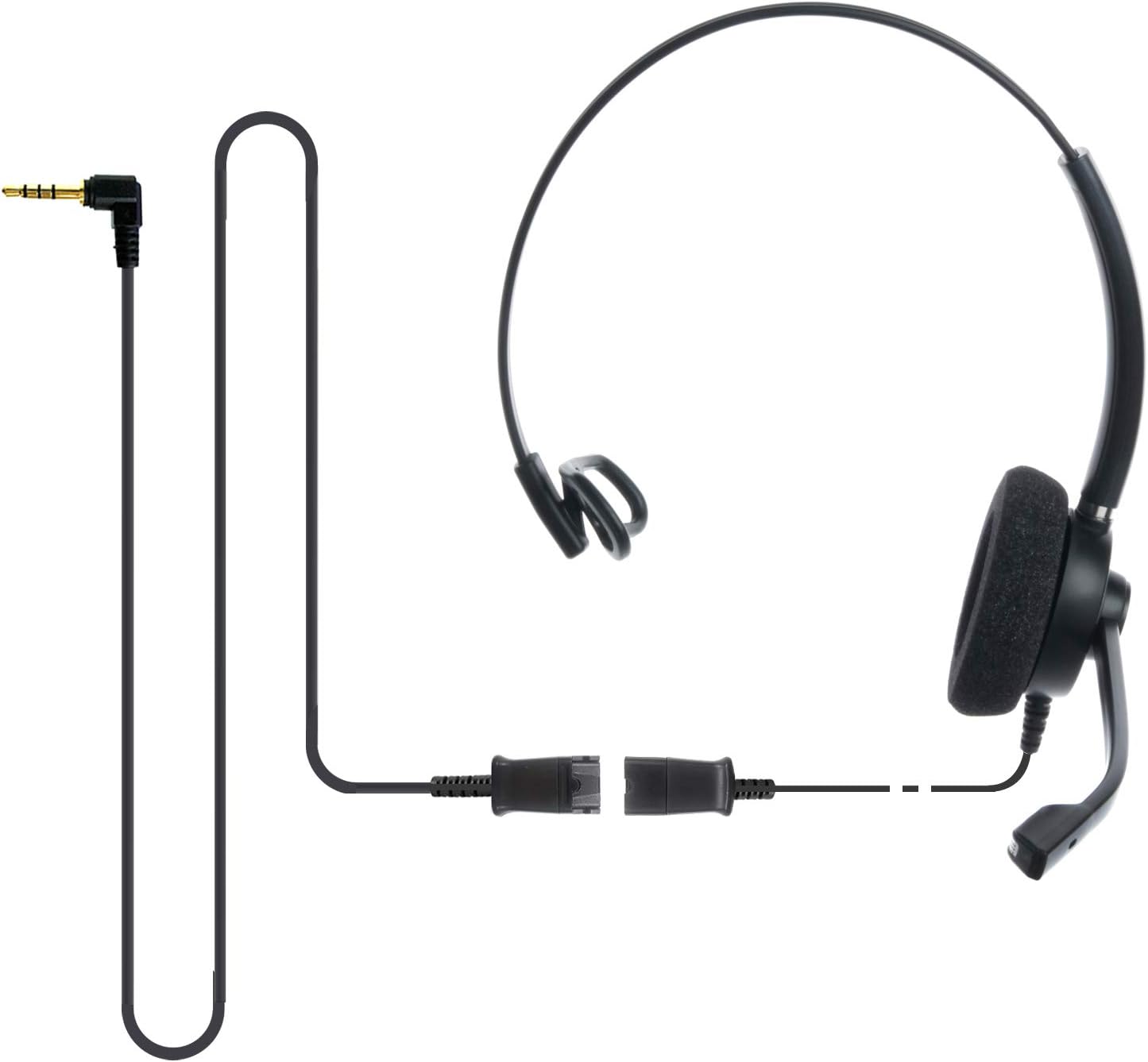
Image: The IPD IPH-160 headset with its detachable Quick Disconnect cable and 3.5mm jack connector.
3. Configuración
3.1 Conexión de los auriculares
- Connect the Quick Disconnect (QD) cable to the headset. Ensure a secure connection.
- Insert the 3.5mm jack of the cable into the corresponding port on your device (Android cell phone, laptop, tablet, Apple MacBook, or other smart device).

Imagen: Un primer plano view of the 3.5mm jack connector, illustrating its connection to a mobile device and laptop.
3.2 Compatibilidad de dispositivos
The 3.5mm jack (4 poles) is compatible with a wide range of devices including:
- Android cell phones (e.g., Samsung, Huawei, HTC, ZTE)
- Computadoras portátiles
- Tabletas
- Apple MacBooks with a single 3.5mm headset port
Nota:
- iPhone 7/7S and later models may require an additional Lightning to 3.5mm adapter (not included).
- If your specific phone model is not listed or you encounter compatibility issues, please contact IPD support for assistance.

Image: The IPD headset shown with various connection options for desk phones, PCs/softphones, and mobile phones, highlighting the versatility of Quick Disconnect cables.
4. Funcionamiento de los auriculares
4.1 Uso y ajuste
The IPH-160 headset is designed for all-day comfort. Adjust the headband for a secure yet comfortable fit. The microphone boom is flexible; position it approximately 1-2 inches from your mouth for optimal voice pickup.
4.2 micrófono con cancelación de ruido
The headset features a passive noise-cancelling microphone to reduce background noise, ensuring clearer conversations. Proper microphone positioning is crucial for effective noise cancellation.

Image: A user wearing the headset, demonstrating the microphone's position and illustrating the effect of noise cancellation on audio waveforms.
4.3 Acoustic Shock Protection (ASP)
The headset incorporates an Acoustic Shock Protection (ASP) circuit on the speaker. This feature protects your hearing from sudden, unwanted loud noises by cutting sounds over 105dB and maintaining levels below 105dB.
4.4 Wideband Audio
The HD Wideband speaker delivers clear sound, enhancing the quality of your calls and audio monitoring.

Image: A close-up of the headset's ear cushion, visually representing the distinction between acoustic noise and clear sound for high-quality voice communication.
5. Mantenimiento
5.1 Limpieza
To maintain hygiene and performance, regularly clean the ear cushions and other surfaces of the headset with a soft, dry cloth. Avoid using harsh chemicals or abrasive materials.
5.2 Almacenamiento
When not in use, store the headset in a clean, dry place away from direct sunlight and extreme temperatures. Avoid tangling the cable to prevent damage.
6. Solución de problemas
6.1 No hay sonido o el volumen es bajo
- Asegúrese de que el conector de 3.5 mm esté completamente insertado en su dispositivo.
- Verifique la configuración de volumen de su dispositivo.
- Verify that the headset is selected as the audio output device in your computer's sound settings.
- Confirm the Quick Disconnect (QD) cable is securely connected to the headset.
6.2 El micrófono no funciona
- Asegúrese de que el brazo del micrófono esté colocado correctamente cerca de su boca.
- Check your device's microphone input settings and ensure the headset is selected as the input device.
- Test the headset with another compatible device to rule out a device-specific issue.
6.3 Problemas de compatibilidad
If you experience compatibility problems with your device, especially if it's not explicitly listed as compatible, please contact IPD customer support for guidance.
7. Especificaciones
| Característica | Especificación |
|---|---|
| Nombre del modelo | IPH-160-35 |
| Tecnología de conectividad | Cableado |
| Toma de auriculares | 3.5 mm Jack (4-pole) |
| Control de ruido | Cancelación pasiva de ruido |
| Respuesta de frecuencia | 10 kHz |
| Sensibilidad | 58 dB |
| Impedancia | 150 ohmios |
| Peso del artículo | 198 gramos (7 onzas) |
| Material | Plástico |
| Colocación de orejas | Sobre la oreja |
| Característica especial | Cancelación de ruido |
| Componentes incluidos | Almohadillas para los oídos |
8. Información de garantía
The IPD IPH-160 Headset comes with a 3 año de garantía A partir de la fecha de compra. Esta garantía cubre defectos de fabricación en condiciones normales de uso. Conserve su comprobante de compra para reclamaciones de garantía.
9. Soporte
For technical assistance, warranty claims, or any questions regarding your IPD IPH-160 Headset, please contact IPD customer support. You can find contact information on the official IPD websitio o a través de su minorista.
Visita el IPD Store Para más información y productos.