
Introducción
This manual provides detailed instructions for the assembly, operation, and maintenance of your Suptek MST002 Monitor Stand. Please read these instructions carefully before use to ensure proper setup and safe operation. This monitor stand is designed to elevate your screen to an ergonomic height and provide additional storage space on your desk.
Características del producto
- Diseño multiusos: Can be configured as a single-layer or two-layer stand, suitable for monitors, laptops, printers, or gaming consoles.
- Ventilated Surface: Features a perforated platform to promote airflow and prevent device overheating.
- Stable and Durable Construction: Made from heavy-duty alloy steel, capable of supporting equipment up to 20 kg (44 lbs).
- Beneficios ergonómicos: Eleva tu monitor a una posición cómoda viewing height, helping to improve posture and reduce neck and shoulder strain.
- Almohadillas antideslizantes: Equipped with reinforced bottom rubber pads to prevent sliding and protect your desk surface from scratches.

Image: The Suptek MST002 Monitor Stand configured as a two-layer structure, supporting a monitor and providing storage space.

Image: A laptop placed on the ventilated surface of the stand, with arrows showing air circulation to prevent overheating.
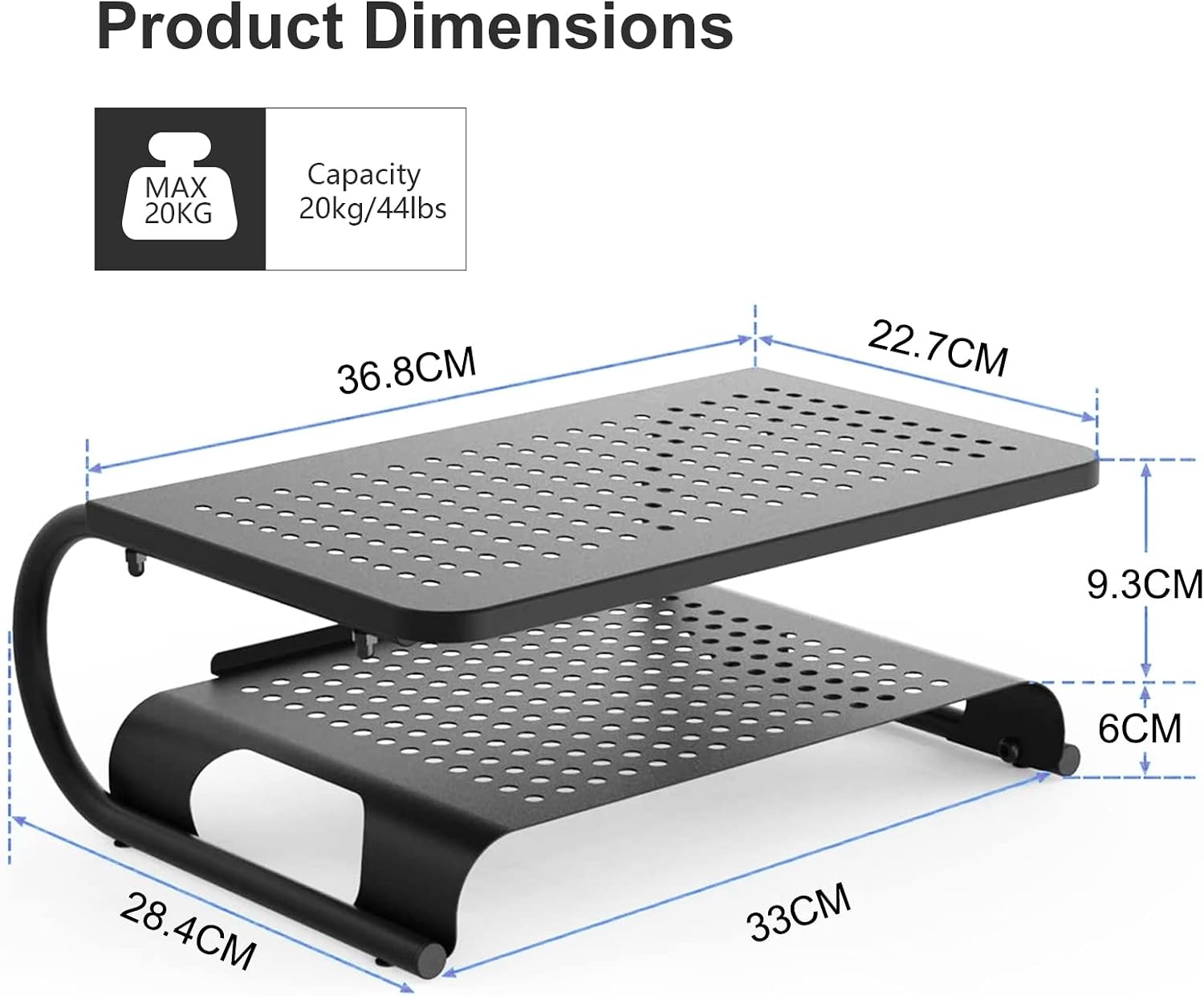
Image: Product dimensions and maximum weight capacity (20kg/44lbs) of the monitor stand.
Contenido del paquete
Verifique que todos los componentes estén presentes antes de comenzar el ensamblaje:
- Monitor Stand Platforms (2 pieces for two-layer configuration)
- Support Legs/Frames (U-shaped metal frames)
- Herrajes de montaje (tornillos, tuercas)
- Assembly Tools (small spanner, Allen key)
- Anti-slip Rubber Pads
- Manual de instrucciones
Instrucciones de instalación y montaje
The Suptek MST002 Monitor Stand is designed for quick and easy assembly. You can configure it as a single-layer or a two-layer stand based on your needs.
- Desempaquetar componentes: Retire con cuidado todas las piezas del embalaje y colóquelas sobre una superficie limpia y plana. Compruebe que estén presentes todos los componentes indicados en la sección "Contenido del paquete".
- Attach Support Legs to Bottom Platform (Step 1):
Align the U-shaped support legs with the pre-drilled holes on the bottom platform. Secure them using the provided screws and the small spanner. Ensure all connections are firm but do not overtighten.

Image: Step 1 of assembly, showing how to attach the bottom platform using the provided spanner.
- Attach Top Platform (Step 2 - for two-layer configuration):
If you are assembling a two-layer stand, align the top platform with the designated attachment points on the upper part of the support legs. Secure it using the provided screws and the Allen key. Ensure stability.

Image: Step 2 of assembly, demonstrating how to attach the top platform using the Allen key.
- Apply Anti-slip Pads: Attach the anti-slip rubber pads to the bottom of the support legs to prevent movement and protect your desk surface.
- Comprobación final: Gently shake the assembled stand to ensure all connections are secure and the stand is stable.
Instrucciones de funcionamiento
Once assembled, the monitor stand is ready for use. Place your monitor, laptop, or other devices on the top platform. Utilize the lower shelf for storing keyboards, mice, notebooks, or other office supplies.
- Capacidad de peso: Do not exceed the maximum weight capacity of 20 kg (44 lbs) to ensure stability and prevent damage.
- Colocación: Coloque el soporte sobre una superficie plana y estable para evitar que se vuelque.
- Posicionamiento ergonómico: Position your monitor so that the top of the screen is at or slightly below eye level to maintain a comfortable posture.

Image: The monitor stand in use, demonstrating how it elevates a monitor for improved ergonomics and provides space for a keyboard underneath.

Imagen: Examples of the stand's versatile use with various devices such as laptops, printers, and monitors.
Mantenimiento
To ensure the longevity and proper function of your Suptek MST002 Monitor Stand, follow these simple maintenance guidelines:
- Limpieza: Limpie el soporte con un paño suave.amp paño. Evite limpiadores abrasivos o disolventes que puedan dañar el acabado.
- Inspección: Revise periódicamente todos los tornillos y conexiones para asegurarse de que estén bien apretados. Vuelva a apretarlos si es necesario.
- Distribución del peso: Ensure weight is evenly distributed on the stand to maintain stability.
Solución de problemas
| Problema | Posible causa | Solución |
|---|---|---|
| El soporte es inestable o tambaleante. | Tornillos flojos o superficie irregular. | Ensure all screws are tightened. Place the stand on a flat, level surface. |
| Desk surface is scratched. | Anti-slip pads are missing or dislodged. | Verify that all anti-slip rubber pads are correctly attached to the bottom of the support legs. |
| Dificultad de montaje. | Alineación incorrecta de piezas. | Refer to the "Setup and Assembly Instructions" section and ensure parts are aligned correctly before tightening screws. |
Presupuesto
- Modelo: MST002
- Material: Acero aleado
- Color: Negro
- Peso del artículo: 2.4 kilogramos
- Capacidad de carga: Hasta 20 kg (44 lbs)
- Numero de niveles: 2 (configurable a 1)
- Características especiales: Dual-height design with vented platform for heat dissipation, anti-slip pads.
- Requiere ensamblaje: Sí
Garantía y soporte
For warranty information or technical support, please refer to the contact details provided with your purchase or visit the official Suptek websitio. Guarde su recibo de compra para reclamos de garantía.