
1. Introducción
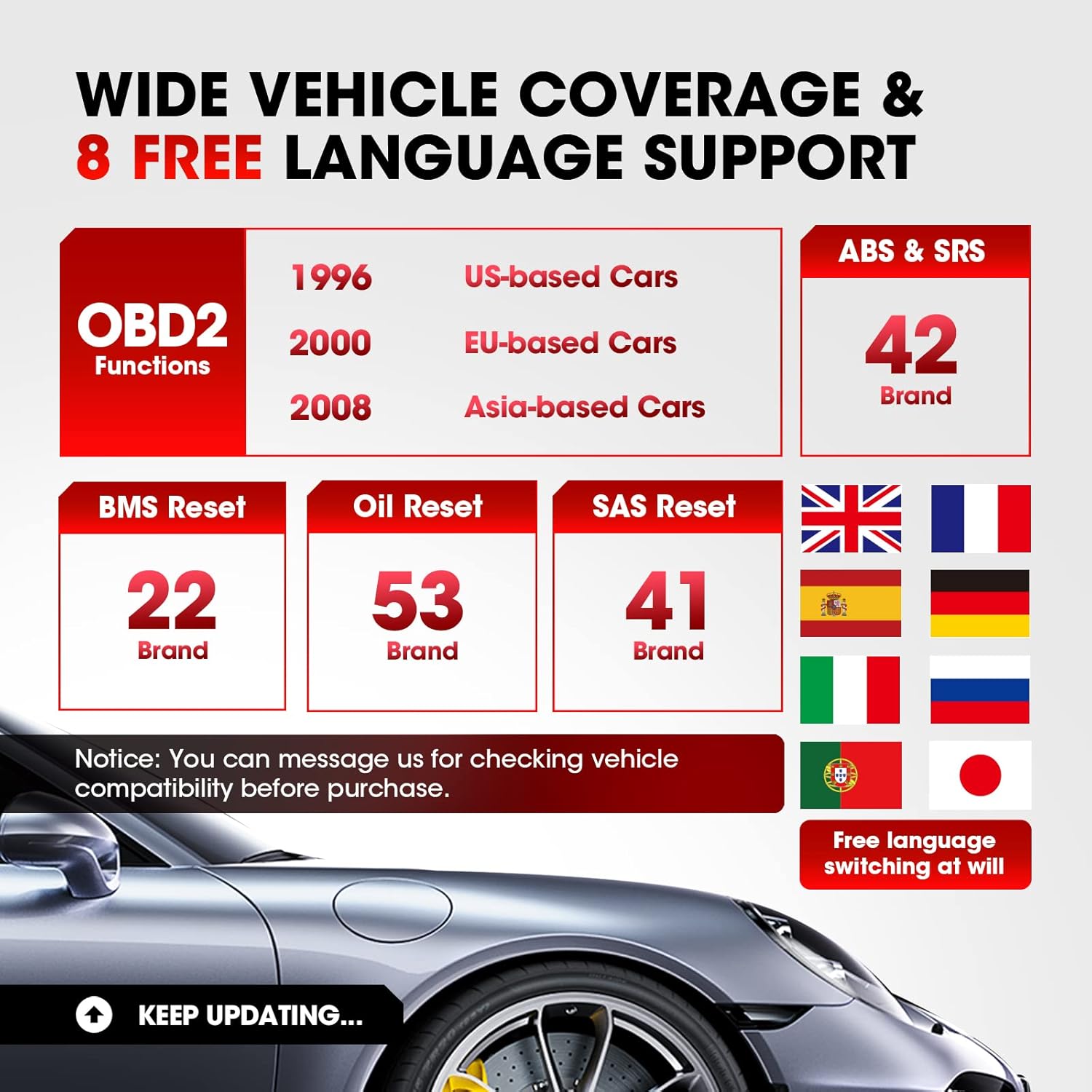
The LAUNCH CR629 is an advanced automotive diagnostic tool designed to assist in vehicle maintenance and troubleshooting. It provides comprehensive diagnostic functions for ABS (Anti-lock Braking System) and SRS (Supplemental Restraint System), including active tests, along with full OBD2 functions and three essential reset services: Oil Reset, Steering Angle Sensor (SAS) Reset, and Battery Management System (BMS) Reset. This manual provides detailed instructions for setting up, operating, and maintaining your CR629 device.
2. Información de seguridad
- Realice siempre pruebas automotrices en un área bien ventilada.
- Use protección ocular y ropa de seguridad que cumpla con las normas de seguridad.
- Mantenga el dispositivo seco y limpio. No lo exponga a temperaturas ni humedad extremas.
- Evite el contacto con partes calientes del motor o componentes móviles.
- Do not connect or disconnect the device while the vehicle's ignition is on, unless instructed otherwise.
- Refer to the vehicle's service manual for specific service procedures and precautions.
3. Configuración
3.1 Conexión al vehículo
- Localice el conector de enlace de datos (DLC) de 16 pines del vehículo. Generalmente se encuentra debajo del tablero, en el lado del conductor.
- Asegúrese de que el encendido del vehículo esté APAGADO.
- Plug the CR629's diagnostic cable into the vehicle's DLC. Ensure a secure connection.
- Turn the vehicle's ignition to the ON position (engine off). The CR629 will power on automatically.
3.2 Encendido inicial y selección de idioma
Upon first use, the device may prompt you to select your preferred language. Use the navigation buttons to select your language and press the 'OK' button to confirm.
3.3 Software Update Process
It is recommended to update the device software regularly to ensure compatibility with the latest vehicle models and diagnostic functions. The CR629 offers lifetime free updates.
- Download and install the update tool on your PC from the official LAUNCH websitio.
- Connect the CR629 scanner to your PC using the provided USB cable.
- Follow the on-screen instructions on the update tool to register your scanner and download the latest software package.
- Copy the update package to the memory card (if applicable) or directly to the device as prompted.
- Disconnect the device safely from the PC and restart it to complete the update.
4. Instrucciones de funcionamiento
4.1 ABS & SRS Diagnostics with Active Test
The CR629 can diagnose issues within the Anti-lock Braking System (ABS) and Supplemental Restraint System (SRS), including performing active tests to pinpoint problems.
- Leer/borrar DTC: Access the 'Scan' menu, select 'ABS/SRS', then choose 'Read Codes' to view diagnostic trouble codes or 'Erase Codes' to clear them.
- View Transmisión de datos en vivo: From the 'Scan' menu, select 'ABS/SRS', then 'Data Stream' to view real-time sensor data in graphical or text format.
- Perform Active Test: Within the 'ABS/SRS' menu, select 'Active Test' to command specific components on and off, verifying their functionality. Note: Active tests are supported for 20 car brands.

4.2 3 Restablecer servicios
The CR629 offers three common reset functions to assist with routine maintenance tasks.
- Reinicio de aceite: Resets the oil life monitoring system after an oil change. Navigate to 'Service' > 'Oil Reset' and follow the prompts.
- Reinicio del SAS (sensor de ángulo de dirección): Calibrates the steering angle sensor after suspension or steering component replacement. Access 'Service' > 'SAS Reset' and follow the instructions.
- Restablecimiento del BMS (sistema de gestión de batería): Re-matches the battery control module and monitoring sensor after battery replacement. Select 'Service' > 'BMS Reset' and proceed as guided.

4.3 Funciones OBD2 completas
The device supports all 10 modes of OBD2 tests for most post-1996 OBD2/CAN compliant vehicles.
- Leer códigos: Recupera códigos genéricos (P0, P2, P3 y U0) y específicos del fabricante (P1, P3 y U1).
- Borrar códigos: Clears Diagnostic Trouble Codes (DTCs) and resets monitors.
- Preparación I / M: Verifica la preparación del sistema de monitoreo de emisiones.
- Flujo de datos: Displays live data from the vehicle's sensors.
- Congelar fotograma: Muestra una instantánea de las condiciones de funcionamiento en el momento de una falla relacionada con las emisiones.
- Prueba del sensor O2: Recupera los resultados de la prueba del monitor del sensor de O2.
- Monitoreo a bordo: Recupera resultados de pruebas para componentes y sistemas del tren motriz relacionados con las emisiones.
- Prueba de componentes: Permite probar componentes o sistemas específicos.
- Información del vehículo: Recupera el número de identificación del vehículo (VIN), el ID de calibración (CALID) y el número de verificación de calibración (CVN).
4.4 Funciones fáciles de usar
- 3.5-inch LCD Color Display: Provides clear and easy-to-read diagnostic information.
- Hotkeys (F1/F2/F3): Quick access to frequently used functions directly from the main menu.
- Búsqueda de DTC: Built-in library to quickly identify the meaning of diagnostic trouble codes without needing external resources.
- PC Printing: Allows printing of diagnostic reports by connecting the device to a PC.
- Review Datos: Access historical DTCs, data streams, and freeze frame data for later analysis.


5. Mantenimiento
5.1 Limpieza del dispositivo
Para mantener el rendimiento y la apariencia del dispositivo, límpielo regularmente con un paño suave y húmedo.amp Paño. No utilice limpiadores abrasivos ni disolventes.
5.2 Actualizaciones de software
Regular software updates ensure your CR629 remains compatible with the latest vehicle models and diagnostic protocols. Refer to section 3.3 for detailed update instructions. Updates are free for the lifetime of the product.
6. Solución de problemas
If you encounter issues with your LAUNCH CR629, refer to the following common problems and solutions:
- El dispositivo no se enciende: Ensure the diagnostic cable is securely connected to the vehicle's DLC and the vehicle's ignition is ON. Check the vehicle's battery voltage.
- Error de comunicación: Verify the vehicle is OBD2 compliant. Check for loose connections. Turn the ignition off and then on again. Try the device on another vehicle to rule out a vehicle-specific issue.
- No se encontraron códigos de falla: If the Check Engine Light (MIL) is not illuminated, there may be no current fault codes. Check I/M Readiness status for pending codes.
- Problemas de actualización: Ensure a stable internet connection and follow the update instructions precisely. Contact customer support if problems persist.
7. Especificaciones
| Característica | Detalle |
|---|---|
| Marca | LANZAMIENTO |
| Número de modelo | CR629 |
| Fuente de poder | Alimentado por batería (a través del puerto OBD2) |
| Dimensiones del producto | 4.49" de largo x 1.36" de ancho x 8.46" de alto |
| Tamaño de pantalla | 3.5 pulgadas |
| Resolución nativa | 320 x 480 |
| Sistema operativo | Windows 7 (for PC connection/updates) |
| Idiomas compatibles | English, French, German, Spanish, Portuguese, Russian, Japanese, Italian |
8. Garantía y soporte
The LAUNCH CR629 comes with a 5-year warranty from the manufacturer. For any technical assistance, warranty claims, or product inquiries, please contact LAUNCH customer service.
- Teléfono de atención al cliente: 1-888-756-2936 (lunes a viernes de 9:00 a. m. a 6:00 p. m. EST)
- Correo electrónico de atención al cliente: lanzamiento-posventa@outlook.com
- Política de devolución y reemplazo: Disponible dentro de los 60 días siguientes a la compra.