
Introducción
Welcome to your new Gembird GHS-U-5.1-01 USB 5.1 Surround Headset. This manual provides essential information for setup, operation, and maintenance to ensure optimal performance and an immersive audio experience.
Contenido del paquete
El paquete debe contener los siguientes artículos:
- Gembird GHS-U-5.1-01 USB 5.1 Surround Headset

Image: Retail packaging for the Gembird GHS-U-5.1-01 USB 5.1 Surround Headset, showing the headset inside a clear window.
Producto terminadoview
The Gembird GHS-U-5.1-01 is a USB headset designed for immersive audio experiences with 5.1 surround sound. It features an adjustable microphone, built-in volume control, comfortable ear pads, and an adjustable headband for extended use.
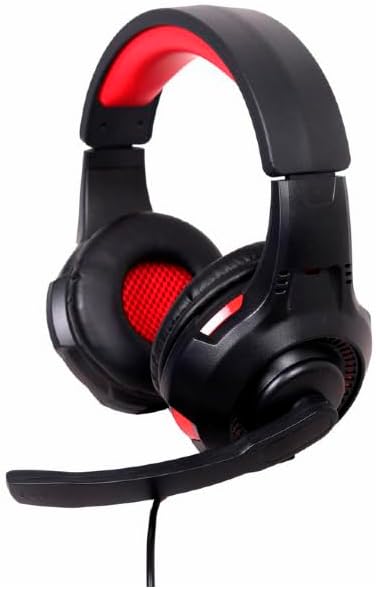
Imagen: En ángulo view of the Gembird GHS-U-5.1-01 USB 5.1 Surround Headset, showcasing its black and red design with the microphone boom extended.
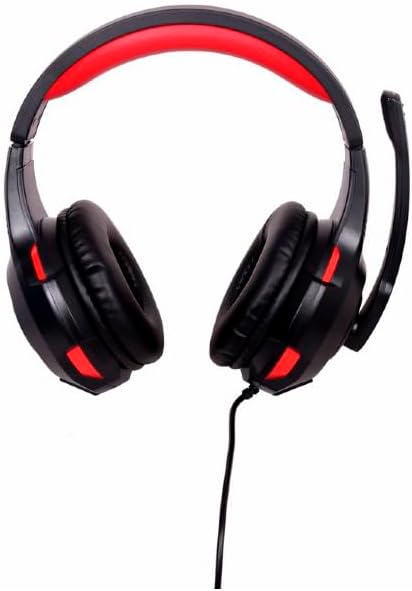
Imagen: Frente view of the Gembird GHS-U-5.1-01 USB 5.1 Surround Headset, highlighting the adjustable headband and earcups.

Image: Close-up of the in-line control unit for the Gembird GHS-U-5.1-01 headset, showing volume up/down and microphone mute buttons.
Configuración
Conexión de los auriculares
The Gembird GHS-U-5.1-01 headset connects via a standard USB port.
- Ubique un puerto USB disponible en su computadora.
- Conecte el conector USB de los auriculares al puerto USB.
- Su sistema operativo debería detectar e instalar automáticamente los controladores necesarios. Este proceso puede tardar unos instantes.
- Once installed, the headset will be ready for use as an audio input and output device.
Audio Settings Configuration
For optimal 5.1 surround sound experience, you may need to configure your computer's audio settings.
- Ventanas: Go to "Sound Settings" (right-click speaker icon in taskbar) > "Sound Control Panel" > "Playback" tab. Select the Gembird headset, click "Configure," and choose "5.1 Surround."
- Mac OS: Go to "System Preferences" > "Sound" > "Output" tab. Select the Gembird headset.
Instrucciones de funcionamiento
Control de volumen
The headset features an in-line remote control for easy volume adjustment.
- Utilice el "+" botón para aumentar el volumen.
- Utilice el "-" para bajar el volumen.
Uso del micrófono
The adjustable microphone boom allows for precise positioning.
- Position the microphone approximately 1-2 inches from your mouth for clear voice capture.
- Use the microphone mute button on the in-line remote to toggle the microphone on or off.
Ajuste de comodidad
Adjust the headband to fit comfortably on your head. The ear pads are designed for extended use.
Mantenimiento
To ensure the longevity and performance of your headset, follow these maintenance guidelines:
- Limpieza: Use a soft, dry cloth to wipe the headset. Do not use harsh chemicals or abrasive cleaners.
- Almacenamiento: Store the headset in a clean, dry place away from extreme temperatures.
- Cuidado de cables: Evite dobleces bruscos o tirones excesivos del cable USB para prevenir daños.
Solución de problemas
No hay sonido o el micrófono no funciona
- Comprobar la conexión USB: Asegúrese de que el conector USB esté completamente insertado en el puerto. Pruebe con otro puerto USB.
- Comprobar los niveles de volumen: Verify that the volume on the in-line control, your computer's system volume, and application-specific volumes are not muted or set too low.
- Comprobar la configuración de audio: Confirm that the Gembird headset is selected as the default playback and recording device in your computer's sound settings.
- Reiniciar la computadora: Sometimes a simple restart can resolve driver or software conflicts.
Problemas de calidad de sonido
- Actualización del controlador: Asegúrese de que los controladores de su sistema operativo estén actualizados.
- Calidad de la fuente: Poor audio quality may stem from the audio source itself. Test with different audio files o aplicaciones.
Presupuesto
| Nombre del modelo | GHS-U-5.1-01 |
| Conectividad | USB con cable |
| Factor de forma | En la oreja |
| Color | Negro |
| Material | Aluminum (Enclosure) |
| Peso | 0.4 kilogramos |
| Características adicionales | Adjustable microphone boom, Built-in volume control, Comfortable ear pads, Adjustable headband |
Información de garantía
This Gembird headset comes with a 24 Month Manufacturer Guarantee. Please retain your proof of purchase for warranty claims. For detailed warranty terms and conditions, refer to the documentation provided with your product or contact Gembird customer support.
Apoyo
If you encounter issues not covered in this manual or require further assistance, please visit the official Gembird website or contact their customer support for technical assistance.