
ROIDMI S2
Manual de usuario de la aspiradora inalámbrica ROIDMI S2
Model: S2 | Brand: ROIDMI
Introducción
This manual provides detailed instructions for the safe and efficient use of your ROIDMI S2 Cordless Vacuum Cleaner. Please read this manual thoroughly before operating the appliance and retain it for future reference.
Instrucciones de seguridad
- Asegúrese de que el adaptador de corriente sea compatible con su voltaje local.tage.
- Do not use the vacuum cleaner to pick up liquids, burning objects, or sharp objects.
- Mantenga el cabello, la ropa suelta, los dedos y todas las partes del cuerpo lejos de las aberturas y las partes móviles.
- No utilice la aspiradora si está dañada o no funciona correctamente.
- Este aparato no está diseñado para ser utilizado por personas con capacidades físicas, sensoriales o mentales reducidas, o con falta de experiencia y conocimientos, a menos que hayan recibido supervisión o instrucciones sobre el uso del aparato por parte de una persona responsable de su seguridad.
- Se debe supervisar a los niños para garantizar que no jueguen con el aparato.
Contenido del paquete
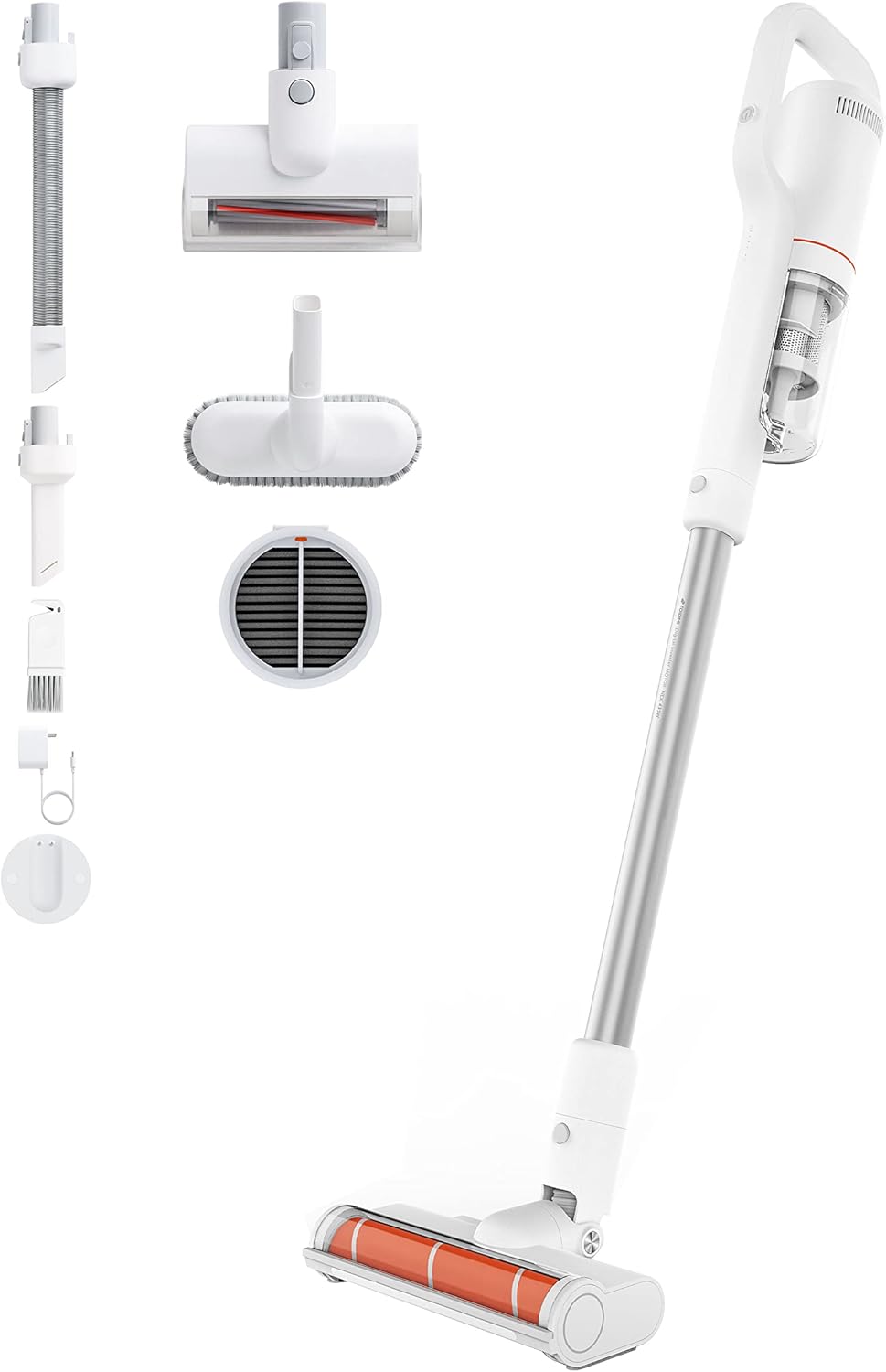
Image: All components included with the ROIDMI S2 Cordless Vacuum Cleaner, laid out on a white background. This includes the main vacuum unit, extension wand, floor brush, various nozzles, and the magnetic wall mount.
Verifique que todos los artículos estén presentes y en buen estado:
- ROIDMI S2 Cordless Vacuum Cleaner (Main Unit)
- Cepillo eléctrico para suelos
- Metal Connecting Tube (Extension Wand)
- Cepillo para colchón
- Cepillo multifunción
- Boquilla plana
- Dust Filter (pre-installed or spare)
- Adaptador de corriente
- Estación de carga de pared magnética
- Tornillos de montaje
- Manual de usuario
Configuración
1. Montaje
- Conecte la varilla de extensión: Insert the metal connecting tube into the main vacuum unit until it clicks securely.
- Coloque el cepillo para pisos: Connect the electric floor brush to the other end of the extension wand. Ensure it clicks into place.
- Archivos adjuntos alternativos: For handheld use, attach the mattress brush, multi-function brush, or flat nozzle directly to the main unit.
2. Carga de la batería
Before first use, fully charge the vacuum cleaner. The battery takes approximately 2.5 hours to fully charge.

Image: Close-up of the ROIDMI S2 main unit magnetically attaching to its wall-mounted charging station. Blue indicator lights are visible, signifying charging status.
- Instalar la estación de carga de pared: Choose a suitable location on a wall near a power outlet. Use the provided screws to securely mount the magnetic charging station.
- Conecte la electricidad: Conecte el adaptador de corriente a la estación de carga y luego a un tomacorriente de pared.
- Charge Vacuum: Place the vacuum cleaner onto the magnetic charging station. The indicator lights on the vacuum will show the charging status.
Instrucciones de funcionamiento
1. Encendido/Apagado y Selección de Modo
Press the power button to turn the vacuum cleaner on. Press it again to cycle through different suction modes (Standard, Max). Press and hold to turn off.
2. Using the Floor Brush

Image: The ROIDMI S2 cordless vacuum in use, showing the motorized floor brush with its automatic LED sensor light illuminating the area in front of it. The brush is designed for various floor types.
- The electric floor brush is suitable for hard floors, laminate, parquet, and carpets.
- The automatic LED sensor light illuminates dark areas, improving visibility during cleaning.
- The 270° flexible design allows for easy maneuverability around furniture and into tight spaces.
3. Uso de archivos adjuntos

Image: A collage of four images demonstrating the versatility of the ROIDMI S2. Top left shows the vacuum standing upright against a wall. Top right shows the flat nozzle cleaning between sofa cushions. Bottom left shows the multi-function brush cleaning a laptop keyboard. Bottom right shows the main unit with the mattress brush cleaning a bed.
- Cepillo para colchón: Ideal for cleaning upholstery, mattresses, and pet hair.
- Cepillo multifunción: Use for delicate surfaces, keyboards, and car interiors.
- Boquilla plana: Perfecto para espacios estrechos, esquinas y áreas de difícil acceso.
4. Duración de la batería
- Standard Mode: Up to 60 minutes.
- Max Mode: Up to 10 minutes.
5. ROIDMI Cleaner App

Image: A smartphone screen displaying the ROIDMI Cleaner App interface. The app shows information such as current electricity percentage, battery starting time, and filter remaining life, providing smart control and monitoring of the vacuum cleaner.
The ROIDMI Cleaner App provides additional features such as battery status, filter condition, and cleaning statistics. Download the app from your device's app store and follow the in-app instructions to connect your S2 vacuum cleaner.
Mantenimiento
1. Vaciado del depósito de polvo
Empty the dust bin regularly to maintain optimal suction performance. Press the release button to detach the dust bin from the main unit, then open the lid and empty the contents.
2. Limpieza de los filtros

Imagen: Una explosión view of the ROIDMI S2's multi-stage filtration system, showing individual components like the HEPA filter, dust filter, and isolation filter. This illustrates the layers of filtration for effective dust capture.
- The multi-filter system (HEPA, dust filter, isolation) should be cleaned periodically.
- Remove the filters from the dust bin. Tap them gently to remove loose dust.
- Rinse washable filters under cold running water. Ensure they are completely dry before reassembling.
- Reemplace los filtros si están muy sucios o dañados.
3. Limpieza del rodillo del cepillo
Regularly check the brush roll for tangled hair or debris. Remove the brush roll from the floor head (refer to the diagram in the full manual for specific instructions) and use scissors or a cleaning tool to remove any obstructions. Reinsert the brush roll securely.
4. Limpieza General
Limpie el exterior de la aspiradora con un paño suave y seco.amp Paño. No utilice detergentes ni disolventes agresivos.
Solución de problemas
| Problema | Posible causa | Solución |
|---|---|---|
| El vacío no se enciende. | La batería está agotada. | Cargue la batería completamente. |
| Potencia de succión reducida. | Dust bin is full; Filters are clogged; Brush roll is obstructed. | Empty dust bin; Clean or replace filters; Remove obstructions from brush roll. |
| El rodillo del cepillo no gira. | Obstrucción en el rodillo del cepillo; rodillo del cepillo no instalado correctamente. | Remove obstructions; Ensure brush roll is securely installed. |
| El vacío se detiene inesperadamente. | La batería está baja; protección contra sobrecalentamiento activada. | Charge the battery; Allow the vacuum to cool down for at least 30 minutes. |
Presupuesto
| Marca | ROIDMI |
| Número de modelo | S2 (XCQ12RM) |
| Fuerza | 425 vatios |
| Poder de succión | 23,500 Pa (135 AW) |
| Volumentage | 100 voltios |
| Tipo de batería | Iones de litio (2500 mAh) |
| Tiempo de ejecución | Hasta 60 minutos (modo estándar) |
| Tiempo de carga | Aproximadamente 2.5 horas |
| Nivel de ruido | 72 decibelios |
| Peso (unidad principal) | 1.5 kilogramos |
| Dimensiones (L x An x Al) | 119.1 x 25.9 x 15.8 cm |
| Tipo de filtro | Multi-filter (HEPA, Dust, Isolation) |
| Características especiales | Automatic LED Sensor Light, Magnetic Wireless Charging, ROIDMI Cleaner App Connectivity |
Garantía y soporte
For warranty information and customer support, please refer to the warranty card included in your product packaging or visit the official ROIDMI webSitio. Conserve su recibo de compra como comprobante de compra.
Recursos en línea: For further assistance, FAQs, and product registration, please visit: www.roidmi.com
Ask a question about this manual
Ask about setup, troubleshooting, compatibility, parts, safety, or missing instructions. Manuals+ will review the question and use this page’s manual context to help answer it.