
1. Introducción
The Gravity 4000.1D is a high-performance Class D monoblock ampLifier diseñado para sistemas de audio de automóviles. Este amplifier delivers 4000 Watts maximum power and is stable at 1 Ohm, 2 Ohm, and 4 Ohm loads, making it suitable for driving subwoofers. It features a digital design with a MOSFET power supply for efficient operation. This manual provides essential information for proper installation, operation, and maintenance of your ampmás duradero.
2. Precauciones de seguridad
- Desconecte siempre el terminal negativo de la batería del vehículo antes de comenzar cualquier instalación.
- Asegúrese de que todo el cableado esté correctamente enrutado y asegurado para evitar daños o cortocircuitos.
- Utilice cables de alimentación y de tierra del calibre adecuado según se especifica en la sección de instalación.
- Instalar el ampLificador en un área bien ventilada para evitar el sobrecalentamiento.
- Evite montar el amplifier in locations exposed to direct sunlight or excessive moisture.
- Consulte con un instalador de audio para automóvil profesional si no está seguro acerca de alguno de los pasos de instalación.
3. Contenido del paquete
Verifique que todos los artículos estén presentes en el paquete:
- Gravity 4000.1D Class D Car Ampmás vivaz
- Perilla de graves remota con cable
- Hardware de montaje (tornillos)
- Manual de usuario (este documento)
- SoundXtreme AP6 Bass Machine (Bundle Component)
4. Producto terminadoview
Familiarícese con el amplifier's layout and connections.

Figura 1: Arriba view of the Gravity 4000.1D Class D Car Amplifier, showing the 'GRAVITY' logo and 'WARZONE' branding, along with the model number 'WZ 4000-1D'.
4.1 Panel de entrada y control

Figura 2: Primer plano view del amplifier's input and control panel. This side features RCA input jacks, a remote bass knob port, and various adjustment controls.
- LED DE PROTECCIÓN: Se ilumina cuando el ampLifier está en modo de protección.
- REMOTO: Port for connecting the wired remote bass knob.
- ENTRADA (RCA): Entrada de señal de audio desde su unidad principal o fuente.
- BRIDGE IN: Used for bridging multiple amplifiers (refer to advanced setup).
- GANAR: Ajusta la sensibilidad de entrada del ampmás duradero.
- LPF (filtro de paso bajo): Adjusts the low-pass crossover frequency (40 Hz ~ 180 Hz).
- SUBSÓNICO: Adjusts the subsonic filter frequency (0 Hz ~ 50 Hz).
- FRECUENCIA DE REFUERZO DE GRAVES: Selects the center frequency for bass boost (30 Hz, 40 Hz, 60 Hz).
- REFUERZO DE GRAVES: Adjusts the level of bass boost (0 dB ~ 12 dB).
- LED DE ALIMENTACIÓN: Se ilumina cuando el ampEl elevador está encendido.
4.2 Power and Speaker Terminal Panel

Figura 3: Primer plano view del amplifier's power and speaker terminal panel. This side includes connections for power, ground, remote turn-on, and speaker outputs.
- VOCERO: Output terminals for connecting your subwoofer(s).
- ALIMENTACIÓN (+12V): Connects to the positive terminal of the vehicle's battery.
- REM (remoto): Connects to the remote turn-on output of your head unit.
- GND (tierra): Se conecta a un punto de tierra sólido del chasis del vehículo.
5. Instalación
5.1 Montaje del Ampmás vivaz
Elija un lugar de montaje seco, bien ventilado y seguro. Asegúrese de que haya suficiente circulación de aire alrededor del amplifier to prevent overheating. The amplifier can be mounted horizontally or vertically. Use the provided mounting screws to secure the ampfijado a una superficie sólida en su vehículo.
5.2 conexiones de cableado
Proper wiring is crucial for optimal performance and safety. Refer to Figure 3 for terminal locations.
- Conexión de alimentación (+12V): Run a heavy-gauge power cable (e.g., 4-gauge or larger) directly from the vehicle's positive battery terminal to the amplifier's +12V terminal. Install an in-line fuse holder with an appropriate fuse (not included) within 18 inches (45 cm) of the battery.
- Conexión a tierra (GND): Run a heavy-gauge ground cable (same gauge as power cable) from the ampConecte el terminal GND del voltímetro a una superficie metálica limpia y sin pintar del chasis del vehículo. Asegúrese de que la conexión eléctrica sea correcta raspando cualquier resto de pintura u óxido. El cable de tierra debe ser lo más corto posible, idealmente de menos de 1 metro (3 pies).
- Conexión de encendido remoto (REM): Conecte un cable de calibre más pequeño (por ejemplo, calibre 18) desde el ampEl terminal REM del amplificador a la salida de encendido remoto de la unidad principal. Este cable le indica al amplificador para encender cuando la unidad principal está activa.
- Conexión de entrada RCA: Connect RCA cables from the pre-out outputs of your head unit to the INPUT RCA jacks on the ampmás duradero.
- Conexión de altavoz: Connect your subwoofer(s) to the SPEAKER output terminals. Ensure correct polarity (+ to + and - to -). The amplifier is stable down to 1 Ohm. Consult your subwoofer's specifications for proper wiring configurations to achieve the desired impedance.
- Perilla de bajo remota: Plug the remote bass knob cable into the REMOTE port on the ampElevador y monte la perilla en una ubicación conveniente para el ajuste.
6. Operación
6.1 Encendido inicial
After all connections are made and verified, reconnect the vehicle's battery. Turn on your head unit. The POWER LED on the amplifier should illuminate. If the PROTECT LED illuminates, refer to the Troubleshooting section.
6.2 Ajuste AmpConfiguraciones de lifier
Adjust these settings carefully to optimize sound quality and prevent damage to your speakers.
- GANAR: Start with the GAIN control at minimum. Play a familiar piece of music at a moderate volume on your head unit. Slowly increase the GAIN until you hear distortion, then back off slightly. This sets the ampSensibilidad de entrada del amplificador para que coincida con la salida de su unidad principal.
- LPF (filtro de paso bajo): Adjust the LPF to filter out frequencies above your desired subwoofer range. A common starting point is 80-100 Hz. This ensures only low frequencies are sent to your subwoofer.
- Filtro SUBSONIC: This filter removes extremely low frequencies that your subwoofer cannot reproduce efficiently, preventing damage and improving sound quality. Set it slightly below your subwoofer's port tuning frequency or around 25-30 Hz for sealed enclosures.
- BASS BOOST FREQ & BASS BOOST: Use these controls to enhance bass output at a specific frequency. Start with Bass Boost at 0 dB and adjust only if needed. Excessive bass boost can cause distortion and damage.
6.3 Perilla de graves remota

Figure 4: The wired remote bass knob, used for convenient adjustment of bass level from the driver's seat.
The remote bass knob allows you to adjust the subwoofer output level conveniently from your listening position. This control typically acts as a master volume for the subwoofer channel, allowing you to fine-tune bass levels without accessing the amplificador directamente.
7. Especificaciones
| Característica | Especificación |
|---|---|
| Modelo | 4000.1D |
| Potencia de salida | 4000 Watts Max |
| Clase | Clase D |
| Estabilidad | 1 Ohm, 2 Ohm, 4 Ohm Stable |
| Relación señal/ruido | > 70 dB |
| Respuesta de frecuencia | 8 Hz ~ 180 Hz |
| Distorsión armónica total | < 0.2% |
| Nivel de refuerzo de graves | 0 ~ 12dB |
| LPF (filtro de paso bajo) | 40 Hz ~ 180 Hz |
| Filtro subsónico | 0 ~ 50 Hz |
| Entradas | High and Low Level Inputs |
| Dimensiones (L×An×Al) | 286 mm (11.3 pulgadas) × 211 mm (8.3 pulgadas) × 64.5 mm (2.5 pulgadas) |
| Número de canales | 1 (Monobloque) |
| Tipo de montaje | Freestanding |
8. Solución de problemas
Si tiene problemas con su amplificador, consulte la siguiente tabla:
| Problema | Posible causa | Solución |
|---|---|---|
| Amplifier does not turn on (POWER LED off) | No power, no ground, or no remote signal. Blown fuse. | Check +12V, GND, and REM connections. Verify in-line fuse. |
| PROTECT LED illuminates | Short circuit in speaker wiring, impedance too low, overheating, or DC offset. | Check speaker wiring for shorts. Verify speaker impedance. Ensure proper ventilation. Allow amplificador para que se enfríe. |
| No hay salida de sonido | No input signal, incorrect gain setting, or speaker wiring issue. | Check RCA input connections. Adjust GAIN. Verify speaker connections and polarity. |
| Sonido distorsionado | GAIN set too high, improper crossover settings, or damaged speakers. | Reduce GAIN. Adjust LPF and Subsonic filters. Inspect speakers for damage. |
| Ruido/silbido del motor | Poor grounding, RCA cable routing, or power cable interference. | Ensure solid ground connection. Route RCA cables away from power cables. Consider a ground loop isolator. |
9. Mantenimiento
To ensure the longevity and optimal performance of your Gravity 4000.1D ampmás duradero:
- Mantener el ampLimpie el dispositivo sin polvo. Utilice un paño suave y seco para limpiarlo.
- Asegúrese de que las aletas de enfriamiento no estén obstruidas para permitir una disipación adecuada del calor.
- Revise periódicamente todas las conexiones del cableado para verificar que estén bien apretadas y no presenten corrosión.
- Evite derramar líquidos sobre el ampmás duradero.
10. SoundXtreme AP6 Bass Machine (Bundle Component)
La gravedad 4000.1D amplifier may be bundled with a SoundXtreme AP6 Bass Machine. This component is designed to enhance bass response and provide additional control over low frequencies in your audio system.
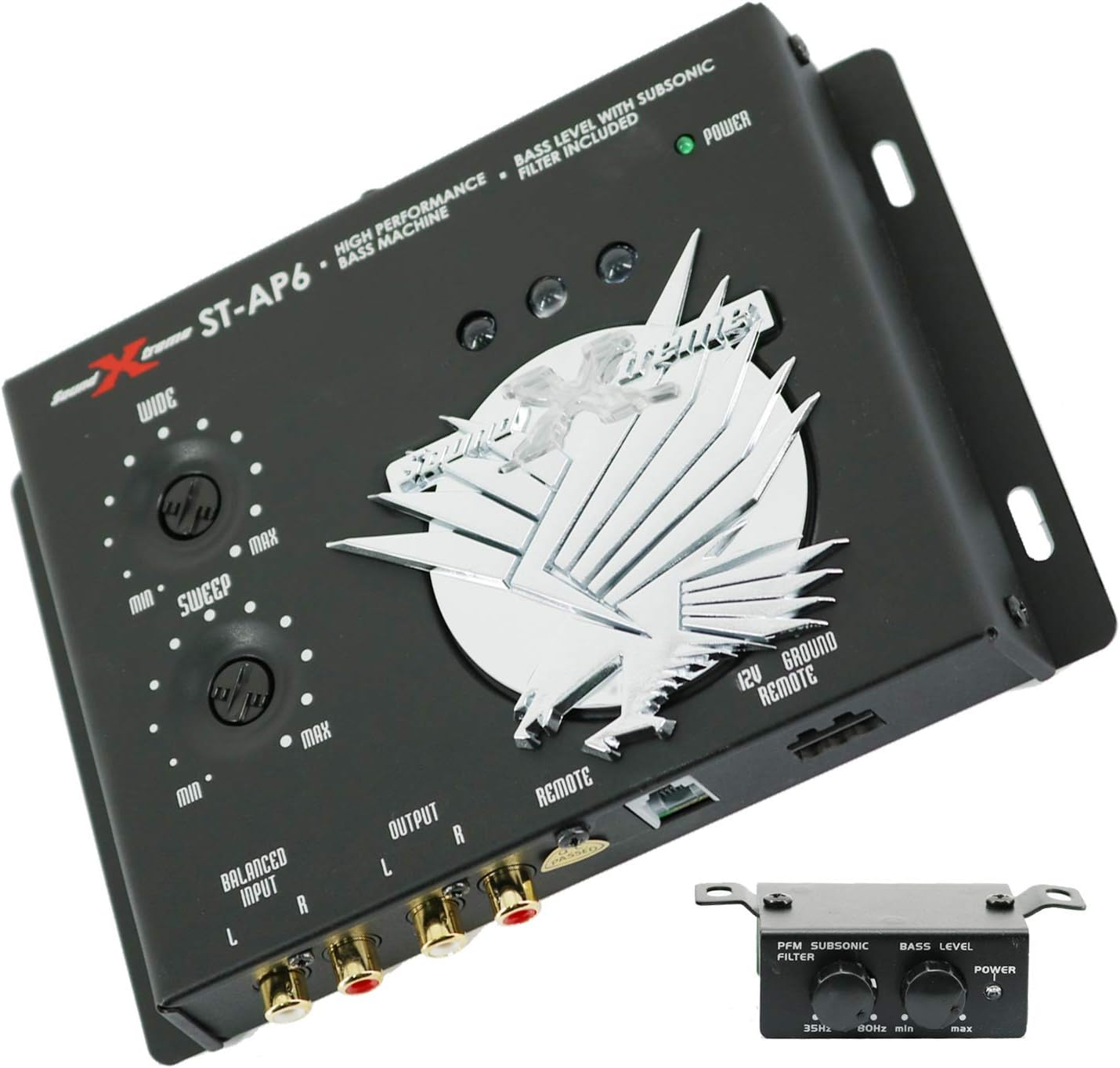
Figure 5: The SoundXtreme AP6 Bass Machine, a high-performance bass processor included in some bundles.
For detailed installation and operation instructions for the SoundXtreme AP6 Bass Machine, please refer to its dedicated user manual, as its functionality is separate from the Gravity 4000.1D ampmás duradero.
11. Garantía y soporte
For warranty information and technical support, please refer to the documentation provided with your purchase or contact Gravity customer service. Keep your proof of purchase for warranty claims.