
INTRATONE HTEL2-00
INTRATONE HTEL2-00 Remote Control User Manual
Model: HTEL2-00 | Brand: INTRATONE
1. Producto terminadoview
The INTRATONE HTEL2-00 - 09-0102 remote control is a sophisticated device featuring 4 bi-technology 868 MHz channels. It integrates both Mifare and HF 868 MHz technologies, allowing for straightforward programming via the official www.intratone.info website or with a dedicated programmer (model 12-0115). A key security feature is its unique ten-digit identification number, ensuring personalized and secure operation. This remote offers an operating range of up to 10 meters and is broadly compatible with various electronic devices, including televisions, smartphones, cameras, and projectors. Measuring 6.5 x 3.8 x 1 cm and weighing only 30 grams, it is designed for portability and ease of use, providing optimal control over your compatible devices.
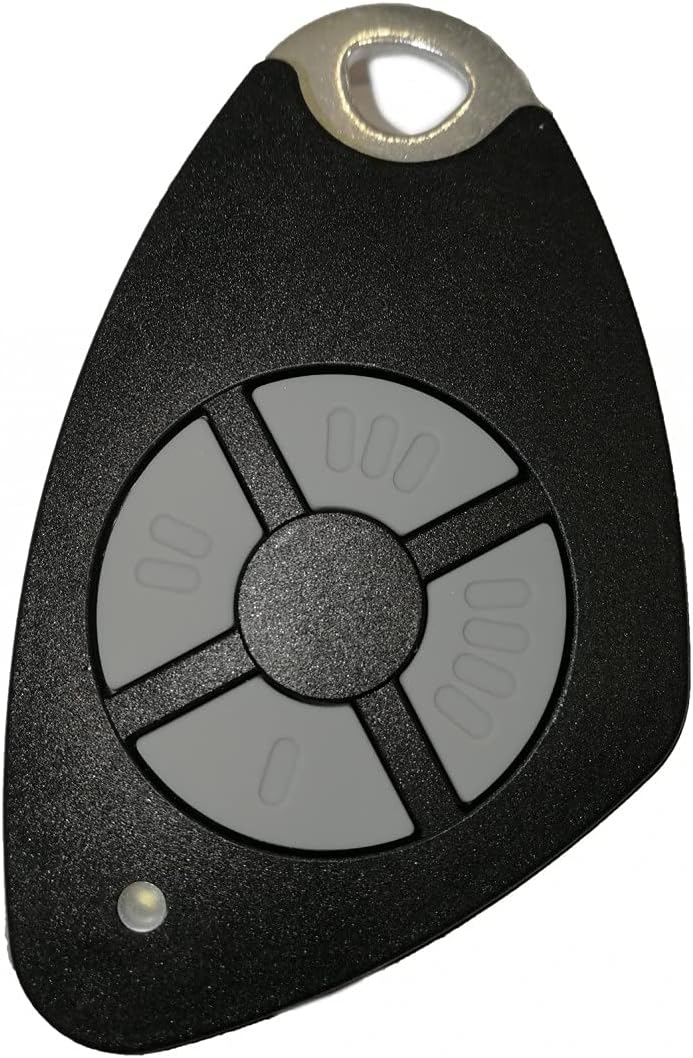
Figura 1.1: Frente view of the INTRATONE HTEL2-00 Remote Control.
2. Características del producto
- 4 canales: Provides control over up to four distinct functions or devices.
- Bi-Technology: Equipped with both Mifare and HF 868 MHz technologies for versatile use.
- Fácil Programación: Can be programmed via the official www.intratone.info website or using a dedicated programmer (model 12-0115).
- Unique Identification: Features a unique ten-digit engraved identification number for enhanced security and personalization.
- Amplia compatibilidad: Compatible with various devices including televisions, smartphones, cameras, and projectors.
- Diseño compacto: Lightweight (30 grams) and small dimensions (6.5 x 3.8 x 1 cm) for easy portability.
3. Configuración
3.1 Instalación de la batería
The INTRATONE HTEL2-00 remote control uses an Alkaline battery. To install or replace the battery:
- Ubique el compartimiento de la batería en la parte posterior del control remoto.
- Abra con cuidado la tapa del compartimento.
- Insert the Alkaline battery, ensuring correct polarity (+ and -).
- Cierre bien la tapa del compartimento de la batería.
3.2 Programación del control remoto
The HTEL2-00 remote control requires programming to function with your specific devices or access systems. Programming can be done via two methods:
- Online Programming: Visit the official INTRATONE programming websitio en www.intratone.info. Follow the on-screen instructions to register your remote using its unique ten-digit identification number and link it to your desired system.
- Programmer Device: Use a dedicated INTRATONE programmer device (model 12-0115). Refer to the programmer's manual for specific instructions on how to transfer programming data to your HTEL2-00 remote.

Figura 3.1: Angulado view of the remote control, showing its compact form factor.
4. Instrucciones de funcionamiento
4.1 Using the Channels
The HTEL2-00 remote control features four distinct buttons, each corresponding to a channel (00, 000, 0000, and 0). Once programmed, each button will activate its assigned function. To operate:
- Point the remote control towards the receiver of the device you wish to control.
- Press the corresponding channel button (00, 000, 0000, or 0) for the desired action.
- The small LED indicator on the remote will illuminate briefly when a button is pressed, indicating signal transmission.
4.2 Rango de operación
The remote control has a maximum operating range of 10 meters (approximately 33 feet) under optimal conditions. Factors such as obstacles (walls, furniture), radio interference, and battery level can affect the effective range.
4.3 Dispositivos compatibles
This remote control is designed for compatibility with a range of devices, including but not limited to:
- Televisores
- Smartphones (with compatible receivers/adapters)
- Cameras (with compatible receivers/adapters)
- Projectors (with compatible receivers/adapters)
- Access control systems (gates, garage doors, etc., if programmed accordingly)
5. Mantenimiento
5.1 Limpieza
Para limpiar el control remoto, utilice un paño suave y seco. Para la suciedad difícil, utilice un paño ligeramente seco.amp cloth with mild soap can be used, ensuring no liquid enters the device. Do not use abrasive cleaners, solvents, or harsh chemicals.
5.2 Reemplazo de batería
Replace the battery when the remote's performance degrades (e.g., reduced range, inconsistent operation) or the LED indicator does not light up. Refer to Section 3.1 for battery installation instructions. Always dispose of old batteries responsibly according to local regulations.
5.3 Almacenamiento
Guarde el control remoto en un lugar fresco y seco, alejado de la luz solar directa, temperaturas extremas y humedad alta. Evite que se caiga o lo exponga a impactos fuertes.
6. Solución de problemas
6.1 El control remoto no responde
- Comprobar la batería: Asegúrese de que la batería esté correctamente instalada y tenga suficiente carga. Reemplácela si es necesario.
- Verificar programación: Confirm that the remote control has been correctly programmed for the intended device or system. If unsure, attempt to reprogram it via www.intratone.info.
- Línea de visión: Ensure there are no obstructions between the remote control and the receiver.
- Proximidad: Move closer to the device you are trying to control, ensuring you are within the 10-meter operating range.
6.2 Reduced Operating Range
- Batería baja: A weak battery can significantly reduce the remote's range. Replace the battery.
- Interferencia: Other electronic devices operating on similar frequencies (868 MHz) can cause interference. Try moving away from such devices.
- Obstrucciones: Thick walls, metal objects, or other physical barriers can block the signal.
6.3 LED Indicator Not Lighting Up
- Problema con la batería: La batería podría estar agotada o mal insertada. Revísela y reemplácela.
- Mal funcionamiento del botón: If only one button's LED doesn't light up, that specific button might be faulty.
7. Especificaciones
| Característica | Especificación |
|---|---|
| Marca | INTRATONE |
| Número de modelo | HTEL2-00 |
| Tecnología de conectividad | Radiofrecuencia (868 MHz) |
| Número de canales | 4 |
| Características especiales | Digital display, Bi-technology (Mifare, HF) |
| Dispositivos compatibles | Television, Smartphone, Camera, Projector |
| Alcance máximo | 10 metros |
| Tipo de batería | Alcalino |
| Dimensiones del producto (L x An x Al) | 6.5 x 3.8 x 1 cm |
| Peso del producto | 30 gramos |
| Identificación | Unique ten-digit engraved number |
8. Garantía y soporte
Specific warranty information for the INTRATONE HTEL2-00 remote control is not provided in this manual. For details regarding warranty coverage, terms, and conditions, please refer to the product packaging or contact INTRATONE customer support directly.
For technical support, programming assistance, or any other inquiries, please visit the official INTRATONE websitio o comuníquese con su departamento de atención al cliente:
- Website for Programming & Information: www.intratone.info
- Contacto del fabricante: Please refer to the INTRATONE official webSitio para obtener detalles de contacto específicos de su región.
Ask a question about this manual
Ask about setup, troubleshooting, compatibility, parts, safety, or missing instructions. Manuals+ will review the question and use this page’s manual context to help answer it.