
1. Introducción
This manual provides instructions for the Powerextra D-Tap Charger, designed for V Mount, V Lock, and Gold Mount batteries. It ensures efficient and safe charging for compatible camera batteries and other devices that utilize a D-Tap port for charging.

Image 1.1: Powerextra D-Tap Charger with its integrated D-Tap cable.
2. Contenido del paquete
Verifique que todos los artículos estén presentes en su paquete:
- 1 x Powerextra D-Tap Charger
- 1 x 100cm AC Charging Cable
- 1 x paño de limpieza de microfibra

Image 2.1: The D-Tap charger, AC power cable, and microfiber cloth included in the package.
3. Especificaciones
| Característica | Especificación |
|---|---|
| Entrada de CA | 100-240 V / 0.8 A |
| Salida DC | 16.8 V-2.0 A |
| Vol de salidatage | 16.8 voltios |
| Peso del artículo | 8.1 onzas (aprox. 230 g) |
| Dimensiones del paquete | 6.14 x 3.58 x 1.46 pulgadas |
| Certificaciones | CE |
4. Configuración
Follow these steps to set up your D-Tap Charger:
- Conecte el cable de alimentación de CA: Insert the included 100cm AC charging cable into the power input port on the charger unit.
- Enchufe al tomacorriente: Plug the other end of the AC charging cable into a standard wall power outlet (100-240V).
- Conectar a la batería: Insert the D-Tap connector from the charger into the D-Tap port on your compatible V Mount, V Lock, or Gold Mount battery. Ensure a secure connection.

Image 4.1: The D-Tap connector for battery connection.


Imagen 4.2: Examples of compatible V-Mount, Gold Mount, and other D-Tap port batteries.
5. Instrucciones de funcionamiento
Once the charger is connected to a power source and a compatible battery, it will begin charging automatically.
- Indicador de carga: The charger features an LED indicator light to show the charging status.
- Luz roja: Indica que la batería se está cargando actualmente.
- Luz verde: Indica que la batería está completamente cargada.
The charger utilizes automatic constant current control to optimize charging speed and prevent overcharging.
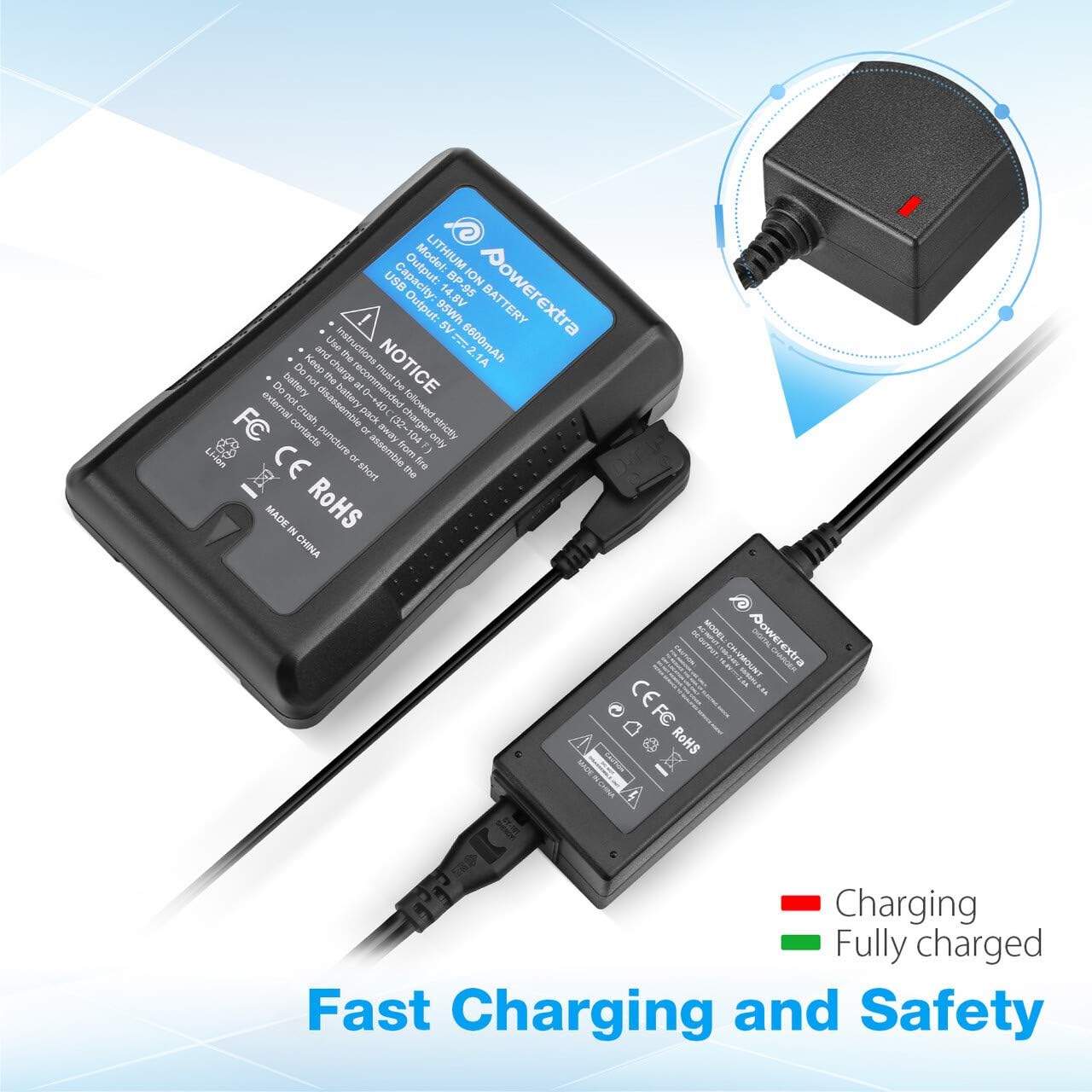
Image 5.1: Charger connected to a battery, with the red LED indicating active charging.
6. Información de seguridad
To ensure safe operation and prolong the life of your charger and batteries, please observe the following safety precautions:
- Protección de sobrecarga: The charger is designed to prevent batteries from overcharging.
- Protección contra cortocircuitos: Los mecanismos incorporados protegen contra cortocircuitos.
- Protección contra la sobretensión: Protecciones contra el flujo excesivo de corriente.
- Protección contra sobrecalentamiento: Evita que el cargador se sobrecaliente durante el funcionamiento.
- Protección contra descarga excesiva: (Note: This protection is typically a feature of the battery itself, but the charger is designed to work safely with such batteries.)
- Use the charger only with compatible V Mount, V Lock, or Gold Mount batteries.
- No exponga el cargador a la humedad, la lluvia o temperaturas extremas.
- No desmonte ni modifique el cargador. Todas las reparaciones deben ser realizadas por personal cualificado.
- Mantener fuera del alcance de los niños.

Image 6.1: Visual representation of the multi-protection features including short circuit, over discharge, over current, over charge, and over heating protection.
7. Mantenimiento
Proper maintenance ensures optimal performance and longevity of your charger:
- Limpieza: Use the provided microfiber cleaning cloth to gently wipe the charger and cables. Do not use liquid cleaners or solvents.
- Almacenamiento: Guarde el cargador en un lugar fresco y seco, alejado de la luz solar directa y de temperaturas extremas cuando no esté en uso.
- Cuidado de cables: Evite doblar o engarzar excesivamente los cables. Al desconectarlos, sujete siempre el enchufe, no el cable.
8. Solución de problemas
If you encounter issues with your Powerextra D-Tap Charger, refer to the following common problems and solutions:
- El cargador no se enciende:
- Asegúrese de que el cable de alimentación de CA esté conectado de forma segura tanto al cargador como al tomacorriente de pared.
- Verifique que el tomacorriente de pared funcione probándolo con otro dispositivo.
- La batería no se carga:
- Check that the D-Tap connector is fully and correctly inserted into the battery's D-Tap port.
- Confirm that the battery is compatible with the charger and is not fully charged already (green LED).
- Inspect the D-Tap cable and connector for any visible damage.
- Indicator Light Not Functioning:
- If the charger is connected and the battery is not fully charged, but the light is off, contact customer support.
If the problem persists after attempting these solutions, please contact Powerextra customer support for further assistance.
9. Garantía y soporte
Powerextra provides the following for this D-Tap Charger:
- Garantía: 12-month hassle-free warranty from the date of purchase.
- Apoyo: Soporte técnico de por vida.
For warranty claims, technical assistance, or any product-related inquiries, please contact Powerextra customer service through their official websitio o el minorista donde se compró el producto.