
1. Introducción
The YABER V3 Mini Bluetooth Projector is designed to provide a versatile and high-quality viewing experience for home entertainment and outdoor use. Featuring native 1280x720p resolution with 1080P support, a 6000:1 contrast ratio, and an advanced German LED light source, it delivers clear and accurate images. This projector also includes Bluetooth 5.0 for wireless audio connectivity and supports wireless screen mirroring via Anycast or Chromecast (adapters sold separately).
2. ¿Qué hay en la caja?
- YABER V3 Mini Bluetooth Projector
- Cable HDMI
- Cable de alimentación
- Manual de usuario
- AV Cable
- El paño de limpieza de lentes
- Control remoto (pilas no incluidas)
3. Características del producto
- Native 720P & 1080P Supported: Offers a native resolution of 1280x720 pixels, supporting up to 1080P input for clear images.
- Relación de alto contraste: Features a 6000:1 contrast ratio for enhanced image depth and detail.
- Conectividad Bluetooth 5.0: Allows wireless connection to Bluetooth headsets, speakers, and Airpods for enhanced audio.
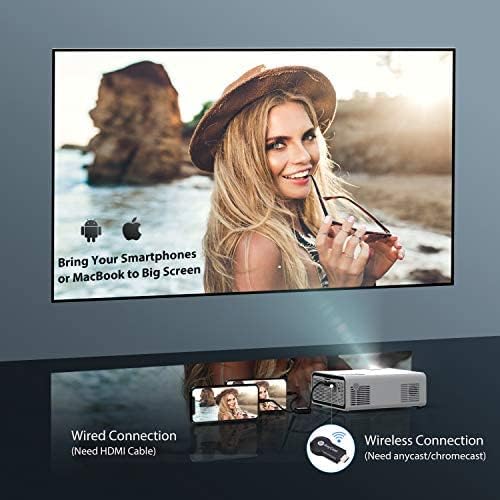
- Duplicación de pantalla inalámbrica: Supports Anycast and Chromecast for mirroring content from smartphones and other devices (adapters required).
- Función de zoom: Adjusts image size from 100% to 50% using the remote control without moving the projector.
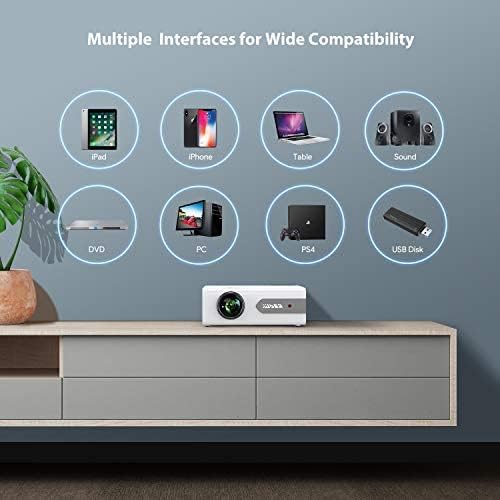
- Múltiples interfaces: Equipped with HDMI, USB, VGA, AV, and Audio ports for wide compatibility with various devices.
- Sonido estéreo HIFI: Built-in dual stereo speakers with an SRS sound system provide a good auditory experience.
- Sistema de enfriamiento avanzado: Designed to minimize lamp power consumption and extend lamp Vida útil de hasta 100,000 horas.


4. Configuración
4.1 Colocación inicial
Place the projector on a stable, flat surface or mount it to the ceiling. Ensure there is adequate ventilation around the projector to prevent overheating. The projection distance and screen size can be adjusted based on your viewentorno de ing.

4.2 Conexión de alimentación
Conecte el cable de alimentación a la entrada de alimentación del proyector y luego conéctelo a una toma de corriente.
4.3 Encendido y apagado
Presione el botón de encendido del proyector o el control remoto para encender o apagar la unidad.
5. Instrucciones de funcionamiento
5.1 Enfoque y corrección trapezoidal
Adjust the focus ring on the projector lens until the image is clear. Use the keystone correction feature (manual or digital, if available) to correct any trapezoidal distortion of the image.
5.2 Selección de la fuente de entrada
Use the 'Source' button on the remote or projector to select the desired input source (HDMI, USB, VGA, AV).
5.3 Conexión Bluetooth
Para conectarse a un dispositivo de audio Bluetooth:
- Ensure your Bluetooth speaker or headset is in pairing mode.
- Navegue a la configuración de Bluetooth en el proyector.
- Seleccione su dispositivo de la lista de dispositivos disponibles para emparejar.
- Una vez conectado, el audio se reproducirá a través del dispositivo Bluetooth.
Nota: The V3 mini projector supports Bluetooth output devices (speakers, headphones) but does not connect to phones/pads via Bluetooth for mirroring. Turn off Bluetooth when not in use to avoid potential issues.
5.4 Duplicación de pantalla inalámbrica
The YABER V3 supports wireless screen mirroring from iOS and Android devices using an external Anycast or Chromecast dongle (purchased separately). Connect the dongle to an HDMI port and follow the dongle's instructions for mirroring.
5.5 Función de zoom
To adjust the image size without moving the projector, use the zoom function via the remote control. This allows you to shrink the image from 100% down to 50%.
5.6 Escenarios de uso
The YABER V3 projector is suitable for various applications:
- Cine en casa: Enjoy movies and shows on a large screen.
- Juego de azar: Conecte consolas de juegos para disfrutar de una experiencia inmersiva.
- Películas al aire libre: Perfect for backyard movie nights in dark environments.

6. Mantenimiento
6.1 Limpieza de lentes
Regularly clean the projector lens using the provided lens cleaning cloth or a soft, lint-free cloth. Avoid using abrasive cleaners or harsh chemicals.
6.2 Limpieza del filtro de aire
Check and clean the air filter periodically to ensure proper airflow and prevent dust buildup, which can affect performance and lamp vida.
6.3 litrosamp Vida
El LED del proyectoramp has a lifespan of up to 100,000 hours. Proper maintenance, including adequate ventilation and cleaning, helps maximize its longevity.
7. Solución de problemas
- Sin imagen:
- Compruebe si el cable de alimentación está conectado de forma segura.
- Asegúrese de que esté seleccionada la fuente de entrada correcta.
- Verify that the connected device (e.g., TV Stick, PC) is powered on and outputting a signal.
- Ajustar el enfoque y la corrección trapezoidal.
- Sin sonido:
- Verifique la configuración de volumen tanto en el proyector como en el dispositivo conectado.
- Si usa Bluetooth, asegúrese de que el dispositivo esté correctamente emparejado y conectado.
- If using an external speaker via AUX, ensure the cable is fully inserted.
- Some content (e.g., certain streaming services) may have audio format incompatibilities; try a different source or content.
- Imagen borrosa:
- Ajuste el anillo de enfoque en la lente.
- Asegúrese de que la superficie de proyección sea plana y que el proyector esté estable.
- Limpie la lente del proyector.
- El control remoto no funciona:
- Reemplace las pilas del control remoto.
- Asegúrese de que no haya obstrucciones entre el control remoto y el receptor de infrarrojos del proyector.
- Calentamiento excesivo:
- Asegúrese de que haya una ventilación adecuada alrededor del proyector.
- Clean the air filter and vents to remove dust.
- Avoid operating in excessively hot environments.
8. Especificaciones
| Número de modelo | V3 |
| Resolución de pantalla | Native 1280 x 720 (Supports 1080P) |
| Relación de contraste | 6000:1 |
| Relación de aspecto | 16:9 / 4:3 |
| Fuente de luz | CONDUJO |
| Lamp Vida | Hasta 100,000 horas |
| Tecnología de conectividad | 3.5mm Jack, Bluetooth, HDMI, USB, VGA, AV |
| Versión de Bluetooth | 5.0 |
| Dimensiones del producto | 8.19 x 6.61 x 3.07 pulgadas |
| Peso del artículo | 2.2 libras |
| Usos recomendados | Home Cinema, Gaming, Business (not recommended for professional presentations) |
9. Garantía y soporte
YABER provides a 6-month return policy and 3-year repair service for the V3 Mini Bluetooth Projector. Lifetime professional technical support is also available. For any issues or inquiries, please contact YABER customer service.