
1. Producto terminadoview
The Cello C2220FSDE is a compact 22-inch Full HD LED television designed for versatile use. It features an integrated DVD player and a triple tuner (DVBT2/S2) for comprehensive signal reception. Its sleek design makes it suitable for various environments, including guest rooms, motorhomes, caravans, trucks, or boats.
Key features include HDMI and USB inputs for connecting external devices like game consoles and hard drives. The USB functionality also supports recording live television and playing stored media. This TV can also function as a monitor for laptops or desktop computers.

Imagen 1.1: The integrated DVD player allows for direct playback of DVDs without additional devices.

Imagen 1.2: Experience clear and detailed images with Full HD 1080p resolution.
2. Configuración e instalación
2.1 Desempaquetado y contenido
Retire con cuidado todos los componentes del embalaje. Asegúrese de que estén presentes los siguientes elementos:
- 1 x Cello 22-inch LED TV
- Cable de alimentación
- Mando a distancia
- Guía de inicio rápido
- 2 pilas AAA
- Soporte TV
2.2 Fijación del soporte
Place the TV screen face down on a soft, clean surface to prevent scratches. Align the stand with the mounting holes on the bottom of the TV and secure it using the provided screws.
2.3 Connecting Power and Antenna
- Conecte el cable de alimentación a la entrada de alimentación del televisor y luego a una toma de pared.
- Connect your TV aerial cable to the 'TV Aerial' input on the back of the TV.
- For satellite reception, connect a satellite dish cable (not supplied) to the 'DVB-S2' input.

Imagen 2.1: Trasero view of the TV showing power, antenna, and other connectivity ports.
2.4 Conexiones de dispositivos externos
El televisor ofrece varios puertos para conectar dispositivos externos:
- HDMI: Conecte dispositivos de alta definición como reproductores de Blu-ray, consolas de juegos o decodificadores.
- USB: Conecte dispositivos de almacenamiento USB para reproducir o grabar medios.
- VGA: Conecte una computadora para usarla como monitor.
- Salida de audio de 3.5 mm: Conecte auriculares o altavoces externos.

Imagen 2.2: Illustration of HDMI and USB ports for connecting various devices.

Imagen 2.3: The integrated satellite tuner allows connection to a satellite dish for satellite TV reception.
3. Instrucciones de funcionamiento
3.1 Encendido inicial y escaneo de canales
- Inserte las pilas AAA en el control remoto.
- Presione el botón de encendido en el control remoto o en el televisor para encenderlo.
- Follow the on-screen instructions for initial setup, including language selection and automatic channel scanning for DVB-T2 (terrestrial) and DVB-S2 (satellite) signals.
3.2 Funciones básicas del televisor
- Selección de canal: Use the 'CH+' / 'CH-' buttons or the numeric keypad on the remote control.
- Control de volumen: Use the 'VOL+' / 'VOL-' buttons.
- Selección de fuente: Press the 'SOURCE' button to switch between inputs (TV, HDMI, USB, DVD).
- Navegación por el menú: Use the 'MENU' button to access settings and navigation arrows to browse.
3.3 Integrated DVD Player Operation
- Asegúrese de que el televisor esté encendido y que la fuente de entrada esté configurada en “DVD”.
- Gently insert a DVD disc into the slot on the side of the TV, label side facing the mirror side (as indicated on the slot).
- The DVD should load automatically. Use the remote control for playback functions (Play, Pause, Stop, Skip).
3.4 USB Recording and Media Playback
- Reproducción de medios: Insert a USB storage device into the USB port. Select 'USB' as the input source. Navigate through your files (fotos, música, vídeos) usando el control remoto.
- USB Recording (PVR): While watching live TV, insert a USB storage device. Press the 'RECORD' button on the remote to start recording. You can also use the 'PAUSE' function for time-shifting live TV.
Vídeo 3.1: This video demonstrates the physical controls on the TV and the various input/output ports available on the back and side of the unit, including the DVD slot, USB, HDMI, and antenna connections.
4. Mantenimiento
4.1 Limpieza del televisor
- Desenchufe siempre el televisor de la toma de corriente antes de limpiarlo.
- Utilice un paño suave y seco para limpiar la pantalla y el gabinete. Para manchas difíciles, limpie ligeramenteampEnjuague el paño con agua o un limpiador de pantalla suave, no abrasivo.
- No utilice alcohol, benceno, disolventes u otras sustancias volátiles, ya que pueden dañar la pantalla o el acabado.
4.2 DVD Player Care
- Keep the DVD slot free from dust and debris.
- Only insert clean, undamaged discs.
5. Solución de problemas
If you encounter issues with your Cello TV, refer to the following common problems and solutions:
| Problema | Posible causa | Solución |
|---|---|---|
| Sin poder | Power cord not connected; power outlet faulty | Verifique la conexión del cable de alimentación; pruebe con una toma de corriente diferente |
| No hay imagen, pero hay sonido | Fuente de entrada incorrecta seleccionada; conexión de cable defectuosa | Press 'SOURCE' to select correct input; check HDMI/VGA cable connections |
| No hay sonido, pero hay imagen | Volume too low or muted; external audio device issue | Increase volume; check mute status; ensure external audio devices are connected correctly |
| Mala calidad de imagen (canales de TV) | Weak antenna signal; incorrect antenna connection | Adjust antenna position; check antenna cable connection; perform a channel rescan |
| El DVD no se reproduce | Disc inserted incorrectly; dirty or damaged disc; incorrect source selected | Re-insert disc correctly; clean or replace disc; select 'DVD' source |
| El control remoto no funciona | Batteries depleted or inserted incorrectly; obstruction between remote and TV | Replace batteries; ensure correct polarity; remove obstructions; point remote directly at TV sensor |
For further assistance, please refer to the support section or the full instruction manual available online.
6. Especificaciones
Below are the detailed technical specifications for the Cello C2220FSDE 22-inch Full HD LED TV:
| Característica | Especificación |
|---|---|
| Tamaño de pantalla | 22 pulgadas (54.6 cm en diagonal) |
| Marca | Violonchelo |
| Tecnología de visualización | CONDUJO |
| Resolución | 1080p (Full HD, 1920 x 1080 píxeles) |
| Frecuencia de actualización | 60 Hz |
| Característica especial | Reproductor de DVD integrado |
| Tecnología de conectividad | HDMI, USB, VGA |
| Relación de aspecto | 16:9 |
| Dimensiones del producto (Pr. x An. x Al.) | 5P x 50.4W x 34.2H cm |
| Peso del artículo | 2.55 kilogramos |
| Relación de contraste | 600:1 |
| Brillo máximo | 180 NIT Coating |
| Compatibilidad con HDR | HDR10 |
| Tiempo de respuesta | 10 milisegundos |
| Tipo de sintonizador | DVB-C, DVB-S2, DVB-T2 |
| Modo de salida de audio | Estéreo |
| Descripción del orador | 2 x 3 W Pitch Perfect Sound |
| Consumo de energía | 21 kWh |
| Volumentage | 230 Volts (100-240 V AC 50-60 Hz) |
| Estándar de montaje VESA | 100 x 100 mm |
| Año del modelo | 2023 |
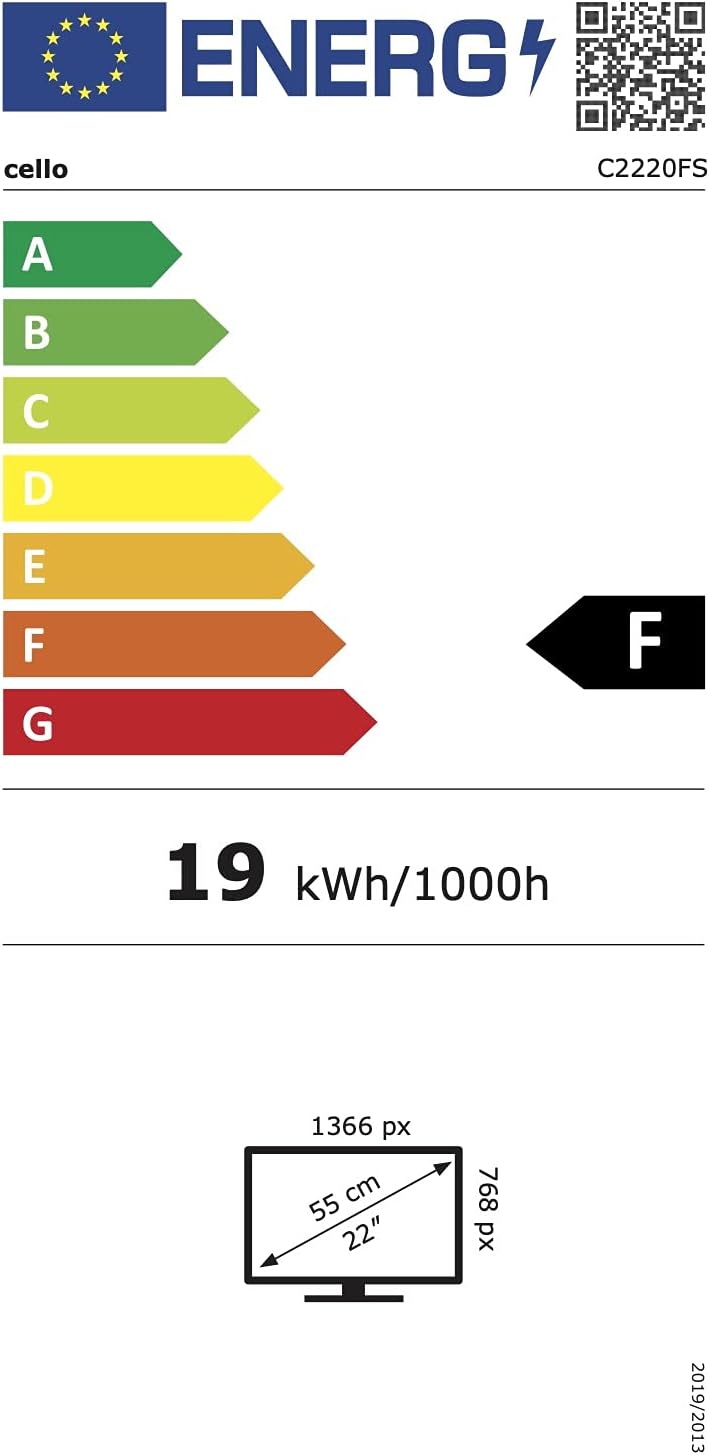
Imagen 6.1: Energy efficiency label for the Cello C2220FSDE TV. For more details, visit Base de datos EPREL.

Imagen 6.2: Detailed product information sheet. For more details, visit Base de datos EPREL.
7. Garantía y soporte
7.1 Información de garantía
This Cello TV comes with a Garantía limitada de 1 añosConserve su comprobante de compra para reclamaciones de garantía.
7.2 Atención al cliente
For technical support or customer service, please contact Cello Electronics:
- Websitio: www.celloelectronics.de
- Correo electrónico: consumersupport@celloelectronics.com
- Teléfono: 03334330312
- DIRECCIÓN: Dovecot Hills, Bishop Auckland, DL14 6XW Durham, United Kingdom
You can also download the full instruction manual for your device in your preferred language from the official Cello websitio: https://celloelectronics.de/instruction-books/.