
1. Introducción
Gracias por la compraasing the YESIDO YSP03 Sports Bluetooth In-Ear Earphones. This manual provides essential information for the safe and efficient use of your new earphones. Please read it thoroughly before use and retain it for future reference.
2. Información de seguridad
- Do not expose the earphones to extreme temperatures, humidity, or corrosive environments.
- Avoid dropping, impacting, or bending the earphones.
- Do not disassemble or modify the earphones. This may void the warranty and cause damage.
- Mantenga los auriculares fuera del alcance de los niños y las mascotas.
- Utilice únicamente el cable de carga proporcionado o un equivalente certificado.
- Escuche a niveles de volumen moderados para evitar daños auditivos.
- Do not use the earphones while driving or in situations where you need to be aware of your surroundings.
3. Contenido del paquete
Por favor revise el paquete para ver los siguientes artículos:
- YESIDO YSP03 Sports Bluetooth In-Ear Earphones
- Cable de carga USB
- Manual de usuario
- Ear tips (various sizes, typically)
4. Producto terminadoview
The YESIDO YSP03 earphones feature an in-ear design with a control unit for easy operation. They support Bluetooth wireless connectivity and also offer direct music playback via an SD card.
Control Unit and Ports
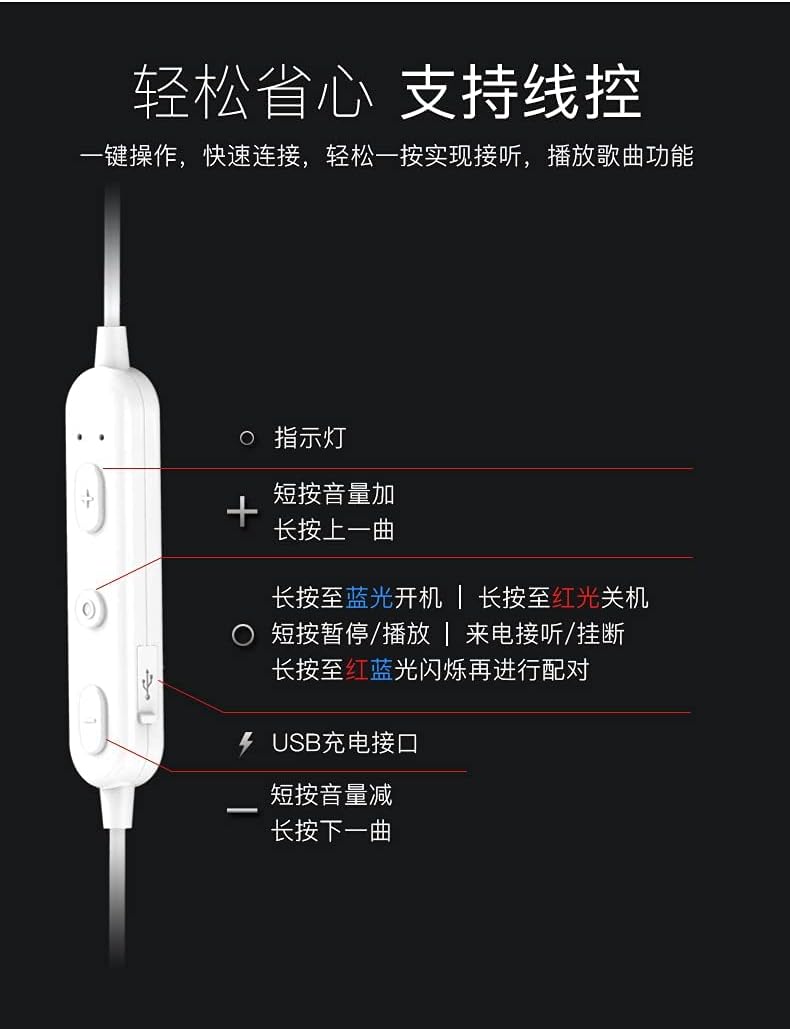
Imagen: Detallado view of the earphone control unit, showing the indicator light, volume/track buttons, multi-function button, and USB charging port.
- Luz indicadora: Muestra el estado (energía, emparejamiento, carga).
- Botón '+': Short press for Volume Up; Long press for Previous Track.
- Botón multifunción (centro): Long press for Power On (blue light) / Power Off (red light); Short press for Play/Pause or Answer/Hang up calls; Long press until red and blue lights flash for Pairing Mode.
- '-' Botón: Short press for Volume Down; Long press for Next Track.
- Puerto de carga USB: Para conectar el cable de carga.
Ranura para tarjeta SD
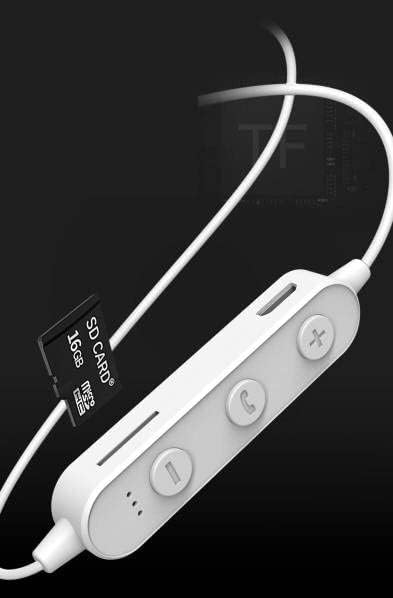
Imagen: Close-up of the control unit showing the SD card slot, indicating direct music playback without a phone. A 64GB card can store approximately 15,000 songs.
The earphones feature an integrated SD card slot, allowing you to play music directly from a memory card without needing a connected device. This is ideal for sports or activities where carrying a phone is inconvenient.
5. Configuración
5.1 Carga de los auriculares
- Connect the USB charging cable to the USB charging port on the earphone control unit.
- Conecte el otro extremo del cable USB a un adaptador de corriente USB (no incluido) o al puerto USB de una computadora.
- The indicator light will typically show a red light during charging and turn off or change color when fully charged.
- Espere aproximadamente 1 a 2 horas para una carga completa.
5.2 Emparejamiento Bluetooth
- Asegúrese de que los auriculares estén apagados.
- Press and hold the Multi-function Button (center button) for approximately 5-7 seconds until the indicator light flashes red and blue alternately. This indicates pairing mode.
- En su teléfono móvil o dispositivo con Bluetooth, vaya a la configuración de Bluetooth y active Bluetooth.
- Buscar available devices. You should see "YESIDO YSP03" or a similar name in the list.
- Select "YESIDO YSP03" to connect. Once successfully paired, the indicator light will typically flash blue slowly or turn off.
- Si se le solicita una contraseña, ingrese "0000".
5.3 Inserción de una tarjeta SD
- Locate the SD card slot on the control unit.
- Gently insert a formatted Micro SD card (TF card) with the metal contacts facing down until it clicks into place.
- The earphones will automatically detect the card and switch to SD card playback mode if no Bluetooth device is connected or if Bluetooth is disconnected.
6. Instrucciones de funcionamiento
6.1 Encendido y apagado
- Encendido: Press and hold the Multi-function Button until the blue indicator light appears.
- Apagado: Press and hold the Multi-function Button until the red indicator light appears.
6.2 Reproducción de música (modo Bluetooth)
- Reproducir/Pausa: Presione brevemente el botón multifunción.
- Sube el volumen: Short press the '+' Button.
- Bajar volumen: Short press the '-' Button.
- Pista siguiente: Long press the '-' Button.
- Pista anterior: Long press the '+' Button.
6.3 Gestión de llamadas
- Responder/Finalizar llamada: Short press the Multi-function Button when an incoming call is received.
- Rechazar llamada: Long press the Multi-function Button when an incoming call is received.
- Volver a marcar el último número: Presione dos veces el botón multifunción.
6.4 Reproducción de tarjeta SD
- Once an SD card is inserted and detected, the earphones will automatically begin playing music from the card.
- The same controls for Play/Pause, Volume, Next/Previous Track apply as in Bluetooth mode.
7. Mantenimiento
- Limpieza: Utilice un paño suave y seco para limpiar los auriculares. No utilice productos químicos agresivos ni materiales abrasivos.
- Almacenamiento: Guarde los auriculares en un lugar fresco y seco, alejado de la luz solar directa y de temperaturas extremas.
- Cuidado de la batería: To prolong battery life, charge the earphones regularly, even if not in frequent use. Avoid fully discharging the battery for extended periods.
8. Solución de problemas
| Problema | Solución |
|---|---|
| Los auriculares no se encienden. | Ensure the earphones are fully charged. Press and hold the Multi-function Button for a longer duration. |
| No se puede emparejar con el dispositivo. | Ensure earphones are in pairing mode (red and blue flashing light). Turn off and on Bluetooth on your device. Move closer to the earphones. Forget the device in your phone's Bluetooth settings and try pairing again. |
| No hay sonido. | Check volume levels on both earphones and your connected device. Ensure earphones are properly connected via Bluetooth or that the SD card is inserted correctly and contains playable files. |
| SD card not playing. | Asegúrese de que la tarjeta SD esté insertada correctamente y contenga audio compatible. files (e.g., MP3). Try re-inserting the card. Ensure no Bluetooth device is actively connected, as SD card playback might be prioritized when Bluetooth is disconnected. |
| Mala calidad de sonido. | Ensure there are no obstructions between the earphones and your device. Move closer to your device. Try a different audio source or file. |
9. Especificaciones
| Característica | Detalle |
|---|---|
| Marca | YESIDO |
| Número de modelo | YSP03 |
| Color | Blanco |
| Colocación de orejas | En la oreja |
| Tecnología de conectividad | Inalámbrico (Bluetooth) |
| Control de ruido | Ninguno |
| Dispositivos compatibles | Teléfonos móviles |
| Usos específicos del producto | Deportes |
| Función del cable | Sin cables |
| Nivel de resistencia al agua | No resistente al agua |
| Tipo de control | Control de voz |
| Método de control | App (Voice Control implies app integration for some functions) |
Rendimiento de la batería

Imagen: Visual representation of battery performance metrics for the YESIDO YSP03 earphones.
- Tiempo de reproducción de música: Aproximadamente 9 horas
- Headphone Standby Time: Aproximadamente 120 horas
- Duración de la llamada: Aproximadamente 7.5 horas
*Note: These data are obtained from YESIDO laboratory tests, and slight deviations may occur due to changes in objective environment and usage patterns.
10. Garantía y soporte
10.1 Información de garantía
This product is provided without an explicit warranty. Please refer to your retailer's return policy for any issues within the applicable return period.
10.2 Atención al cliente
For further assistance or inquiries, please contact the retailer where you purchased the product. You may also visit the official YESIDO website for general product information and potential support resources.