
GOKOO B08FMBHSWD
GOKOO Smart Watch B08FMBHSWD User Manual
Introducción
This manual provides essential information for the proper setup, operation, and maintenance of your GOKOO Smart Watch B08FMBHSWD. Please read it thoroughly before using the device to ensure optimal performance and longevity.
The GOKOO Smart Watch is a versatile fitness tracker and smartwatch designed to monitor various health metrics and assist with daily activities. It features a full touch screen, heart rate and blood oxygen monitoring, sleep tracking, multiple sports modes, and notification capabilities.
Producto terminadoview
The GOKOO Smart Watch B08FMBHSWD is equipped with advanced features to support your active lifestyle and health monitoring needs.
- Seguimiento de actividad durante todo el día: Records steps, calories, and mileage. Supports 10 sports modes including walking, running, yoga, and swimming.
- Vigilancia Integral de la Salud: Continuously monitors heart rate and blood oxygen levels. Features automatic sleep tracking, breathing training, and sedentary reminders.
- Diseño duradero e impermeable: IP68 waterproof rating suitable for daily use and swimming.
- Pantalla personalizable: 1.3-inch round high-definition screen with personalized UI interfaces.
- Notificaciones inteligentes: Synchronizes messages and allows management of incoming calls.
- Batería de larga duración: Up to 10 days of usage on a single charge (200MA battery).
- Amplia compatibilidad: Works with Android 5.0+ and iOS 9.0+ devices.

Figure 1: GOKOO Smart Watch highlighting its design and core functionalities.
Configuración
1. Carga del dispositivo
Before initial use, fully charge your GOKOO Smart Watch. Connect the magnetic charging cable to the charging contacts on the back of the watch and plug the USB end into a power adapter (not included) or a computer's USB port. The watch display will indicate charging status.
A full charge typically takes approximately 2 hours and provides up to 10 days of usage, depending on individual use patterns.

Figure 2: Illustration of the watch's IP68 waterproof capability and its extended battery life.
2. Instalación y emparejamiento de la aplicación
- Descargar la aplicación: Buscar the official GOKOO companion app in your smartphone's app store (Apple App Store for iOS, Google Play Store for Android).
- Instalar y registrar: Instale la aplicación y siga las instrucciones en pantalla para crear una cuenta o iniciar sesión.
- Habilitar Bluetooth: Asegúrese de que Bluetooth esté habilitado en su teléfono inteligente.
- Combina el reloj: Open the GOKOO app, navigate to the device pairing section, and select your GOKOO Smart Watch from the list of available devices. Confirm the pairing request on both your phone and the watch if prompted.
- Permisos de concesión: Permita los permisos necesarios (por ejemplo, notificaciones, ubicación, datos de salud) para que la aplicación funcione correctamente.
The watch will synchronize its language with your phone upon successful connection.
Instrucciones de funcionamiento
1. Navegación básica
- Pantalla táctil: The watch features a full touch screen for interaction.
- Deslizar hacia arriba/abajo: Desplácese por los menús y las notificaciones.
- Deslizar hacia la izquierda/derecha: Accede a diferentes widgets o funciones rápidas.
- Grifo: Seleccione un elemento o confirme una acción.
- Botón lateral: Generalmente se utiliza para volver a la pantalla de inicio o activar/desactivar la pantalla.

Figure 3: The watch interface displaying multiple functions and touch screen interaction methods.
2. Seguimiento de actividad
The watch automatically tracks your daily steps, calories burned, and distance traveled. For specific activities, you can select from 10 sports modes:
- Caminando
- Correr
- Yoga
- Nadar
- Ciclismo
- Escalada
- Baloncesto
- Fútbol americano
- Bádminton
- Salto a la comba
To start a workout, navigate to the 'Sports' menu on your watch, select the desired activity, and tap to begin. The watch will record your exercise data, which can be reviewed en la aplicación complementaria.

Figure 4: The watch interface showing available sports monitoring modes.

Figure 5: The watch tracking an outdoor run, displaying distance, calories, and a trajectory map.
3. Monitoreo de la salud
- Frecuencia cardíaca: El reloj monitorea continuamente tu frecuencia cardíaca. View datos en tiempo real en el reloj o datos históricos detallados en la aplicación.
- Oxígeno en sangre (SpO2): Controle sus niveles de oxígeno en sangre durante todo el día.
- Seguimiento del sueño: The watch automatically records your sleep quality, including deep sleep, light sleep, and wake times. Review sleep patterns in the app to help adjust your habits.
- Entrenamiento de respiración: Access guided breathing exercises on the watch to help reduce stress and improve relaxation.
- Recordatorios sedentarios: Configure recordatorios en la aplicación para que le avisen que debe moverse después de períodos de inactividad.

Figure 6: The watch displaying real-time heart rate and blood oxygen data during exercise.
4. Notificaciones y funciones inteligentes
Once paired with your smartphone, the GOKOO Smart Watch can display notifications for incoming calls, messages, and various app alerts. You can read messages directly on your wrist and manage incoming calls (answer/reject) without reaching for your phone.
- Gestión de llamadas: Swipe on the watch screen to accept or reject incoming calls.
- Visualización de mensajes: View text messages and app notifications.
- Pronóstico del tiempo: Access current weather information.
- Control de música: Controla la reproducción de música en tu teléfono inteligente.
- Control remoto de la cámara: Utilice el reloj como obturador remoto para la cámara de su teléfono.
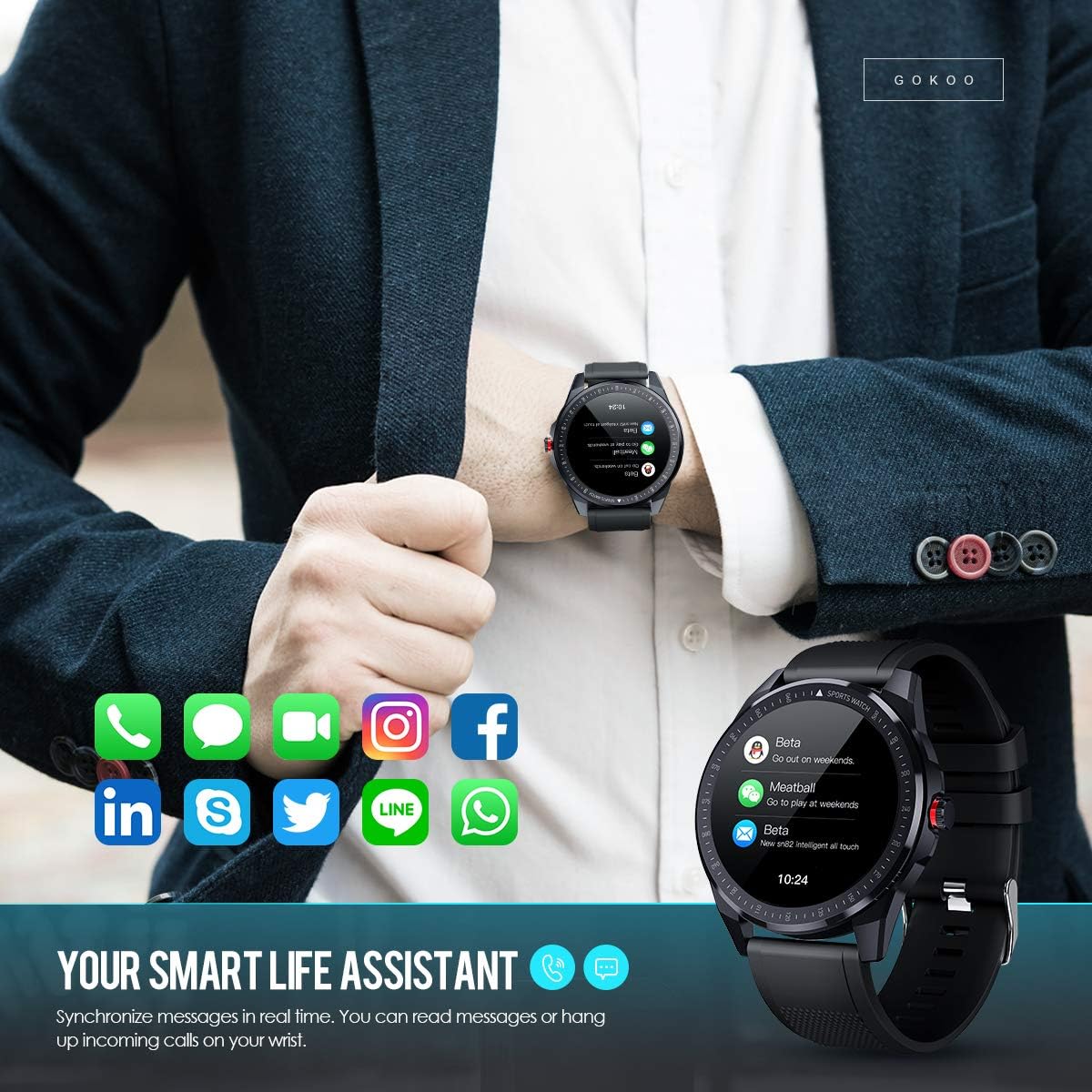
Figure 7: The watch showing synchronized notifications from a smartphone.
5. Personalización
The GOKOO Smart Watch allows for personalization of its interface. You can select from various pre-installed watch faces or download additional styles through the companion app to match your preference.
Mantenimiento
1. Limpieza
Limpie regularmente su reloj y correa para evitar la irritación de la piel y mantener la higiene del dispositivo. Utilice un paño suave que no deje pelusa. Si es necesario, límpielo ligeramente.ampEnjuague el paño con agua. Evite usar productos químicos agresivos, limpiadores abrasivos o aerosoles.
2. Pautas de resistencia al agua
The GOKOO Smart Watch has an IP68 waterproof rating, meaning it is resistant to dust and can withstand immersion in water up to 1.5 meters for 30 minutes. It is suitable for daily use, hand washing, rain, and swimming.
Importante: Do not use the watch in hot water baths, saunas, or during diving. High temperatures and high pressure can compromise the waterproof seals and cause damage.
3. Cuidado de la batería
- Evite descargar completamente la batería con frecuencia.
- Cargue el reloj utilizando el cable de carga magnético proporcionado.
- Guarde el reloj en un lugar fresco y seco cuando no lo utilice durante períodos prolongados.
Solución de problemas
- El reloj no enciende: Asegúrese de que el reloj esté completamente cargado. Conéctelo al cargador durante al menos 30 minutos.
- No se puede emparejar con el teléfono:
- Asegúrese de que Bluetooth esté habilitado en su teléfono.
- Asegúrese de que el reloj esté dentro del alcance Bluetooth de su teléfono.
- Reinicie tanto el teléfono como el reloj.
- Compruebe si la aplicación tiene los permisos necesarios.
- Datos de salud inexactos: Asegúrese de que el reloj esté ajustado a la muñeca, aproximadamente un dedo por encima del hueso de la muñeca. Limpie el sensor de la parte trasera del reloj.
- Las notificaciones no aparecen:
- Verify that notification permissions are granted in the app and your phone's settings.
- Asegúrese de que el reloj esté conectado mediante Bluetooth.
- Compruebe si el modo “No molestar” está activo en el reloj o en el teléfono.
- Duración de la batería corta: Reduce screen brightness, disable continuous heart rate monitoring if not needed, and limit the number of active notifications.
Presupuesto
| Característica | Detalle |
|---|---|
| Marca | GOKOO |
| Modelo | B08FMBHSWD |
| Tamaño de pantalla | 1.3 pulgadas |
| Sistema operativo | Android 5.0 o superior, iOS 9.0 o superior |
| Dispositivos compatibles | Teléfono inteligente |
| Duración de la batería | Hasta 10 días (dependiendo del uso) |
| Tipo de batería | Polímero de litio |
| Resistencia al agua | IP68 |
| Conectividad inalámbrica | Bluetooth |
| Entrada de interfaz humana | Pantalla táctil |
| Dimensiones del producto | 27 x 5 x 1.08 cm; 168 g |

Figure 8: Detailed product dimensions of the GOKOO Smart Watch.
Garantía y soporte
For warranty information or technical support, please refer to the contact details provided with your purchase or visit the official GOKOO website. If you require a copy of this manual or have any questions regarding your GOKOO Smart Watch B08FMBHSWD, please contact customer service.
Documentos relacionados - B08FMBHSWD
 |
Manual del usuario del reloj inteligente GOKOO Manual de usuario del reloj inteligente GOKOO, que cubre la descarga de aplicaciones, carga, conexión, funciones y solución de problemas. |
 |
Manual del usuario del reloj inteligente GOKOO Manual de usuario del reloj inteligente GOKOO, que detalla la configuración, funciones como la frecuencia cardíaca y el monitoreo del sueño, modos deportivos, notificaciones y consejos para la solución de problemas. |
Ask a question about this manual
Ask about setup, troubleshooting, compatibility, parts, safety, or missing instructions. Manuals+ will review the question and use this page’s manual context to help answer it.