
EARISE M15
Manual de usuario de la máquina de karaoke EARISE M15
Modelo: M15
Introducción
Gracias por la compraasing the EARISE M15 Karaoke Machine. This portable PA loudspeaker system is designed to provide high-quality audio for various entertainment and public address needs. Featuring powerful sound output, versatile connectivity options, and vibrant LED lights, the M15 is perfect for parties, gatherings, and karaoke sessions. Please read this manual thoroughly before operating the device to ensure proper use and to maximize its lifespan.
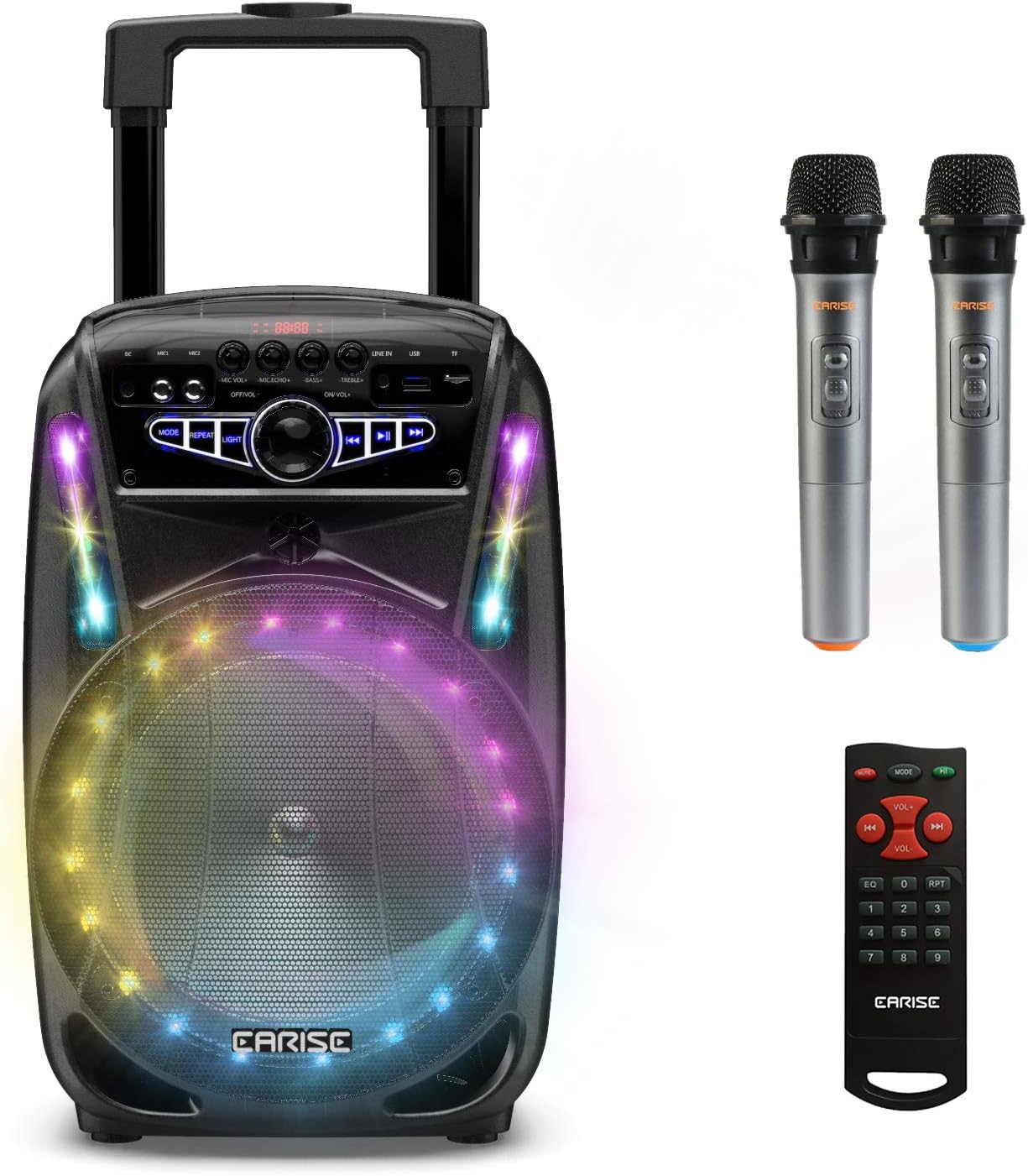
Image: The EARISE M15 Karaoke Machine, a black portable speaker with colorful LED lights on the front, shown with two wireless microphones and a remote control.
¿Qué hay en la caja?
Revise el contenido de su paquete para asegurarse de que todos los artículos estén presentes y en buenas condiciones.
- 1 sistema PA con carro M15
- 2 micrófonos inalámbricos (pilas no incluidas)
- 1 x control remoto
- 1 x Cable de Alimentación
- Cable 1 x AUX
- 1 x Manual de usuario (este documento)

Image: A visual representation of the package contents, showing the M15 speaker, two wireless microphones, a remote control, an AUX cable, and a charging cable.
Guía de configuración
1. Cargando la unidad
Before first use, fully charge the M15 Karaoke Machine. The built-in 3600mAh 7.4V Lithium rechargeable battery provides portability. A full recharge takes approximately 3 hours.
- Connect the included power cord to the DC Charging Port (6) on the back of the unit.
- Conecte el otro extremo del cable de alimentación a una toma de corriente CA estándar de 100-240 V.
- The charging indicator light will illuminate. Once fully charged, the light may change color or turn off depending on the unit's design.
2. Instalación de las baterías del micrófono
The wireless microphones require batteries (not included). Open the battery compartment of each microphone and insert the required batteries, ensuring correct polarity.
3. Encendido inicial
Locate the Power On/Off switch (15) on the control panel. Turn the switch to the "ON" position to power on the unit.
Instrucciones de funcionamiento
Panel de control sobreview
Familiarícese con el panel de control para un funcionamiento óptimo.

Image: Close-up of the M15's control panel, highlighting various buttons and ports with corresponding numbers for easy identification.
- Pantalla de visualización: Muestra el modo actual, el número de pista y otra información.
- Volumen del micrófono: Ajusta el volumen de los micrófonos conectados.
- Eco de micrófono: Controla el efecto de eco de los micrófonos.
- Bajo: Ajusta el nivel de graves de la salida de audio.
- Triplicar: Ajusta el nivel de agudos de la salida de audio.
- Puerto de carga de CC: For connecting the power adapter to charge the unit.
- Mic 1 Port: Entrada para micrófono con cable.
- Mic 2 Port: Input for a second wired microphone.
- Line In Port (AUX): Para conectar dispositivos de audio externos mediante cable AUX.
- Ranura para unidad flash USB: Para reproducir audio files desde una unidad USB.
- Ranura para tarjeta TF/SD: Para reproducir audio files from a TF or SD card.
- Modo: Switches between Bluetooth, USB, TF, AUX, and FM Radio modes.
- Repetir: Repite la pista o lista de reproducción actual.
- Luz: Alterna o cambia los patrones de luz LED.
- Power On/Off, Master Volume: Turns the unit on/off and adjusts the overall volume.
- Pista anterior: Salta a la pista anterior.
- Reproducir/Pausa: Reproduce o pausa la pista actual.
- Pista siguiente: Salta a la siguiente pista.
1. Emparejamiento Bluetooth
Connect your smartphone, tablet, or other Bluetooth-enabled device to the M15 for wireless audio streaming.
- Power on the M15 unit.
- Presione el Modo button (12) until "Bluetooth" or "BT" appears on the Display Screen (1).
- Enable Bluetooth on your device and search for "EARISE M15" in the list of available devices.
- Select "EARISE M15" to pair. A confirmation sound will indicate successful pairing.
- You can now play audio from your device through the M15.

Image: A person sitting outdoors, connecting their smartphone to the EARISE M15 speaker via Bluetooth, indicated by the Bluetooth logo.
2. Reproducción de tarjeta USB/TF
Reproducir audio files directly from a USB flash drive or TF/SD card.
- Insert a USB flash drive into the USB Flash Drive Slot (10) or a TF/SD card into the TF/SD Card Slot (11).
- The unit should automatically switch to USB or TF mode and begin playing compatible audio files. Si no, presione el Modo Botón (12) para seleccionar el modo correcto.
- Utilice el Pista anterior (16), Reproducir/Pausa (17), y Pista siguiente (18) botones para controlar la reproducción.
3. Entrada AUX
Connect external audio devices that do not have Bluetooth capability using the AUX cable.
- Connect one end of the included AUX cable to the Line In Port (9) on the M15.
- Conecte el otro extremo del cable AUX al conector de salida de audio de su dispositivo externo (por ejemplo, reproductor de MP3, computadora portátil).
- Presione el Modo button (12) until "AUX" or "LINE" appears on the Display Screen (1).
- Controle la reproducción desde su dispositivo externo.
4. Uso del micrófono
The M15 supports up to two wireless microphones and two wired microphones simultaneously for karaoke fun.
- Micrófonos inalámbricos: Turn on the wireless microphones. They should automatically connect to the M15.
- Micrófonos con cable: Plug wired microphones into Mic 1 Port (7) or Mic 2 Port (8).
- Adjust the Microphone Volume (2) and Microphone Echo (3) knobs to achieve desired sound effects.

Image: A group of people enjoying karaoke, with the EARISE M15 speaker providing sound and multiple microphones in use, demonstrating its multi-user capability.
5. luces LED
Enhance your party atmosphere with the M15's colorful LED disco lights.
- Presione el Luz button (14) to toggle the LED lights on/off or to cycle through different light patterns.

Image: The EARISE M15 speaker with its front-facing LED lights glowing in multiple colors, creating a vibrant visual effect.
6. Uso del control remoto
El control remoto incluido proporciona una operación conveniente a distancia.
- Asegúrese de que el control remoto tenga baterías que funcionen.
- Point the remote control towards the front of the M15 unit.
- Use the buttons on the remote to control volume, mode, track selection, EQ, and other functions.
Mantenimiento
Proper maintenance will ensure the longevity and optimal performance of your EARISE M15 Karaoke Machine.
- Limpieza: Utilice un paño suave y seco para limpiar el exterior de la unidad. No utilice limpiadores abrasivos, ceras ni disolventes, ya que pueden dañar el acabado.
- Cuidado de la batería: Para prolongar la vida útil de la batería, evite descargarla completamente con frecuencia. Si va a guardar la unidad durante un período prolongado, cárguela al 50 % aproximadamente cada pocos meses.
- Almacenamiento: Guarde la unidad en un lugar fresco y seco, lejos de la luz solar directa, temperaturas extremas y alta humedad.
- Manejo: While the unit is portable with wheels and a handle, avoid dropping or subjecting it to strong impacts.

Image: A person demonstrating the portability of the EARISE M15 by pulling it with its retractable handle and built-in wheels.
Solución de problemas
If you encounter issues with your M15, please refer to the following common problems and solutions.
| Problema | Posible causa | Solución |
|---|---|---|
| Sin energía / La unidad no se enciende. | La batería está agotada. El cable de alimentación no está conectado correctamente. | Cargue la unidad completamente. Ensure power cord is securely connected to both the unit and the power outlet. |
| No hay sonido desde el altavoz. | El volumen es demasiado bajo. Modo incorrecto seleccionado. External device volume is low. | Increase the Master Volume (15). Presione el Modo button (12) to select the correct input source (Bluetooth, USB, AUX). Increase volume on the connected external device. |
| El micrófono no funciona. | Microphone batteries are dead or incorrectly inserted. El volumen del micrófono es demasiado bajo. Wireless microphone not paired. | Replace microphone batteries, ensuring correct polarity. Increase Microphone Volume (2). Ensure wireless microphones are turned on and within range. |
| El emparejamiento de Bluetooth falló. | M15 is not in Bluetooth mode. Device is too far from M15. El Bluetooth del dispositivo está desactivado. | Prensa Modo button (12) to select Bluetooth mode. Move your device closer to the M15. Habilite Bluetooth en su dispositivo. |
| La tarjeta USB/TF no se reproduce. | Incorrecto file formato. La tarjeta/unidad no se insertó correctamente. Unit not in USB/TF mode. | Asegurar audio fileLos archivos están en un formato compatible (por ejemplo, MP3). Vuelva a insertar la unidad USB o la tarjeta TF firmemente. Prensa Modo button (12) to select USB or TF mode. |
Presupuesto
Detailed technical specifications for the EARISE M15 Karaoke Machine.
| Característica | Especificación |
|---|---|
| Modelo | M15 |
| Potencia de salida | 400W máx. |
| Frecuencia R | 90 Hz-20 KHz |
| Batería de iones de litio | 3.7V / 2600mAh (Built-in) |
| Unidad de manejo | 8" 4Ω*1 + 1" tweeter*1 |
| Relación señal/ruido | ≥60dB |
| Fuente de alimentación | CA 100-240 V |
| Dimensiones del producto (L x An x Al) | 27.94 x 25.4 x 40.64 cm (11 x 10.4 x 16.3 pulgadas) |
| Peso del artículo | 4.08 kilogramos |
| Tecnología de conectividad | Bluetooth, USB, AUX |
| Dispositivos compatibles | Computadoras portátiles, teléfonos inteligentes |

Image: A diagram illustrating the physical dimensions of the EARISE M15 speaker, showing its height, width, and depth.
Garantía y soporte
Para obtener información sobre la garantía o asistencia técnica, consulte los datos de contacto que se incluyen con la documentación de compra o visite el sitio web oficial de EARISE. webSitio. Conserve su recibo de compra como comprobante de compra para cualquier reclamación de garantía.
Ask a question about this manual
Ask about setup, troubleshooting, compatibility, parts, safety, or missing instructions. Manuals+ will review the question and use this page’s manual context to help answer it.