
Introducción
Thank you for choosing the HOMIDEC Office Desk with Bookshelf. This manual provides essential information for the safe and efficient assembly, operation, and maintenance of your new desk. Please read these instructions carefully before assembly and retain them for future reference.
This versatile desk features a two-in-one design, combining a spacious computer desk with integrated storage shelves, ideal for home offices, studies, or bedrooms. Its robust construction ensures durability and stability for your workspace needs.
Información de seguridad
- Siempre siga cuidadosamente las instrucciones de montaje.
- Asegúrese de que todos los tornillos y fijaciones estén bien apretados antes de usar. Revíselos periódicamente y vuelva a apretarlos si es necesario.
- Do not overload the desk or shelves beyond the recommended weight capacity.
- Mantenga las piezas pequeñas fuera del alcance de los niños durante el montaje para evitar peligro de asfixia.
- Coloque el escritorio sobre una superficie nivelada para garantizar la estabilidad.
Configuración y montaje
Assembly of your HOMIDEC Office Desk is designed to be straightforward. It is recommended that two people assemble the desk for ease and safety, although it can be assembled by one person.
Antes de comenzar:
- Desembale todos los componentes y verifíquelos con la lista de piezas (no incluida en este manual, consulte el manual físico incluido).
- Despeje un área espaciosa para la reunión.
- Mantenga todas las herramientas y el hardware organizados.
Pasos de montaje (orientación general):
- Coloque el marco: Begin by assembling the metal frame components according to the provided diagrams. Ensure all connections are finger-tightened initially.
- Instalar estantes: The storage shelves can only be placed on the right side of the desk. Secure them to the frame as indicated in your specific manual.
- Montar el escritorio: Carefully place the desktop onto the assembled frame and secure it with the provided fasteners.
- Ajuste final: Una vez instalados todos los componentes, apriete sistemáticamente todos los tornillos y pernos con las herramientas adecuadas. No apriete demasiado.
- Ajuste de las patas niveladoras: El escritorio cuenta con patas ajustables para garantizar la estabilidad en suelos irregulares. Gire las patas en sentido horario o antihorario para nivelarlo.
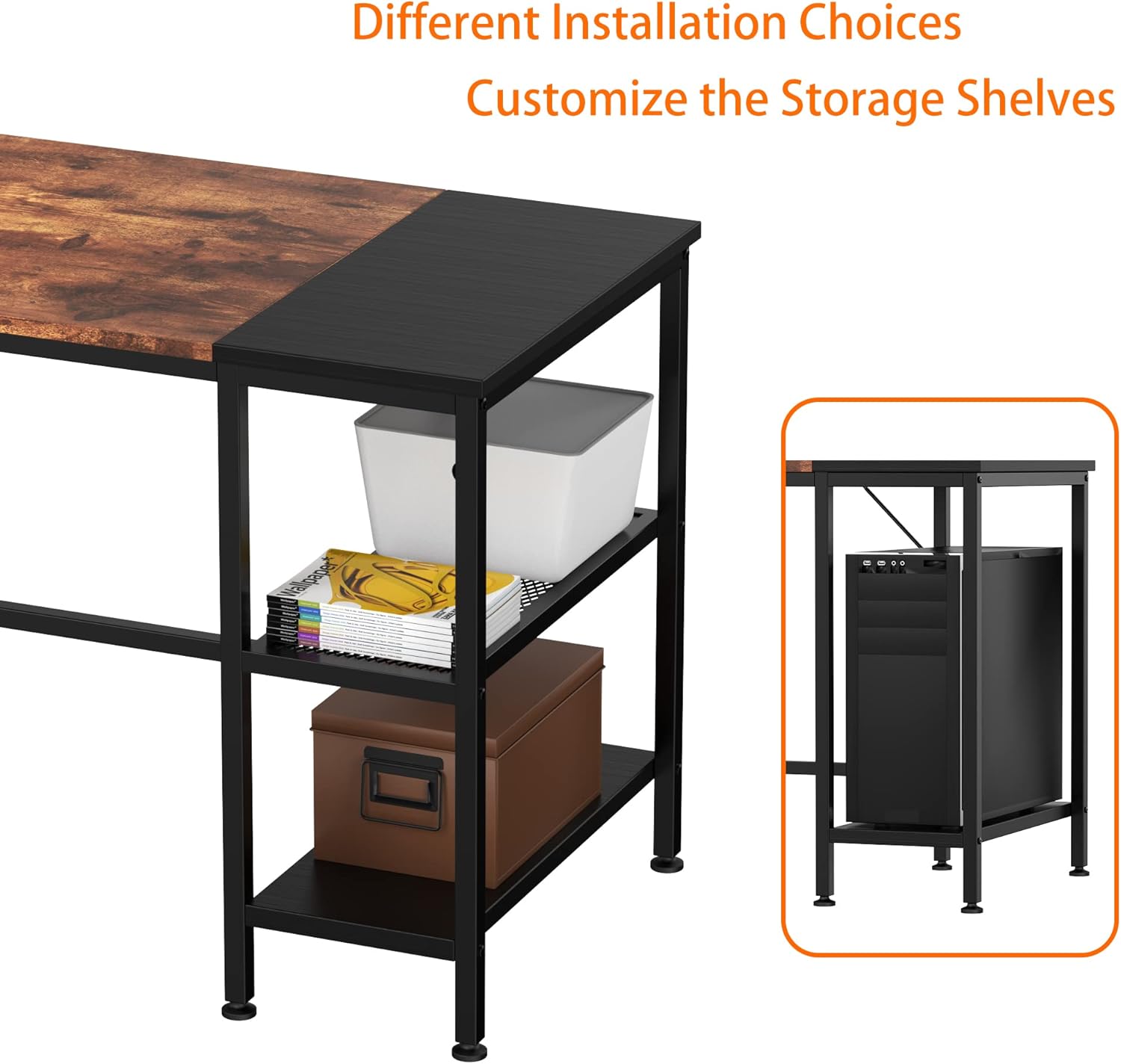
Image: Different Installation Choices for Storage Shelves. This diagram illustrates how the storage shelves can be configured on the right side of the desk, offering options for open shelving or space to accommodate a PC tower.
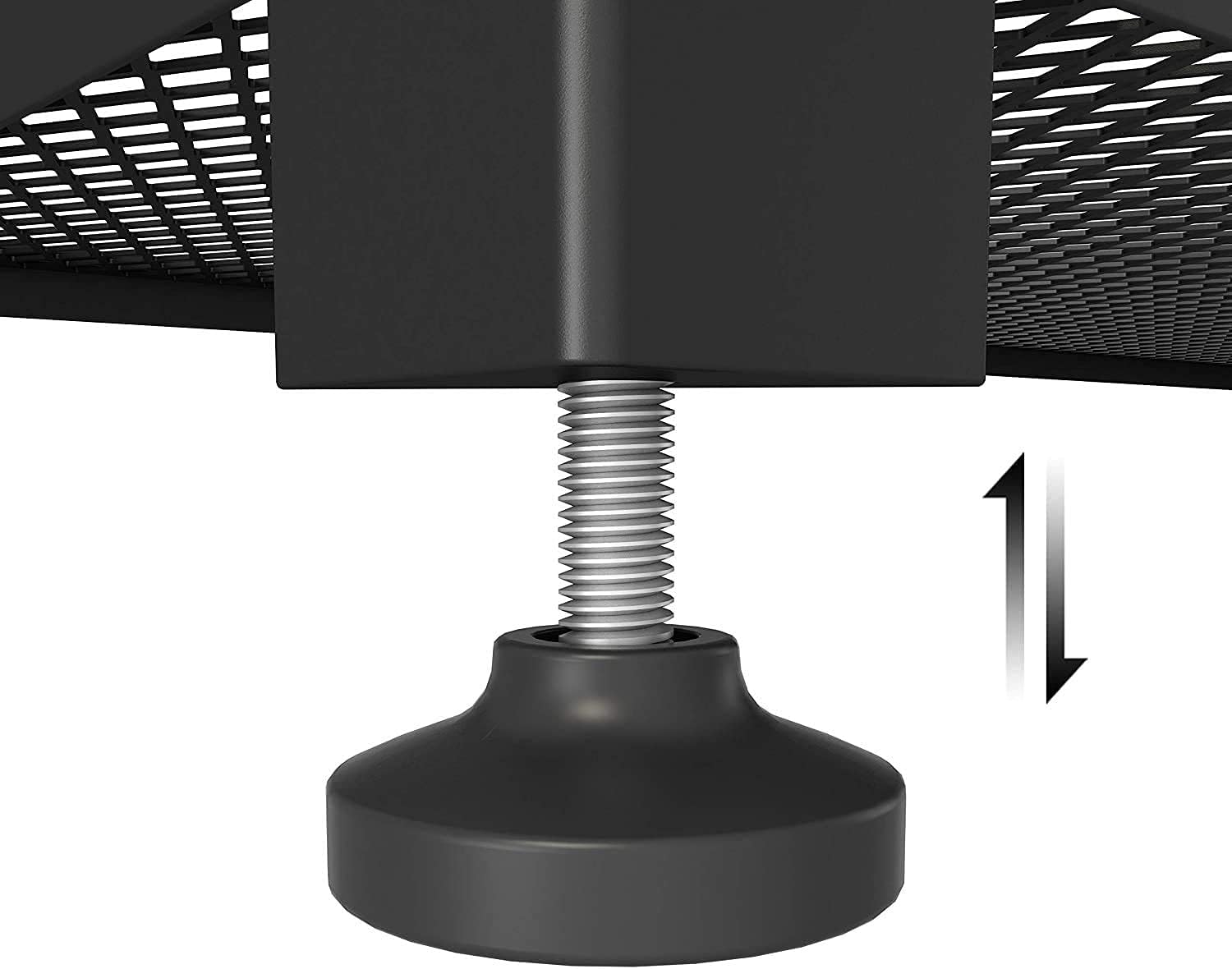
Image: Adjustable Leveling Foot. A close-up view of the adjustable leveling foot located at the base of a desk leg, demonstrating the screw mechanism used for fine-tuning height and ensuring stability on uneven surfaces.
Instrucciones de funcionamiento
The HOMIDEC Office Desk is designed for versatile use in various settings, providing ample space for your work and storage needs.
- Uso del escritorio: The spacious desktop (140x60cm) is suitable for laptops, desktop computers, monitors, keyboards, and other office accessories. Arrange your equipment to optimize your workflow and comfort.
- Estantes de almacenamiento: Utilize the integrated 3-tier storage shelves for books, documents, stationery, potted plants, or decorative items. The shelves are designed to keep your essentials within easy reach, enhancing work efficiency.
- Distribución del peso: Distribute weight evenly across the desktop and shelves. Avoid placing heavy items solely on one side to maintain stability. The desk has a maximum weight recommendation of 110 kg.

Image: Desk in Use with Dual Monitors. This image shows the HOMIDEC Office Desk set up in a room, accommodating two computer monitors, a keyboard, and a mouse on its main surface. A PC tower is neatly stored on the lower shelf of the integrated bookshelf, demonstrating practical use of the desk's features.

Image: Desk in Use with Single Monitor and Storage. This image presents the HOMIDEC Office Desk within a home office environment, featuring a single computer monitor, keyboard, and mouse. The integrated 3-tier storage shelves are utilized for organizing books and displaying decorative items, highlighting the desk's functional design.
Mantenimiento y cuidado
Proper care will extend the life and appearance of your HOMIDEC Office Desk.
- Limpieza: The desk surface is anti-scratch and wear-resistant. Wipe surfaces with a soft, damp paño. Evite limpiadores abrasivos o productos químicos fuertes que puedan dañar el acabado.
- Derrames: Immediately wipe up any spills to prevent water damage or staining, especially on the wood board components. The tabletop has a protective layer designed to be waterproof.
- Protección: Use coasters for drinks and protective pads under hot items to prevent marks.
- Sujetadores: Revise periódicamente todos los tornillos y pernos para asegurarse de que estén bien apretados. Vuelva a apretarlos si detecta alguna holgura.
- Ambiente: Evite exponer el escritorio a temperaturas extremas o humedad, que pueden afectar la integridad del material.

Image: Desk Surface Detail. A close-up shot of the desk surface, showcasing the distinct textured vintage wood finish adjacent to a smooth black section. This detail highlights the desk's double color matching design and material quality.
Solución de problemas
If you encounter any issues with your HOMIDEC Office Desk, refer to the following common problems and solutions:
- El escritorio se tambalea:
- Asegúrese de que todos los tornillos y pernos de montaje estén bien apretados.
- Check if the desk is on a level surface. Adjust the leveling feet at the bottom of each leg until the desk is stable.
- Piezas faltantes o dañadas:
- Revise nuevamente con cuidado todos los materiales de embalaje.
- Contact HOMIDEC customer support immediately with details of the missing or damaged parts. Refer to the "Support" section for contact information.
- Dificultad de montaje:
- Review the assembly instructions provided with your product.
- Asegúrese de utilizar el hardware correcto para cada paso.
- Si es posible, busque ayuda de otra persona.
Presupuesto
| Número de modelo: | FY-SJDNZ140-FGS |
| Marca: | HOMIDEC |
| Dimensiones (L x An x Al): | 140 cm x 60 cm x 75 cm (55.12" de profundidad x 23.62" de ancho x 29.53" de alto) |
| Peso: | 18.6 kilogramos |
| Capacidad máxima de peso: | 110 kg (242 libras) |
| Material: | E1 Grade Solid Particle Wood Board, Steel Frame |
| Color: | Vinotage Wood and Black |
| Requiere ensamblaje: | Sí |
Información de garantía
HOMIDEC provides a Garantía de 12 meses for this product, covering returns and exchanges for manufacturing defects. This warranty applies from the date of purchase. Please retain your proof of purchase for warranty claims.
Atención al cliente
Should you have any questions, require assistance with assembly, or encounter any issues with your HOMIDEC Office Desk, please do not hesitate to contact our professional service team.
We are committed to providing the best service and will respond to your inquiries as soon as possible, typically within 24 hours.
Información del contacto: Please refer to the contact details provided in your product packaging or on the official HOMIDEC websitio.