
Introducción
The Directed Electronics DS3 Remote Start Interface System is designed to enhance vehicle security and convenience. As a global leader in security and control telematics, this system aims to make your vehicle experience more secure, comfortable, and enjoyable. This manual provides essential information for the proper setup, operation, and maintenance of your DS3 system.
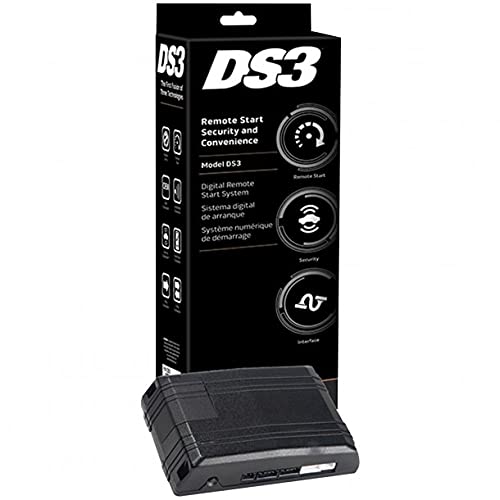
Figure 1: Directed Electronics DS3 Remote Start Interface System module.
Configuración e instalación
Proper installation of the DS3 system is crucial for its functionality and your vehicle's safety. It is highly recommended that installation be performed by a qualified professional installer.
Pasos generales de instalación (se recomienda instalación profesional):
- Preparación del vehículo: Asegúrese de que la batería del vehículo esté desconectada antes de comenzar cualquier trabajo eléctrico.
- Colocación del módulo: Select a secure and discreet location within the vehicle for mounting the DS3 module, away from excessive heat or moisture.
- Conexiones de cableado: Carefully follow the detailed wiring diagrams provided with the professional installation kit. This typically involves connecting to the vehicle's ignition, power, ground, data bus, and other relevant circuits.
- Programación del módulo: Once all physical connections are made, the DS3 module will need to be programmed to your specific vehicle using specialized tools and software. This step integrates the system with the vehicle's onboard computer.
- Pruebas: After programming, thoroughly test all functions of the remote start and interface system to ensure correct operation and vehicle compatibility.
Note: Incorrect installation can lead to vehicle damage, system malfunction, or safety hazards. Always consult the professional installation guide or a certified technician.
Instrucciones de funcionamiento
Once installed and programmed, the DS3 system allows for remote control of various vehicle functions. Specific operations may vary based on your vehicle and the remote control device used (e.g., factory key fob, dedicated remote, smartphone app).
Operaciones comunes:
- Inicio remoto: Typically activated by pressing a specific button sequence on your remote control (e.g., lock button three times, or a dedicated remote start button). The vehicle will start and run for a pre-set duration.
- Parada remota: To turn off the engine after remote starting, repeat the remote start button sequence or press a dedicated stop button.
- Toma de posesión clave: After remote starting, enter the vehicle, insert the key into the ignition, turn it to the ON/RUN position, and press the brake pedal. This transfers control from the remote start system to the vehicle's ignition.
- Bloqueo/desbloqueo de puerta: Use your remote control to lock or unlock the vehicle doors.
- Apertura del maletero: If configured, a dedicated button on your remote may release the vehicle's trunk.
Refer to your specific remote control's user guide for exact button functions and sequences.
Mantenimiento
The Directed Electronics DS3 system is designed for reliable operation with minimal maintenance. Follow these general guidelines:
- Mantener seco: Asegúrese de que el módulo y sus conexiones permanezcan secos y libres de humedad.
- Evite temperaturas extremas: While designed for automotive environments, prolonged exposure to extreme temperatures outside normal operating ranges can affect performance.
- Baterías de control remoto: Replace batteries in your remote control devices as needed to ensure consistent performance. Refer to your remote's manual for battery type and replacement instructions.
- Actualizaciones de software: Periodically, your installer may recommend software updates for the DS3 module to improve performance or add new features. These updates should only be performed by a qualified technician.
Solución de problemas
If you experience issues with your DS3 system, consider the following common troubleshooting steps:
- El sistema no responde:
- Check the battery in your remote control.
- Asegúrese de estar dentro del alcance del vehículo.
- Verify that the vehicle's hood is closed, and the parking brake is engaged (if required by your vehicle's setup).
- El vehículo no arranca de forma remota:
- Confirm the vehicle is in Park (automatic transmission) or Neutral with the parking brake engaged (manual transmission, if configured).
- Check if the vehicle's check engine light is on, which can prevent remote start.
- Ensure all doors, trunk, and hood are securely closed.
- Short Remote Range:
- Reemplace la batería del control remoto.
- Evite áreas con alta interferencia de radiofrecuencia.
If problems persist, contact your authorized Directed Electronics dealer or professional installer for assistance.
Presupuesto
| Número de modelo: | DS3 |
| Dimensiones del producto: | 10.5 x 4 x 3.5 pulgadas |
| Peso del artículo: | 1.1 libras |
| Marca: | Dirigido |
| Fabricante: | Víbora |
| País natal: | Porcelana |
| Otras características de visualización: | Inalámbrico |
Garantía y soporte
Directed Electronics products are backed by a limited warranty. For specific warranty terms and conditions, please refer to the documentation provided with your purchase or visit the official Directed Electronics website. For technical support, service, or warranty claims, please contact your authorized dealer or the Directed Electronics customer support team.
Conserve su comprobante de compra para fines de garantía.