
1. Introducción
This manual provides essential instructions for the safe and efficient use of your Savio Tws-04 Wireless Bluetooth Earphones. Please read this manual thoroughly before using the product and retain it for future reference.
2. Información de seguridad
- No exponga los auriculares ni el estuche de carga a temperaturas extremas, humedad o líquidos.
- Evite dejar caer, golpear o desmontar el dispositivo.
- Mantener fuera del alcance de los niños.
- Utilice únicamente cargadores y cables aprobados.
- La escucha prolongada a niveles de volumen altos puede causar daños auditivos.
3. Contenido del paquete
Asegúrese de que todos los artículos estén presentes en el paquete:
- Savio Tws-04 Wireless Bluetooth Earphones (Left and Right)
- Estuche de carga
- Cable de carga USB
- Puntas para los oídos de varios tamaños
- Manual de usuario

Image 3.1: Contents of the Savio Tws-04 package, showing the earphones, charging case, and various ear tip sizes.
4. Producto terminadoview
The Savio Tws-04 earphones are designed for wireless audio playback and hands-free communication. They come with a portable charging case for convenience.

Image 4.1: Savio Tws-04 earphones displayed with their charging case.
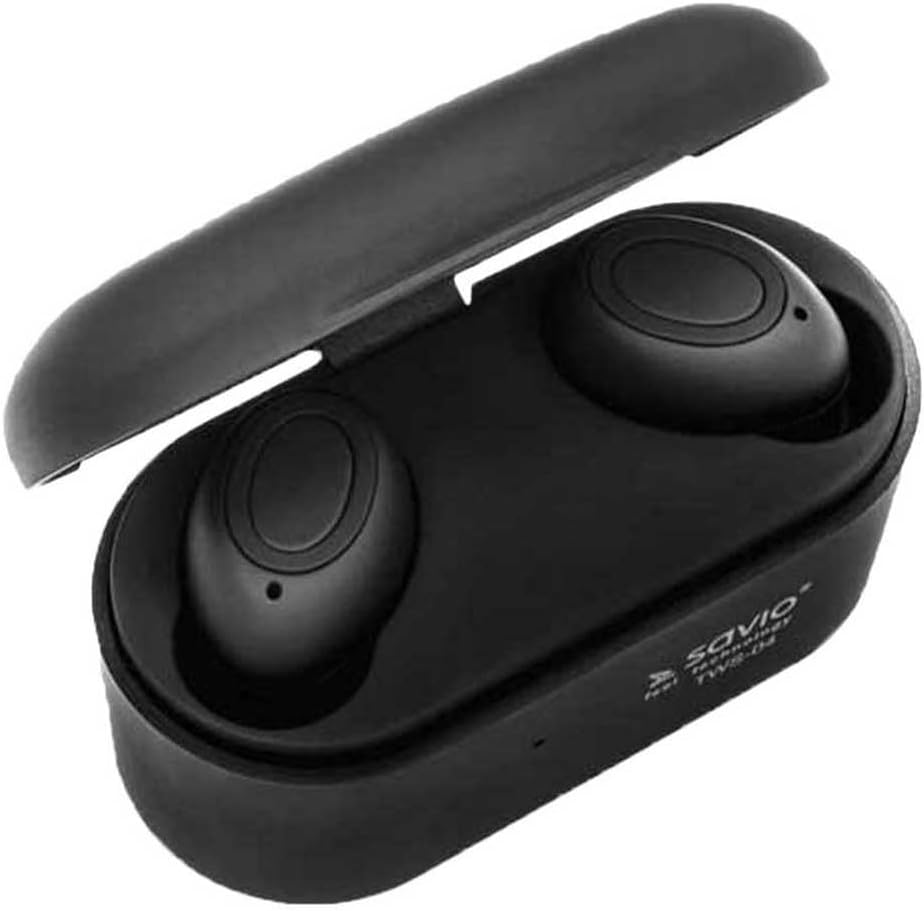
Image 4.2: The Savio Tws-04 earphones seated within their open charging case, showing charging contacts.
5. Configuración
5.1. Carga de los auriculares y el estuche
- Carga inicial: Antes del primer uso, cargue completamente los auriculares y el estuche de carga.
- Caso de carga: Connect the USB charging cable to the charging port on the case and to a power source (e.g., computer USB port, wall adapter). The indicator light on the case will show charging status.
- Cargar auriculares: Place the earphones into the charging slots inside the case. Ensure they are properly seated. The indicator lights on the earphones will illuminate to show they are charging.
- Carga completa: Una vez cargada por completo, las luces indicadoras cambiarán o se apagarán. Desconecte el cable de carga.

Image 5.1: An earphone placed in the charging case, illustrating the charging process.
5.2. Emparejamiento con un dispositivo Bluetooth
- Encendido: Saca ambos auriculares del estuche de carga. Se encenderán automáticamente e intentarán emparejarse.
- Modo de emparejamiento: Once paired with each other, one earphone's indicator light will flash, indicating it is ready to pair with your device.
- Habilitar Bluetooth: En su teléfono inteligente u otro dispositivo con Bluetooth habilitado, vaya a la configuración de Bluetooth y habilite Bluetooth.
- Seleccione el dispositivo: Buscar available devices and select "Savio Tws-04" from the list.
- Confirmación de conexión: Once successfully paired, the earphone indicator light will stop flashing, and you may hear an audio prompt.
- Reconexión: Los auriculares se volverán a conectar automáticamente al último dispositivo emparejado cuando se saquen del estuche, si Bluetooth está habilitado en el dispositivo.
6. Funcionamiento de los auriculares
6.1. Encendido y apagado
- Encendido: Take earphones out of the charging case. They will power on automatically. Alternatively, press and hold the multi-function button on both earphones for approximately 3 seconds.
- Apagado: Place earphones back into the charging case. They will power off automatically. Alternatively, press and hold the multi-function button on both earphones for approximately 5 seconds.
6.2. Reproducción de música
- Reproducir/Pausa: Single tap the multi-function button on either earphone.
- Pista siguiente: Double tap the multi-function button on the right earphone.
- Pista anterior: Double tap the multi-function button on the left earphone.
- Control de volumen: (Note: Volume control may be managed directly from your connected device. Refer to your device's manual for specific instructions.)
6.3. Gestión de llamadas
- Responder/Finalizar llamada: Single tap the multi-function button on either earphone.
- Rechazar llamada: Mantenga presionado el botón multifunción en cualquiera de los auriculares durante aproximadamente 2 segundos.
- Asistente de voz: Triple tap the multi-function button on either earphone to activate your device's voice assistant (e.g., Siri, Google Assistant).
7. Mantenimiento
- Limpieza: Utilice un paño suave, seco y sin pelusa para limpiar los auriculares y el estuche de carga. No utilice limpiadores abrasivos ni disolventes.
- Consejos para los oídos: Retire y limpie periódicamente las puntas de los oídos con un paño húmedo.amp paño. Asegúrese de que estén completamente secos antes de volver a colocarlos.
- Almacenamiento: Cuando no los uses, guarda los auriculares en su estuche de carga para protegerlos y mantenerlos cargados. Guárdalos en un lugar fresco y seco.
- Cuidado de la batería: Para prolongar la vida útil de la batería, evite descargarla por completo con frecuencia. Cargue el dispositivo regularmente, incluso si no lo usa durante períodos prolongados.
8. Solución de problemas
| Problema | Posible solución |
|---|---|
| Los auriculares no se encienden. | Asegúrese de que los auriculares y el estuche de carga estén completamente cargados. |
| Los auriculares no se emparejan con el dispositivo. |
|
| Sólo funciona un auricular. |
|
| Mala calidad de audio. |
|
9. Especificaciones
| Característica | Detalle |
|---|---|
| Nombre del modelo | Savio Tws-04 |
| Tecnología de conectividad | Inalámbrico (Bluetooth, NFC) |
| Factor de forma | En la oreja |
| Color | Negro |
| Material | Aluminio |
| Nivel de resistencia al agua | Impermeable |
| Dispositivos compatibles | Teléfono celular |
| Tipo de control | Control de aplicaciones |
| Peso del artículo | 2 kilogramos |
Note: The listed item weight of 2 Kilograms may refer to the packaged shipping weight rather than the actual product weight. The form factor is visually identified as In-Ear, despite a specification listing 'Supra-Auriculaire'.
10. Garantía y soporte
Savio products are designed for reliability and performance. For warranty information, technical support, or service inquiries, please refer to the warranty card included with your product or visit the official Savio webSitio. Conserve su comprobante de compra para reclamaciones de garantía.
Disponibilidad de repuestos en la UE: 2 años.