
1. Información importante de seguridad
Please read this manual carefully before assembly and use. Keep this manual for future reference.
- Capacidad de peso: Do not exceed the maximum weight capacity of 80 kg (176 lbs). Overloading can cause instability and potential damage.
- Estabilidad: Ensure the desk is stable and level on a flat surface before placing items on it and during height adjustments.
- Autorización: Keep the area around the desk clear of obstructions during operation to prevent pinching or damage.
- Niños y mascotas: Mantenga a los niños y a las mascotas alejados del escritorio durante su funcionamiento para evitar accidentes.
- Asamblea: Follow all assembly instructions precisely. Incorrect assembly can lead to instability and injury.
2. Producto terminadoview
The FLEXISPOT H1W is a hand-crank adjustable standing desk frame designed to provide a flexible and ergonomic workspace. It allows for smooth transitions between sitting and standing positions.
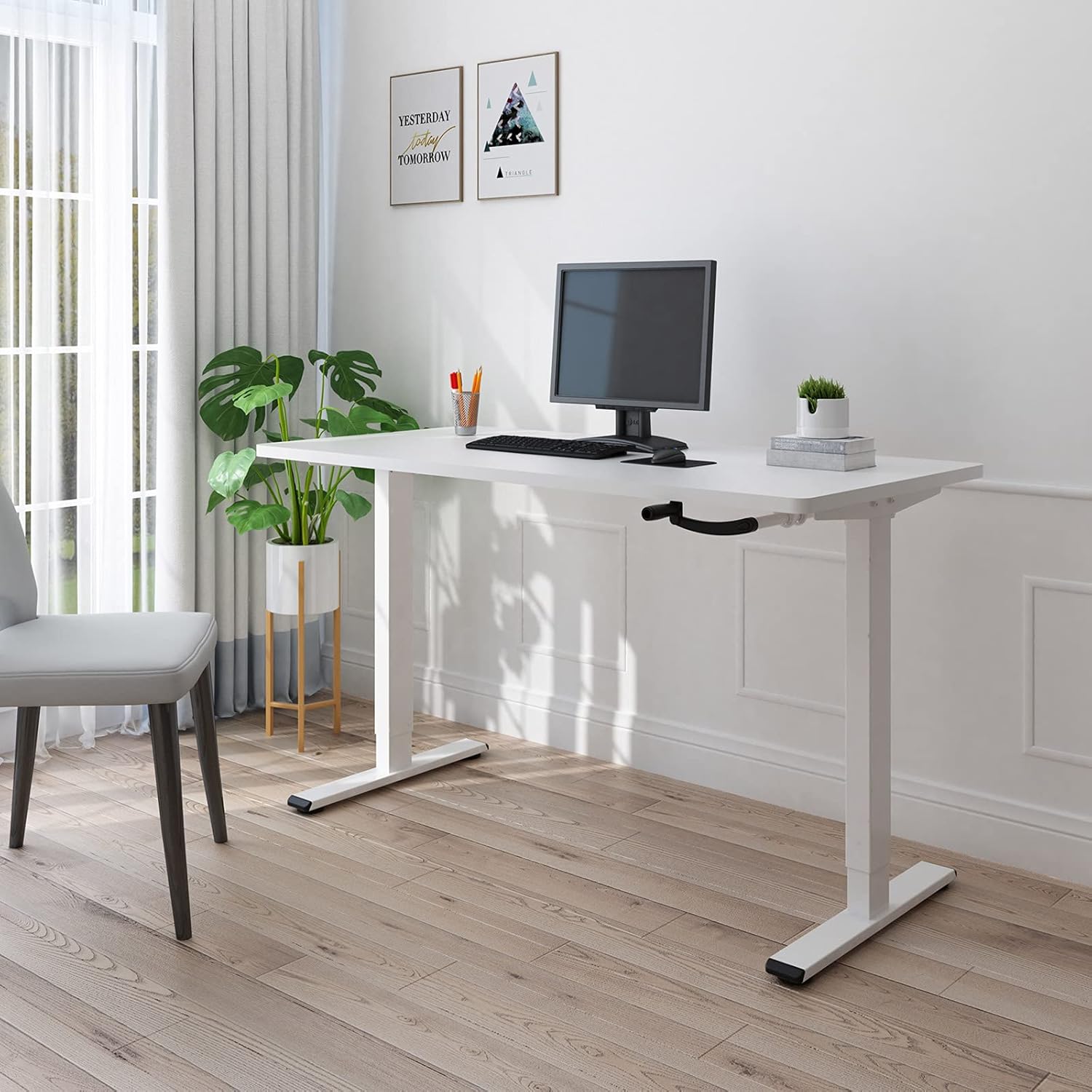
Figure 2.1: The FLEXISPOT H1W Hand-Crank Adjustable Standing Desk frame with a white tabletop, set up in an office environment.
Características principales:
- Ajuste de altura suave: The innovative hand-crank system provides a smooth and quiet height adjustment experience.
- Rango de altura ajustable: The desk frame can be adjusted from 71 cm (27.9 inches) to 121 cm (47.6 inches).
- Customizable Frame Width: The frame extends laterally from 85 cm (33.5 inches) to 129 cm (50.8 inches) to accommodate various tabletop sizes.
- Alta capacidad de peso: Designed for maximum structural integrity, supporting up to 80 kg (176 lbs).
- Construcción duradera: Features double-walled steel tubes for enhanced strength and stability.
- Flexible Crank Installation: The hand crank can be installed on either the left or right side, or completely removed when not in use.
3. Configuración y montaje
Assembly of the FLEXISPOT H1W desk frame is designed to be straightforward. It is recommended that one person performs the assembly.
3.1 Desembalaje e inspección
- Desempaque con cuidado todos los componentes de la caja.
- Verifique que todas las piezas indicadas en la lista de empaque estén presentes y sin daños. Contacte con atención al cliente inmediatamente si alguna pieza falta o está dañada.
- Todas las herramientas necesarias para el montaje están incluidas en el paquete.
3.2 Pasos de montaje
Follow the detailed step-by-step instructions provided in the separate assembly guide included with your product. Key steps include:
- Assemble the leg columns and feet.
- Attach the crossbar and side brackets, adjusting the width to match your tabletop.
- Install the hand-crank mechanism. The hand crank can be positioned on the left or right side of the desk, or removed entirely when not needed.
- Securely attach your chosen tabletop to the assembled frame using appropriate screws (tabletop not included).

Figure 3.1: The desk frame's width can be adjusted from 850mm to 1290mm to fit various tabletops.

Figure 3.2: The hand crank offers flexible installation options, allowing it to be placed on either side or removed.
3.3 Recommended Tabletop Dimensions
- Longitud: 100 cm a 160 cm (39.4 pulgadas a 63 pulgadas)
- Ancho: 60 cm a 80 cm (23.6 pulgadas a 31.5 pulgadas)
- Espesor: 2 cm (0.8 pulgadas) o más

Figure 3.3: Recommended tabletop dimensions for optimal fit and stability.
4. Instrucciones de funcionamiento
The FLEXISPOT H1W desk frame features a manual hand-crank system for height adjustment.
4.1 Ajuste de la altura del escritorio
- Ensure the area above and below the desk is clear of any obstacles.
- Locate the hand crank on the side of the desk.
- To raise the desk, turn the hand crank clockwise.
- To lower the desk, turn the hand crank counter-clockwise.
- Adjust the desk to your desired sitting or standing height within the range of 71 cm to 121 cm.

Figure 4.1: The desk frame offers a height adjustment range from 710mm to 1210mm.
4.2 Capacidad de peso
The desk frame is designed to safely support a maximum load of 80 kg (176 lbs). Distribute weight evenly across the tabletop to maintain stability.

Figure 4.2: The desk frame supports a maximum weight of 80 kg (176 lbs).
5. Mantenimiento
Regular maintenance helps ensure the longevity and smooth operation of your FLEXISPOT H1W desk frame.
- Limpieza: Limpie el marco del escritorio con un paño suave.amp paño. Evite productos químicos agresivos o limpiadores abrasivos que puedan dañar el acabado.
- Sujetadores: Revise periódicamente todos los tornillos y pernos para asegurarse de que estén bien apretados. Vuelva a apretarlos si es necesario para mantener la estabilidad.
- Partes móviles: The hand-crank mechanism is designed for smooth operation. If you notice any stiffness, ensure no debris is obstructing the mechanism. Do not lubricate unless specifically instructed by the manufacturer.
- Distribución del peso: Always distribute weight evenly on the tabletop. Avoid placing heavy items on one side only.
6. Solución de problemas
If you encounter any issues with your FLEXISPOT H1W desk frame, refer to the following common troubleshooting tips:
- El escritorio se tambalea:
- Asegúrese de que todos los tornillos y pernos de montaje estén bien apretados.
- Check that the desk is placed on a level surface. Adjust the leveling feet if necessary.
- Verify that the tabletop is securely attached to the frame.
- Hand Crank is Stiff or Difficult to Turn:
- Check for any obstructions in the crank mechanism or along the lifting columns.
- Asegúrese de que el escritorio no esté sobrecargado más allá de su capacidad de 80 kg.
- Confirm that the crank handle is properly installed.
- Desk Does Not Adjust Height Smoothly:
- Ensure the weight on the desk is within the specified limit and evenly distributed.
- Inspect the lifting columns for any visible damage or foreign objects.
Si estos pasos no resuelven el problema, comuníquese con el servicio de atención al cliente de FLEXISPOT para obtener más ayuda.
7. Especificaciones
| Número de modelo | H1W |
| Marca | FLEXISPOT |
| Tipo | Hand-Crank Adjustable Standing Desk Frame |
| Material | Acero aleado |
| Color | Marco blanco |
| Rango de ajuste de altura | 71 cm - 121 cm (27.9 pulgadas - 47.6 pulgadas) |
| Ajuste del ancho del marco | 85 cm - 129 cm (33.5 pulgadas - 50.8 pulgadas) |
| Recommended Tabletop Length | 100 cm - 160 cm (39.4 pulgadas - 63 pulgadas) |
| Ancho de mesa recomendado | 60 cm - 80 cm (23.6 pulgadas - 31.5 pulgadas) |
| Recommended Tabletop Thickness | 2 cm (0.8 in) or more |
| Capacidad máxima de peso | 80 kg (176 libras) |
| Peso del artículo (solo marco) | 21 kg (46.3 libras) |
| Requiere ensamblaje | Sí |
| Personas recomendadas para la asamblea | 1 |
| Código UPC/GTIN | 810054070498 |
8. Garantía y soporte
For warranty information and customer support, please refer to the documentation included with your purchase or visit the official FLEXISPOT websitio.
If you have any questions or require assistance with your FLEXISPOT H1W desk frame, please contact FLEXISPOT customer service directly.