
1. Introducción
Thank you for choosing the REDPINGUO Digital Indoor Thermometer Hygrometer. This device is designed to provide accurate and real-time measurements of indoor temperature and humidity, helping you maintain a comfortable and healthy living environment. Please read this manual carefully before use to ensure proper operation and longevity of your device.
2. Producto terminadoview
The REDPINGUO Digital Indoor Thermometer Hygrometer features a large LCD display for easy readability, showing time, temperature, and humidity. It is designed for various indoor applications, from bedrooms to greenhouses.

Figure 2.1: Two REDPINGUO Digital Thermometer Hygrometers (Black and White models).

Figure 2.2: Device displaying temperature and humidity, highlighting its role in monitoring environmental conditions for health.
Características principales:
- Large, clear LCD display (8.1 x 7.1 cm) for easy reading.
- Displays temperature in Celsius only.
- High accuracy: 2-5% RH and 1°C.
- Fast refresh rate: Data updates every 20 seconds.
- Integrated clock with AM/PM indicator.
- Versatile placement options: tabletop stand or wall-mount with double-sided stickers.
- Powered by 1 CR2032 battery (included).
3. Configuración
3.1 Instalación de la batería
- Localice el compartimento de la batería en la parte posterior del dispositivo.
- Abra la tapa del compartimento.
- Insert one CR2032 battery, ensuring the correct polarity (+/-). The positive (+) side should face upwards.
- Cierre bien la tapa del compartimento de la batería.
3.2 Opciones de colocación
El dispositivo ofrece dos métodos de colocación convenientes:
- Soporte de mesa: Utilize the integrated stand on the back of the device to place it on any flat surface, such as a desk, shelf, or countertop.
- Montaje en pared: Use the provided double-sided adhesive stickers to attach the device to a wall or other vertical surface, such as a refrigerator. Ensure the surface is clean and dry before applying the stickers.

Figura 3.1: Opciones de montaje disponibles para el dispositivo.
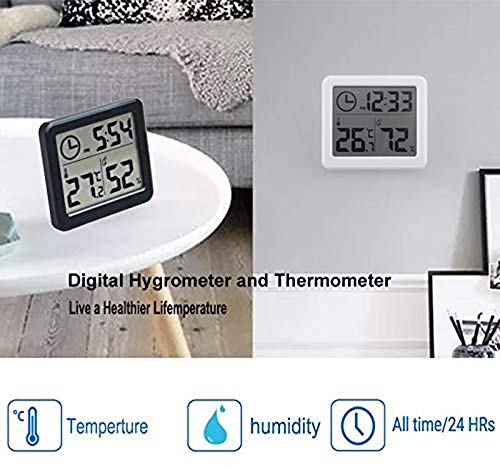
Figura 3.2: Examples of device placement on a table and mounted on a wall.
4. Instrucciones de funcionamiento
4.1 Visualización sobreview
La gran pantalla LCD muestra la siguiente información:
- Tiempo: Shown in 12-hour format with AM/PM indicator.
- Temperatura: Displayed in Celsius (°C) only.
- Humedad: Mostrado como un porcentajetagmi (%).

Figura 4.1: detallada view of the LCD display and comfort level indicators.
4.2 Configuración de la hora
Para ajustar la hora:
- Locate the 'Adjust time' button, typically on the side or back of the device (refer to Figure 4.1).
- Press and hold the 'Adjust time' button until the hour digits start flashing.
- Press the 'Adjust time' button repeatedly to cycle through the hours.
- Once the correct hour is set, wait a few seconds, and the minute digits will start flashing.
- Press the 'Adjust time' button repeatedly to cycle through the minutes.
- After setting the minutes, wait a few seconds for the setting to be saved, and the display will return to normal operation.
4.3 Lectura de temperatura y humedad
The device automatically measures and displays the current indoor temperature and humidity. Readings are updated approximately every 20 seconds to provide current environmental data.
Nota: Temperature is displayed exclusively in Celsius (°C). The device does not support Fahrenheit (°F) display.
4.4 Comfort Level Indicators
The device may provide visual indicators for humidity comfort levels:
- SECO: Humedad por debajo del 30%
- COMODIDAD: Humedad entre 30% y 60%
- MOJADO: Humedad superior al 60%
5. Mantenimiento
5.1 Reemplazo de batería
Cuando la pantalla se oscurezca o deje de funcionar, es momento de reemplazar la batería CR2032. Siga los pasos de instalación de la batería que se indican en la Sección 3.1.
5.2 Limpieza
Para limpiar el dispositivo, limpie suavemente la pantalla yasing with a soft, dry cloth. Do not use abrasive cleaners, solvents, or immerse the device in water, as this can damage the electronic components.
6. Solución de problemas
- Sin pantalla o pantalla tenue:
Check if the battery is installed correctly with the correct polarity. Replace the CR2032 battery if it is depleted. - Lecturas inexactas:
Ensure the device is placed in a stable environment, away from direct sunlight, heat sources, or strong drafts, which can affect readings. Allow the device a few minutes to stabilize after placement or battery change. - Time not setting:
Ensure you are pressing and holding the 'Adjust time' button long enough to enter setting mode. Follow the steps in Section 4.2 carefully. - El dispositivo no responde:
Remove the battery, wait for 30 seconds, and then reinsert it to perform a soft reset.
7. Especificaciones
| Característica | Especificación |
|---|---|
| Número de modelo | Temp-BW |
| Tipo de pantalla | Pantalla LCD |
| Tamaño de la pantalla | Aproximadamente 8.1 x 7.1 cm (3.2 x 2.8 pulgadas) |
| Unidad de temperatura | Celsius (°C) only |
| Precisión de temperatura | ±1 °C |
| Precisión de humedad | ±2-5% humedad relativa |
| Frecuencia de actualización de datos | Cada 20 segundos |
| Fuente de poder | Batería 1 x CR2032 (incluida) |
| Dimensiones del producto | 18.1 x 9 x 2.2 cm (Dimensiones del paquete) |
| Peso | 140 gramos (Peso del paquete) |
| Fabricante | YOUDUO |

Figure 7.1: LCD Display Dimensions.
8. Garantía y soporte
For warranty information and customer support, please refer to the documentation provided with your purchase or visit the official REDPINGUO webSitio. Conserve su recibo de compra como comprobante de compra para cualquier reclamación de garantía.