
1. Introducción
Thank you for choosing the XTUGA AM6 4/6-Channel Audio Mixer. This professional mixing console is designed for a variety of audio applications, including home music production, live webcasting, and karaoke (K-song). It features Bluetooth connectivity, USB recording capabilities, 48V phantom power for condenser microphones, and integrated effects. Please read this manual thoroughly to understand the mixer's functions and ensure optimal performance.
2. Contenido del paquete
Por favor revise el paquete para ver los siguientes artículos:
- 1 x XTUGA AM6 Audio Mixer
- 1 x cable USB
- 1 x Adaptador de corriente/cargador
- 1 x Manual de usuario
3. Características del producto
The XTUGA AM6 mixer offers a range of features to enhance your audio experience:
- 4-Channel/6-Channel Mixing Console: Features two mono channels and one stereo tape channel.
- Grabación y reproducción USB: Direct recording to USB or computer, and playback of MP3, FLAC, etc.
- Conectividad Bluetooth: Wireless connection for mobile devices within 4-8 meters (without obstruction).
- Alimentación fantasma de 48 V: Integrated phantom power for condenser microphones.
- Built-in Effects Processor: Includes Delay and Repeat effects.
- Sound Card Function: Acts as an external sound card when connected to a computer via USB.
- Diseño de bajo ruido: Ensures clear audio on all microphone inputs.
- Controles ajustables: Gain, 2-band EQ (high/low), signal level, main output, headphone volume, and effect parameters.
- Dedicated Headphone Output: With independent volume control for monitoring.
- Múltiples opciones de entrada: Supports 6.5mm phone type and RCA type connectors for line-level instruments.
- Compacto y portátil: Can be powered directly via PC USB, mobile power bank, or AC/DC adapter.
4. Configuración
4.1 Conexión de alimentación
Connect the provided power adapter to the mixer's power input and then to a suitable power outlet. Alternatively, the mixer can be powered via a USB connection to a computer or a mobile power bank.
4.2 Conexiones de entrada
Connect your audio sources to the appropriate input channels:
- Micrófonos: Use XLR (card head) or 6.5mm jack connectors for microphone inputs. For condenser microphones requiring phantom power, ensure the 48V phantom power is activated (see Section 5.2).
- Instrumentos de nivel de línea: Use 6.5mm phone type or RCA type connectors for instruments like electronic keyboards or other audio equipment.

4.3 Conexiones de salida
- Salida principal: Connect the main output (L/R) to your ampificador, altavoces amplificados o interfaz de grabación.
- Salida de auriculares: Connect your headphones to the dedicated headphone jack for monitoring. Adjust the headphone volume using its dedicated control.
5. Instrucciones de funcionamiento
5.1 Mezcla básica de audio
Each input channel features controls for gain, high/low EQ, and signal level. Adjust these to achieve the desired sound for each input. Use the main output level control to set the overall volume.
5.2 Alimentación fantasma de 48 V
To use condenser microphones, activate the 48V phantom power. Locate the 48V switch on the mixer and press it. Ensure condenser microphones are connected before activating phantom power to prevent damage to other equipment.

5.3 Conexión Bluetooth
Para conectar un dispositivo móvil a través de Bluetooth:
- Asegúrese de que el mezclador esté encendido.
- Switch the MP3 function to BT (Bluetooth) mode. The display will indicate Bluetooth pairing mode.
- On your mobile device, search for available Bluetooth devices and select "XTUGA AM6" (or similar name).
- Una vez conectado, puede transmitir audio de forma inalámbrica desde su dispositivo al mezclador.

5.4 Grabación y reproducción USB
5.4.1 Grabación en la computadora
The mixer can function as a sound card for your computer:
- Conecte el mezclador a su computadora mediante el cable USB provisto.
- Switch the mixer's MP3 function to PC mode. The display will show "PC".
- On your computer, select the mixer as the audio input/output device in your recording software (e.g., GoldWave).
- You can now record audio from the mixer to your computer and play background music from your computer through the mixer.


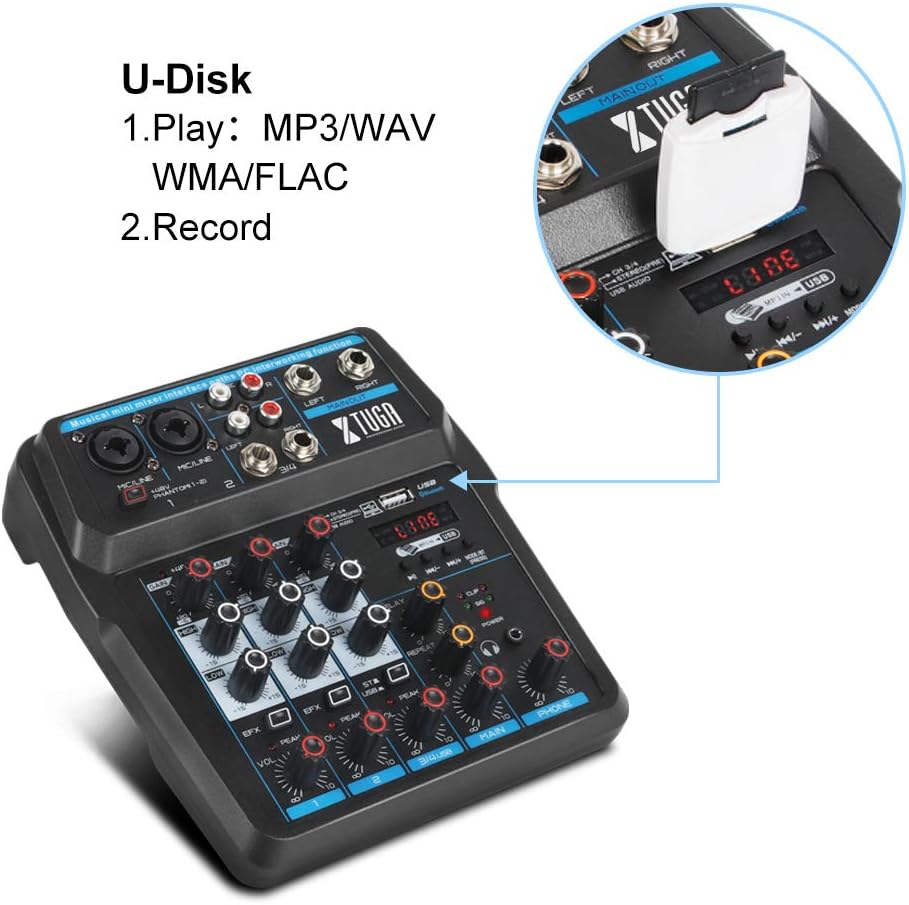
5.4.2 U-Disk (USB Drive) Playback and Recording
Insert a USB flash drive into the USB port on the mixer:
- Reproducción: The mixer can play MP3, WAV, WMA, FLAC, and other audio formats directly from the U-Disk. Use the MP3 function keys to control playback.
- Grabación: You can also record directly to the U-Disk. Refer to the mixer's display and controls for recording functions.
5.5 Procesador de efectos
The mixer includes built-in Delay and Repeat effects. Use the dedicated controls to adjust the effect parameters, such as echo repeat frequency and time interval, to achieve your desired sound.
6. Mantenimiento
To ensure the longevity and optimal performance of your XTUGA AM6 mixer:
- Limpieza: Utilice un paño suave y seco para limpiar la superficie de la batidora. Evite usar limpiadores líquidos o disolventes.
- Almacenamiento: Guarde la batidora en un lugar fresco y seco, alejado de la luz solar directa, temperaturas extremas y alta humedad.
- Manejo: Handle the mixer with care. Avoid dropping it or subjecting it to strong impacts.
- Ventilación: Asegure una ventilación adecuada alrededor de la batidora para evitar el sobrecalentamiento.
7. Solución de problemas
If you encounter issues with your XTUGA AM6 mixer, refer to the following common problems and solutions:
- Sin energía: Ensure the power adapter is securely connected and the power outlet is functional. Try a different USB power source if using USB power.
- Sin salida de sonido: Check all cable connections (inputs, main output, headphones). Verify that gain controls, channel levels, and the main output level are turned up. Ensure the correct input source is selected (e.g., LINE, BT, PC, USB).
- El micrófono no funciona: For condenser microphones, ensure 48V phantom power is activated. Check microphone cable connections. Verify microphone gain and channel level.
- Problemas de conexión Bluetooth: Ensure the mixer is in BT mode and discoverable. Turn off and on Bluetooth on your mobile device. Ensure no other devices are connected to the mixer via Bluetooth.
- USB Recording/Playback Problems: Ensure the mixer is in PC or USB mode as appropriate. Check USB cable connection to the computer or U-Disk insertion. Verify computer audio settings if recording to PC.
- Sonido distorsionado: Reduce input gain or channel levels to prevent clipping (indicated by peak LEDs). Check cable quality.
If the problem persists, please contact XTUGA customer support for further assistance.
8. Especificaciones
| Característica | Especificación |
|---|---|
| Marca | XTUGA |
| Modelo | AM4 |
| Número de canales | 4 (also described as 4/6-channel) |
| Tecnología de conectividad | Auxiliar, Bluetooth, USB |
| Fuente de poder | Eléctrico con cable |
| Volumentage | 48 Volts (for Phantom Power) |
| Número de pieza del fabricante | AM |
| Código Postal | 784124158778 |
9. Garantía y soporte
Los productos XTUGA están diseñados para brindar confiabilidad y rendimiento. Para obtener información sobre la garantía, soporte técnico o consultas de servicio, consulte la tarjeta de garantía incluida con su producto o visite el sitio web oficial de XTUGA. webSitio. Conserve su recibo de compra como comprobante de compra para cualquier reclamación de garantía.